




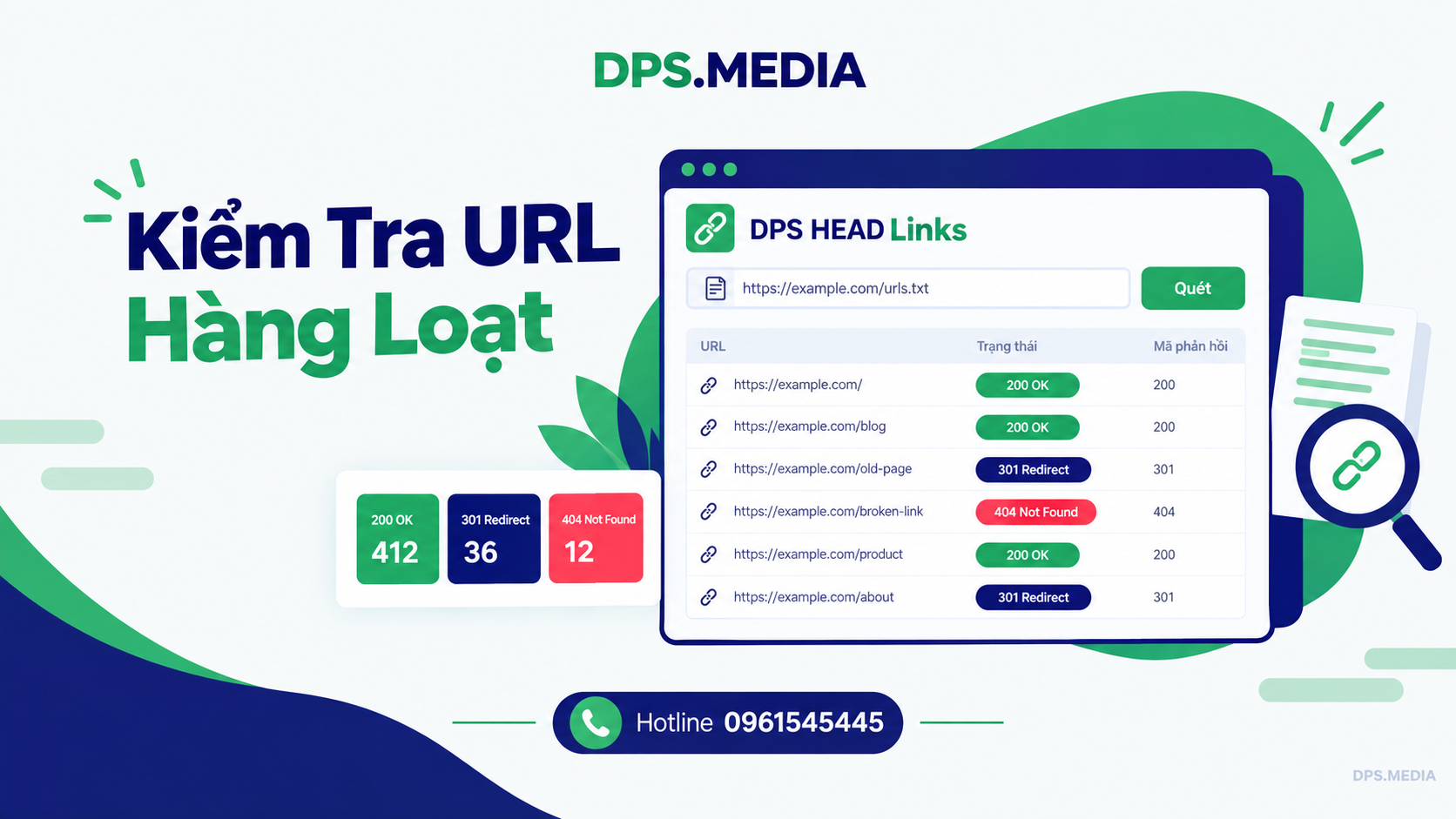

If you have ever experienced that heart-stopping feeling in the morning after a website migration, only to discover that 40% of your traffic had suddenly vanished because of dozens of endlessly looping 301 redirect chains, you will understand the importance of link control. Manually clicking through every link in a list of 500 URLs to find 404 errors before a project handover is also an exhausting experience.
Desktop applications such as Screaming Frog often consume all available RAM and freeze your computer, while overseas SaaS platforms charge hundreds of USD per month and limit the number of URLs you can check. That is why the DPS.MEDIA ecosystem developed DPS HEAD Links – a specialized link auditing toolkit that runs smoothly right on your WordPress website.
| # | Original URL | Status | Hops | Destination (Final URL) | Time | Headers (X-Robots / Canonical / Server) |
|---|---|---|---|---|---|---|
| No data yet. Enter a list of URLs and click "Start Checking". | ||||||
Why is bulk URL checking a critical step in Technical SEO?
In search engine optimization, bulk URL checking is not simply about determining whether a webpage is still working. Every link sends a technical signal that Googlebot uses to navigate and evaluate the credibility of your entire website structure.
When a website contains multi-layer redirect chains (from HTTP to HTTPS, then to non-WWW, and finally to a page with a trailing slash), search engine bots' crawl budget is wasted unnecessarily. According to Google's official guide to handling 301 redirects, overly long redirect chains slow down page loading and seriously harm keyword rankings.
In addition, widespread 404 Not Found broken links in navigation menus or blog posts not only frustrate visitors and drive them away, but also reduce the overall quality score of the domain.
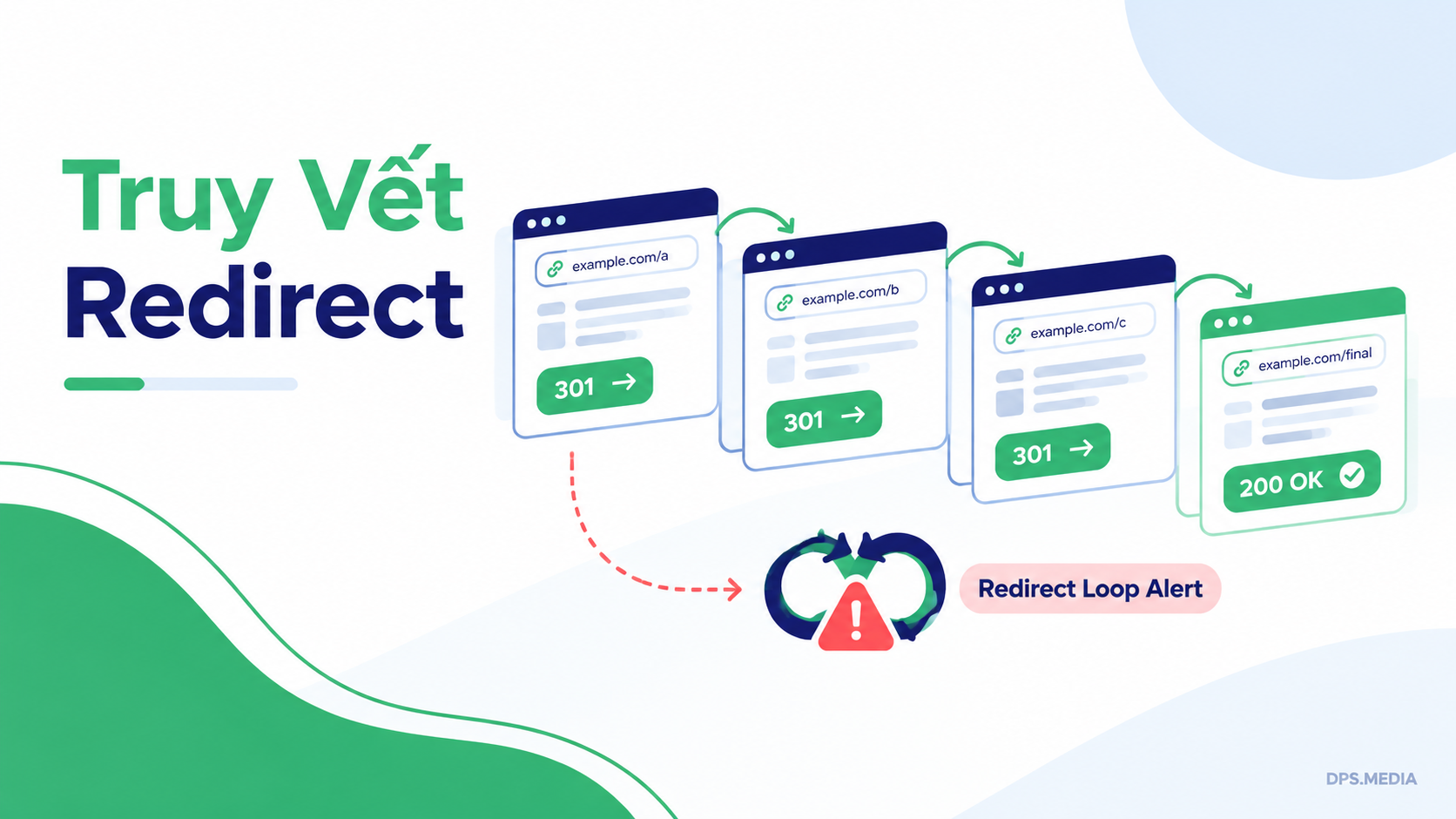
DPS HEAD Links – A Breakthrough in Client-Side Low Memory Batching Architecture
The biggest difference between DPS HEAD Links and conventional WordPress plugins lies in its resource allocation mechanism. Older link-scanning plugins run entirely in the background on the server (PHP background), making hosting highly susceptible to crashes from CPU exhaustion when processing lists of more than 500 links.
DPS HEAD Links uses a Client-Side Low Memory Batching architecture combined with parallel cURL Multi-Handle technology:
- Smart Batch Processing: The browser automatically divides thousands of URLs into small batches, processes them asynchronously, and releases memory after each batch. You can continuously scan 1,000 – 3,000 links without worrying about frozen tabs or a sluggish computer.
- Comprehensive HTTP Status Detection: Accurately classify everything from
200 OK(live), redirect groups301 / 302 / 307 / 308, error groups404 / 410 / 403to server errors500 / 502 / 503and DNS Timeout errors. - Redirect Chain Tracker: Break down every stop in detail:
URL Gốc → Bước 1 (301) → Bước 2 (302) → URL Đích (200 OK), with an immediate red warning if a redirect loop is detected. - Canonical Tag and Mixed Content Auditing: Directly compare the
rel="canonical"tag with the final destination URL to detect potential indexing issues, while also warning about HTTP links that are not securely encrypted with SSL.
Dedicated URL Mapping Feature for Website Migration Projects
Anyone who has managed a website migration from an old platform to WordPress understands the stress of reviewing a URL Mapping Sheet. Just a few mistakes in key category paths can cause years of accumulated traffic to plummet.
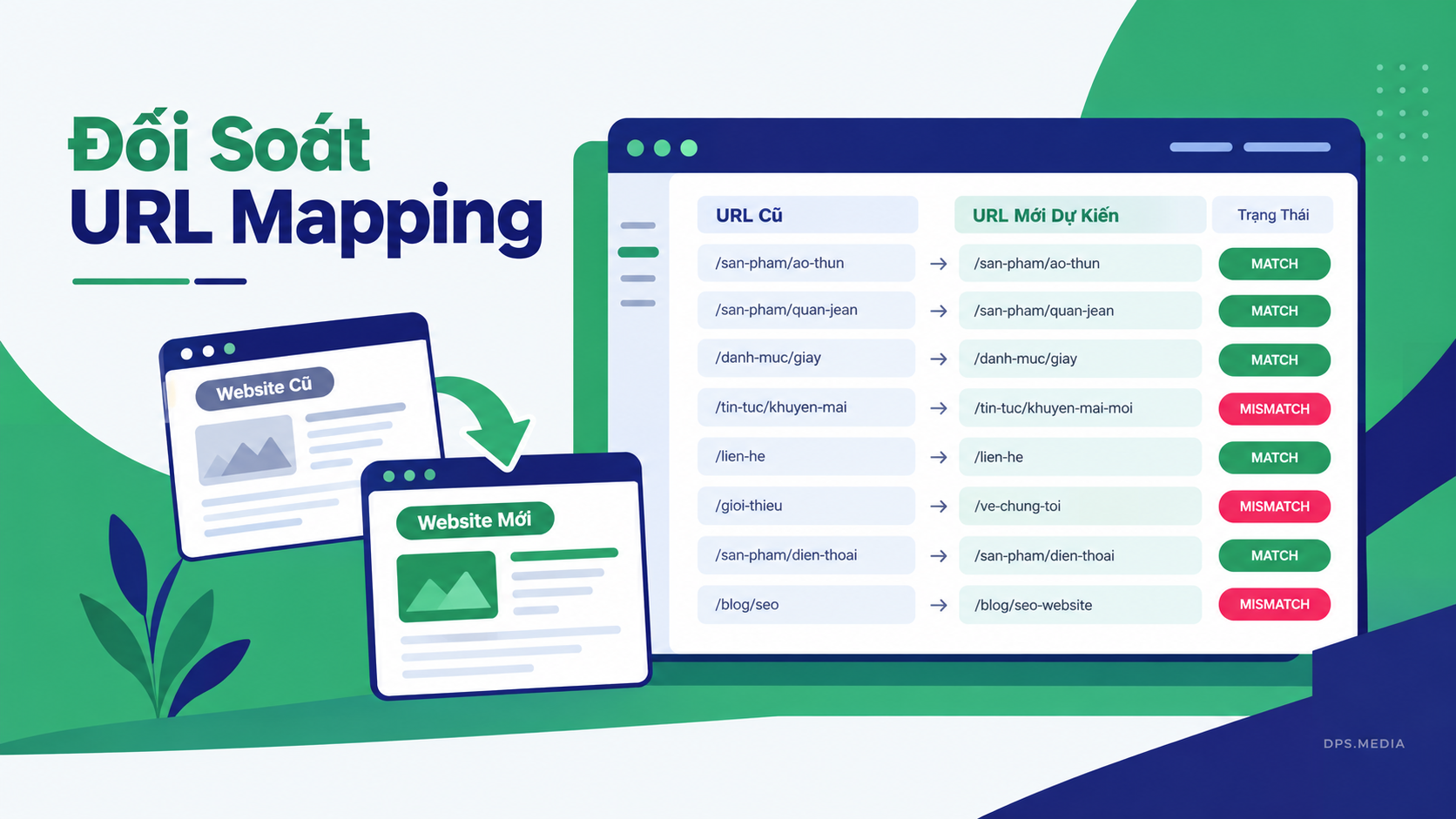
DPS HEAD Links provides an exclusive auditing workspace for this task. You only need to paste two columns: [Old URL] and [Expected New URL]. The system will automatically scan each row, check whether the old URL redirects accurately to the new URL with a 301, and assign a visual label:
- MATCH (100% Match): Accurate redirect, response
200 OKat the destination URL. - MISMATCH (Discrepancy): Incorrectly points to the homepage, points to a 404 page, or leads to a different product.
The technical team can reconcile 1,200 URLs in under 2 minutes with a transparent, row-by-row report instead of spending several days on manual checks.
Deep Technical Header Inspection and Multi-Platform Googlebot Simulation
Many mysterious SEO issues originate from directive tags X-Robots-Tag (commands noindex configured behind the scenes in the Nginx server configuration or .htaccess) that ordinary HTML source inspection cannot detect. DPS HEAD Links directly extracts all HTTP Headers returned by the server, helping you uncover hidden indexing-blocking directives.
The tool also includes a flexible User-Agent switcher:
- Googlebot Smartphone: Check the website from the perspective of mobile-first indexing standards (Mobile-First Indexing).
- Googlebot Desktop: Check how the website renders on desktop computers.
- Chrome Desktop & Safari iOS: Reconcile the actual experience of end users.
After scanning, you can export a professional CSV report or use the Copy Data (TSV) button to paste directly into Excel or Google Sheets with a single click.
Comparison Table: DPS HEAD Links vs. Current Link Auditing Tools
| Comparison Criteria | Manual inspection | Screaming Frog | Overseas SaaS | DPS HEAD Links |
|---|---|---|---|---|
| Investment cost | Free (Time-Consuming) | ~259 USD/year | 99 – 299 USD/month | 100% Owned by You |
| Resource Consumption | Low | Consumes a lot of RAM | Does not consume local computer resources | Lightweight Zero-Freeze Optimization |
| Shortcode Embedding Capability | No | Not supported | Not supported | Convenient one-click embedding |
| URL Mapping Migration Checking | Very tedious and prone to omissions | Requires complex Regex configuration | Not specialized | Dedicated Match/Mismatch Reconciliation Interface |
3-Step Guide to Installing and Deploying the Tool on Your Website
Deploying the tool on your website takes only about 30 seconds and requires no complex server configuration:
- Install Plugin: Download the ZIP file
dps-head-links.zip, go to WordPress Admin → Plugins → Add New → Upload Plugin and click Activate. - Create a Utility Page: Create a new post or content page (for example:
/kiem-tra-link/) and insert the utility Shortcode# URL Ban Đầu Status Hops Đích đến (Final URL) Time Headers (X-Robots / Canonical / Server) Chưa có dữ liệu. Nhập danh sách URLs và nhấn "Bắt đầu kiểm tra". - Publish and Use: Publish the post. You now have a powerful link auditing tool for internal use or as a free utility to attract potential customers to your website.
Elevate Your Digital Infrastructure and Optimize SEO with DPS.MEDIA
A sustainable SEO campaign always begins with a solid technical foundation. No content creation or link-building effort can reach its full potential if your website is clogged with hundreds of 404 errors, endless redirect chains, and incorrect canonical tags.
If your business is preparing for a website redesign, domain migration, or a comprehensive restructuring to achieve higher search rankings, explore our comprehensive SEO services at DPS.MEDIA. With hands-on experience since 2017 and an advanced ecosystem of automation tools, we are always committed to building secure and effective digital infrastructure for businesses.
DPS.MEDIA JOINT STOCK COMPANY
📍 Address: 56 Nguyen Dinh Chieu, Tan Dinh Ward, Ho Chi Minh City
📞 Hotline / Zalo: 0961 545 445
✉️ Email: marketing@dps.media
🌐 Website: https://dps.media
🏢 Tax identification number: 0318700500 | VCB: 1051160909



Ý kiến bạn đọc (9)
Đăng nhập để bình luận
Đăng nhập nhanh 1-chạm bằng Google để chia sẻ ý kiến của bạn về bài viết.
Bằng cách đăng nhập, bạn đồng ý với điều khoản và chính sách cộng đồng.
Chưa có bình luận nào. Hãy là người đầu tiên chia sẻ cảm nghĩ!
Đăng nhập / Tạo tài khoản
Đăng nhập với Google để gửi bình luận và tương tác cùng cộng đồng.
Tiếp tục là đồng ý với điều khoản sử dụng và chính sách bảo mật của DPS Media.