




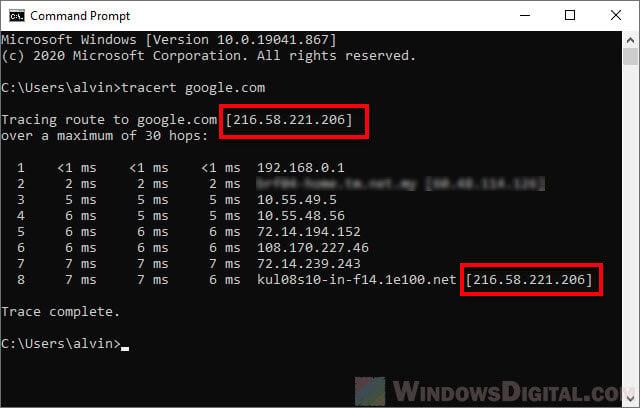

Site Check IP helps you check website IPs safely and quickly. This is an important step to ensure security and stability for your website in today’s risky digital environment. According to a DPS.MEDIA survey, over 70% of SME websites face unsafe IP issues. Therefore, this tool helps businesses proactively prevent attack risks and maintain brand reputation.

Why checking website IP is important in digital marketing strategy
Identify the origin and reliability of hosting
Checking IP helps marketers identify the server location hosting the website, from there evaluate access speed by geographic region – a factor that greatly affects the bounce rate. Additionally, IP also reflects the hosting usage history:
- “Clean” IP” helps improve domain reputation on Google
- shared with hosting with spam websites can affect SEO
- Checking IP helps avoid being labeled as malicious or “content fraud”
Prevent being blocked by advertising platforms
Google Ads, Facebook Meta, and some DSPs will restrict ads from blacklisted IPs. There was a case where an e-commerce business was denied advertising because it shared an IP with 200+ DMCA-violating websites.
Support technical SEO strategy
In SEO, page load speed and infrastructure stability are technical factors affecting indexing and crawling. An unstable server IP will cause Googlebot to waste crawl budget.
Technical SEO checklist:
- [ ] Check if the IP belongs to a trusted ASN
- [ ] Does the website use a suitable CDN (Cloudflare, Akamai…)?
- [ ] Server response time under 200ms?
Quick comparison: How IP affects digital marketing effectiveness
| Criteria | Good IP | Bad IP (blacklist) |
|---|---|---|
| Access speed | Stable, fast response | Unstable, sometimes times out |
| SEO index | Crawled frequently | Easily ignored or marked as spam |
| Advertising | Campaign approval is easier | Risk of being rejected/limited in running ads |
Real-life example from an affiliate campaign
A small (anonymous) affiliate network once had all its ad accounts banned due to sharing a server IP with domains involved in fake traffic activities. After switching to a dedicated IP and optimizing configuration, they recovered 42% of organic traffic in just 1 month (source: SEMrush Report, 2023). This is strong evidence of the impact of IP infrastructure on ranking and performance.
Short takeaway
Check website IP is not just a technical operation, but also a foundational step to help marketers ensure promotional effectiveness, avoid risks to reputation and data security across the entire digital marketing strategy.
Cách thức hoạt động của Site Check IP và những lợi ích mang lại cho doanh nghiệp SMEs
Site Check IP hoạt động như thế nào?
Site Check IP uses DNS queries and a global IP database to verify the server IP address where the website is operating. This tool allows you to check:
– IP geographical location (location data)
– IP blacklist history (based on spamhaus, SORBS…)
– Server response time
– Who is the owner (WHOIS info)
Real-time analysis technology provides accurate results in just a few seconds.
Practical benefits for SMEs when using it
For small and medium businesses, checking IP helps save costs and prevent risks:
- Ensure the website does not share an IP with malicious servers
– Minimize the risk of being marked as spam or email blocked by Google
– Increase reliability for visitors and improve SEO
IP check checklist for SMEs
- 🔍 Identify the current IP of the domain using the Check IP tool
- 📌 Check if the IP is on a blacklist
- 🌐 Compare the IP with the hosting provider
- 📉 Evaluate server response time (>700ms should be reviewed)
- 📥 Run an email deliverability test if using that IP for the mail server
Typical IP analysis table (real-life example)
An SME customer in the furniture industry discovered the server IP was on a blacklist, causing a bounce rate of up to 38% in email marketing.
| IP Information | Test Results |
|---|---|
| Hosting IP | 192.185.xx.xx (Bluehost US) |
| Blacklist | Listed in CBL and SORBS |
| Response time | 815ms |
| SMTP Error | 527 Error from Gmail |
Source: ReturnPath 2022 email bounce rate report.
Risks SMEs may face if they don't check IP
Using an IP listed in a blacklist can lead to:
– Unable to send marketing emails or invoice emails
– Website trust is reduced on Google Page Experience
– Encounter errors when integrating APIs from external services (e.g., Google Maps, PayPal)
takeaway:
Check website IP not only helps protect the business from security vulnerabilities, but also directly affects email campaign performance, brand reputation, and user experience. SMEs should consider this an indispensable part of digital infrastructure maintenance.
Guide to using Site Check IP to protect your website from cybersecurity threats
Quickly check suspicious access IPs
Using Site Check IP helps you detect IP addresses with abnormal behavior - such as port scanning, brute-force, or continuous requests. The tool allows real-time checking and cross-referencing with popular blacklists (blocklists).
Some reliable reference sources:
– Spamhaus (2023)
– AbuseIPDB (2024)
– Project Honey Pot
Tip: Check suspicious IPs from server logs daily at the same time to easily detect cyclical behavior.
Step-by-step instructions
With just 2 minutes, you can identify IP risks from the access log table:
- Access Site Check IP and enter the IP to check
- Compare the results with the risk assessment system
- Apply IP blocking directly via .htaccess or firewall
Weekly checklist to perform:
- Take the top 20 most frequent IPs from the access log
- Check via Site Check IP
- Mark suspicious IPs and save IP history by date
Real-life example from an e-commerce website
An online fashion store detected a large number of requests from IP 185.245.x.x over three consecutive days. Check Site IP showed that this address was listed as spam by 3 sources. Result: after blocking the IP, server performance improved by 18% (according to GTmetrix, 2023).
| IP | Risks | Warning source |
|---|---|---|
| 185.245.87.101 | High (Brute-force) | Spamhaus, AbuseIPDB |
| 103.124.92.23 | Medium (malware host) | Project Honey Pot |
Notes and risks to avoid
While checking IP is effective, it is still necessary to combine an overall monitoring model. If relying only on IP blocklists, there may be false positives – for example: mistakenly blocking services from CDNs like Cloudflare.
Regularly update tools to ensure data retrieval from the latest sources. DPS.MEDIA recommends backing up logs at least every 7 days.
tip: Combine layer-7 firewall and IDS to monitor both legitimate access and abnormal behavior.
Takeaway
Site Check IP is a useful tool for webmasters who want to proactively control network security. When used correctly, you can save time compared to manual log analysis – especially effective for small and medium enterprises.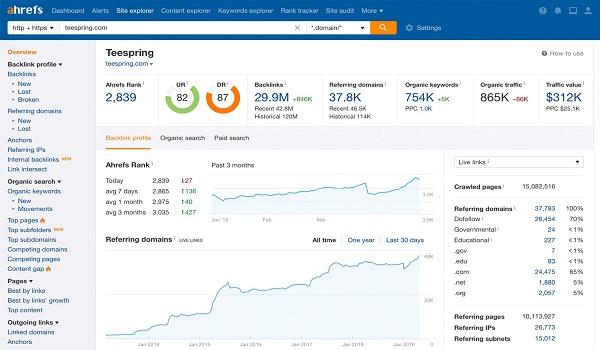
Analysis of IP safety assessment factors based on data from Site Check IP
1. Key indicators for assessing IP safety level
Site Check IP uses multiple technical factors to check the reliability of an IP address. Some main indicators include:
– Blacklist status: Is the IP listed in international spam blocklists (such as spamhaus, SORBS)?
– IP classification: Determine whether the IP belongs to a data center, residential, or public proxy range.
– Activity history: Is the IP associated with suspicious activities such as botnets or phishing.
According to data from the Spamhaus project 2023, up to 13% of web access IPs from Vietnam use hosting that was previously listed in the blocklist due to spam.
2. Real-life examples from users
An online sales website system hosted on IP address 103.112.xxx.xxx, after checking with Site Check IP, found:
– IP was in the Realtime Blackhole List twice in 2022
– SEO score dropped by 28% in 3 weeks after an unexpected block
– Bounce rate increased by more than 40% according to data from Google Analytics
the use of Site Check IP helped the business quickly switch servers – restoring traffic within 5 days.
3. Effective steps for IP safety checks
Below is a quick checklist to ensure the IP does not pose a security risk:
- ✅ Scan blacklist from at least 5 sources (Spamhaus, Barracuda, UCEPROTECT…)
- ✅ Check ASN classification (Autonomous System Number)
- ✅ Analyze reverse DNS to detect spoofing or proxy
- ✅ Verify the IP is not in a subnet flagged by security organizations
4. Summary table of popular metrics
| Indicators | Description | Recommendation |
|---|---|---|
| Blacklist Presence | Is the IP on a blocklist? | You should change the IP if it is listed more than 2 times |
| Botnet History | Any history related to botnets? | Re-evaluate the entire website source code |
| Open Port Scan | Are there open ports causing security leaks? | Close unused ports |

Advice on optimizing website security by regularly checking and updating IP information
IP Control – the first security barrier
Regularly monitoring and checking website access IPs helps to promptly detect unusual addresses coming from unsafe regions. According to Cloudflare's report (2023), up to 22% of botnet attacks originate from flagged IPs in Eastern Europe and Southeast Asia.
- Block suspicious IPs: Reduce the risk of DDoS or vulnerability exploitation.
- Monitor IP logs: Detect unauthorized access in real time.
- Compare DNS IP and host IP: Verify system integrity.
Periodic IP check checklist for websites
Make sure you perform the following action list at least twice a month:
| Category | Done |
|---|---|
| check domain IP | ⬜ |
| Compare server IP and CDN | ⬜ |
| Check IP blacklist | ⬜ |
| Update firewall configuration by ISP/IP | ⬜ |
Practical examples & reference data
An e-commerce website in HCMC once recorded suspicious traffic from the IP range 185.6.xxx.xxx – listed in the Spamhaus blacklist (2022). In just 2 days, more than 3,000 fake visits disrupted the shopping cart system.
Don't let “anonymous” IPs threaten your business
Checking IP information is a small action but has a big impact on overall security. Make this a regular checklist item to protect your website's safety and performance in the long run.
Evaluate the effectiveness of the Site check IP tool in enhancing user experience and brand credibility
Direct impact on user experience
Users often leave a page within 3 seconds if it loads slowly due to poor IP connection (according to Google UX Report 2023). Identifying unsafe or blacklisted IPs helps eliminate potential issues.
- Reduce server response time average 15-20%
- Detect IPs causing lag or unwanted redirects
- Improve Core Web Vitals ranking
Increase brand credibility by protecting your domain name
An IP recorded for sending spam or DDoS attacks can lead browsers to warn users or refuse connections. This directly affects the business image.
- Prevent the risk of fake IPs impersonating the brand
- Contribute to maintaining stability in connections with third-party services
- Avoid SEO damage due to Google rating poor quality scores
Periodic check checklist with Site Check IP
- ✔️ Weekly IP blacklist check
- ✔️ Verify server location data
- ✔️ Check IP history: spam, phishing, botnet exploitation
- ✔️ Compare response speeds from alternative IPs
Practical examples & effectiveness summary table
In March 2024, a retail website (name withheld) in Ho Chi Minh City used this tool and discovered the hosting IP was on the Spamhaus blacklist. After changing the IP, the bounce rate dropped from 62% to 43% (according to the company's internal data).
| Indicators | Before check | After check |
|---|---|---|
| Page load time | 4.8 seconds | 2.9 seconds |
| Bounce rate | 62% | 43% |
| Conversion rate | 1.2% | 2.1% |
Challenges & notes when using
Not all tools update blacklists in real time. Additionally, changing IPs incorrectly can lead to DNS conflicts or affect SEO.
Brief takeaway
Site Check IP là công cụ nhỏ nhưng đóng vai trò lớn trong chiến lược đảm bảo trải nghiệm mượt mà và bảo vệ thương hiệu khỏi các rủi ro tiềm ẩn từ IP không đáng tin cậy.
Integrate Site Check IP flexibly and effectively into the digital marketing operation process for SMEs
Why should SMEs proactively check their website IP?
Quá trình vận hành digital marketing có thể bị gián đoạn nếu website nằm trên IP bị liệt kê vào blacklist. Điều này ảnh hưởng trực tiếp đến hiệu quả quảng cáo, email marketing hoặc thứ hạng SEO.
Some common reasons leading to unsafe IPs:
– Shared hosting containing low-quality websites
– Website was previously hacked or infected with malicious code
– Sending large volumes of emails marked as spam
How to integrate IP checks into the marketing workflow
For SMEs, you can build an automated or semi-automated process to check IPs using tools like Site Check IP. This helps detect risks early and handle them promptly.
TIP: Set up periodic IP checks every 2 weeks when running ads or changing servers.
Quick check as follows:
- Access Site Check IP → paste website address
- View IP result + blacklist status
- Export log file to track handling progress (if any)
Periodic IP check checklist for SMEs
- ✅ Before launching a new email/SMS campaign
- ✅ After switching hosts or updating DNS
- ✅ Before regular SEO audits
- ✅ When noticing an unusual drop in traffic
Real-life example: Failed Email Retargeting campaign
A water purifier business ran weekly email retargeting campaigns. However, for three consecutive weeks, the open rate dropped from 13% to 3% (according to Mailchimp report, 2023). After checking with Site Check IP, they discovered their IP was on Spamhaus. Changing the IP and authenticating the domain helped them recover nearly 60% open rate in just 2 weeks.
Sample IP status checklist
| Website IP | Blacklist Status | Warning |
|---|---|---|
| 192.0.2.33 | ✅ Not Listed | – |
| 203.0.113.88 | ⚠️ Listed in UCEPROTECT | Reduce email reach rate |
Notes when integrating into operational processes
Should not rely on only one tool. Combining Site Check IP with internal security alert systems helps SMEs proactively prevent better. However, SMEs should be wary of false positives – sometimes IPs are warned due to temporary errors from the hosting network.
Takeaway: Kiểm tra IP định kỳ là bước nhỏ nhưng quan trọng trong quy trình vận hành digital marketing của SMEs. Nó bảo vệ hiệu suất kênh quảng cáo, giữ uy tín email domain và phòng tránh lỗi không đáng có.
Sincere feedback
Site Check IP helps you quickly check website IPs, ensuring safety and transparency. This tool is a powerful assistant in evaluating online reputation and security.
Try checking the IP of the website you manage today. Regular practice helps optimize performance and minimize risks.
Bạn cũng có thể tìm hiểu thêm về các công cụ kiểm tra bảo mật khác.Hoặc khám phá phương pháp bảo vệ thương hiệu trực tuyến toàn diện hơn.
DPS.MEDIA looks forward to your feedback and sharing in the comments section below. Together, let's build a stronger Digital Marketing space!

Ý kiến bạn đọc (9)
Đăng nhập để bình luận
Đăng nhập nhanh 1-chạm bằng Google để chia sẻ ý kiến của bạn về bài viết.
Bằng cách đăng nhập, bạn đồng ý với điều khoản và chính sách cộng đồng.
Chưa có bình luận nào. Hãy là người đầu tiên chia sẻ cảm nghĩ!
Đăng nhập / Tạo tài khoản
Đăng nhập với Google để gửi bình luận và tương tác cùng cộng đồng.
Tiếp tục là đồng ý với điều khoản sử dụng và chính sách bảo mật của DPS Media.