





Changing your domain name (domain migration) is an important decision for any business. Whether you are rebranding, switching to a shorter domain, or merging websites, the biggest concern is always: How do you avoid losing your existing keyword rankings and traffic on Google?
This article will guide you through the detailed step-by-step SEO-standard domain change process, helping the transition go as smoothly and safely as possible.
Step 1: Preparation before moving the domain
Before you begin, make sure you have completed the following steps:
- Purchase a new domain and configure DNS: Carefully check the history of the new domain to see if it has ever been penalized by Google.
- Backup all data: Create a full backup of the old website's database and source code.
- Build a redirect map (URL Mapping): Create a list of all URLs on the old website and match them with the corresponding URLs on the new website. Avoid redirecting all pages to the homepage of the new domain, as Google will consider that a soft-404 and reduce rankings.
Step 2: 301 Redirect (Permanent Redirect)
This is the most important step to transfer “SEO strength” (Link Juice) from the old domain to the new domain. You need to configure a 301 redirect (permanent redirect) for the entire website.
If your server uses Apache, here is the standard .htaccess code snippet to redirect the entire old domain to the new domain while keeping the path structure and query string intact:
RewriteEngine On

# Redirect toàn bộ traffic từ mitsubishimotors.vn (có hoặc không có www) sang showroomisamco.vn
RewriteCond %{HTTP_HOST} ^(www\.)?mitsubishimotors\.vn$ [NC]
RewriteRule ^(.*)$ https://showroomisamco.vn/$1 [R=301,L]
Step 3: Declare address change in Google Search Console
After configuring the 301 redirect, you need to notify Google about this change through the Google Search Console tool.
- Log in to Google Search Console, making sure you have verified ownership for both the old and new domains.
- Select your old domain property.
- Go to the Settings (Settings) > Change of Address section.
- Follow the instructions so Google can validate the 301 redirect from the old website to the new website.
Google will proceed to check the redirect commands. Once the mandatory conditions are met, the system will successfully validate:
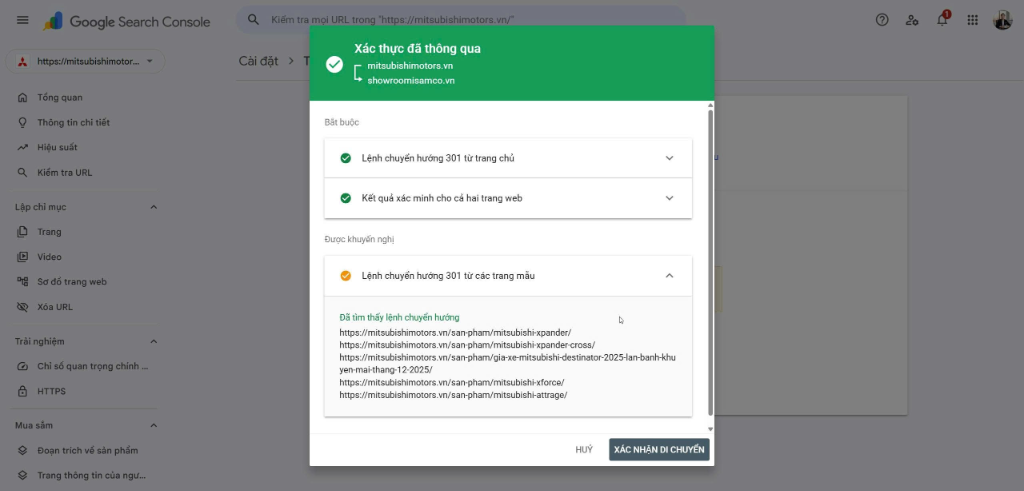
After clicking the Confirm Move, button, Google Search Console will begin the index update process. On the admin interface of the old property, you will see a notification that the migration is in progress:
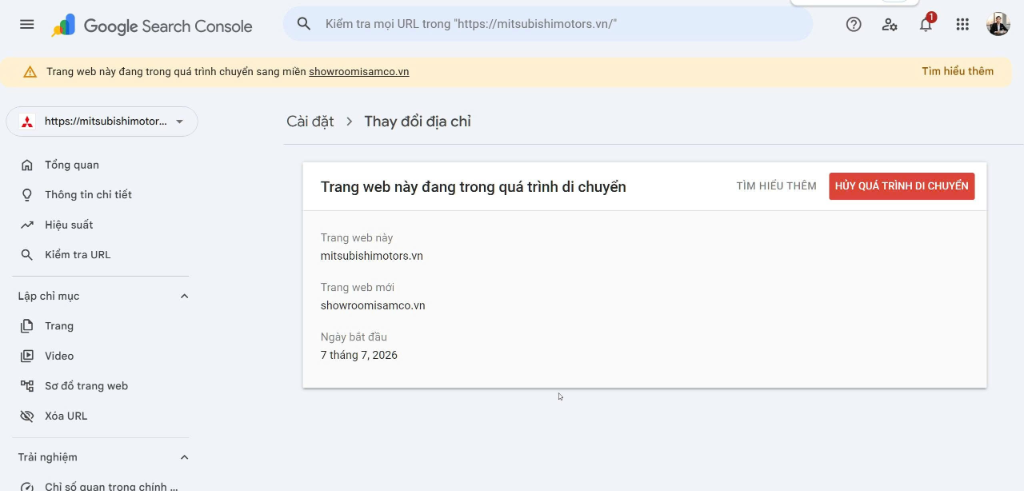
Step 4: Update Off-page elements and monitor performance
- Update Google Analytics: Change the website URL in the GA4 property settings to continue tracking traffic.
- Update quality Backlinks: Contact major websites that are linking to you and ask them to update to the new URL.
- Check for 404 errors: Use tools like Screaming Frog or Ahrefs to scan the new website to detect and fix broken links.
Please patiently monitor for about 2 - 4 weeks. Normally, keyword rankings may fluctuate slightly in the beginning, but they will soon stabilize if you correctly follow the 301 redirect and address change declaration processes mentioned above.
Ý kiến bạn đọc (9)
Đăng nhập để bình luận
Đăng nhập nhanh 1-chạm bằng Google để chia sẻ ý kiến của bạn về bài viết.
Bằng cách đăng nhập, bạn đồng ý với điều khoản và chính sách cộng đồng.
Chưa có bình luận nào. Hãy là người đầu tiên chia sẻ cảm nghĩ!
Đăng nhập / Tạo tài khoản
Đăng nhập với Google để gửi bình luận và tương tác cùng cộng đồng.
Tiếp tục là đồng ý với điều khoản sử dụng và chính sách bảo mật của DPS Media.