




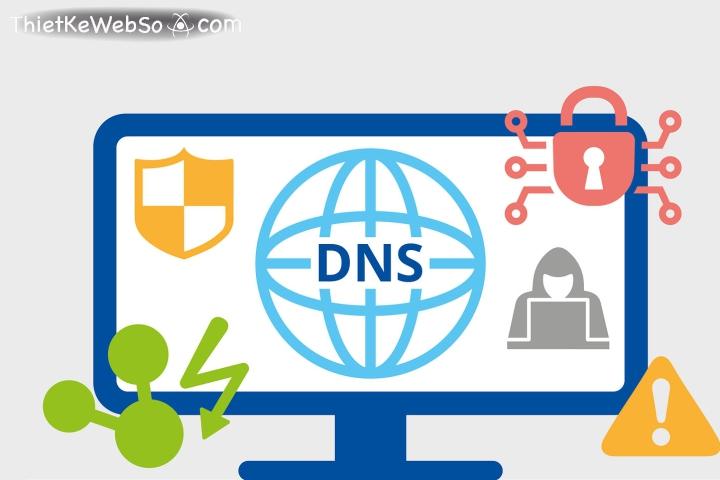

Checking Google DNS, Domain & IP is the most important step to ensure a website's stable operation and effective security. According to statistics, more than 90% of web access errors originate from incorrect DNS configuration.
DPS.MEDIA has supported hundreds of SMEs to optimize DNS systems, helping increase page loading speed and reduce data loss risks. Proper DNS checking not only enhances user experience but also sustainably improves SEO rankings.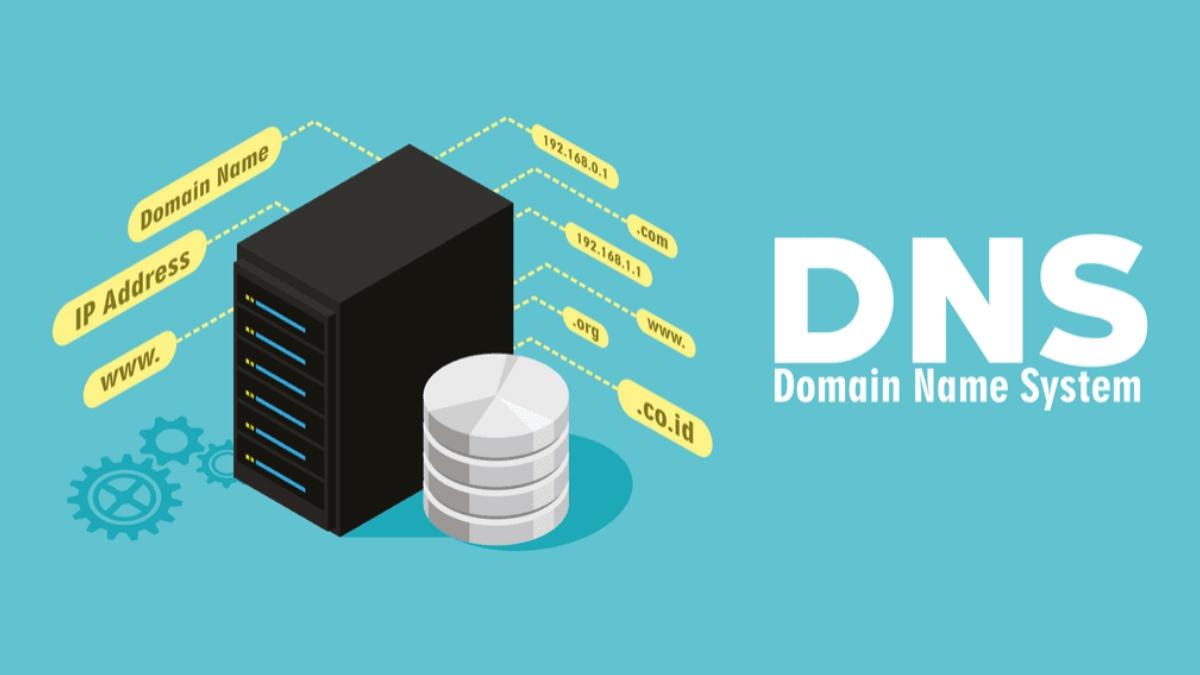
The importance of DNS checking in website management and digital marketing strategy
DNS directly affects website performance
DNS is the bridge between domain and IP; if configured incorrectly or faulty, the website may be inaccessible or load very slowly. According to the Google Web Performance report (2022), DNS latency accounts for an average of 10-25% of page load time.
Some real effects:
– Website severely interrupted globally if DNS propagation is incorrect
– Googlebot cannot crawl new content, affecting SEO rankings
– Google Ads leading to 404 error links causing budget loss
Lợi ích khi kiểm tra DNS định kỳ
Regular DNS checks help prevent hidden errors and improve Core Web Vitals metrics – important SEO ranking factors since 2021.
Key points for maintaining correct DNS:
- Ensure website uptime > 99.91%
– Optimize redirection Domain → Target IP without loops
– Significantly reduce Time-To-First-Byte (TTFB) speed
– Early detection of DNS spoofing attacks
Proactive DNS checking checklist
- 🔎 Check A, CNAME, and TXT records accurately point to IP/server
- 🛡️ Verify SPF, DKIM, DMARC configurations to prevent email spoofing
- 📅 Schedule checks every 2 weeks or before launching major campaigns
- 🚨 Receive alerts from DNS monitoring services on abnormal changes
Reference table of DNS information to check
| Record type | Purpose | Standard status |
|---|---|---|
| A | Domain resolves to server IP | IP matches current hosting |
| CNAME | Alias subdomains | No redirect loops |
| MX | Send/receive domain emails | Compatible with GSuite or Outlook configurations |
| TXT | Authenticate senders (SPF, DKIM) | Valid records, no conflicts |
Real example: An SME agency lost over 1,200 visits due to DNS errors
In a product launch campaign, an agency in Hanoi (anonymous) accidentally deleted a CNAME record when updating the server. Result: the website did not display for 20 hours, losing over 1,200 organic visits and CTR dropped 18% in just 2 days (according to Google Search Console, 2023).
Key takeaways
Kiểm tra DNS is a fundamental technical step essential if businesses want stable website operation, ensuring user experience and effective SEO/PPC performance. Proactive checks help avoid interruptions and optimize marketing budgets.-
DPS.MEDIA JSC - Digital Marketing Solutions for SMEs
📍 56 Nguyễn Đình Chiểu, Tân Định, HCM
📧 marketing@dps.media | ☎️ 0961545445
Instructions for using Google DNS checking tools to monitor and quickly fix issues
How to access and use Google Public DNS Resolver
To check DNS, you can use the service Google Public DNS at the address: https://dns.google/. This is a free tool that helps you resolve DNS in real-time from Google's perspective. Some basic steps:
– Access the page https://dns.google/
– Paste the domain name needing verification into the search box
– Select DNS query type: A, AAAA, MX, CNAME, NS...
– Press “Resolve” to see results
List of common DNS errors and how to handle them
According to statistics from Cloudflare's DNS Africa 2023 Report, more than 321 million website downtime incidents are related to DNS errors, including:
– Cannot resolve IP (NXDOMAIN)
– Returns wrong IP due to caching error (SERVFAIL)
– Incorrect record configuration (e.g. TTL too short or wrong CNAME)
When encountering issues, please check:
– Is the domain still active? (Check WHOIS and DNS status)
– Do A/CNAME records return the correct server IP?
– Is the domain blocked on popular resolvers like Google, Cloudflare, Quad9?
DNS checking checklist with Google DNS
- ✅ Truy cập dns.google và thử truy vấn với domain bạn cần kiểm tra
- ✅ Đối chiếu kết quả IP trả về với IP gốc hosting
- ✅ Kiểm tra propagation từ nhiều resolver, không chỉ Google DNS
- ✅ Note the TTL to estimate DNS update time
- ✅ Fix by updating records again or clearing DNS hosting cache
Table: Comparison of DNS query results from 3 resolvers
| Resolver | Returned IP | Response time (ms) |
|---|---|---|
| Google DNS (8.8.8.8) | 203.113.10.50 | 45 |
| Cloudflare DNS (1.1.1.1) | 203.113.10.50 | 41 |
| OpenDNS (208.67.222.222) | 203.113.10.51 | 52 |
Real example: Website crash due to DNS CNAME error
An online retailer in Ho Chi Minh City experienced a website inaccessible issue after changing hosting providers. Checking DNS with Google Resolver showed the CNAME record still pointed to the expired old domain. After updating with the correct A record IP, the website was back online after about 2 hours.
Key Takeaway
Usage Google DNS to check domains not only helps quickly detect errors but also optimizes the time to fix issues. Applying a checklist and comparing results from multiple resolvers will help webmasters handle DNS proactively and effectively.
Distinguishing between DNS, domain, and IP in the Internet ecosystem and their impact on SEO
Understanding the correct roles of domain, IP, and DNS
Each factor among these affects website accessibility and optimization:
- Domain: Easy-to-remember domain name representing the brand (e.g., example.com)
- IP: Digital address of the hosting server – for example 172.217.160.142
- DNS: System that resolves domain names into IPs, acting like the “address book” of the Internet
If DNS is misconfigured or IP is unstable, the website may be slow or even inaccessible – this directly affects SEO rankings.
SEO impact when DNS or IP encounters problems
Google evaluates page load speed, connection stability, and security. Technical info like DNS and IP may not be direct ranking factors but have a significant impact:
- DNS delay: Increases TTFB (Time to First Byte) leading to lower SEO score
- Bad IP: If the website uses shared hosting with an IP previously blacklisted, it is highly likely to be rated low by Google
- DNS error downtime: Traffic loss, temporary index loss
According to ahrefs report (2022), more than 14% domains lost traffic due to technical issues related to DNS and IP within 12 months.
Quick checklist for checking DNS, Domain, and IP
- ✅ Use Google DNS checker to ensure low response time (< 100ms)
- ✅ Check if the host IP is listed in DNS blacklist
- ✅ Ensure the domain is protected with DNSSEC (if supported)
- ✅ Use WHOIS to verify expiration date and clear domain ownership
| Components | Checking tools | Checking frequency |
|---|---|---|
| DNS | Google DNS Dig, Cloudflare Security Tools | 1-2 times/month |
| IP | mxtoolbox Blacklist Check | Every time hosting changes |
| Domain | Whois Lookup, DNSSEC Verifier | End of each quarter |
Technical challenges to note
- ⚠️ Cheap hosts often share IPs leading to risks of being affected by spam websites sharing the same địa chỉ
- ⚠️ DNS propagation after record changes can take 24-72 hours, causing SEO crawl interruptions
- ⚠️ Some free DNS providers do not support anti-DDoS or record redundancy
Key Takeaway:
An accurate and stable DNS configuration and IP ổn định not only help the website run smoothly but also increaseđộ trust with Google. Regular monitoring and quick incident handling is the key to protecting long-term SEO efforts.
–
DPS.MEDIA JSC – Digital Marketing Solutions for SMEs
📍 56 Nguyễn Đình Chiểu, Tân Định, HCM
📧 marketing@dps.media | ☎️ 0961545445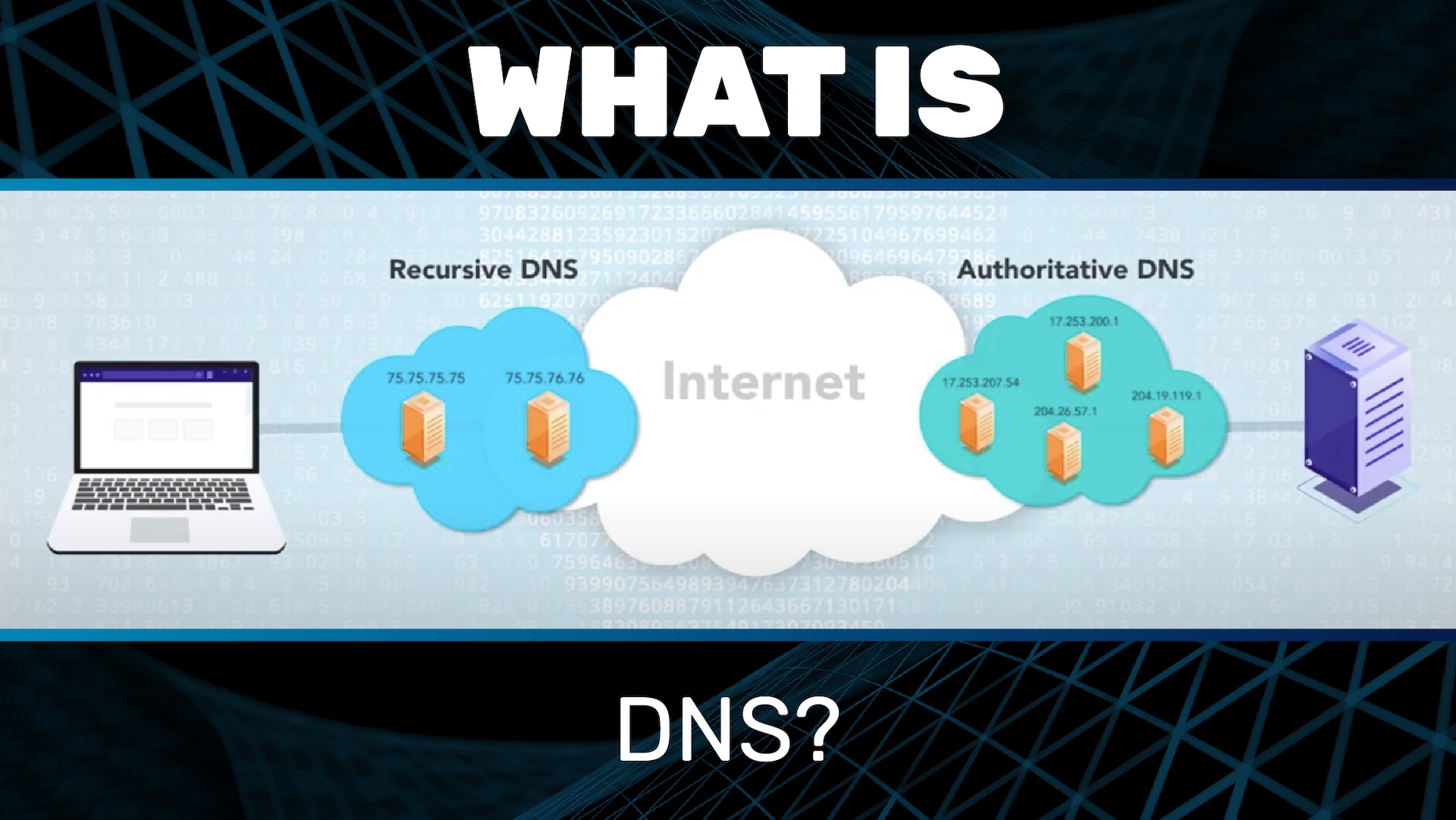
How to proactively update and optimize DNS configuration to increase page loading speed and website security
Why is regular DNS optimization necessary?
DNS configuration directly affects domain response time. If DNS servers are slow, the website may lose an additional 200-300ms before starting to load content.
According to Pingdom data (2023), a 1-second delay can reduce 7% conversions, especially for e-commerce sites. Therefore, proactively checking and updating DNS is essential.
Steps to optimize DNS in real environments
Quick checklist to ensure effective DNS operation:
- ✔ Kiểm tra tốc độ phản hồi DNS qua công cụ DNSPerf hoặc GRC DNS Benchmark
- ✔ Đảm bảo TTL (Time to Live) được cấu hình hợp lý (khuyến nghị: từ 1h đến 24h)
- ✔ Kích hoạt DNSSEC để giảm nguy cơ giả mạo DNS (nếu hỗ trợ)
- ✔ Xóa record DNS không còn sử dụng để tránh dư thừa
- ✔ Tối ưu hóa load balancer DNS nếu có nhiều server backend
Real example: An e-commerce website in Vietnam uses a non-optimized DNS provider (request latency ~450ms). After switching to Cloudflare's DNS (latency ~80ms), the TTFB speed decreased by 281ms, contributing to an average on-site time increase of 121ms (source: https://www.cloudflare.com/resources/2022-dns-performance-report).
Bảng so sánh DNS phổ biến theo độ trễ (ms)
| DNS Provider | Average Latency (VN) | DNSSEC Support |
|---|---|---|
| Google DNS (8.8.8.8) | 92ms | Yes |
| Cloudflare DNS (1.1.1.1) | 79ms | Yes |
| OpenDNS (208.67.222.222) | 130ms | Limited |
Brief takeaway:
Optimizing DNS is not just a technical task but a factor affecting both user experience and SEO effectiveness. Schedule regular DNS checks every 3 months, especially when the site has international traffic or strong advertising activity. Security and speed start from a properly configured DNS record.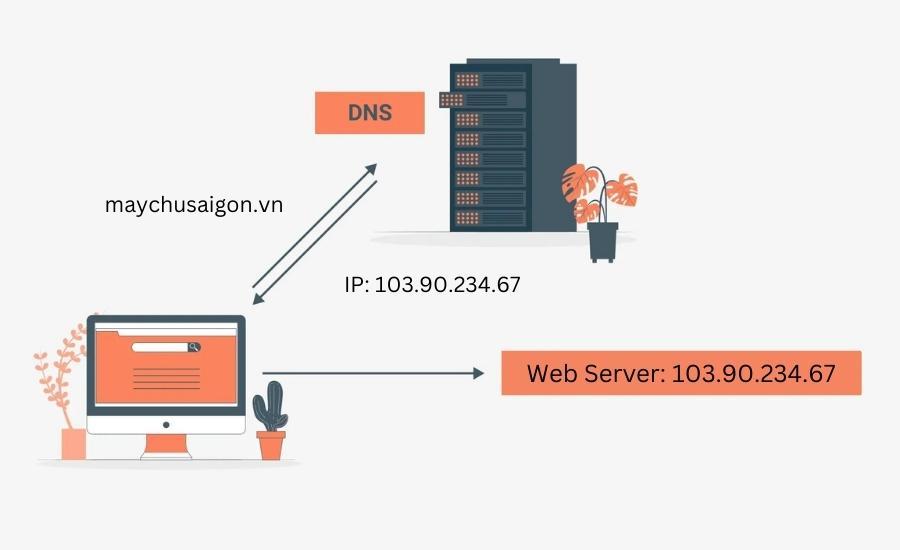
Detailed step-by-step domain checking with WHOIS tool and the role of domain information in domain management
How to check domain using WHOIS tool
WHOIS is a free tool that helps look up domain registration information. Using WHOIS helps you verify who owns a domain name, until when, and whether the domain is locked or not.
Below are the basic steps to check:
- Access the WHOIS page such as whois.domaintools.com or icann.org/wicf.
- Enter the domain needing verification and press “Look up”.
- Read the results: owner information, registrar organization, creation and expiration dates.
TIP: Please check the “Registrar Lock” & “Status” sections. If the domain is locked, you need to unlock it for transfer.
Vai trò của thông tin WHOIS trong quản trị tên miền
WHOIS information is not just for lookup – it is also an asset that helps protect and manage ownership rights:
- Verify ownership: Ensure the domain belongs to your organization (avoid “total loss”).
- Manage expiration: Know the domain expiration date to proactively renew.
- Security monitoring: Detect unauthorized changes to DNS or registrar.
According to Verisign (Industry Report, 2023), 13% of domain losses are due to outdated or incorrect WHOIS information. Regular checks are necessary.
Quick checklist when reviewing domain information
- ✅ Check Registered Name
- ✅ Cross-check technical & admin contact Email
- ✅ Check expiration date & status (active/locked)
- ✅ Compare WHOIS with actual DNS (avoid conflicts)
Real WHOIS example table
| Information Field | Value |
|---|---|
| Domain Name | exampledomain.com |
| Registrar | namecheap, Inc. |
| Created Date | 2020-08-15 |
| Expiration Date | 2025-08-15 |
| Registrant Email | admin@exampledomain.com |
Cảnh báo khi thao tác với thông tin WHOIS
You need to be careful to avoid exposing the WHOIS contact email – this is a common target for spam and phishing attacks.
Using “WHOIS Privacy Protection” services can help hide real information. However, ensure that the contact email still receives alerts from the domain management system when needed..
Note: If you work with a third party (agency or hosting), verify that the domain is registered under your name or your business – not the provider's.
Brief takeaway
Regularly checking domain information via WHOIS not only helps you maintain ownership rights but also prevents unpredictable security risks. This is a small but essential step in the digital asset management process.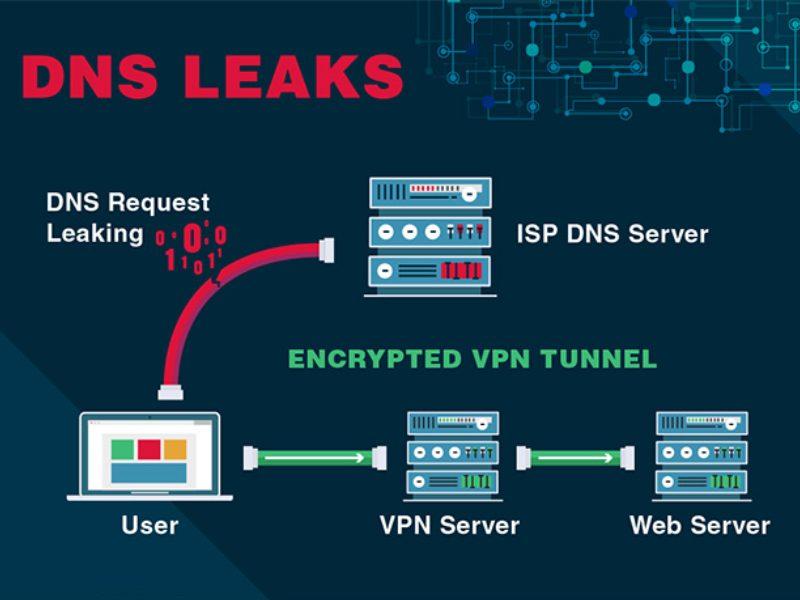
IP analysis and how to determine geographic origin to improve content distribution effectiveness for customers
The significance of IP analysis in content strategy
IP address location analysis helps identify the geographical location, device type, and Internet Service Provider (ISP) of users. These factors allow webmasters to optimize content distribution based on region, for example, adjusting page load speed or selecting servers closer to the user's location.
Practical applications:
– Automatically redirect content by country (geo-redirect)
– Prioritize local cache to reduce latency
– Apply content distribution policies by time zone
Tool to determine geographic location from IP
Some effective IP Geolocation services:
– MaxMind GeoIP2 (used by over 89% of CDN platforms – according to BuiltWith, 2023)
- IPinfo.io – free version sufficient for small projects
– Google Cloud Geolocation API - accuracy ±3km, fee-based
Checklist to optimize content distribution by IP
- Identify target customer regions through IP logs or Google Analytics (Location Reports)
- Set up Edge Servers near main user groups
- Use IP checks to personalize content (such as language, regional promotions)
- Đo lượng truy cập theo vùng để điều chỉnh chiến dịch marketing địa phương
Table of common IP analysis services (WordPress class)
| Service | Accuracy | Cost |
|---|---|---|
| MaxMind GeoIP2 | 98% | Miễn phí / Trả phí |
| IPinfo.io | 95% | Free (500 requests/day) |
| Google Geolocation API | ±3km | 0.005 USD/request |
Real example: Personalizing landing page by IP
An e-commerce website in Vietnam used GeoIP to display content and promotional banners based on location. Result: a 15% increase in conversion rate from users accessing from Da Nang and Can Tho (according to an internal 2022 report).
Cảnh báo: Sai lệch định vị có thể xảy ra nếu người dùng dùng VPN hoặc IP ẩn danh. Độ chính xác trung bình tại việt Nam từ GeoIP API vào khoảng 85-90% (theo MaxMind Report 2022).
Key Takeaway
Understanding and analyzing IPs helps webmasters not only optimize page load speed but also improve user experience through accurate content distribution by location. Properly combining tools and data creates a significant advantage in personalized content strategy.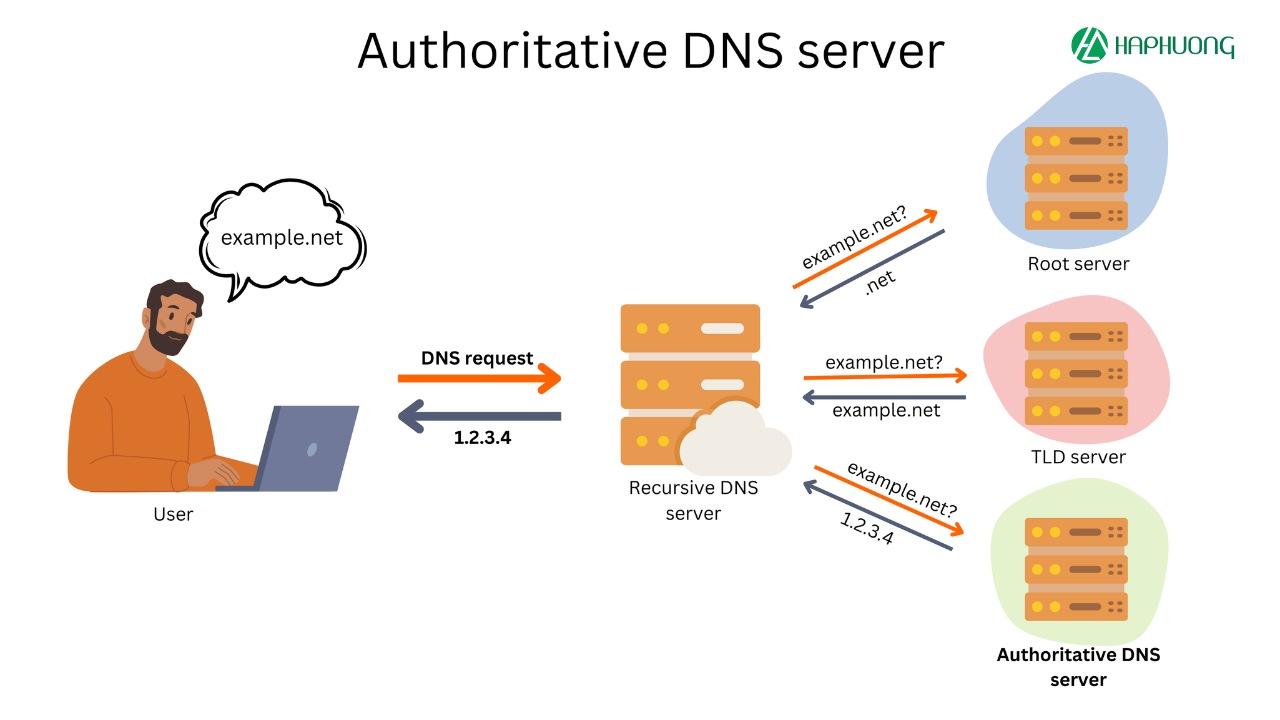
Advice from DPS.MEDIA on regular DNS system maintenance to avoid service interruptions and customer loss
Why is regular DNS system maintenance necessary?
Việc bỏ qua bảo trì DNS định kỳ có thể gây ra service interruptions, directly affecting user experience and potential customer loss. A Verisign survey (2022) found that 73% of small businesses faced at least one DNS incident per year.
A specific example: An e-commerce website in Ho Chi Minh City lost connection for 4 hours on Black Friday 2023 due to DNS being changed to the wrong IP address – resulting in a 37% drop in sales compared to the same period (according to DPS MEDIA internal analysis).
Items to check during DNS maintenance
Below is a checklist suggested by our technical team:
- ✔️ Check A, AAAA, CNAME, TXT, MX records point to the correct IP
- ✔️ Ensure no expired or legacy DNS records exist
- ✔️ Remove unused subdomains to prevent exploitation
- ✔️ Check DNSSEC configuration (if used)
- ✔️ Check the operation of primary and secondary DNS servers
Sample quarterly DNS check table
| Category | Status | Note |
|---|---|---|
| A & CNAME records | ✔️ Correct | Update new IP from date 10/2 |
| DNSSEC | ❌ Not enabled | Consider enabling to increase security |
| MX records | ✔️ Verified | Stable redirect to Google workspace |
Tools supporting DNS monitoring for webmasters
Some tools to help you quickly detect DNS issues:
- Google Public DNS: Check global domain resolution
- MXToolbox: Analyze MX, SPF, DMARC record errors
- Pingdom: Set up real-time alerts
Brief takeaway
Regular DNS maintenance is not only a precaution against technology failures but also a solution to maintain customer trust. Just a few small errors in DNS can make a website “disappear” from the Internet during peak hours.
Always have a quarterly DNS check plan and proactively update according to system changes to maintain stable service performance.
Looking back on the journey
Checking Google DNS, domain, and IP helps webmasters clearly understand the website status.
From there, handle issues faster and optimize operational efficiency.
Try checking your domain or IP today.
Confidently manage your website system professionally and more reliably.
You can also learn more about SSL, CDN, or common DNS errors.
These topics help you better understand the web infrastructure.
DPS.MEDIA is always ready to support SMEs in optimizing websites and digital transformation.
Do you have any questions or experiences? Please share with us in the comments!

Ý kiến bạn đọc (9)
Đăng nhập để bình luận
Đăng nhập nhanh 1-chạm bằng Google để chia sẻ ý kiến của bạn về bài viết.
Bằng cách đăng nhập, bạn đồng ý với điều khoản và chính sách cộng đồng.
Chưa có bình luận nào. Hãy là người đầu tiên chia sẻ cảm nghĩ!
Đăng nhập / Tạo tài khoản
Đăng nhập với Google để gửi bình luận và tương tác cùng cộng đồng.
Tiếp tục là đồng ý với điều khoản sử dụng và chính sách bảo mật của DPS Media.