




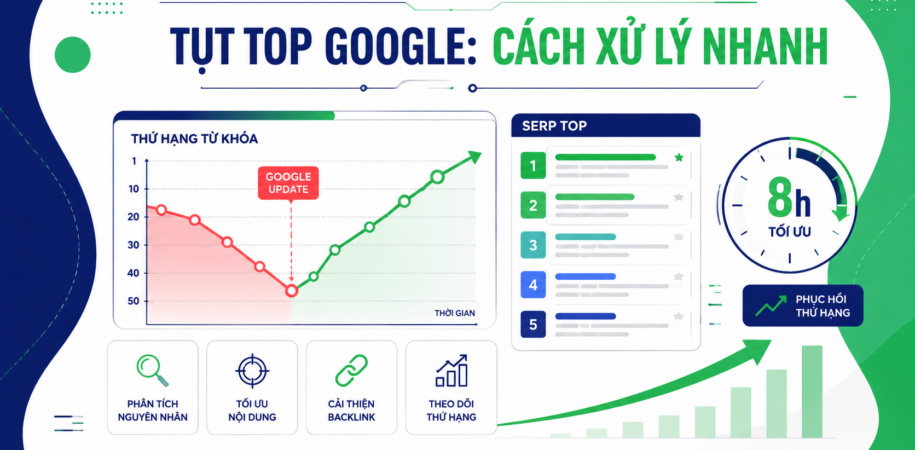

After every major Google algorithm update, the first thing SEO practitioners usually do is immediately open Google Search Console and Ahrefs, see the traffic graph glowing red, and panic while looking for a quick fix. Many people hastily delete articles, disavow backlinks in bulk, or revise every title tag across the entire website. But if you calmly examine the actual data, you will realize one thing: keywords dropping in rankings after a Google Update does not necessarily mean that the website has received a manual penalty or a site-wide penalty.
In fact, the latest major update shows that a group of keywords holding steady at Top 1 – Top 5 can suddenly fall to page 2, page 3 (or even disappear from the Top 50), often because Google has reshaped the Search Intent (the user's search intent) for that query. If you are in this situation, join comprehensive SEO services DPS.MEDIA in breaking down the underlying cause and going through the SERP analysis process to bring rankings back within just a few hours.
The nature of the update: When Google targets Scaled Content Abuse directly
Before starting to fix the content, you need to clearly understand what Google has just changed in its algorithm. The latest update focused heavily on the policy against Scaled Content Abuse (large-scale content abuse). Google's primary goal is to clean up websites that produce content at scale but lack substantive value.
The following models are currently among those most heavily affected:
- Template-based repurposed content: Using AI to generate hundreds to thousands of articles every day, changing only the product name or province/city name (for example: creating 63 articles for 63 provinces while the content inside is exactly the same).
- Disguised Thin Content: Collecting data from Google's Top 10, using AI to rewrite it (spin content), and extending articles to 2,500 – 3,500 words filled with lengthy, hollow definitions that do not directly answer the reader's question.
- Fake reviews and pricing: Creating large numbers of comparison articles, product reviews, or service pricing tables without verifiable data, real-world experience, or specific pricing information.
Notably, this policy applies to every form of content creation: whether you use automation tools, hire a team of manual contributors, or combine both. As long as the content shows signs of “many words but little value”, the website will immediately receive a lower quality evaluation from the algorithm. You can track the progress of algorithm rollouts directly at Google Search Central Status Dashboard.
Why do keywords drop in rankings after a Google Update if the website was not penalized?
Many website administrators see a few articles lose rankings and immediately conclude that the domain has received a Manual Action or been hit by a Site-wide penalty. This is an assumption that can easily lead to wrong decisions that damage an otherwise stable website structure.
Classify ranking data into clearly defined groups:
- Group 1 – Entire website drops: Almost all pages, from the homepage and categories to articles, lose all visibility and traffic falls to 0. This is the case where you need to carefully examine technical factors (Technical SEO), algorithmic penalties, or a toxic backlink profile.
- Group 2 – Localized drops by URL / Intent group: Only a few articles or a specific group of keywords fall from Top 1 – 5 to Top 15 – 30, while other pages retain their positions or even increase slightly.
If you belong to Group 2, the 90% cause is not the domain name, but rather how that article meets users' search needs compared with the competitor that Google has just pushed up.
Don't guess the algorithm: Open the SERP and read Top 1 to Top 5
Google never publishes every line of code behind an algorithm update. But the most accurate answer is right there on the current search results page (SERP). Instead of sitting around speculating, the first thing you need to do is open an incognito tab or a non-personalized rank-checking tool, search for the exact keyword that dropped, and analyze the top 5 results.
Ask the following questions when comparing your article with the new Top 1 – 5:
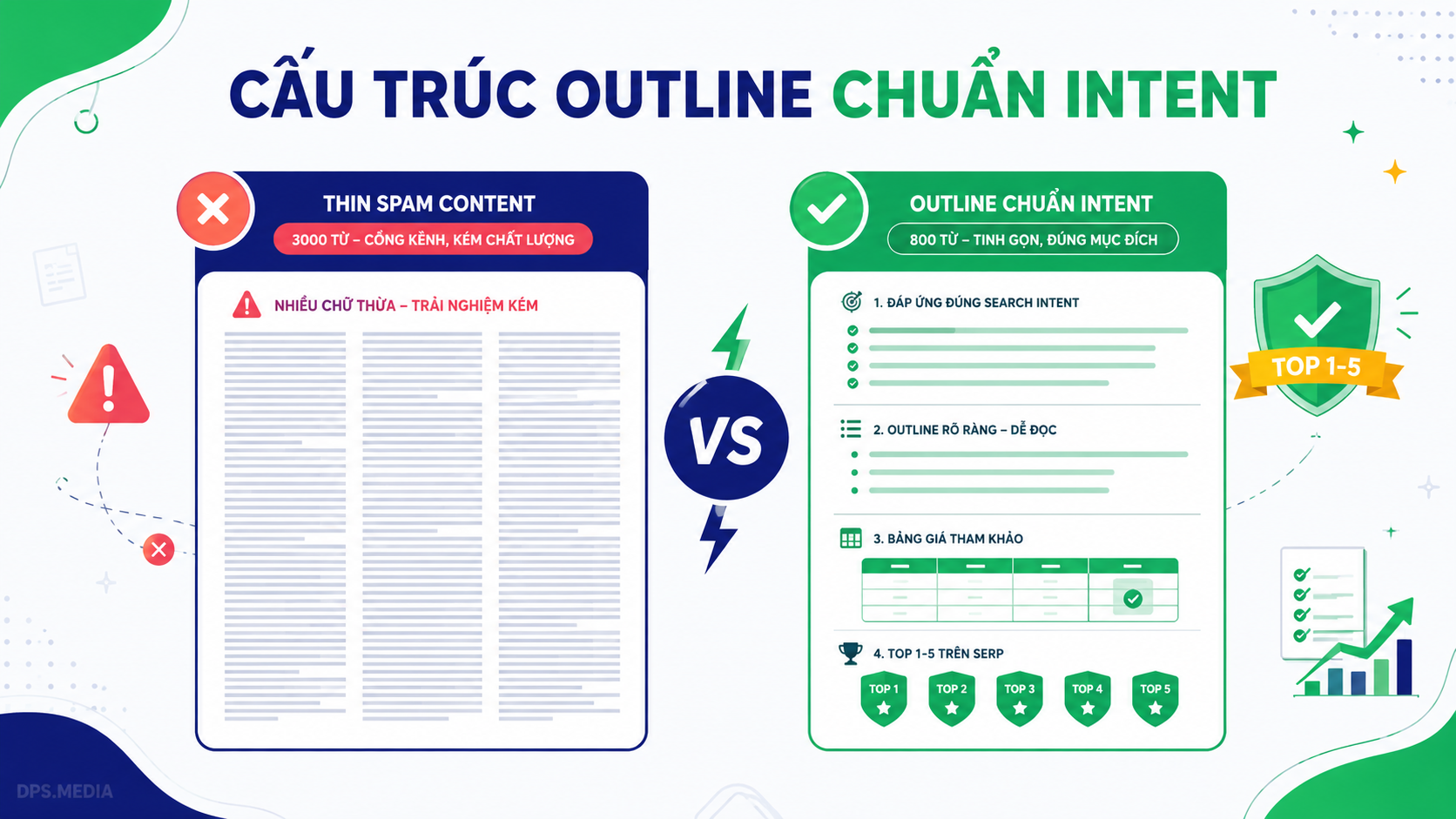
- What is the actual length? Don't assume that longer articles win. In a recent real-world case study for the project of Toan Thang Industrial Equipment, an old 2,800-word article dropped from Top 2 to Top 23. When the SERP was examined again, the new Top 1 to Top 5 competitors averaged only 600 – 850 words. The old article was considered rambling and stuffed with unnecessary text.
- What does the competitor answer first? Do they put the price table, solution, or short answer directly within the first 200 words? Or do they also use a lengthy introduction like you?
- Which Heading tags appear repeatedly among competitors? Which subtopics, technical specifications, or perspectives is your article currently missing?
- Reading experience and information formatting: Do competitors use comparison tables, real-world videos, checklists, or plain text?
A basic mistake that many websites encounter: a review of the Onpage setup reveals that the same URL contains as many as 2 – 3 H1 tags due to theme conflicts or incorrect plugin settings, confusing search bots when identifying the main topic.
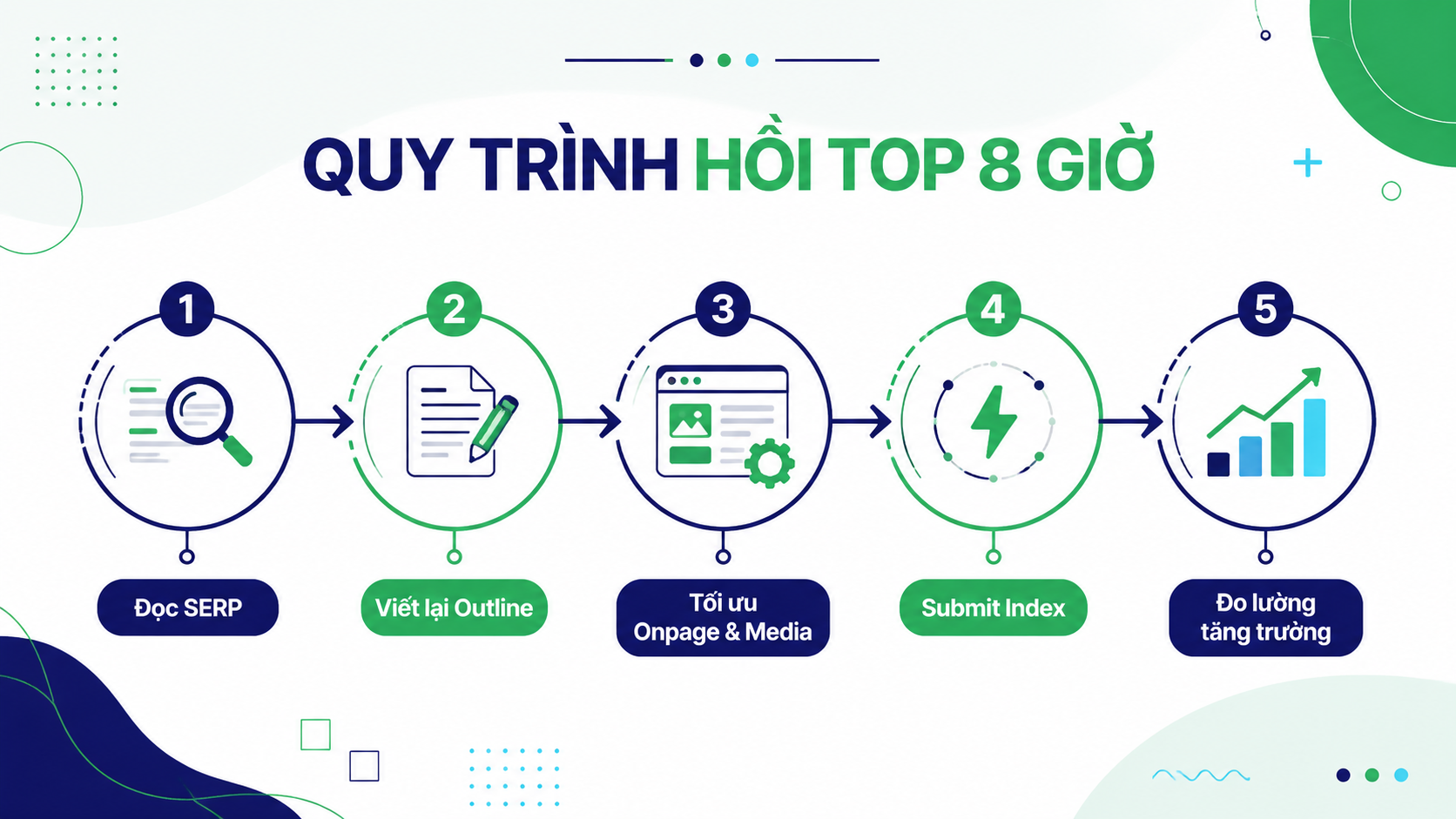
The 5-step process to rescue keywords that dropped after a Google Update within 8 hours
Below is a hands-on recovery process that has been applied to bring a group of keywords that dropped from Top 3 to page 3 back to Top 5 just 8 hours after Google completed the crawl.
Step 1: Analyze the content gap (the real Content Gap)
Many people misunderstand the concept of Content Gap: whenever they see a competitor ranking for a keyword, they try to stuff that keyword into their article. But a Content Gap is actually the information gap in addressing the user's needs.
For example: For a query about purchasing a B2B product, readers do not just want to know the concept of “what is this product”. They immediately want to know: how much it costs, what factory scale it is suitable for, common operational errors, and situations where it should not be used. Adding exactly these answers is what truly fills the content gap.
Step 2: Rewrite the Outline from scratch (Restructure the information flow)
Don't patch a few sentences into the old article. Open a blank file and recreate the complete outline as if you were writing the article for the first time:
- Put the most important information first: The price table, direct answer, or solution summary must appear immediately after the brief introduction.
- Cut 100% of the unnecessary introduction: Remove obvious definitions that everyone already knows. Reduce the length from 2,800 words to a concise, focused 800 – 1,000 words.
- Combine duplicate sections: Group fragmented points into a visually comprehensive table instead of splitting them into many separate paragraphs.
Step 3: Optimize Onpage and add multimedia assets
After rewriting the content according to the new outline, refine the technical elements on the page:
- Standardize the Heading tag structure (1 unique H1 tag, with H2 and H3 tags logically distributed according to the flow of thought).
- Redesign exclusive illustrative images and add the tag
altthat accurately describes the image content. - Add short videos or visual comparison tables to keep users engaged (increase Dwell Time and reduce Bounce Rate).
- Adjust the internal linking network (Internal Link), directing link equity from related articles to the newly optimized page.
Step 4: Resubmit the URL for Google to crawl
Once the article has been substantially updated, submit a request for reindexing through Google Search Console or high-speed Indexing services so search bots can quickly recognize the new structure.
Step 5: Measure and monitor SERP fluctuations
After submitting, continue monitoring the rankings of keywords dropping in rankings after a Google Update for 24 to 48 hours. When the content correctly satisfies the new Search Intent of the SERP, rankings will tend to rebound very quickly.
Comparison table: Common mistakes vs. Correct actions after a Google Update
| Wrong action (Panic) | Correct hands-on action |
|---|---|
| Rewrite the Title and Heading and delete articles across the entire website. | Classify keywords, isolate only the locally affected URLs, and address them. |
| Try to stuff in 1,000 – 2,000 more words to make the article longer than competitors. | Trim rambling content, shorten the length, and focus on answering the core question correctly. |
| Hastily disavow large numbers of backlinks because you think they are toxic links. | Carefully read Top 1 – 5 on the SERP to find the Content Gap and create a new outline structure. |
| Guess at the algorithm and passively wait for months. | Redo the Onpage optimization, update pricing/media, resubmit the URL, and monitor recovery. |
Conclusion
The SEO race after every Google Update does not belong to the person who makes the most changes, but to the person who analyzes the SERP most accurately. When keyword rankings fluctuate, keep a cool head, stay closely aligned with users' search intent, and streamline the content toward genuine value.
If your business is struggling to maintain keyword rankings or needs a well-structured overall SEO strategy that can sustainably withstand every algorithm update, contact DPS.MEDIA:
- Consultation Hotline / Zalo: 0961545445
- Address: 56 Nguyen Dinh Chieu, Tan Dinh Ward, District 1, Ho Chi Minh City
- Website: https://dps.media



Ý kiến bạn đọc (9)
Đăng nhập để bình luận
Đăng nhập nhanh 1-chạm bằng Google để chia sẻ ý kiến của bạn về bài viết.
Bằng cách đăng nhập, bạn đồng ý với điều khoản và chính sách cộng đồng.
Chưa có bình luận nào. Hãy là người đầu tiên chia sẻ cảm nghĩ!
Đăng nhập / Tạo tài khoản
Đăng nhập với Google để gửi bình luận và tương tác cùng cộng đồng.
Tiếp tục là đồng ý với điều khoản sử dụng và chính sách bảo mật của DPS Media.