

1. Accountants' nightmare when opening tax finalization XML files
Whenever the Personal Income Tax (PIT) finalization season arrives, the accounting department becomes busier than ever. When exporting data Form 05/QTT-TNCN from HTKK software to XML format, you must have a specialized reading tool.
Traditionally, we often download and install the iTaxViewer software from the General Department of Taxation. However, using this application often comes with many inconveniences:
- Complicated installation requirements and frequent updates to new versions.
- Computers with low specifications open the software slowly and are prone to freezing (application hangs).
- Frequently encountering “cannot open XML file” errors due to installer issues or software conflicts.
- No search or filtering tools for quickly finding employees.
Understanding these difficulties, we have developed the Online Personal Income Tax Finalization XML File Reader – a completely new, optimized, and streamlined solution!
2. iTaxViewer Mini Online Solution: Convenient, Fast, Secure
Now, you can view tax declaration XML files directly in your web browser without installing any software on your computer.
Simply visit dps.media/Itaxviewer, and our tool will help transform dry XML data into highly visual and attractive tables.
Why should you use our XML reader tool?
👉 1. No installation required: Everything runs in a web browser (Chrome, Safari, Edge...). Whether you use Windows or a MacBook, it works smoothly.
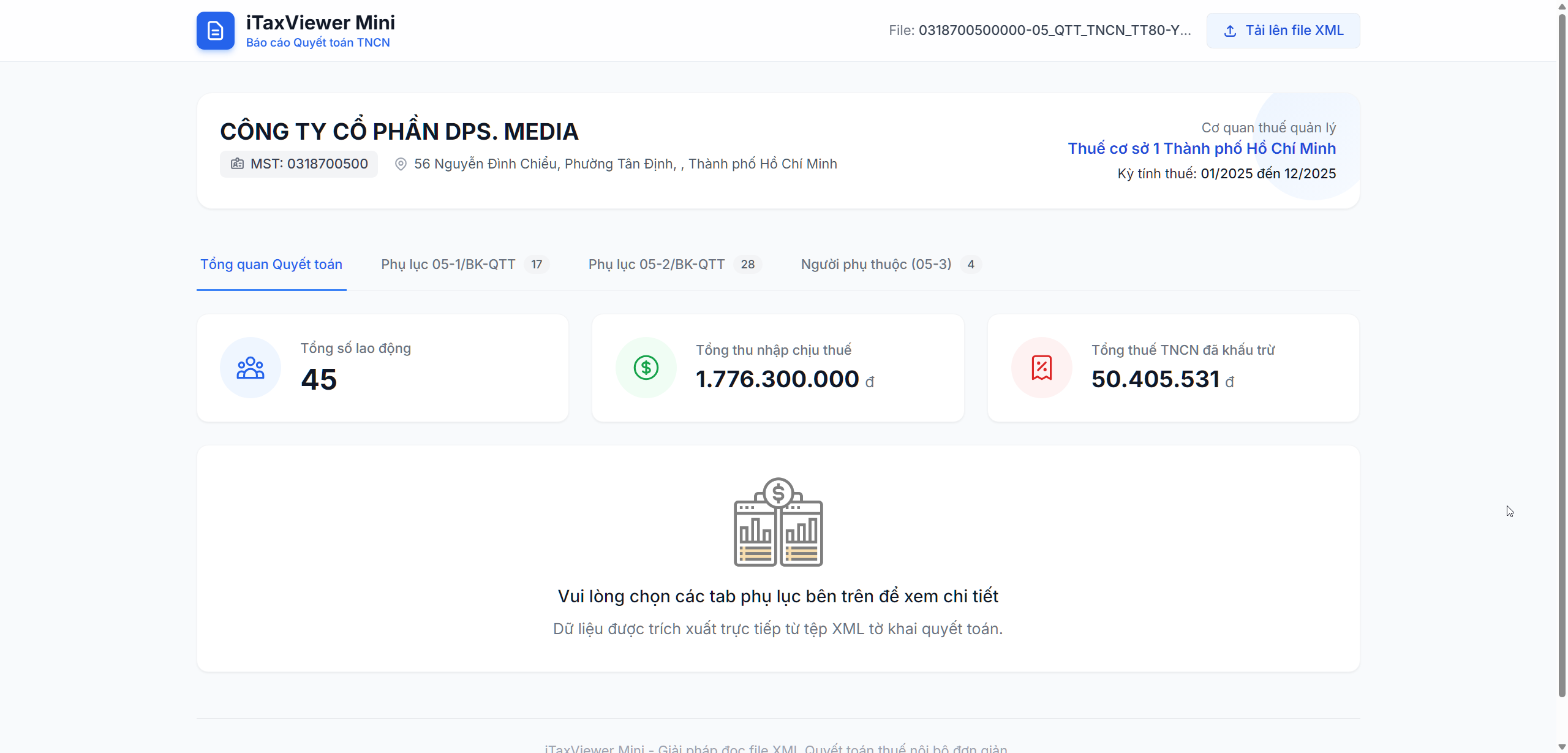
👉 2. Smart interface designed for accountants: Reports are clearly divided into tabs identical to the actual declaration forms:
- Overview: Quickly view Total Employees, Total Income, and Total PIT Withheld.
- Appendix 05-1/BK-QTT: List of individuals with labor contracts.
- Appendix 05-2/BK-QTT: List of individuals without labor contracts.
- Appendix 05-3/BK-QTT: Detailed list of dependents for family circumstance deductions.
👉 3. Integrated ultra-fast filtering & search: This is the most valuable feature! The tool allows you to enter a name, tax identification number (TIN), or citizen ID number to instantly find an employee among hundreds or thousands of records. It also supports sorting by income from highest to lowest, making it extremely convenient.
👉 4. Absolute data security: Our system only processes files directly in the browser's temporary memory to extract and display data for viewing. XML files are absolutely NOT stored on the server system, ensuring 100% enterprise information security.
3. Guide to viewing Personal Income Tax Finalization XML files
To get started, you only need to follow 3 very simple steps:
- Step 1: Export the Personal Income Tax Finalization file (Form 05/QTT-TNCN) in XML format from your HTKK software.
- Step 2: Visit the website: dps.media/Itaxviewer
- Step 3: Click the “Select XML file from computer” button and upload the file. Overview reports and employee lists will be displayed clearly and completely in an instant.
4. Try it today!
Don't let reviewing tax finalization XML files take up more of your valuable time during peak season. Experience the next-generation PIT finalization XML file reader that is convenient, visually appealing, and fast!
Keywords: tax xml file reader, online itaxviewer software, how to open personal income tax finalization xml files, view appendix 05-1 xml, accounting support tool.



