







Recently, Microsoft has strengthened security by enabling by default Security Defaults, making traditional SMTP connection (Basic Authentication) from accounting software like MISA, sales software, or WordPress websites difficult. You often encounter connection failure or authentication failure errors.
This article will guide you step by step on how to ♻️, enable SMTP Auth and get App Password (app password) to successfully integrate mail sending 100%.
Why can't you send mail with your regular Outlook password?
Microsoft has now blocked Basic Authentication (login with only User/Pass) for legacy protocols to avoid security risks. To send mail via SMTP, you need to “relax” some security policies for that mailing account while using App Password instead of the daily login password.
3-step process to perform
The standard process consists of 3 steps:
- Disable Security Defaults in Microsoft Entra ID (Azure AD).
- Enable Authenticated SMTP for the outgoing email account.
- Create App Password to paste into MISA/Software configuration.
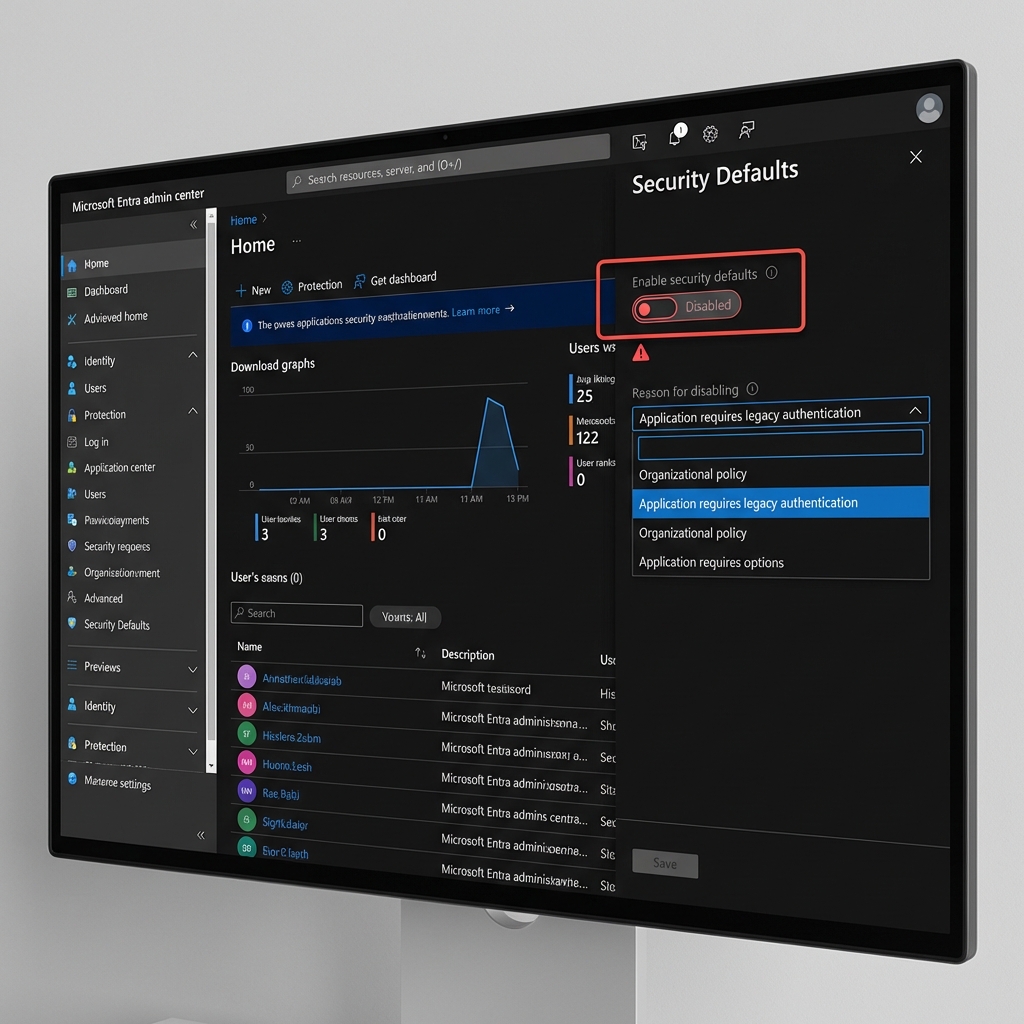
Step 1: Disable Security Defaults (Required)
This is the most important step. If not disabled, you cannot enable SMTP Auth.
- Access the admin page Microsoft Entra admin center with a Global Admin account.
- Look at the search bar at the top, type “Properties”.
- Select result Properties under the section Microsoft Entra ID.
- Scroll to the bottom of the page, find the blue link line Manage security defaults.
- Change status to Disabled (Not recommended).
- Select any reason (for example: Application requires legacy authentication) and click Save.
Step 2: Enable Authenticated SMTP for the sending email account
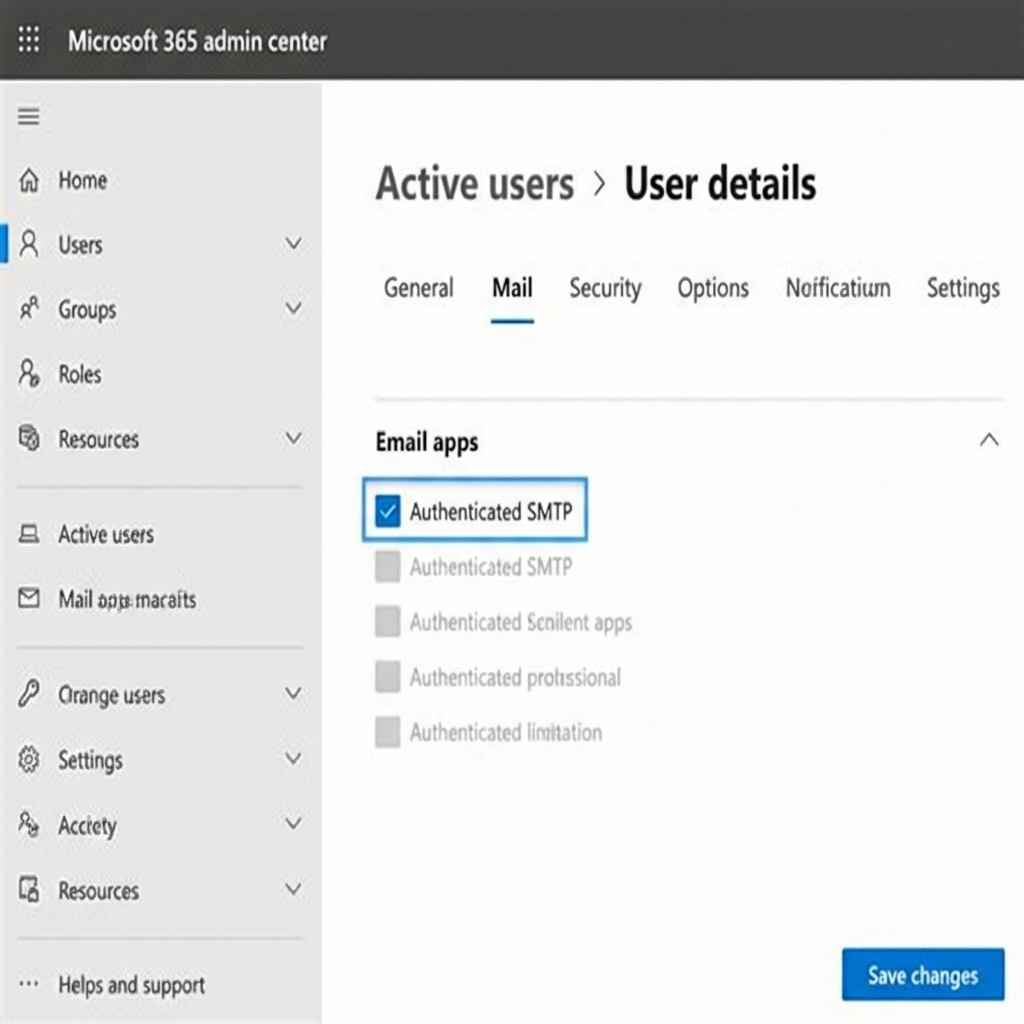
After disabling the common security policy, you need to grant SMTP mail sending permissions to the correct account you want to use (for example: hoadon@congty.com).
- Access Microsoft 365 admin center.
- Go to menu Users > Active users.
- Click on the email account name you want to configure.
- Apply practical data analytics from Zalo OA in marketing campaigns Mail.
- Find the section Email apps, click on Manage email apps.
- Check the box Authenticated SMTP.
- Press Save changes.
Step 3: Allow and Create App Password
💪
📉
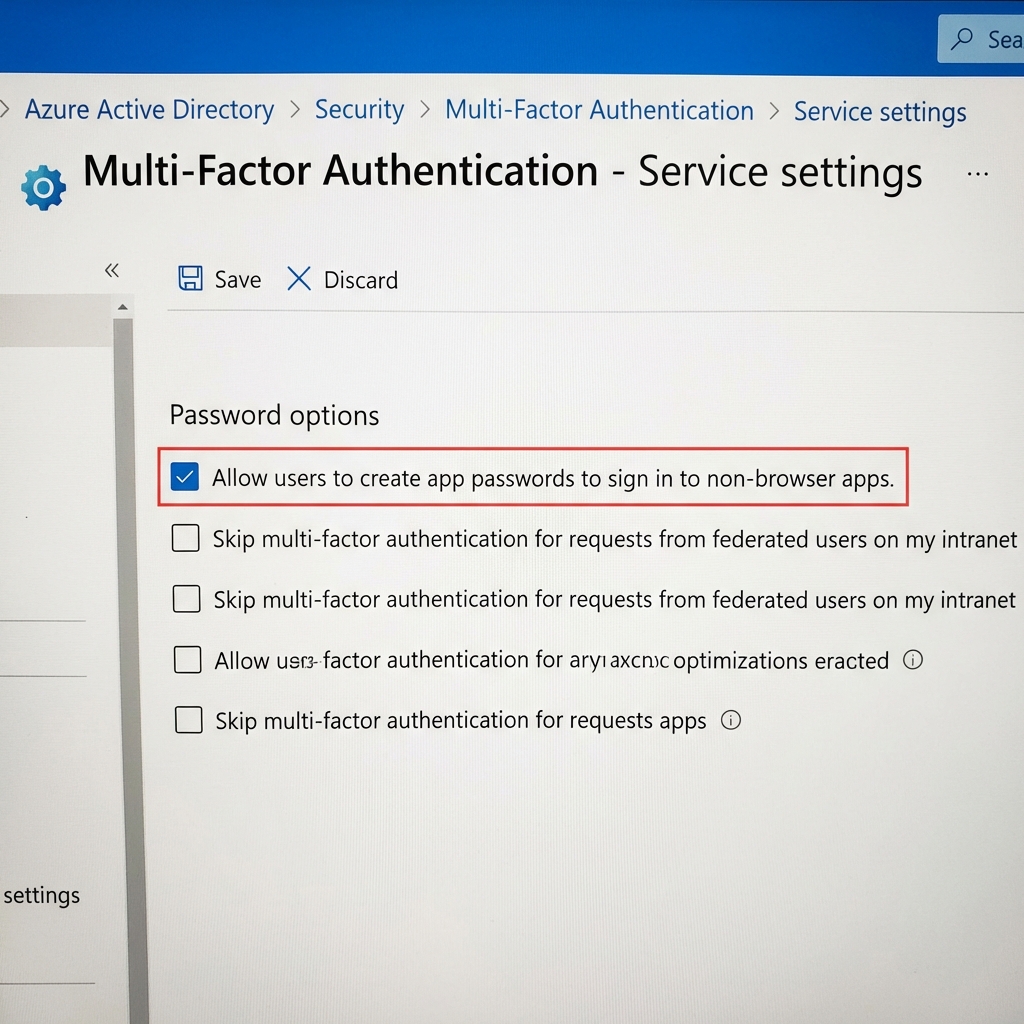
- Still on the page Active users, click on the button Multi-factor authentication on the toolbar (or search for “Multi-factor authentication” if not found).
- In the new window, select service settings (service settings).
- Check the box: Allow users to create app passwords to sign in to non-browser apps.
- Press Save.
3.2. Get App Password
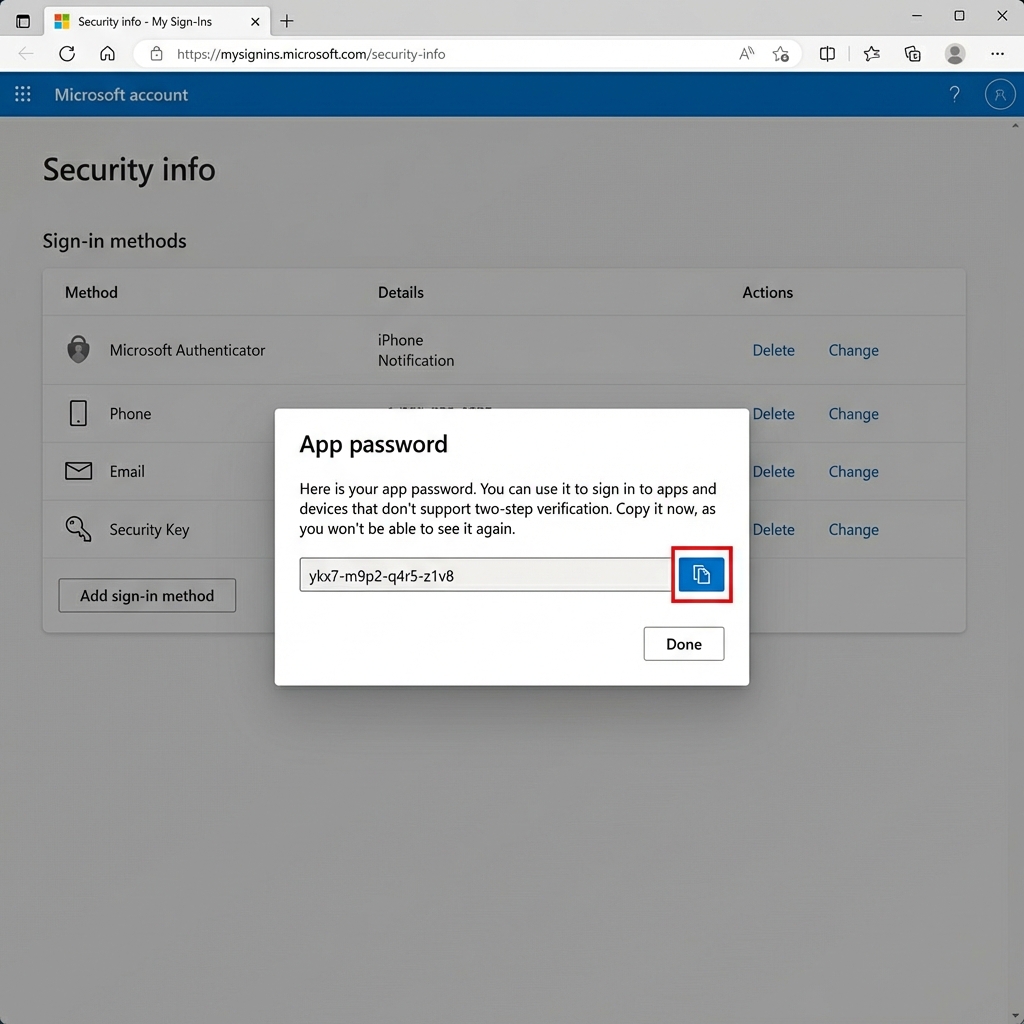
- Log in to link: mysignins.microsoft.com/security-info Research - DPS.MEDIA JSC
- Vietnam Fashion Industry Strategy Report 2026: The Era of “Green Fashion” and the Strong Rise of Local Brands Amid Comprehensive Digital Transformation [18]. 1. Market Overview 2025-2026: 2025 marked a spectacular recovery of the textile and garment industry and the […] (+) Add sign-in method.
- Domain management and DNS configuration are the vital foundation that helps businesses ensure stable and secure online presence. App password.
- Set a descriptive name, for example: “MISA SMTP”.
- Vietnam Fashion Industry Report 2026 Vietnam Fashion Industry Strategy Report 2026: The Era of "Green Fashion" and the Rise...23 February, 2026
Configure in MISA / Software
Free AI Certification from Google: A Golden Opportunity for SMEs to Optimize...
- unwatermarked
smtp.office365.com - Port:
587 - Security method (Encryption):
STARTTLS(or TLS). - Username: Your full email address.
- Password: Paste the App Password created in Step 3 (Do not use Outlook login password).
Analyze data from Zalo OA to improve marketing strategies Test connection and enjoy the “Connection successful” result!
Technical guide article by DPS MEDIA.


Ý kiến bạn đọc (8)
Đăng nhập để bình luận
Đăng nhập nhanh 1-chạm bằng Google để chia sẻ ý kiến của bạn về bài viết.
Bằng cách đăng nhập, bạn đồng ý với điều khoản và chính sách cộng đồng.
We use Outlook SMTP for WordPress. Before, signing in with the regular email password worked, but this time it keeps reporting authentication failed. Is it mandatory to turn off Security Defaults to fix this?
If the tenant has Security Defaults enabled, legacy SMTP AUTH may be blocked. However, disabling tenant-wide security policies is a significant change, so review the authentication policies and account scope before proceeding.
Right, our side also ran into the same issue with MISA. Only after properly issuing Authenticated SMTP for the sending account did it run smoothly; simply changing the Outlook password was not enough.
May I ask, is an App Password the same as the main Outlook password? If employees change their daily login password, do MISA or the website using the App Password need to be reconfigured?
This is not your main password. An App Password is a separate password for applications that require this type of authentication, so don't paste your regular Outlook password into the SMTP settings. However, Microsoft's security policies may affect the use of App Passwords.
I'm a bit hesitant about turning off Security Defaults, since our company systems rely on multiple layers of security. Is there a way to keep the security policy in place while still allowing legacy software to send email? That would be better.
This article describes the exact problem we ran into. The most important thing is to distinguish the email account password from the App Password. If you enter the wrong one first, you'll think SMTP is broken.
If many accounts send invoices, you should enable a separate SMTP for each account that needs it, rather than granting it across the board. Doing so makes control easier.
Chưa có bình luận nào. Hãy là người đầu tiên chia sẻ cảm nghĩ!
Đăng nhập / Tạo tài khoản
Đăng nhập với Google để gửi bình luận và tương tác cùng cộng đồng.
Tiếp tục là đồng ý với điều khoản sử dụng và chính sách bảo mật của DPS Media.