






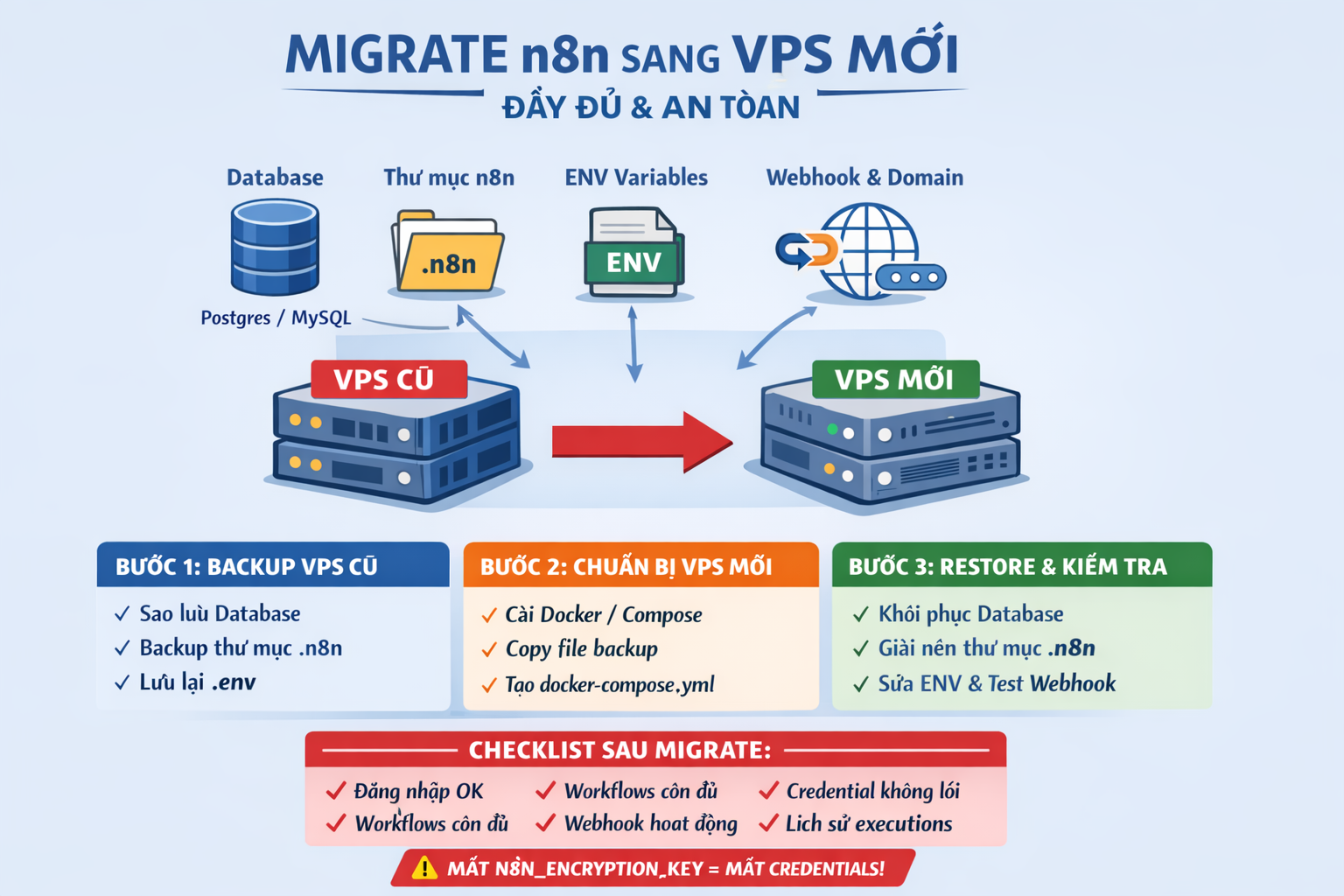

Migrating n8n from old VPS to new VPS sounds simple, but in reality, if you miss a few important steps, you may face serious errors such as losing credentials, webhook not working, or even the entire workflow disappearing.
This article is written based on real-world experience when migrating n8n in a production environment, ensuring the safest and most complete process.
Objective of the migration process
After completing the migration, the new VPS must ensure:
- Normal n8n login
- All workflows remain intact
- Credentials are not faulty (no red color displayed)
- Webhooks and Cron operate stably
- Execution history is preserved
Components to be migrated (VERY IMPORTANT)
A complete n8n stack includes 4 mandatory parts:
1. Database
- PostgreSQL / MySQL / SQLite
2. n8n data directory
- Workflows
- Credentials
- Executions
3. Environment variables
- Especially
N8N_ENCRYPTION_KEY
4. Domain & webhook configuration
Note: Missing even one of these four parts can cause serious errors in the entire system.
Step 1: Prepare on old VPS (Source VPS)
1.1. Check if n8n is running
First, check how n8n is running:
bash
docker ps
docker compose ps
Identify the following information:
- Type of database in use
- Where the volume is currently mounted (
~/.n8nor Docker volume)
1.2. Backup database
With PostgreSQL:
bash
docker exec -t postgres \
  pg_dump -U n8n n8n > n8n.sql
With MySQL:
bash
docker exec -t mysql \
  mysqldump -u n8n -p n8n > n8n.sql
With SQLite:
bash
cp ~/.n8n/database.sqlite n8n.sqlite1.3. Backup n8n data
If using bind mount:
bash
tar -czvf n8n-data.tar.gz ~/.n8nIf using Docker volume:
bash
docker run --rm \
  -v n8n_data:/data \
  -v $(pwd):/backup \
  alpine tar czvf /backup/n8n-data.tar.gz /data
Important notes: This directory contains all encrypted credentials.
1.4. Save environment variables (.env)
File .env must have the following variables:
env
N8N_ENCRYPTION_KEY=
DB_TYPE=
DB_POSTGRESDB_DATABASE=
DB_POSTGRESDB_USER=
DB_POSTGRESDB_PASSWORD=
N8N_HOST=
WEBHOOK_URL=
⚠️ WARNING: Loss N8N_ENCRYPTION_KEY https://dps.media/wp-content/uploads/2026/02/dich-vu-tang-comment-threads-goi-tu-100k-giup-post-viral-nhanh-1770347148307_dpsmedia-356x356.png
Step 2: Prepare new VPS (Destination VPS)
2.1. Install Docker & Docker Compose
bash
apt update && apt upgrade -y
apt install docker.io docker-compose-plugin -y
systemctl enable docker --now
2.2. Create project directory
bash
mkdir -p /opt/n8n
cd /opt/n8n
Copy the following files into this directory:
docker-compose.yml.env- Backup file (
n8n.sql,n8n-data.tar.gz)
Step 3: Restore data on new VPS
3.1. Restore n8n data
With bind mount:
bash
tar -xzvf n8n-data.tar.gz -C /- DPS.MEDIA JSC - Page 10 of 11
bash
docker volume create n8n_data

docker run --rm \
  -v n8n_data:/data \
  -v $(pwd):/backup \
  alpine tar xzvf /backup/n8n-data.tar.gz -C /
3.2. Restore database
PostgreSQL:
bash
docker compose up -d postgres
docker exec -i postgres \
  psql -U n8n n8n < n8n.sql
MySQL:
bash
docker compose up -d mysql
docker exec -i mysql \
  mysql -u n8n -p n8n < n8n.sql
Step 4: Start n8n
Start n8n:
bash
docker compose up -dMonitor logs to check:
bash
docker compose logs -f n8nWhen you see the following log line, n8n has started successfully:
Editor is now accessible via:Step 5: Fix domain & webhook (THE MOST EASILY FORGOTTEN STEP)
5.1. Update .env file
env
N8N_HOST=n8n.domainmoi.com
N8N_PROTOCOL=https
WEBHOOK_URL=https://n8n.domainmoi.com/
Then restart n8n:
bash
docker compose restart n8n5.2. Test webhook
- Open workflow with webhook
- Click Test URL
- Test by calling with browser or curl
If webhook errors, it is almost certainly due to WEBHOOK_URL not being configured correctly.
Step 6: Post-migration checklist
- ✅ Successfully logged into n8n
- ✅ Workflow is still sufficient
- ✅ Credentials not showing red
- ✅ Webhook works normally
- ✅ Cron workflow runs on schedule
- ✅ Execution history is intact
Common errors when migrating n8n
| Error | Cause | How to handle |
|---|---|---|
| Credentials error | Lost encryption key | Reuse old key |
| Webhook returns 404 | Wrong WEBHOOK_URL | Set correct domain |
| No workflow found | DB not restored yet | Re-import SQL |
| n8n restarts continuously | Wrong DB env | Check again .env |
| OAuth error | Change domain | Re-authorize |
Real-world experience
Always stop n8n before backup:
bash
docker compose stop n8nSome other notes:
- Production environment should use PostgreSQL instead of SQLite
- Save file
.envto password manager to avoid loss - Take VPS snapshot before migrate to be able to rollback if needed
- If using queue mode, remember to migrate Redis as well
Conclusion
Migrating n8n to a new VPS will be completely safe if you ensure all 4 pillars:
- Database – Contains all workflows and executions
- n8n data – Credentials and configuration
- Encryption key – To decrypt credentials
- Webhook – Ensure domain and URL are correct
If you're having trouble during the migration process or need further support, don't hesitate to leave a comment below. Let me know:
- Are you using PostgreSQL or MySQL?
- Single n8n or queue mode?
- Are you using reverse proxy (Nginx / Traefik / Cloudflare)?
I will support and provide specific commands suitable for your stack!


Ý kiến bạn đọc (9)
Đăng nhập để bình luận
Đăng nhập nhanh 1-chạm bằng Google để chia sẻ ý kiến của bạn về bài viết.
Bằng cách đăng nhập, bạn đồng ý với điều khoản và chính sách cộng đồng.
The N8N_ENCRYPTION_KEY part is indeed the most common pitfall. If you migrate the database and the full ~/.n8n folder but forget the old key, will the credentials on the new VPS still work?
Do not change the key when restoring. Credentials were encrypted with the old key, so keep N8N_ENCRYPTION_KEY unchanged, and check your .env file before starting n8n.
We ran into this before: the workflows still showed up, but all the credentials reported errors. Luckily we had a .env backup, so restoring the old keys got everything running again.
After moving to a new VPS, the domain is still accessible, but webhooks from external systems no longer run. Is this usually caused by the IP change, or does the n8n configuration also need adjusting?
Moving to a VPS usually brings a new IP address, so in addition to DNS, you must also check the URL and webhook variables in n8n and the reverse proxy. Test a webhook directly after migration instead of concluding the work is done just because the login page loads.
Exactly. Last time we forgot to update the domain configuration, so the workflow's cron jobs ran normally but the webhook from the third-party service went silent.
This article is useful because it reminds readers to back up both the database and the data folders. Many people assume exporting workflows is enough, until they lose their credentials and only then see the problem.
If the production system runs many executions, backup and database restore should be tested first on a staging VPS; migrating directly is quite risky.
A post-migration checklist is well worth doing, especially checking workflows, credentials, cron jobs, and webhooks. Being able to load the n8n interface doesn't mean the system is running properly yet.
Chưa có bình luận nào. Hãy là người đầu tiên chia sẻ cảm nghĩ!
Đăng nhập / Tạo tài khoản
Đăng nhập với Google để gửi bình luận và tương tác cùng cộng đồng.
Tiếp tục là đồng ý với điều khoản sử dụng và chính sách bảo mật của DPS Media.