





● Internal Data from Google Search Central Live
Google Crawl and Index Time: Should SEOs Wait or Make Changes?
Whenever a newly published article has not yet been indexed, a revised title has not yet appeared in the SERP, or a website has just lost traffic after a Core Update, the first reaction of many SEOs is to panic and keep making changes. But the truth is that Googlebot operates according to very specific time cycles. Understanding these milestones is the dividing line between a capable SEO professional and someone endlessly editing content in vain.
Part 1Crawl Cycle~20h to 30 days
Part 2Index Cycle~1.5h to several months
Part 3Serving Cycle~2h to 6 months
Part 4Action MatrixWait or Fix Now?
~1.5h
Typical Indexing
End-to-end time to complete indexing for 1 page that meets quality standards.
~20h
New URL Discovery
Time for Googlebot to discover a new article through natural internal links.
~30d
Sitemap Processing
An XML sitemap is not a shortcut; full Google processing can take a month.
3–6m
Core Update Recovery
Site-wide signals need months of accumulation to recover rankings.
These timing data were officially shared by Google Search team expert Gary Illyes at the event Google Search Central Live Deep Dive in Zurich (Europe), and were then analyzed in depth by Search Engine Land. The core point every webmaster needs to understand: the three stages Crawl, Index and Serving are a sequential chain. A bottleneck in one link will delay the entire process behind it. For business websites built on a foundation of professional SEO-friendly website design, clean code structure, and fast server response times are the most important prerequisites for helping Googlebot pass through the crawling funnel without triggering the load-reduction (back-off) mechanism.
Stage 1: Data Collection
1. CRAWL Process: How Long Does Googlebot Take to Discover & Load a Page?
Crawl is the step where Googlebot scours the internet to find new URLs or recheck known URLs to see whether their content has been updated. Below is Google's official slide showing the timing chart for each crawling task:
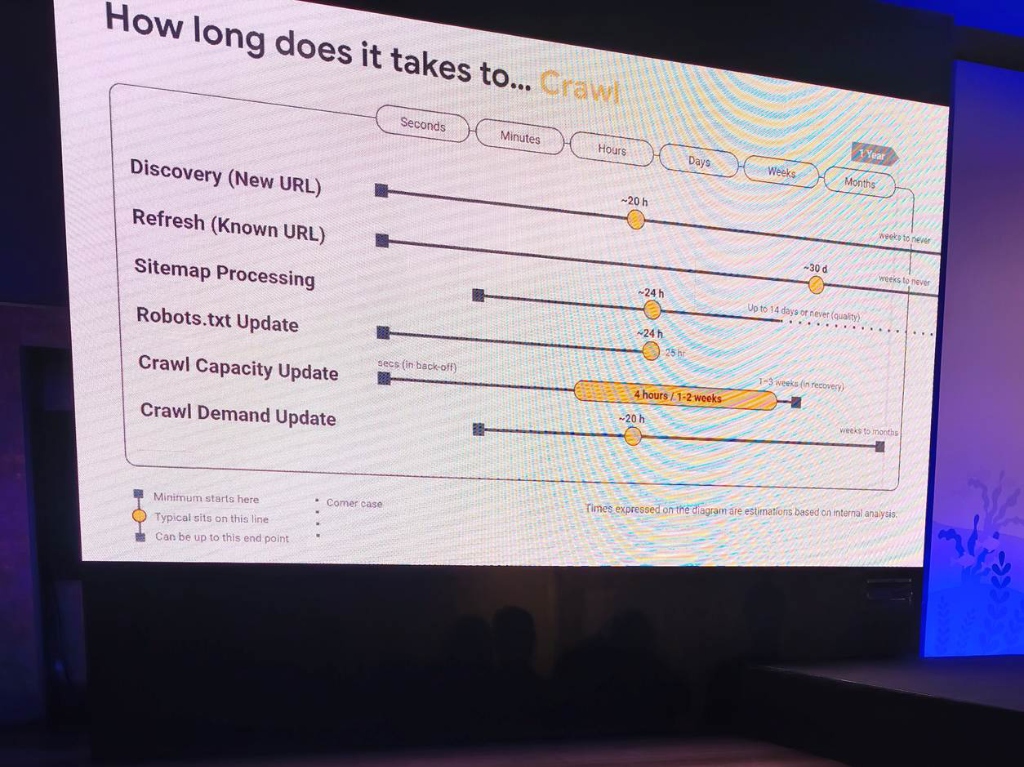
Data source: Presented by Gary Illyes (Google). The yellow dot represents the typical time (Typical). The extended line represents the longest distribution tail (Can be up to).
Crawl Task
Typical Time
Minimum
Worst Case
Meaning for SEOs
Discovery (brand-new URL)
Approximately ~20 hours
A few seconds to a few minutes
Several weeks or never
Do not expect Google to crawl immediately after you hit publish. 20 hours is the normal cycle if there are good internal links.
Refresh (known URL)
Approximately ~20 hours
A few seconds
Several weeks or never
An old article that has been edited needs about 1 day for the bot to crawl the new version, unless the page has a news-like update frequency.
Sitemap Processing
Approximately ~30 days
A few hours
Up to 14 days or never
A sitemap is not a shortcut! It is a fallback map; sitemap processing is 35 times slower than natural links.
Robots.txt Update
Approximately ~24 hours
A few hours
25 hours (rare worst-case: 14 days)
When unblocking robots.txt, you must wait a full day for Googlebot to synchronize the new directive.
Crawl Capacity
4 hours to 1–2 weeks
A few seconds (when backing off)
1–3 weeks (recovery phase)
Server 5xx lag makes the bot reduce crawling in an instant, but recovering crawl capacity can take up to 3 weeks!
Crawl Demand
Approximately ~20 hours
A few hours
A few weeks to several months
Crawl demand depends on the website's freshness and authority, changing on a monthly cycle.
Practical perspective: The biggest misconception among SEOs is submitting an XML Sitemap and then sitting back expecting Google to index immediately. Gary Illyes points out that Sitemap processing takes an average 30 days. If you want Google to discover a new article within 20 hours, the fastest and most natural way is to place a direct internal link from articles that consistently receive traffic!
Stage 2: Processing & Indexing
2. INDEX Process: Why Is the Typical Time Only 1.5 Hours but Some Pages Get Stuck for Months?
After crawling the HTML, Google must put the page into the Render Queue, run JavaScript, extract entities, add Link Annotations, and then decide whether to add it to the index. The second slide reveals the actual timing:
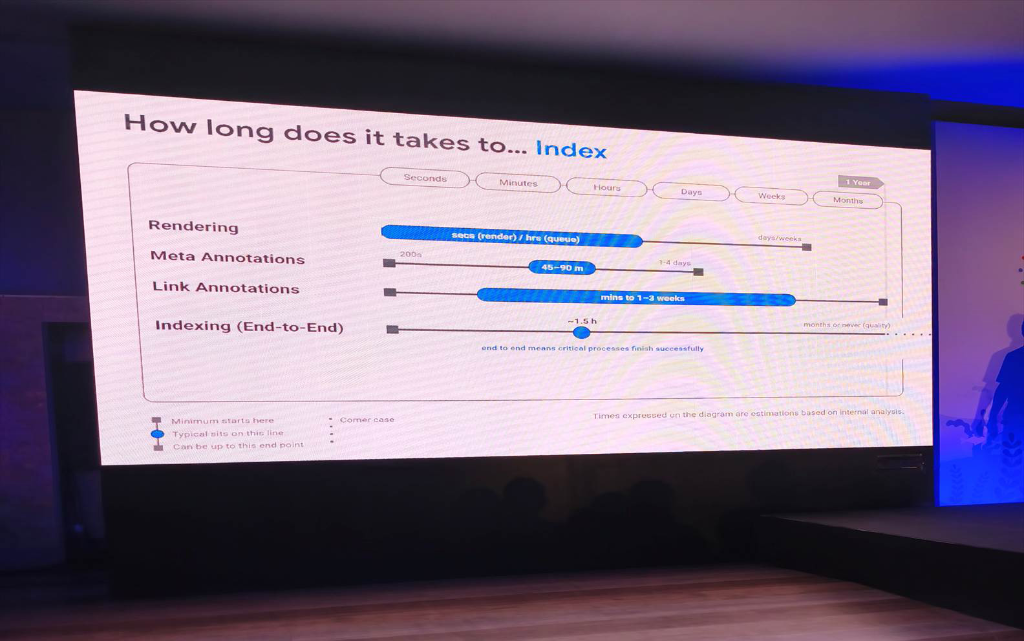
Important note from Google: “End to end means critical processes finish successfully” (Only counted when critical processes are successfully completed). The distribution tail extends to “months or never (quality)”.
Indexing Stage
Typical Time
Queue Time
Worst Case
Meaning for SEOs
Rendering (DOM/JS Execution)
A few seconds (actual rendering)
A few hours in the queue
Several days to several weeks
Chromium itself takes only 2-3 seconds to render, but Google's resource queue can hold a page for several days if the website is too heavy.
Meta Annotations
45 – 90 minutes
Approximately 200 seconds
1 – 4 days
Canonical, noindex, and hreflang tags are processed fairly quickly after passing the rendering stage.
Link Annotations
A few minutes to 1–3 weeks
A few minutes
Several months
Analyzing PageRank flow and link anchors from an article can take several days to 3 weeks to spread across the entire system.
Indexing (End-to-End)
Approximately ~1.5 hours
A few minutes
Several months or NEVER (Quality)
If the content meets quality standards, Google indexes it within 90 minutes. If it remains stuck for a long time, 100% is because the page did not pass the quality threshold (Quality Gate).
The Shocking Truth About Indexing: The median time (typical) for Google to complete the entire indexing cycle is 1.5 hours! But the key point is in Google's note on the right: “months or never (quality)”. This frees SEOs from the illusion that Googlebot is “slow” or that “the system is lagging”. If your page is still not in the index after 3 days, it is NOT a crawling technical error, but the algorithm rejecting indexing because the content lacks unique value or is information-poor.
Stage 3: Serving & Ranking
3. SERVING Process: Updating Titles, Snippets & Recovering from Core Updates
Serving is the step where data is retrieved from the index to display in search results to end users. This is where much of the impatience comes from: why has the title not changed after editing it, when will a penalty be lifted, and how long after a Core Update will rankings return?
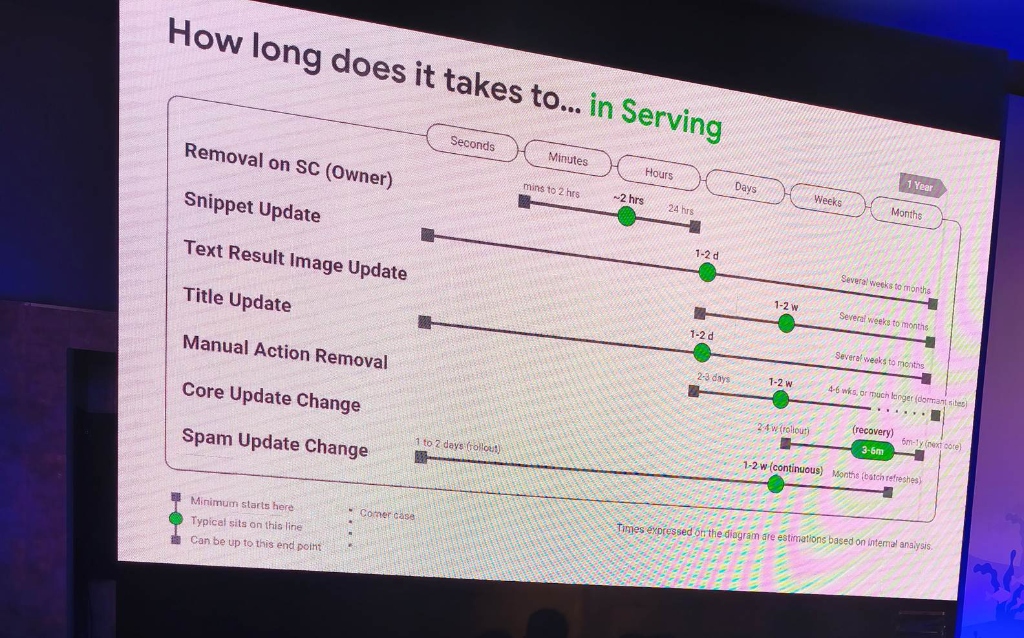
Key highlight: Removal through Search Console takes only ~2 hours (fastest). But recovery after a Core Update takes 3–6 months (longest).
Serving Task
Typical Time
Minimum
Worst Case
Meaning for SEOs
Removal on SC
Approximately ~2 hours
A few minutes to 2 hours
24 hours
Google's fastest processing tool. Use it when you need to urgently hide leaked-data links or 404 links.
Snippet Update (Search Description)
1 – 2 days to 1–2 weeks
1 – 2 days
A few weeks to several months
Editing the meta description does not change it immediately. Google needs time to recalculate relevance to the query.
Title Update (Search Title)
1 – 2 days to 1–2 weeks
1 – 2 days
A few weeks to several months
Do not change the title continuously every day! Changing it too quickly causes the algorithm to retain the old cache longer.
Text Result Image Update
1 – 2 weeks
A few days
A few weeks to several months
Thumbnails displayed beside search results are updated much more slowly than text.
Manual Action Removal
1 – 2 weeks
2 – 3 days
4 – 6 weeks (site may remain dormant longer)
Because Google specialists review it manually; the time depends on the complexity of the explanation dossier.
Core Update Change
Recovery: 3 – 6 months
Rollout: 2 – 4 weeks
6 months – 1 year (waiting for the next Core Update)
A Core Update drop cannot be fixed overnight. New authority signals need to accumulate for 3–6 months to recover.
Spam Update Change
1 – 2 weeks (continuous)
1 – 2 days (rollout)
Several months (batch data-cleaning rounds)
Spam updates have a fast impact, but hidden data-cleaning rounds can continue for many months.
Rule for Recovery After a Core Update: The speed of decline is always dozens of times faster than the speed of recovery. A Core Update rollout takes 2 to 4 weeks, but to regain rankings, the machine-learning system needs 3 to 6 months (or even 1 year) to collect enough new user-experience signals. Therefore, after re-optimizing the website, stay committed to the content plan instead of becoming pessimistic when there is no change in the first week.
Action Strategy
4. Four Golden Rules to Help SEOs Decide: Wait or Fix?
From Google's internal data, we can derive a decisive set of rules for every real-world situation in daily SEO work:
Rule 1
Rule 1.5 Hours & the Quality Boundary
If an article has good quality and reasonable internal links, it will be indexed within 90 minutes after crawling. If the page is still in the “Discovered – currently not indexed”, state after 72 hours, stop waiting passively! You need to FIX IT NOW: audit the usefulness of the article, write more deeply, add real data tables, and place a link from a high-ranking article.
Rule 2
Dispelling the XML Sitemap Illusion
Submitting a sitemap takes ~30 days to process. Never use a sitemap as a tool to force Google to urgently crawl an article. To get the bot to discover a new article within 20 hours, turn internal links into a natural reflex: as soon as you publish a new article, immediately go to 2–3 older articles on the same topic and insert a contextual link pointing to the new article.
Rule 3
Healing a Core Update Takes 3–6 Months
Never promise your boss or client that “I just fixed the article, the keyword will recover next week” after a Core Update. The algorithm evaluates at the entire-domain (site-wide) level. Plan to clean up low-quality content, improve UX, enhance E-E-A-T, and prepare for a steady 3- to 6-month journey of accumulating signals.
Rule 4
End the Habit of Changing Titles Daily
The title update cycle on Google takes from 1 to 2 weeks, and even several months. If you change the title on Monday, see that it has not changed by Wednesday, and hastily switch to another version, you are pushing the URL into a delayed-processing loop. Give each title version at least 14 days to let Googlebot register it fully.
DPS.MEDIA JOINT STOCK COMPANY
📍 Address: 56 Nguyen Dinh Chieu, Tan Dinh Ward, Ho Chi Minh City
📞 Hotline / Zalo: 0961 545 445
✉ Email: marketing@dps.media
🌐 Website: https://dps.media
🏢 Tax identification number: 0318700500 | VCB: 1051160909
Ý kiến bạn đọc (9)
Đăng nhập để bình luận
Đăng nhập nhanh 1-chạm bằng Google để chia sẻ ý kiến của bạn về bài viết.
Bằng cách đăng nhập, bạn đồng ý với điều khoản và chính sách cộng đồng.
Chưa có bình luận nào. Hãy là người đầu tiên chia sẻ cảm nghĩ!
Đăng nhập / Tạo tài khoản
Đăng nhập với Google để gửi bình luận và tương tác cùng cộng đồng.
Tiếp tục là đồng ý với điều khoản sử dụng và chính sách bảo mật của DPS Media.