






In the global digitalization era, connecting with customers is no longer limited by geographical or language barriers. Learning how to integrate Google Translate into Chatwoot is the golden key that helps SMEs expand into international markets professionally. Understanding customers in their native language creates absolute trust and strongly boosts conversion rates.
According to the 2024 industry report, more than 75% of customers prefer shopping on websites that provide services in the local language. This poses a major challenge for customer support teams that have to deal with dozens of different languages every day. Chatwoot combined with the power of Google Translate will completely solve this problem with just a few simple setup steps.
Experts at DPS.MEDIA believe that optimizing the multilingual user experience is a vital factor. With hands-on experience since 2017, we have found that businesses using automated translation can reduce response time by 40%. This article will guide you through the configuration process in detail to turn your chatbot into a true interpreter.
Implementing how to integrate Google Translate into Chatwoot is not simply a technical installation. It is a strategy for building a global and professional brand image in the eyes of international partners. Let us explore the detailed roadmap to master this technology and elevate your business customer service to a new level.
Why is integrating Google Translate into Chatwoot important?

Eliminate language barriers in customer communication
Language barriers are often the main cause of misunderstandings and reduced service quality. When implementing how to integrate Google Translate into Chatwoot, support agents can immediately read and understand the content sent by customers. This keeps the conversation smooth and uninterrupted by manual dictionary lookups.
Instant communication is a key factor in retaining customers in a fiercely competitive environment. According to the latest market research, responding in the local language increases the likelihood of closing a sale by 3 times. Automating translation gives your team more confidence when entering new markets such as Japan, South Korea, or Europe.
For example, a travel startup in Vietnam succeeded by using Chatwoot to support Russian and French tourists. Thanks to automatic translation, they handled more than 500 booking requests per month without hiring foreign-language staff. This is clear evidence of the effectiveness of applying technology to business operations.
| Comparison Criteria | Before integration | After integration |
|---|---|---|
| Response time | 5-10 minutes (due to lookup) | Under 1 minute |
| Content accuracy | Low, easy to misunderstand | High, professional |
| Personnel Cost | Requires multilingual staff | Use existing staff |
| Customer satisfaction level | Average | Very high |
Optimize productivity for the Support team
Integrating Google Translate into Chatwoot helps reduce the workload for support agents. Instead of having to copy and paste content back and forth between browser tabs, everything is displayed directly in the Chatwoot interface. This focus allows agents to handle more conversations within the same working period.
Based on experience from projects at DPS.MEDIA, employee productivity increased by an additional 35% after optimizing this process. Employees no longer feel anxious when encountering unfamiliar languages, thereby improving their mindset and service attitude. A smart working environment always goes hand in hand with outstanding and sustainable business performance.
Another real-world example is an electronics retailer that saved USD 2,000 per month. Instead of hiring translation freelancers, they used the Google Translate API deeply integrated into their existing Chatwoot system. As a result, all technical inquiries from international customers were answered accurately and quickly.
- Save time switching between external translation applications.
- Ensure consistency in response content for all customers.
- Easily train new employees to use the multilingual support system.
- Store translated conversation history for management purposes.
- Increase support scalability without incurring significant additional costs.
Detailed guide on how to integrate Google Translate into Chatwoot
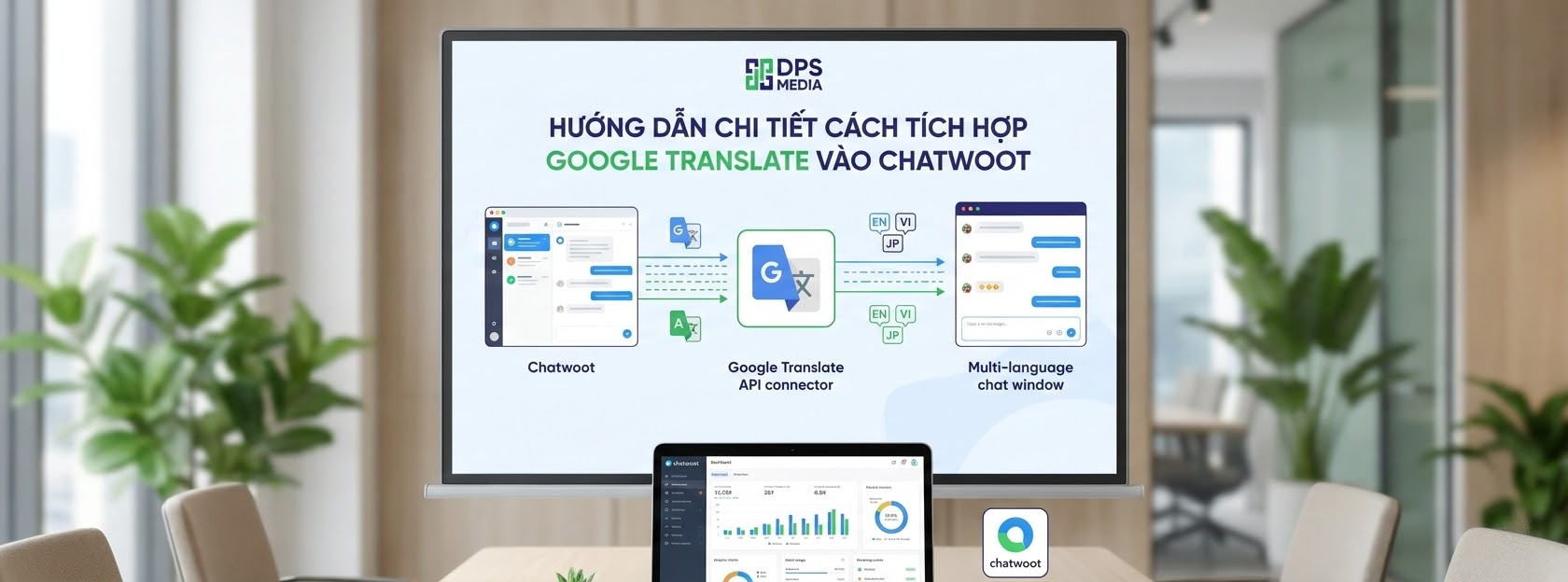
Prepare a Google Cloud Platform account
To begin implementing how to integrate Google Translate into Chatwoot, you need an active Google Cloud account. First, access the Google Cloud Console dashboard and create a new project dedicated to this purpose. Separating the project makes it easier to manage usage limits and API costs later.
Next, you must enable the Cloud Translation API in the Google API Library. Note that Google provides a monthly free quota for new users, which is very suitable for SMEs. After activation, the system will require you to set up billing information to ensure the service is not interrupted when the quota is exceeded.
For a project that DPS.MEDIA implemented for a beauty industry client, this setup took only about 15 minutes. However, you need to carefully secure the API key to prevent misuse by third parties. A leaked API key can lead to unexpected costs on the monthly bill.
| Implementation Steps | Detailed content | Important note |
|---|---|---|
| Create Project | Choose an easy-to-remember name on Google Cloud | Do not duplicate an existing project |
| Enable API | Select Cloud Translation API | Check version V3 |
| Create Credentials | Create an API Key or Service Account | Secure the Key completely |
| Set up Billing | Link a Visa/Mastercard card | Monitor usage limits |
Get the API Key and configure it in Chatwoot
After obtaining the API Key from Google, the next step in integrating Google Translate into Chatwoot is to enter this code into the system. You need to access the Settings section in the Chatwoot administration interface. There, find the Integration section and select the Google Translate icon to begin the connection process.
Paste the API Key you copied from Google Cloud into the corresponding field in Chatwoot. The system will automatically authenticate this key and notify you when the connection is successful. If you encounter an error, check whether the API Key is restricted by any IP address or referrer in the Google Cloud settings.
According to DPS.MEDIA research, configuring everything correctly from the beginning helps the system operate with 99.9% stability. A common mistake is forgetting to grant permissions to the Service Account in Google Cloud. This prevents Chatwoot from calling the translation service even though the API Key is completely valid and correct.
- Access the Chatwoot administration Dashboard with the highest Admin privileges.
- Select the ‘Integrations’ section from the navigation menu on the left side of the workspace.
- Search for the ‘Google Translate’ application and click the ‘Configure’ button to set it up.
- Enter the API Key accurately and select the default target language for the system.
- Click ‘Save’ to finish and start experiencing the automatic translation feature.
Test the translation feature on a real conversation
After completing the integration of Google Translate into Chatwoot, you need to test it on a real conversation to ensure everything works. Try sending a message in English or any language you do not regularly use. Chatwoot will display a translation icon right next to the customer message content.
When you click this icon, the content will be converted into the language you configured in the system. Translation usually takes less than one second thanks to Google’s powerful infrastructure. You can also translate your reply back into the customer’s language before sending it.
DPS.MEDIA experts recommend carefully checking specialized terminology after automatic translation. Although Google’s AI is very intelligent, it can sometimes confuse highly specialized terms. Combining translation technology with human oversight will provide the best possible customer service translation experience.
According to 2024 industry statistics, businesses using automated translation support tools have customer satisfaction scores (CSAT) that are 22% higher than other businesses.
Tips to optimize Google Translate integration into Chatwoot for businesses

Manage API costs effectively
One of the biggest concerns when integrating Google Translate into Chatwoot is the cost incurred from Google Cloud. However, you can completely control this issue by setting daily Quotas. This ensures that the translation budget always remains under the control of the company’s finance department.
Google charges based on the number of characters translated, so encourage employees to translate only the conversations that truly require it. At DPS.MEDIA, we often guide clients on how to optimize chat scripts to minimize unnecessary wording. This not only saves costs but also makes communication more concise and effective.
For example, instead of translating all system-generated greetings, you can set up ready-made multilingual automatic replies. Only when customers move into detailed questions do we activate automatic translation through the API. This is a smart strategy for balancing operating costs and customer support quality.
| Business type | Recommended quota | Optimization goal |
|---|---|---|
| SMEs / Startup | 500,000 characters/month | Take advantage of Google’s free plan |
| Mid-sized business | 2,000,000 characters/month | Prioritize key markets |
| Large corporation | Unlimited | Automate 100% of the translation process |
| Marketing Agency | By project | Optimize the budget for partners |
Improve specialized translation quality
Although integrating Google Translate into Chatwoot provides convenience, translation quality remains an important consideration. For specialized industries such as law, healthcare, or engineering, technical terms need to be translated with absolute accuracy. You can use the Google Cloud Glossary feature to predefine these specialized terms.
Uploading a dedicated vocabulary list helps Google’s AI better understand the context in which your business operates. This makes translations more natural and professional, avoiding silly mistakes that could damage brand credibility. A good translation must not only be semantically correct but also culturally appropriate for the recipient.
DPS.MEDIA once helped a wood export company establish a specialized dictionary in its translation system. As a result, the rate of incorrect responses regarding product technical specifications dropped to nearly zero. Customers felt more confident working with a partner that understood the industry’s specialized technical language.
- Build a common code of conduct and terminology for all consulting staff.
- Use short, clear sentences so the translation tool can work as accurately as possible.
- Regularly review and update the specialized glossary on Google Cloud.
- Organize short training sessions on how to use translations flexibly for employees.
- Combine with grammar-checking tools to perfect the final response.
Protect customer information during translation
Data security is always a top priority when implementing how to integrate Google Translate into Chatwoot. You need to ensure that sensitive customer information such as credit card numbers or passwords is not sent through the translation API. Setting up automatic data filters before translation is a safe and necessary solution.
According to international information security standards, encrypting data in transit is mandatory for every business. Google Cloud provides strict security certifications, but responsibility for protecting user data still belongs to the business. Always be transparent with customers about the use of supporting technology to process their requests.
At DPS.MEDIA, we always prioritize advising on multilayer security solutions for customers’ CRM and Chatbot systems. A small mistake in data management can also lead to serious legal consequences in markets such as the EU (GDPR). Information security is the foundation for building lasting trust with international customers.
Studies show that 47% of customers will abandon a brand if they feel their personal data is not securely protected during digital interactions.
Resolving common issues during integration

Fix the issue of the translation icon not appearing
Many users find that after completing the integration of Google Translate into Chatwoot, the feature does not appear to work. The most common cause is that the Chatwoot version you are using is too old and does not support the latest API. Always ensure that your system is updated to the latest stable version.
Another reason may be that the API Key has restricted access permissions in the Google Cloud dashboard. Check whether you have accidentally enabled IP address restrictions while the Chatwoot server is not on the allowed list. Incorrect firewall configuration on the server can also block outgoing connections to Google API servers.
If you use a self-hosted version of Chatwoot, check the Environment Variables again. Sometimes missing a small line in the .env configuration file can cause the entire integration feature to become disabled. Patiently review each step to ensure all connections are smooth and accurate.
| Issues | Possible cause | Solution |
|---|---|---|
| Missing translation button | Old software version | Update Chatwoot to the latest version |
| API Key error | Quota exceeded or incorrect key | Check Billing again in Google Cloud |
| Incorrect contextual translation | Ambiguous words, missing glossary | Configure a specialized Glossary |
| Slow speed | Weak server network connection | Upgrade infrastructure or change API Region |
Handle incorrect or unnatural translations
Although Google Translate is very powerful, it can sometimes produce dry translations or distort the intended meaning. In this case, support agents need to develop judgment skills based on the overall context of the conversation. Do not rely entirely on machines while ignoring human emotion and subtlety.
The most effective way to integrate Google Translate into Chatwoot is to use it as a support tool for understanding the main idea. Then, agents can use pre-standardized sentence templates to respond to customers as politely as possible. Combining machine speed with human skill creates 5-star customer service.
DPS.MEDIA experts recommend that businesses build a multilingual library of Canned Responses. These responses should be translated by native speakers to ensure maximum naturalness and accuracy. In that case, automatic translation only serves as a bridge for unexpected situations that are not covered by the scripts.
- Use simple language and avoid idioms or local slang.
- Always check the Back-translation to confirm the meaning of the response.
- Encourage customers to use common language so the translation tool can work more effectively.
- Record common translation errors to provide feedback for improving the system.
- Train employees in the communication culture of each target market the business is pursuing.
The Agency’s role in optimizing the Chatbot system

Why should you work with DPS.MEDIA experts?
Implementing how to integrate Google Translate into Chatwoot may seem simple, but optimizing it for business purposes requires experience. DPS.MEDIA not only helps you technically but also provides comprehensive multilingual content strategy consulting. We understand the difficulties SMEs face when they want to expand into the global market.
With an experienced technical team that has had hands-on experience since 2017, we have handled thousands of complex integration cases. DPS.MEDIA is committed to helping businesses operate their customer care systems smoothly while minimizing technical risks. Your success is the measure of the value of our team’s efforts and dedication.
We have served more than 5,400 customers across many different industries, from e-commerce to hospitality. This diversity of experience enables DPS.MEDIA to provide sharp advice tailored to each business’s specific characteristics. We do not just sell solutions; we accompany our partners in sustainable growth.
| Benefits of partnering | Value delivered | DPS.MEDIA commitment |
|---|---|---|
| Technical expertise | Stable, secure system | 24/7 technical support |
| Strategic consulting | Increase customer conversion rate | Practical, effective solutions |
| Time saving | Fast deployment | On schedule |
| Cost optimization | Avoid wasting resources | Transparent in all costs |
Build a comprehensive Digital Marketing system for SMEs
Integrating Google Translate into Chatwoot is only a small piece of the larger Digital Marketing picture. At DPS.MEDIA, we provide comprehensive solutions to help businesses build a strong online presence. From website optimization and multichannel advertising to in-depth customer relationship management (CRM).
Connecting tools together in a synchronized way allows customer data to flow smoothly. This enables businesses to run highly effective personalized marketing campaigns. When you understand what customers are saying and what they need, selling becomes easier than ever in a volatile business environment.
Imagine a fully automated system from reaching international customers to closing sales and providing after-sales care. That is the goal DPS.MEDIA pursues for all of its partners. We believe technology should serve people and promote shared prosperity within the Vietnamese business community.
According to research by DPS.MEDIA experts, synchronously integrating marketing tools helps businesses increase capital efficiency by 45% in the first year.
Do not let language barriers prevent your business from moving forward on the path to conquering the world. Start with the smallest steps that have the greatest impact, such as optimizing your chat system. Every investment in customer experience will bring deserved rewards in the form of loyalty and trust.
Integrating Google Translate into Chatwoot demonstrates that technology is becoming increasingly accessible and useful. Mastering these tools helps SMEs confidently compete on equal terms with large global corporations. Let us help you turn challenges into powerful opportunities for growth in the future.
In conclusion, applying how to integrate Google Translate into Chatwoot is a highly strategic move for any business that wants to reach international markets. Thorough technical preparation combined with a customer-service mindset focused on dedication will provide a solid foundation for your success. The DPS.MEDIA team is always ready to support you on every step toward reaching new heights.
Mastering how to integrate Google Translate into Chatwoot will help your business operate without borders. This is the optimal solution for connecting with global customers professionally and cost-effectively. Apply this process now to experience positive changes in your customer support efficiency and revenue.
- Immediately eliminate the language barrier between employees and international customers.
- Optimize operating costs by leveraging the company’s existing workforce.
- Enhance brand credibility through professional multilingual support services.
- Increase revenue from promising and emerging foreign markets.
- Build a global customer data foundation to support long-term marketing strategies.
- Improve customer satisfaction (CSAT) and the retention rate of existing users.
- Help employees work more effectively and reduce pressure when communicating with foreigners.
In the future, AI tools will continue to develop strongly, delivering increasingly high accuracy. Becoming familiar with and mastering how to integrate Google Translate into Chatwoot early will give your business a significant competitive advantage. Continuously update the latest technology trends so you are not left behind in the digital transformation race.
Finally, remember that the core goal of all technology is still understanding between people. A good translation is only a means; sincerity in service is the strongest bond for long-term customer relationships. We wish your business great success in international markets with the support of modern technology.


Ý kiến bạn đọc (9)
Đăng nhập để bình luận
Đăng nhập nhanh 1-chạm bằng Google để chia sẻ ý kiến của bạn về bài viết.
Bằng cách đăng nhập, bạn đồng ý với điều khoản và chính sách cộng đồng.
Chưa có bình luận nào. Hãy là người đầu tiên chia sẻ cảm nghĩ!
Đăng nhập / Tạo tài khoản
Đăng nhập với Google để gửi bình luận và tương tác cùng cộng đồng.
Tiếp tục là đồng ý với điều khoản sử dụng và chính sách bảo mật của DPS Media.