





In today's fiercely competitive digital marketing era, managing and developing communities on social media plays an extremely important role for businesses, especially brands operating in F&B, food services, and retail. Facebook Groups are essentially “gold mines” concentrating highly potential target customer segments. However, maintaining consistent, high-quality posts across multiple groups every day is an enormous challenge for small marketing teams or busy restaurant owners.
To thoroughly solve this problem, the most optimal solution today is to establish a system automatically posting to Facebook Groups integrating Artificial Intelligence (AI) and the n8n workflow automation tool. This system not only helps you automate scheduled posting to groups but also automatically creates natural, engaging content using large language models (LLMs) based on a pre-planned content calendar.
This in-depth article from DPS.MEDIA will guide you step by step from A-Z on how to set up this automation system, helping optimize 90% of resources and significantly increase community engagement rates.
1. Why should you apply an AI-powered system for automatically posting to Facebook Groups?
Many community managers often make the mistake of using uncontrolled automated spam tools. Mass-spamming the same content can quickly result in an account being blocked for violating Facebook's policies. In contrast, a system combining AI and n8n provides completely different and outstanding benefits:
- Naturally personalized content: Each post is composed by AI based on a specific topic from Google Sheets, ensuring unique, valuable content, flexible emoji usage, and a style that perfectly matches each group.
- Easy multi-channel management: You can control and simultaneously publish posts to dozens of different Facebook Groups from a single central dashboard on Google Sheets.
- Post at peak engagement times: The automated system operates continuously 24/7, publishing posts precisely during peak hours with the highest traffic without requiring you to be constantly present.
- Maximum cost savings: Instead of hiring an expensive team of Content Creators, you only need to invest in setting up the system once so it can operate smoothly and automatically over the long term.
2. Overview of the architecture and automation system diagram
This automation system operates through the close integration of 4 modern technology components:
- Google Sheets: Acts as the “planning brain”, storing topic columns, marketing funnels, angles, post formats, and post links after publication.
- n8n Automation Platform: The central orchestration platform responsible for triggering workflows on schedule, querying data from Google Sheets, sending requests to AI, and pushing content to the Facebook Graph API.
- AI Content Engine (LLM): The AI model (such as GPT-4 or Gemini) handles receiving the original topic, analyzing the angle, and writing detailed text content with appropriate hashtags and emojis.
- Facebook Graph API: Facebook's official programming interface, enabling safe and direct content publishing to the target Facebook Group.
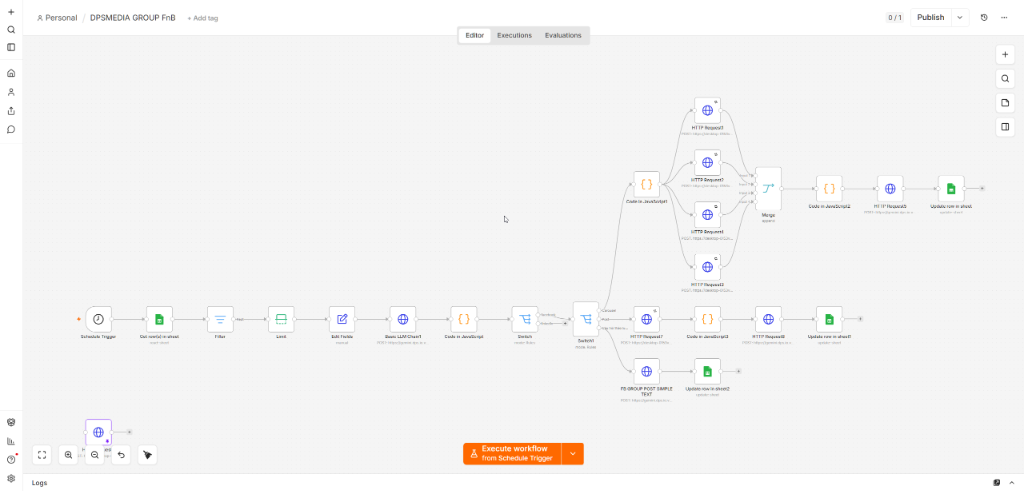
The n8n workflow diagram illustrates in detail the data flow from triggering the process (Schedule Trigger), reading the plan from Google Sheets, calling the AI API to generate content, branching by post format (Switch), and publishing to Facebook, finally updating the results back in Google Sheets.
3. Step 1: Set up Google Sheets as the planning data source
To begin deploying the system automatically posting to Facebook Groups, the first step is to prepare a Google Sheets spreadsheet as the database. This spreadsheet should be divided into clear columns so that AI can understand and write the most accurate content:
- Month/Day: Defines the expected posting time so the system can cross-reference and filter data.
- Funnel: Classifies which funnel the post belongs to (for example:
Attention– Attract attention,Trust– Build trust,Conversion– Convert purchases). - Pillar (Content Pillar): Identifies the main topic group (for example: Restaurant owner's problems, F&B operations experience).
- Angle (Approach): How to develop the specific topic (for example: Quiet restaurant on weekends, has anyone experienced this?).
- Format: Facebook post format (such as:
Câu hỏi thảo luận,Bài viết dài,Ảnh kèm Caption). - Channel (Distribution Channel): The name or ID of the target Facebook Group where the post should be published.
- Calendar Title: The headline or opening question guiding the post.
- Status: The processing status of the post (default entry
Planned, the system will automatically update it toPostedafter completion). - Posted Link: The column storing the actual Facebook post link for checking and performance reporting.

4. Step 2: Register a Facebook App and obtain a Group-permission Access Token
This is an extremely important step to ensure that the system can connect to Facebook legitimately without being flagged for unusual activity:
- Access the developer portal Facebook for Developers and create a new App.
- Link the app to the Page representing your organization that you use to manage the Group, or to your Group administrator account.
- Grant the application the necessary permissions such as
publish_to_groups(for older Group applications), or use the Page linking feature to make a Page a Group administrator and publish posts as the representative Page through the permissionpages_manage_posts. - Use Graph API Explorer to create a Long-lived Access Token so that n8n can maintain an automated connection for many consecutive months without requiring you to log in again.
5. Step 3: Configure the detailed Workflow in n8n
Now we will dive into configuring each Node in n8n to complete the automation flow:
5.1 Trigger the process (Schedule Trigger & Read Sheet)
First, the Node Schedule Trigger will be configured to run regularly each day at predefined times (for example: 9:00 AM). Then, the Node Google Sheets will connect to your Google Drive account, using the action Read Row to find the first row with the column Status = Planned.
5.2 Call AI to create personalized content
The system passes the information Pillar, Angle, Format and Calendar Title to the HTTP Request Node connected to OpenAI or Gemini. The accompanying configuration prompt instructs the AI:
“Act as a marketing expert with the friendly, natural tone of an F&B restaurant owner. Write a discussion-style sharing post for a Facebook Group based on the title: ‘{Calendar Title}’ and angle: ‘{Angle}’. The post must have a clear structure, use appropriate emojis, include natural hashtags, and end with an open-ended question to encourage lively discussion.”
5.3 Branch processing based on post format (Switch Node)
Depending on the post format in the column Format, the Node Switch will route the processing flow:
- If it is Discussion question (Simple Text): The system will directly call the Facebook API to publish plain text with a prominent background color format to attract attention.
- If it is Long-form post or Image: The system will combine the text content with an image file to upload it to the Group.
5.4 Publish the post and Update status
The system calls the Facebook Graph API to publish the content to the Group. The returned result contains the ID of the new post. n8n will automatically convert this ID into a complete link and write it back to the Posted Link column in Google Sheets, while also changing the Status from Planned to Posted.
6. Actual publishing results on Facebook Group
After successful setup, the entire process will run completely automatically in the background. Below is an image of an actual post automatically published to the Group “Hội Chủ Quán Ăn – Cafe – F&B” using the account Nguyễn Thị Trà My (completely controlled by AI and n8n):
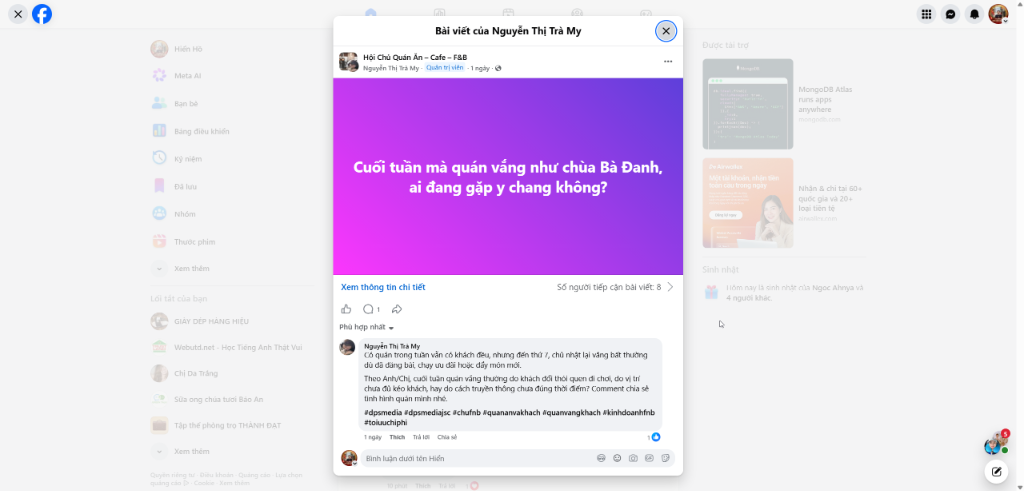
The post uses a prominent purple background text format that attracts significant attention. Directly below the comments section, AI continues to automatically respond with detailed topic-related sharing in an extremely authentic tone, accompanied by branded hashtags such as #dpsmedia, #chufnb, #quanvangkhach, helping optimize reach and naturally create a lively discussion thread.
7. Important precautions to avoid account suspension when automatically posting
When operating the system automatically posting to Facebook Groups, safety must always be the top priority. Strictly follow the following principles:
- Use the official Facebook App: Absolutely do not use unsafe personal tokens from unfamiliar websites. Create your own official App through Meta Developer.
- Control posting frequency reasonably: The interval between posts should be at least 2–4 hours. Do not publish dozens of posts in a short period.
- Unique Content: Thanks to the new generation of AI models, every post is written completely from scratch, avoiding duplicate-content spam detected by Meta's scanning algorithms.
- Post through the administrator Page: If possible, link your business Page to the Group and publish posts as the Page. This method is extremely safe and recommended by Facebook.
8. Conclusion and DPS.MEDIA automation solution support services
Building an automated posting workflow is not merely a trend but has become a mandatory requirement for optimizing business productivity in the digital era. The intelligent combination of Google Sheets, n8n, and AI will help you master your community marketing channel in the most sustainable and intelligent way.
Introduction to professional digital services by DPS.MEDIA JSC
If you are looking for a reliable partner to set up an entire marketing automation system, build an AI-powered automated content creation workflow, or optimize your business website's SEO in depth, contact DPS.MEDIA JSC.
We are proud to be a pioneering provider of comprehensive digital transformation solutions, from SEO-friendly website design and n8n automation system management to breakthrough multi-channel marketing campaigns. We are committed to accompanying you in elevating your brand's position and achieving breakthrough revenue.
👉 Visit our official homepage at: https://dps.media to discover the most optimal solutions for your business today!
Ý kiến bạn đọc (9)
Đăng nhập để bình luận
Đăng nhập nhanh 1-chạm bằng Google để chia sẻ ý kiến của bạn về bài viết.
Bằng cách đăng nhập, bạn đồng ý với điều khoản và chính sách cộng đồng.
Chưa có bình luận nào. Hãy là người đầu tiên chia sẻ cảm nghĩ!
Đăng nhập / Tạo tài khoản
Đăng nhập với Google để gửi bình luận và tương tác cùng cộng đồng.
Tiếp tục là đồng ý với điều khoản sử dụng và chính sách bảo mật của DPS Media.