

Smart Tool
Sticker Splitter
Upload a sticker grid image file, the tool will automatically cut and remove the background to give you perfect transparent PNG files.
✨
Drag and drop or click to select an image
Supports JPG, PNG, WebP formats
💡 Sample Sticker Prompt
For the best cutting results, use the prompt below:
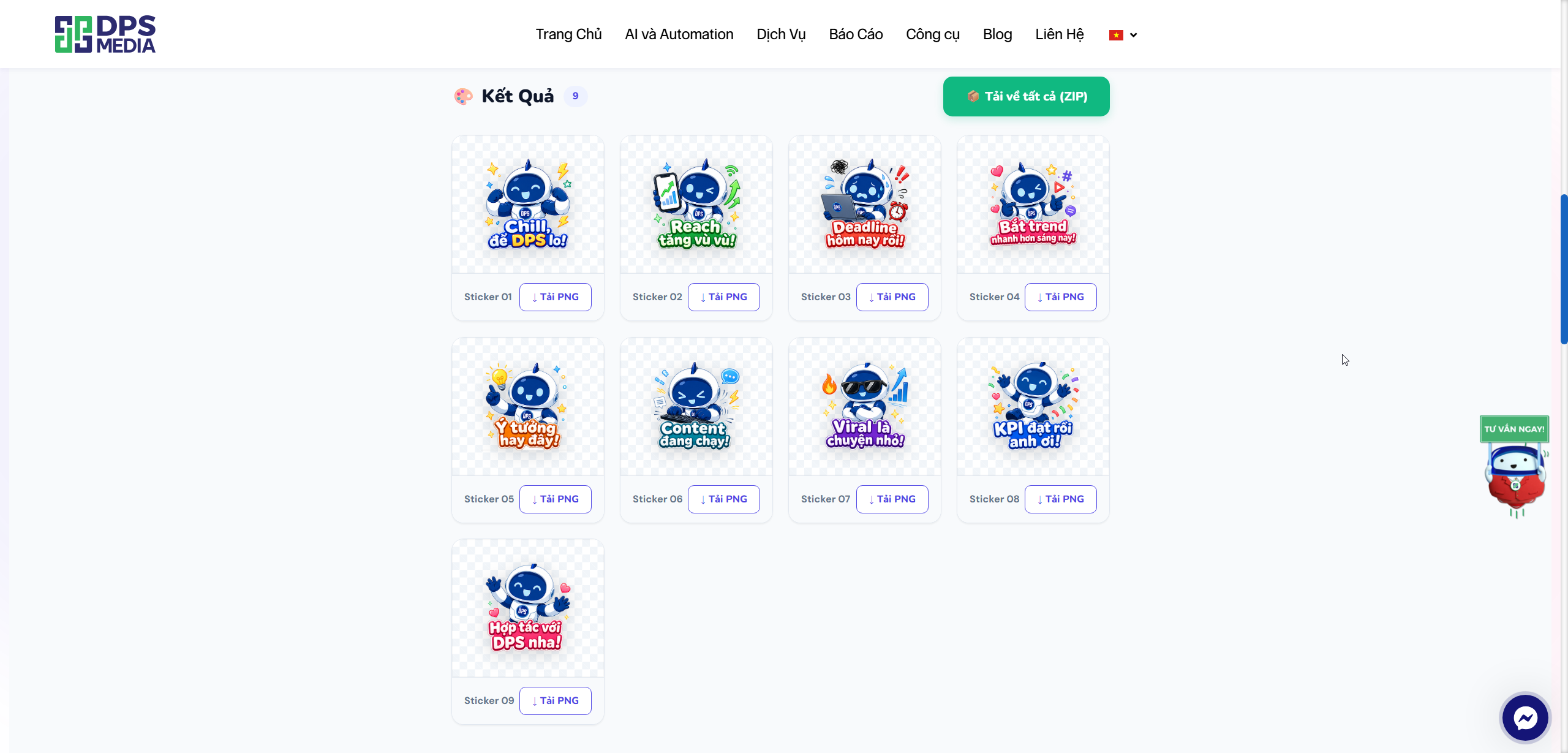
Create a cute Vietnamese Zalo sticker pack in a 3×3 grid layout on a white background. The canvas is square. Divide it into a strict 3×3 grid where each cell occupies exactly 1/3 of the total width and 1/3 of the total height. Each sticker must be fully contained within its own cell — nothing may cross cell boundaries or overlap into adjacent cells. Within each cell: Kabot’s character takes up the top 70% of the cell height, and the Vietnamese caption takes up the bottom 30% of the cell height. All elements including decorative doodles must stay strictly within the cell’s boundaries. Use the robot mascot “Kabot” from DPS Media consistently across all 9 stickers. Kabot’s design: round dark blue oval head, two light blue circular eye highlights, small blue antenna on top, expressive curved mouth, white and dark blue body suit with the DPS logo badge on the chest, short rounded limbs, friendly chibi proportion. Sticker list (left to right, top to bottom): Flexing confidently with big grin — “Chill, để DPS lo!” Holding phone showing graph going up — “Reach tăng vù vù!” Panicking with sweat drops holding laptop — “Deadline hôm nay rồi!” Winking doing finger guns — “Bắt trend nhanh hơn sáng nay!” Pointing at glowing lightbulb above head — “Ý tưởng hay đây!” Typing furiously on tiny keyboard — “Content đang chạy!” Arms crossed cool pose with sunglasses — “Viral là chuyện nhỏ!” Jumping in joy with confetti — “KPI đạt rồi anh ơi!” Waving both hands cheerfully — “Hợp tác với DPS nha!” Add small colorful doodles (lightning bolts, sparkles, stars, hearts, arrows) inside each cell, strictly within bounds. Style: cute chibi robot, Zalo sticker style, vibrant Gen Z colors (electric blue, coral, yellow, mint green), bold colorful gradient captions with thick white outline, high resolution, 1:1 square canvas.
📋 Copy Prompt
filename.png
1024 × 1024px · 1.5 MB
📐 Grid Size
2×2
3×3
4×4
2×3
3×2
4×3
×
🎉 Will cut into 9 stickers
🪄 Remove white background
Automatically detect and make the surrounding white background transparent
240
-1
💧 Smooth edges (Anti-alias)
Reduce jagged edges, recommended to avoid image clipping
✂️ Crop
Crop inward to remove grid lines
px
🎯 Auto center
Trim excess space and place the sticker in the center of the frame
⚡ Cut Stickers Now
↺ Change image
Processing…
Please wait a moment
🎨 Result 0
📦 Download all (ZIP)
🪄 Guide to Using the Automatic Sticker Cutting & Background Removal Tool (Sticker Splitter)
You’ve just created a beautiful sticker set on Midjourney, DALL-E, or Canva, but they are stuck together in a single grid image (2×2, 3×3…)? Want to separate each image, remove the white background, and center them automatically in just seconds?
Don’t worry, the tool Sticker Splitter will completely solve this problem for you with just a few clicks!
🌟 Key Features
- Automatic grid cutting: Supports cutting images in popular grid formats (2×2, 3×3, 4×4,…) quickly.
- Smart white background removal (AI-like): Automatically detects and makes the white background around stickers transparent.
- Crop (trim edges): Completely removes black/white lines separating cells.
- Auto center: Automatically trims excess space and places the sticker in the center of a standard 465x465px square frame (Zalo/Telegram standard).
- Bulk download: Package all stickers into one file
.ZIPor download each image individually in transparent PNG format.
📝 Step-by-Step Guide
Step 1: Create Sticker Image (If you don’t have one yet)
If you use Midjourney or DALL-E, try copying the sample prompt suggested in our tool (by clicking the button 📋 Copy Prompt). The AI will generate an image containing multiple stickers arranged on a white grid.
Step 2: Upload image to the tool
- Access the tool Sticker Splitter.
- Click on the area “Click or Drag and drop image here” or paste (Ctrl+V) your grid sticker image.
Step 3: Adjust cutting parameters
Immediately after uploading, the control panel will appear. Here, set the following parameters:
- 📐 Grid Size: Choose the number of columns and rows matching your image. Example: If your image has 9 stickers (3 rows, 3 columns), select 3×3.
- 🪄 Remove white background: Turn this on if your image has a white background. The tool will automatically convert it to a transparent background. You can adjust the slider “White color sensitivity” ✂️ Crop:.
- If your image has grid lines, increase this value (e.g., 3px
or5px) to crop inward and remove unwanted borders.🎯 Auto center:. - Recommended! This feature tightly fits the character and places it perfectly centered in a square frame. Step 4: Process and Download.
After adjusting parameters, click the button
- “🚀 Start Cutting Stickers” “Wait about 1–2 seconds for processing.”.
- Result.
- Scroll down to the section , you will see the stickers separated and with transparent backgrounds., You can click.
- “↓ Download PNG” “under each image to download individually, or click the green button” “📦 Download all (ZIP)” “to download everything instantly!” 💡 Tips for perfect results
Image prompt:
- Always add the keyword white background
to your Midjourney/DALL-E prompt so the background removal works most accurately.The sharper the image and the less anti-aliasing blur, the cleaner the cut with no tiny white edges. - Image quality: The downloaded file name will automatically.
- remain the same as the original file name (e.g., hoat-hinh_01.png
helping-you-manage-files-more-easilyHope you create unique and fun sticker sets! If you have any questions, feel free to leave a comment below.
Automatic Sticker Cutting &Amp; Background Removal Tool (Sticker Splitter).



