


`;const ta = root.querySelector('#dns-lines'); const btnRun = root.querySelector('#dns-run'); const btnStop = root.querySelector('#dns-stop'); const btnClear = root.querySelector('#dns-clear'); const typesWrap = root.querySelector('#dns-types'); const statusEl = root.querySelector('#dns-status'); const errorEl = root.querySelector('#dns-error'); const errorTextEl = root.querySelector('#dns-error-text'); const resultsEl = root.querySelector('#dns-results'); const delayInput = root.querySelector('#dns-delay'); const btnCopy = root.querySelector('#dns-copy-table'); const countEl = root.querySelector('#dns-count'); const progressEl = root.querySelector('#dns-progress'); const progressBarEl = root.querySelector('#dns-progress-bar'); const runTextEl = root.querySelector('#run-text');// Type pills với DPS branding const TYPE_LABELS = { 'ALL': 'TẤT CẢ', 'A': 'A', 'CNAME': 'CNAME', 'MX': 'MX', 'NS': 'NS', 'TXT': 'TXT' };let activeType = 'A'; RECORDS.forEach(t => { const b = document.createElement('button'); b.textContent = TYPE_LABELS[t] || t; b.className = 'dns-type-btn'; if (t === activeType) { b.classList.add('active'); } b.addEventListener('click',()=>{ if (isRunning) return; activeType = t; [...typesWrap.children].forEach(c => c.classList.remove('active')); b.classList.add('active'); }); typesWrap.appendChild(b); });// Domain count tracker với DPS colors function updateDomainCount() { const domains = ta.value.split(/\r?\n/) .map(s=>extractHostname(s)) .filter(Boolean); countEl.textContent = `${domains.length} tên miền`; if (domains.length > 100) { countEl.style.background = 'rgba(220,38,38,0.9) !important'; countEl.style.color = 'white !important'; } else if (domains.length > 50) { countEl.style.background = 'rgba(245,158,11,0.9) !important'; countEl.style.color = 'white !important'; } else if (domains.length > 0) { countEl.style.background = 'rgba(50,181,97,0.9) !important'; countEl.style.color = 'white !important'; } else { countEl.style.background = 'rgba(21,21,119,0.9) !important'; countEl.style.color = 'white !important'; } }ta.addEventListener('input', updateDomainCount); updateDomainCount();function clampDelay(){ let v = Number(delayInput.value || 0); if (!Number.isFinite(v) || v { if (e.key === '-') e.preventDefault(); });function extractHostname(input){ if(!input) return ''; try{ return new URL(input).hostname.replace(/\.$/,''); } catch(e){ return String(input).trim().replace(/^https?:\/\//i,'').replace(/^\/*/,'').split('/')[0].split('?')[0].replace(/\.$/,''); } }function sleep(ms){ return new Promise(r=>setTimeout(r, ms)); }function clearError(){ errorEl.style.display='none'; errorTextEl.textContent=''; } function showError(msg){ errorEl.style.display='flex'; errorTextEl.textContent=msg; } function setStatus(msg){ statusEl.textContent = msg; }function updateProgress(current, total) { if (total === 0) { progressEl.style.display = 'none'; return; } progressEl.style.display = 'block'; const percentage = Math.min((current / total) * 100, 100); progressBarEl.style.width = `${percentage}%`; }// Render table với DPS branding - Sử dụng div thay vì table elements function ensureTable(){ if(resultsEl.firstChild && resultsEl.firstChild.classList && resultsEl.firstChild.classList.contains('dns-table')) return resultsEl.firstChild; resultsEl.innerHTML = ''; const table = document.createElement('div'); table.className = 'dns-table'; const isMobile = window.innerWidth
`; resultsEl.appendChild(table); return table; }const allRows = []; function appendRows(rows){ const table = ensureTable(); const tbody = table.querySelector('.dns-table-body'); const frag = document.createDocumentFragment(); const isMobile = window.innerWidth { allRows.push(r); const tr = document.createElement('div'); tr.className = 'dns-table-row'; let dataColor = '#374151'; if (r.data === '(không có dữ liệu)') dataColor = '#9ca3af'; else if (r.data && r.data.startsWith('Lỗi:')) dataColor = '#dc2626'; tr.innerHTML = `
`; frag.appendChild(tr); }); tbody.appendChild(frag); btnCopy.disabled = false; btnCopy.classList.remove('success'); }async function queryDoH(domain, type){ const base = 'https://dns.google/resolve'; const params = new URLSearchParams(); params.set('name', domain); params.set('type', TYPE_CODE[type]); const url = `${base}?${params.toString()}`; const res = await fetch(url, { headers: { 'Accept':'application/json' }}); if(!res.ok) throw new Error(`HTTP ${res.status}`); return await res.json(); }let abortFlag = false; let isRunning = false;btnStop.addEventListener('click', ()=>{ abortFlag = true; setStatus('🛑 Đang dừng...'); });btnClear.addEventListener('click', () => { if (isRunning) return; resultsEl.innerHTML = `
`;
allRows.length = 0;
btnCopy.disabled = true;
btnCopy.classList.remove('success');
clearError();
setStatus('');
progressEl.style.display = 'none';
});btnRun.addEventListener('click', async ()=>{
if (isRunning) return;
clearError();
allRows.length = 0;
abortFlag = false;
isRunning = true;btnRun.disabled = true;
runTextEl.textContent = '⏳ Đang chạy...';
btnStop.style.display = 'block';
btnClear.style.display = 'none';
[...typesWrap.children].forEach(b => {
b.style.cursor = 'not-allowed';
b.style.opacity = '0.6';
});const delay = clampDelay();const domains = ta.value.split(/\r?\n/)
.map(s=>extractHostname(s))
.filter(Boolean);if (!domains.length){
showError('Vui lòng nhập ít nhất 1 tên miền.');
resetUIState();
return;
}
if (domains.length > 100){
showError('Giới hạn 100 tên miền mỗi lần để tránh quá tải. Hãy chia nhỏ danh sách.');
resetUIState();
return;
}const types = (activeType==='ALL') ? [...POPULAR] : [activeType];
const totalQueries = domains.length * types.length;resultsEl.innerHTML = '';
ensureTable();let completed = 0;
for (let i=0; i
DPS.MEDIA đã hỗ trợ hàng trăm SMEs tối ưu hóa hệ thống DNS,giúp tăng tốc độ tải trang và giảm rủi ro mất dữ liệu. Việc kiểm tra DNS đúng cách không chỉ nâng cao trải nghiệm người dùng mà còn cải thiện thứ hạng SEO bền vững.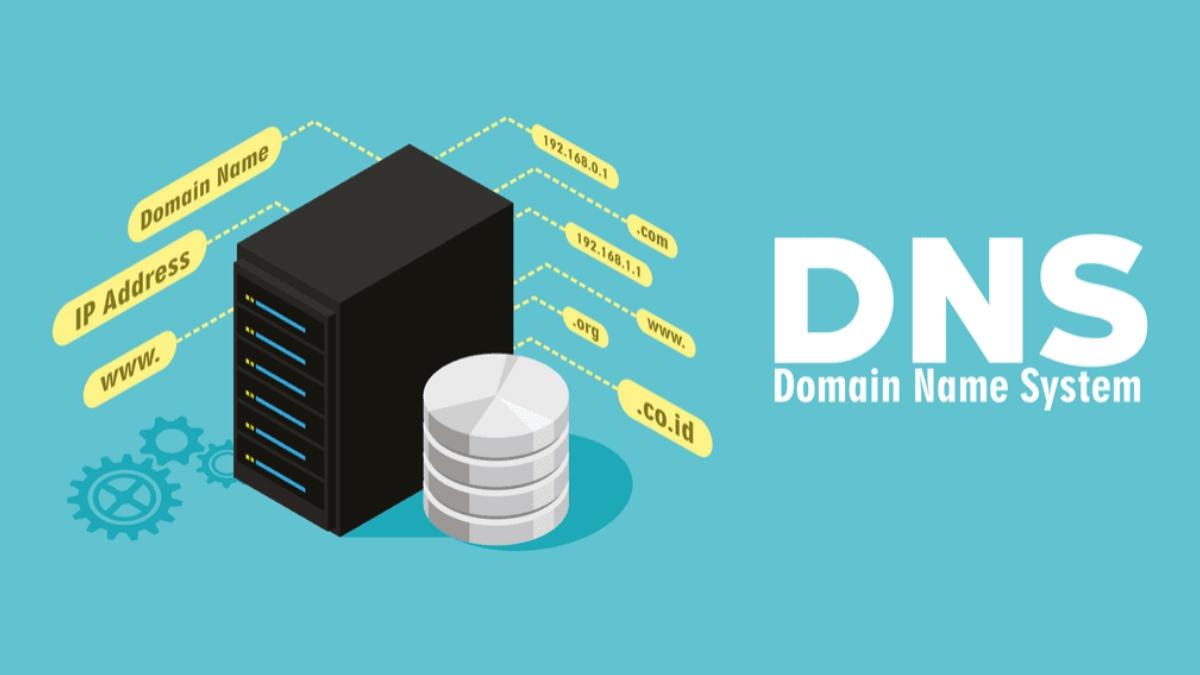
The importance of DNS checking in website management and digital marketing strategy
DNS directly affects website performance
DNS is the bridge between domain and IP; if configured incorrectly or faulty, the website may be inaccessible or load very slowly. According to the Google Web Performance report (2022), DNS latency accounts for an average of 10-25% of page load time.
Some real effects:
– Website bị gián đoạn nghiêm trọng trên toàn cầu nếu DNS propagation sai
– Googlebot không thể crawl nội dung mới, ảnh hưởng thứ hạng SEO
– Quảng cáo Google Ads dẫn về link lỗi 404 gây mất ngân sách
Benefits of regular DNS checking
Việc kiểm tra DNS đều đặn giúp phòng tránh các lỗi ẩn và nâng cao chỉ số Core Web Vitals – yếu tố xếp hạng SEO quan trọng từ 2021.
Key points for maintaining correct DNS:
- Ensure website uptime > 99.91%
– Tối ưu chuyển hướngTên miền → IP đích không bị vòng lặp
– Giảm tốc độ Time-To-First-Byte (TTFB) đáng kể
– Phát hiện tấn công DNS spoofing sớm
Proactive DNS checking checklist
- 🔎 Check A, CNAME, and TXT records accurately point to IP/server
- 🛡️ Verify SPF, DKIM, DMARC configurations to prevent email spoofing
- 📅 Schedule checks every 2 weeks or before launching major campaigns
- 🚨 Receive alerts from DNS monitoring services on abnormal changes
Reference table of DNS information to check
| Record type | Purpose | Standard status |
|---|---|---|
| A | Domain resolves to server IP | IP matches current hosting |
| CNAME | Alias subdomains | No redirect loops |
| MX | Send/receive domain emails | Compatible with GSuite or Outlook configurations |
| TXT | Authenticate senders (SPF, DKIM) | Valid records, no conflicts |
Real example: An SME agency lost over 1,200 visits due to DNS errors
In a product launch campaign, an agency in Hanoi (anonymous) accidentally deleted a CNAME record when updating the server. Result: the website did not display for 20 hours, losing over 1,200 organic visits and CTR dropped 18% in just 2 days (according to Google Search Console, 2023).
Key takeaways
DNS checking is a fundamental technical step essential if businesses want stable website operation, ensuring user experience and effective SEO/PPC performance. Proactive checks help avoid interruptions and optimize marketing budgets.-
DPS.MEDIA JSC - Digital Marketing Solutions for SMEs
📍 56 Nguyen Dinh Chieu, Tan Dinh, HCM
📧 marketing@dps.media | ☎️ 0961545445
Instructions for using Google DNS checking tools to monitor and quickly fix issues
How to access and use Google Public DNS Resolver
To check DNS, you can use the service Google Public DNS at the address: https://dns.google/. This is a free tool that helps you resolve DNS in real-time from Google's perspective. Some basic steps:
– Truy cập trang https://dns.google/
– Dán tên miền (domain) cần kiểm tra vào ô tìm kiếm
– Chọn loại truy vấn DNS: A, AAAA, MX, CNAME, NS…
– Nhấn “Resolve” để xem kết quả
List of common DNS errors and how to handle them
According to statistics from Cloudflare's DNS Africa 2023 Report, more than 321 million website downtime incidents are related to DNS errors, including:
– Không phân giải được IP (NXDOMAIN)
– Trả về sai IP do caching lỗi (SERVFAIL)
– Sai cấu hình bản ghi (ví dụ TTL quá ngắn hoặc sai CNAME)
When encountering issues, please check:
– Tên miền còn hoạt động không? (Check WHOIS và trạng thái DNS)
– Bản ghi A/CNAME có trả về đúng IP server?
– Tên miền có bị block ở các resolver phổ biến như Google, Cloudflare, Quad9?
DNS checking checklist with Google DNS
- ✅ Access dns.google and try querying the domain you need to check
- ✅ Compare the returned IP results with the original hosting IP
- ✅ Check propagation from multiple resolvers, not just Google DNS
- ✅ Note the TTL to estimate DNS update time
- ✅ Fix by updating records again or clearing DNS hosting cache
Table: Comparison of DNS query results from 3 resolvers
| Resolver | Returned IP | Response time (ms) |
|---|---|---|
| Google DNS (8.8.8.8) | 203.113.10.50 | 45 |
| Cloudflare DNS (1.1.1.1) | 203.113.10.50 | 41 |
| OpenDNS (208.67.222.222) | 203.113.10.51 | 52 |
Real example: Website crash due to DNS CNAME error
An online retailer in Ho Chi Minh City experienced a website inaccessible issue after changing hosting providers. Checking DNS with Google Resolver showed the CNAME record still pointed to the expired old domain. After updating with the correct A record IP, the website was back online after about 2 hours.
Takeaway
Usage Google DNS to check domains not only helps quickly detect errors but also optimizes the time to fix issues. Applying a checklist and comparing results from multiple resolvers will help webmasters handle DNS proactively and effectively.
Distinguishing between DNS, domain, and IP in the Internet ecosystem and their impact on SEO
Understanding the correct roles of domain, IP, and DNS
Each factor among these affects website accessibility and optimization:
- Domain: Easy-to-remember domain name representing the brand (e.g., example.com)
- IP: Địa chỉ số của máy chủ lưu trữ – ví dụ 172.217.160.142
- DNS: Hệ thống phân giải tên miền thành IP,hoạt động như “sổ danh bạ” của Internet
Nếu DNS bị cấu hình sai hoặc IP không ổn định,website có thể chậm,thậm chí không truy cập được – điều này ảnh hưởng trực tiếp đến xếp hạng SEO.
SEO impact when DNS or IP encounters problems
Google evaluates page load speed, connection stability, and security. Technical info like DNS and IP may not be direct ranking factors but have a significant impact:
- DNS delay: Increases TTFB (Time to First Byte) leading to lower SEO score
- Bad IP: If the website uses shared hosting with an IP previously blacklisted, it is highly likely to be rated low by Google
- DNS error downtime: Traffic loss, temporary index loss
According to ahrefs report (2022), more than 14% domains lost traffic due to technical issues related to DNS and IP within 12 months.
Quick checklist for checking DNS, Domain, and IP
- ✅ Use Google DNS checker to ensure low response time (< 100ms)
- ✅ Check if the host IP is listed in DNS blacklist
- ✅ Ensure the domain is protected with DNSSEC (if supported)
- ✅ Use WHOIS to verify expiration date and clear domain ownership
| Components | Checking tools | Checking frequency |
|---|---|---|
| DNS | Google DNS Dig, Cloudflare Security Tools | 1-2 times/month |
| IP | mxtoolbox Blacklist Check | Every time hosting changes |
| Domain | Whois Lookup, DNSSEC Verifier | End of each quarter |
Technical challenges to note
- ⚠️ Cheap hosts often share IPs leading to risks of being affected by spam websites sharing the same địa chỉ
- ⚠️ DNS propagation after record changes can take 24-72 hours, causing SEO crawl interruptions
- ⚠️ Some free DNS providers do not support anti-DDoS or record redundancy
Takeaway:
An accurate and stable DNS configuration and IP ổn định not only help the website run smoothly but also increaseđộ trust with Google. Regular monitoring and quick incident handling is the key to protecting long-term SEO efforts.
–
DPS.MEDIA JSC – Digital Marketing Solutions cho SMEs
📍 56 Nguyen Dinh Chieu, Tan Đinh, HCM
📧 marketing@dps.media | ☎️ 0961545445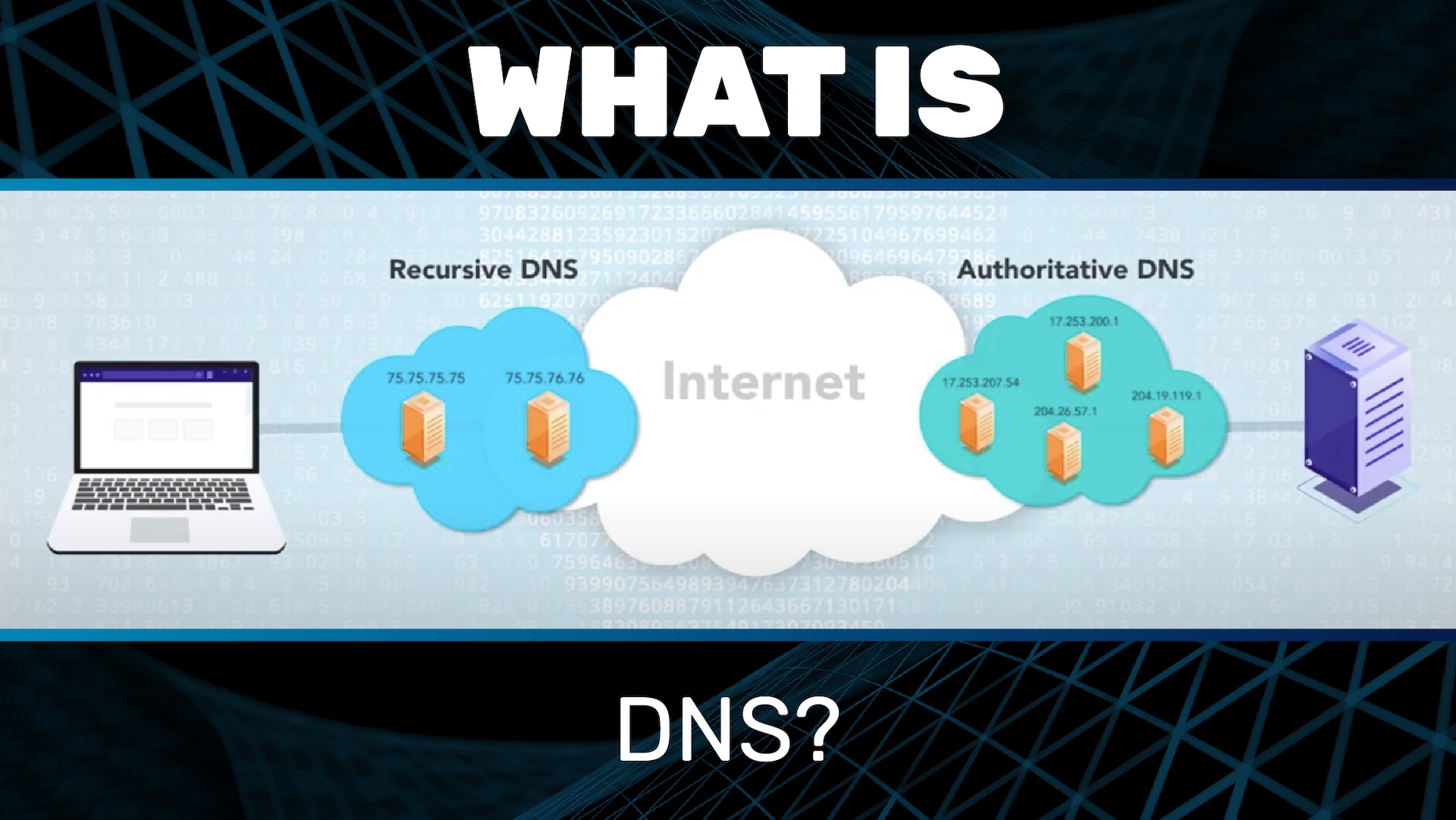
How to proactively update and optimize DNS configuration to increase page loading speed and website security
Why is regular DNS optimization necessary?
DNS configuration directly affects domain response time. If DNS servers are slow, the website may lose an additional 200-300ms before starting to load content.
According to Pingdom data (2023), a 1-second delay can reduce 7% conversions, especially for e-commerce sites. Therefore, proactively checking and updating DNS is essential.
Steps to optimize DNS in real environments
Quick checklist to ensure effective DNS operation:
- ✔ Check DNS response speed via DNSPerf or GRC DNS Benchmark tools
- ✔ Ensure TTL (Time to Live) is configured reasonably (recommended: from 1h to 24h)
- ✔ Activate DNSSEC để reduce DNS spoofing risk (if supported)
- ✔ Delete unused DNS records to avoid redundancy
- ✔ Optimize DNS load balancer if there are multiple backend servers
Real example: An e-commerce website in Vietnam uses a non-optimized DNS provider (request latency ~450ms). After switching to Cloudflare's DNS (latency ~80ms), the TTFB speed decreased by 281ms, contributing to an average on-site time increase of 121ms (source: https://www.cloudflare.com/resources/2022-dns-performance-report).
Table comparing common DNS by latency (ms)
| DNS Provider | Average Latency (VN) | DNSSEC Support |
|---|---|---|
| Google DNS (8.8.8.8) | 92ms | Yes |
| Cloudflare DNS (1.1.1.1) | 79ms | Yes |
| OpenDNS (208.67.222.222) | 130ms | Limited |
Brief takeaway:
Optimizing DNS is not just a technical task but a factor affecting both user experience and SEO effectiveness. Schedule regular DNS checks every 3 months, especially when the site has international traffic or strong advertising activity. Security and speed start from a properly configured DNS record.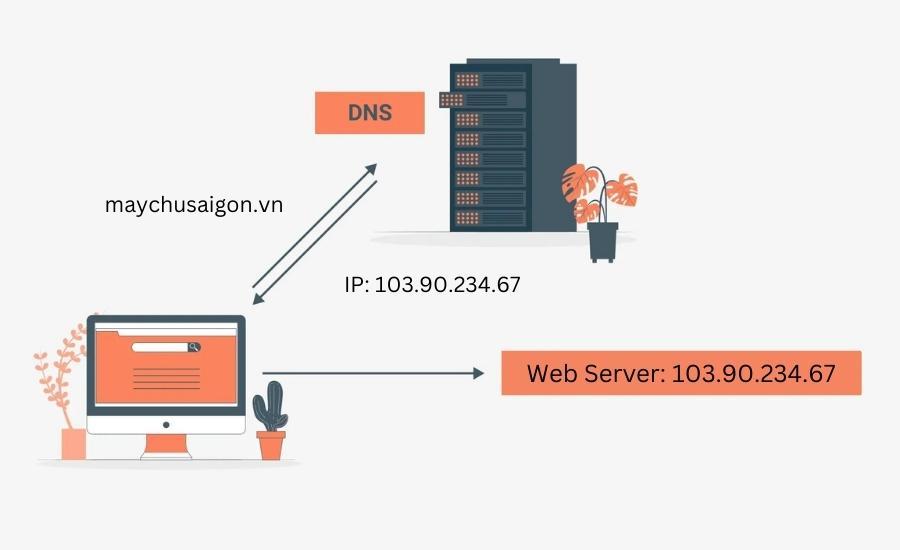
Detailed step-by-step domain checking with WHOIS tool and the role of domain information in domain management
How to check domain using WHOIS tool
WHOIS is a free tool that helps look up domain registration information. Using WHOIS helps you verify who owns a domain name, until when, and whether the domain is locked or not.
Below are the basic steps to check:
- Access the WHOIS page such as whois.domaintools.com or icann.org/wicf.
- Nhập domain cần kiểm tra và nhấn “Tra cứu”.
- Read the results: owner information, registrar organization, creation and expiration dates.
TIP: Hãy kiểm tra phần “Registrar Lock” & “Status”. Nếu domain bị lock, bạn cần mở khóa để chuyển nhượng.
The role of WHOIS information in domain management
Thông tin WHOIS không chỉ để tra cứu – nó còn là tài sản giúp bảo vệ và quản lý quyền sở hữu:
- Verify ownership: Đảm bảo domain thuộc về tổ chức bạn (tránh “mất trắng”).
- Manage expiration: Know the domain expiration date to proactively renew.
- Security monitoring: Detect unauthorized changes to DNS or registrar.
According to Verisign (Industry Report, 2023), 13% of domain losses are due to outdated or incorrect WHOIS information. Regular checks are necessary.
Quick checklist when reviewing domain information
- ✅ Check Registered Name
- ✅ Đối chiếu Email liên hệ kỹ thuật & admin
- ✅ Kiểm tra ngày hết hạn & status (active/locked)
- ✅ Compare WHOIS with actual DNS (avoid conflicts)
Real WHOIS example table
| Information Field | Value |
|---|---|
| Domain Name | exampledomain.com |
| Registrar | namecheap, Inc. |
| Created Date | 2020-08-15 |
| Expiration Date | 2025-08-15 |
| Registrant Email | admin@exampledomain.com |
Warnings when handling WHOIS information
You need to be careful to avoid exposing the WHOIS contact email – this is a common target for spam and phishing attacks.
Việc sử dụng dịch vụ “WHOIS Privacy Protection” có thể giúp che giấu thông tin thật. Tuy nhiên, ensure that the contact email still receives alerts from the domain management system when needed..
Note: Nếu bạn làm việc với bên thứ ba (agency hoặc hosting), hãy xác thực rằng domain đăng ký dưới tên bạn hoặc doanh nghiệp bạn – không phải bên cung cấp.
Brief takeaway
Regularly checking domain information via WHOIS not only helps you maintain ownership rights but also prevents unpredictable security risks. This is a small but essential step in the digital asset management process.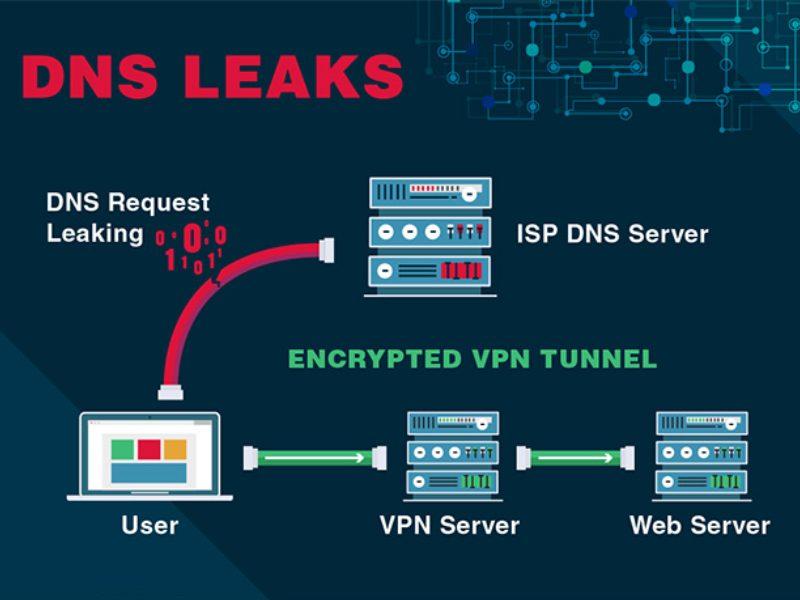
IP analysis and how to determine geographic origin to improve content distribution effectiveness for customers
The significance of IP analysis in content strategy
IP address location analysis helps identify the geographical location, device type, and Internet Service Provider (ISP) of users. These factors allow webmasters to optimize content distribution based on region, for example, adjusting page load speed or selecting servers closer to the user's location.
Practical applications:
– Tự động chuyển hướng nội dung theo quốc gia (geo-redirect)
– Ưu tiên cache tại địa phương để giảm độ trễ
– Áp dụng chính sách phân phối nội dung theo múi giờ
Tool to determine geographic location from IP
Some effective IP Geolocation services:
– MaxMind GeoIP2 (được sử dụng bởi hơn 89% các nền tảng CDN – theo BuiltWith,2023)
- IPinfo.io – bản miễn phí đủ cho dự án nhỏ
– Google Cloud Geolocation API - độ chính xác ±3km, có tính phí
Checklist to optimize content distribution by IP
- Identify target customer regions through IP logs or Google Analytics (Location Reports)
- Set up Edge Servers near main user groups
- Use IP checks to personalize content (such as language, regional promotions)
- Measure access by region to adjust local marketing campaigns
Table of common IP analysis services (WordPress class)
| Service | Accuracy | Cost |
|---|---|---|
| MaxMind GeoIP2 | 98% | Free / Paid |
| IPinfo.io | 95% | Free (500 requests/day) |
| Google Geolocation API | ±3km | 0.005 USD/request |
Real example: Personalizing landing page by IP
An e-commerce website in Vietnam used GeoIP to display content and promotional banners based on location. Result: a 15% increase in conversion rate from users accessing from Da Nang and Can Tho (according to an internal 2022 report).
Warning: Location inaccuracies may occur if users use VPNs or anonymous IPs. Average accuracy in Vietnam from GeoIP APIs is about 85-90% (according to MaxMind Report 2022).
Takeaway
Understanding and analyzing IPs helps webmasters not only optimize page load speed but also improve user experience through accurate content distribution by location. Properly combining tools and data creates a significant advantage in personalized content strategy.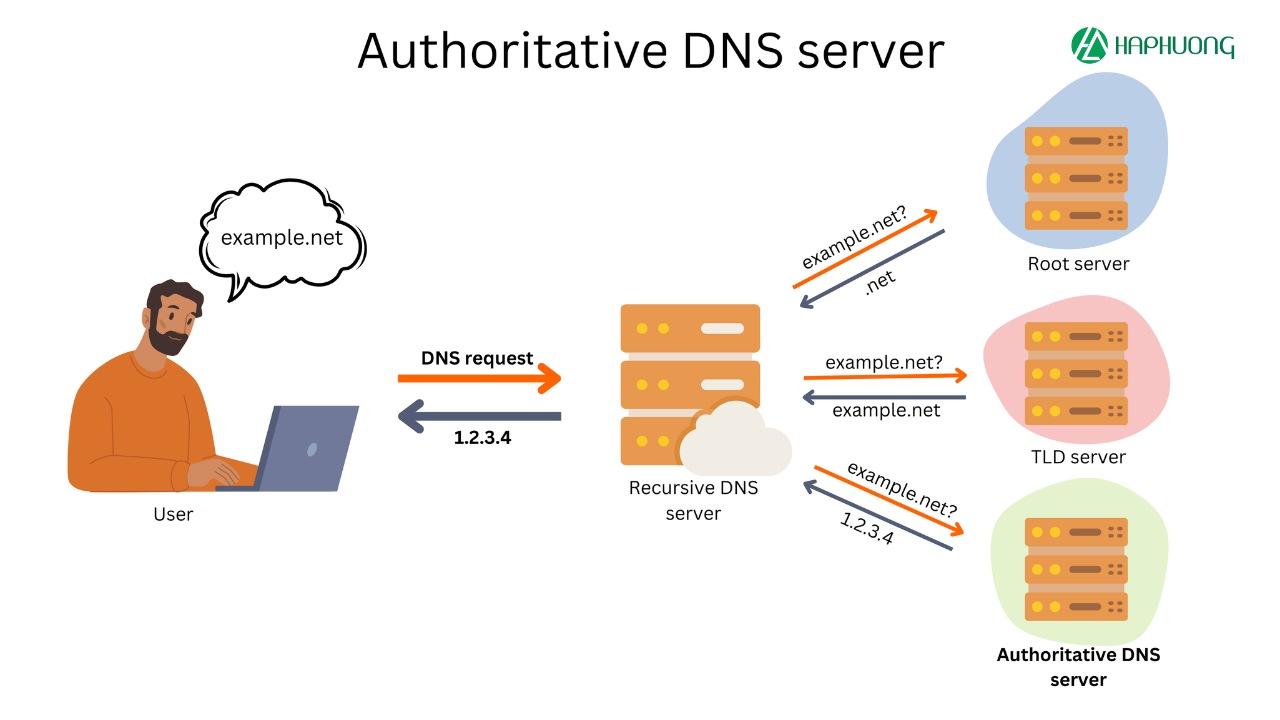
Advice from DPS.MEDIA on regular DNS system maintenance to avoid service interruptions and customer loss
Why is regular DNS system maintenance necessary?
Skipping regular DNS maintenance can cause service interruptions, directly affecting user experience and potential customer loss. A Verisign survey (2022) found that 73% of small businesses faced at least one DNS incident per year.
Một ví dụ cụ thể: Một website TMĐT tại TP.HCM đã mất kết nối đến 4 giờ trong ngày Black Friday 2023 do DNS bị đổi sai địa chỉ IP – kết quả là sụt giảm 37% doanh số so với cùng kỳ (theo nội bộ phân tích DPS MEDIA).
Items to check during DNS maintenance
Below is a checklist suggested by our technical team:
- ✔️ Check A, AAAA, CNAME, TXT, MX records point to the correct IP
- ✔️ Ensure no expired or legacy DNS records exist
- ✔️ Remove unused subdomains to prevent exploitation
- ✔️ Check DNSSEC configuration (if used)
- ✔️ Check the operation of primary and secondary DNS servers
Sample quarterly DNS check table
| Category | Status | Note |
|---|---|---|
| Bản ghi A & CNAME | ✔️ Correct | Update new IP from date 10/2 |
| DNSSEC | ❌ Not enabled | Consider enabling to increase security |
| MX records | ✔️ Verified | Stable redirect to Google workspace |
Tools supporting DNS monitoring for webmasters
Some tools to help you quickly detect DNS issues:
- Google Public DNS: Check global domain resolution
- MXToolbox: Analyze MX, SPF, DMARC record errors
- Pingdom: Set up real-time alerts
Brief takeaway
Regular DNS maintenance is not only a precaution against technology failures but also a solution to maintain customer trust. Chỉ cần vài lỗi nhỏ trong DNS có thể khiến website “biến mất” khỏi Internet trong giờ cao điểm.
Always have a quarterly DNS check plan and proactively update according to system changes to maintain stable service performance.
Looking back on the journey
Checking Google DNS, domain, and IP helps webmasters clearly understand the website status.
From there, handle issues faster and optimize operational efficiency.
Try checking your domain or IP today.
Confidently manage your website system professionally and more reliably.
You can also learn more about SSL, CDN, or common DNS errors.
These topics help you better understand the web infrastructure.
DPS.MEDIA is always ready to support SMEs in optimizing websites and digital transformation.
Do you have any questions or experiences? Please share with us in the comments!




