


`;const ta = root.querySelector('#dns-lines'); const btnRun = root.querySelector('#dns-run'); const btnStop = root.querySelector('#dns-stop'); const btnClear = root.querySelector('#dns-clear'); const typesWrap = root.querySelector('#dns-types'); const statusEl = root.querySelector('#dns-status'); const errorEl = root.querySelector('#dns-error'); const errorTextEl = root.querySelector('#dns-error-text'); const resultsEl = root.querySelector('#dns-results'); const delayInput = root.querySelector('#dns-delay'); const btnCopy = root.querySelector('#dns-copy-table'); const countEl = root.querySelector('#dns-count'); const progressEl = root.querySelector('#dns-progress'); const progressBarEl = root.querySelector('#dns-progress-bar'); const runTextEl = root.querySelector('#run-text');// Type pills với DPS branding const TYPE_LABELS = { 'ALL': 'TẤT CẢ', 'A': 'A', 'CNAME': 'CNAME', 'MX': 'MX', 'NS': 'NS', 'TXT': 'TXT' };let activeType = 'A'; RECORDS.forEach(t => { const b = document.createElement('button'); b.textContent = TYPE_LABELS[t] || t; b.className = 'dns-type-btn'; if (t === activeType) { b.classList.add('active'); } b.addEventListener('click',()=>{ if (isRunning) return; activeType = t; [...typesWrap.children].forEach(c => c.classList.remove('active')); b.classList.add('active'); }); typesWrap.appendChild(b); });// Domain count tracker với DPS colors function updateDomainCount() { const domains = ta.value.split(/\r?\n/) .map(s=>extractHostname(s)) .filter(Boolean); countEl.textContent = `${domains.length} tên miền`; if (domains.length > 100) { countEl.style.background = 'rgba(220,38,38,0.9) !important'; countEl.style.color = 'white !important'; } else if (domains.length > 50) { countEl.style.background = 'rgba(245,158,11,0.9) !important'; countEl.style.color = 'white !important'; } else if (domains.length > 0) { countEl.style.background = 'rgba(50,181,97,0.9) !important'; countEl.style.color = 'white !important'; } else { countEl.style.background = 'rgba(21,21,119,0.9) !important'; countEl.style.color = 'white !important'; } }ta.addEventListener('input', updateDomainCount); updateDomainCount();function clampDelay(){ let v = Number(delayInput.value || 0); if (!Number.isFinite(v) || v { if (e.key === '-') e.preventDefault(); });function extractHostname(input){ if(!input) return ''; try{ return new URL(input).hostname.replace(/\.$/,''); } catch(e){ return String(input).trim().replace(/^https?:\/\//i,'').replace(/^\/*/,'').split('/')[0].split('?')[0].replace(/\.$/,''); } }function sleep(ms){ return new Promise(r=>setTimeout(r, ms)); }function clearError(){ errorEl.style.display='none'; errorTextEl.textContent=''; } function showError(msg){ errorEl.style.display='flex'; errorTextEl.textContent=msg; } function setStatus(msg){ statusEl.textContent = msg; }function updateProgress(current, total) { if (total === 0) { progressEl.style.display = 'none'; return; } progressEl.style.display = 'block'; const percentage = Math.min((current / total) * 100, 100); progressBarEl.style.width = `${percentage}%`; }// Render table với DPS branding - Sử dụng div thay vì table elements function ensureTable(){ if(resultsEl.firstChild && resultsEl.firstChild.classList && resultsEl.firstChild.classList.contains('dns-table')) return resultsEl.firstChild; resultsEl.innerHTML = ''; const table = document.createElement('div'); table.className = 'dns-table'; const isMobile = window.innerWidth
`; resultsEl.appendChild(table); return table; }const allRows = []; function appendRows(rows){ const table = ensureTable(); const tbody = table.querySelector('.dns-table-body'); const frag = document.createDocumentFragment(); const isMobile = window.innerWidth { allRows.push(r); const tr = document.createElement('div'); tr.className = 'dns-table-row'; let dataColor = '#374151'; if (r.data === '(không có dữ liệu)') dataColor = '#9ca3af'; else if (r.data && r.data.startsWith('Lỗi:')) dataColor = '#dc2626'; tr.innerHTML = `
`; frag.appendChild(tr); }); tbody.appendChild(frag); btnCopy.disabled = false; btnCopy.classList.remove('success'); }async function queryDoH(domain, type){ const base = 'https://dns.google/resolve'; const params = new URLSearchParams(); params.set('name', domain); params.set('type', TYPE_CODE[type]); const url = `${base}?${params.toString()}`; const res = await fetch(url, { headers: { 'Accept':'application/json' }}); if(!res.ok) throw new Error(`HTTP ${res.status}`); return await res.json(); }let abortFlag = false; let isRunning = false;btnStop.addEventListener('click', ()=>{ abortFlag = true; setStatus('🛑 Đang dừng...'); });btnClear.addEventListener('click', () => { if (isRunning) return; resultsEl.innerHTML = `
`;
allRows.length = 0;
btnCopy.disabled = true;
btnCopy.classList.remove('success');
clearError();
setStatus('');
progressEl.style.display = 'none';
});btnRun.addEventListener('click', async ()=>{
if (isRunning) return;
clearError();
allRows.length = 0;
abortFlag = false;
isRunning = true;btnRun.disabled = true;
runTextEl.textContent = '⏳ Đang chạy...';
btnStop.style.display = 'block';
btnClear.style.display = 'none';
[...typesWrap.children].forEach(b => {
b.style.cursor = 'not-allowed';
b.style.opacity = '0.6';
});const delay = clampDelay();const domains = ta.value.split(/\r?\n/)
.map(s=>extractHostname(s))
.filter(Boolean);if (!domains.length){
showError('Vui lòng nhập ít nhất 1 tên miền.');
resetUIState();
return;
}
if (domains.length > 100){
showError('Giới hạn 100 tên miền mỗi lần để tránh quá tải. Hãy chia nhỏ danh sách.');
resetUIState();
return;
}const types = (activeType==='ALL') ? [...POPULAR] : [activeType];
const totalQueries = domains.length * types.length;resultsEl.innerHTML = '';
ensureTable();let completed = 0;
for (let i=0; i
Theo thống kê,75% sự cố website bắt nguồn từ sai sót trong cấu hình DNS hoặc thông tin tên miền không chính xác. DPS.MEDIA đã hỗ trợ hàng trăm SMEs Việt Nam tối ưu hạ tầng này, nâng cao hiệu quả digital marketing.
The importance of checking domain DNS in digital marketing strategy
Xác minh quyền sở hữu & tính toàn vẹn tên miền
A domain with correctly configured DNS ensures business emails are not blocked or sent to spam. According to Google Postmaster Tools (2023), over 62% of unauthenticated emails are marked as spam. If you run email marketing campaigns without checking SPF, DKIM, TLS, or MX records, your chances of reaching customers will be very low.
- SPF: identifies servers allowed to send email from the domain
- DKIM: digitally signs and authenticates email content
- MX records: sets up the mail server for the domain
Tối ưu tốc độ & khả năng phân phối nội dung
Bản ghi DNS giúp phân phối traffic về đúng máy chủ web, email, CDN,… Điều này ảnh hưởng trực tiếp đến trải nghiệm người dùng. Ví dụ: một đơn vị agency không cập nhật DNS sau khi chuyển hosting, khiến cả website và landing page của chiến dịch chạy quảng cáo Google Ads mất kết nối trong 6 giờ. Chi phí thất thoát có thể lên đến hàng triệu đồng.
- Update A, CNAME records when changing DNS/hosting
- Verify TTL (Time to live) to avoid delays
Ngăn rủi ro chiếm đoạt Domain & lộ Data
DNS sai sót có thể khiến domain bị chuyển hướng độc hại. Theo Công ty Bảo mật Palo Alto Networks (2022), 20% phishing attack bắt nguồn từ DNS misconfiguration. Những lỗi phổ biến gồm DNS lộ bản ghi nội bộ, chưa cấu hình DNSSEC…
| Record type | Purpose | Check |
|---|---|---|
| SPF | Anti-email spoofing | SPF lookup tool |
| MX | Mail distribution | MXToolbox |
| DNSSEC | DNS query security | Whois/DNS check |
DNS checklist for digital marketing campaigns
✅ Verify SPF, DKIM, DMARC are working correctly
✅ Check mail server IP is not blacklisted
✅ Update A/CNAME records when changing hosting
✅ Thiết lập CDN đúng (nếu dùng Cloudflare, AWS…)
✅ Enable DNSSEC and hide WHOIS information if extra security is needed
Brief conclusion
DNS is not just for technical purposes, but also directly affects digital marketing effectiveness and brand reputation.. A few minutes checking DNS can help avoid losses of hundreds of millions of VND in advertising and CRM.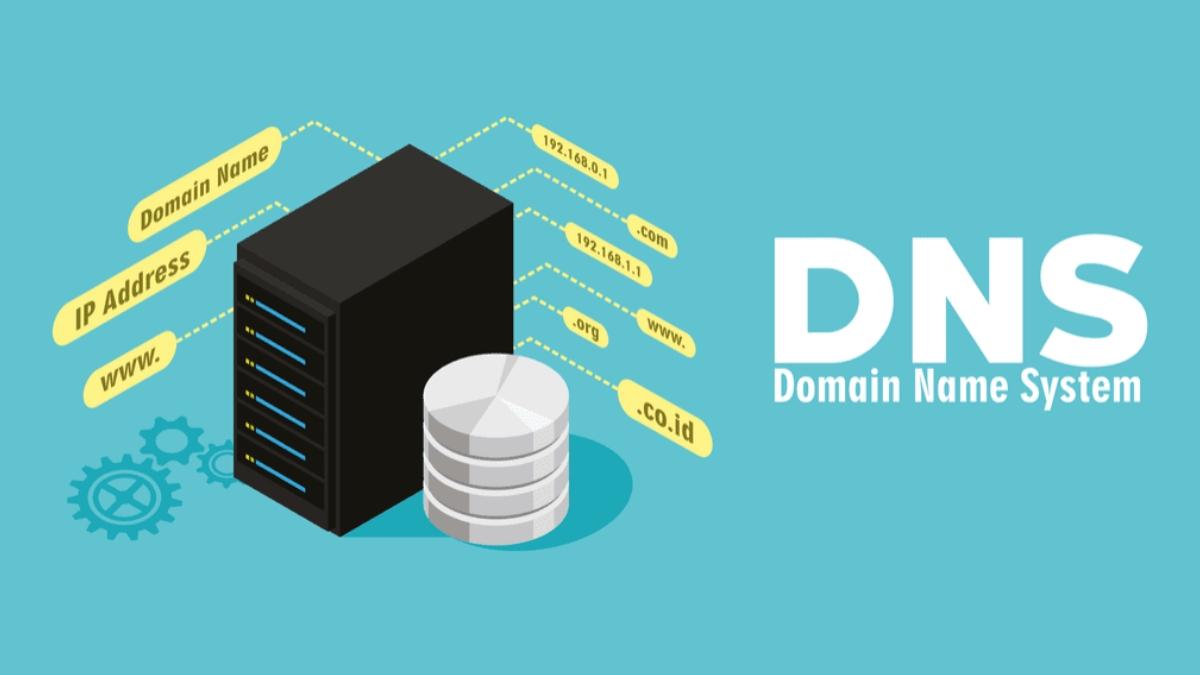
How the DNS system works and its impact on website performance
What is DNS and how does it work?
– DNS (Domain Name System) is the system that resolves domain names, converting user-friendly domains like example.com into IP addresses that servers understand (e.g., 192.0.2.1).
– Khi người dùng gõ địa chỉ website, trình duyệt sẽ gửi yêu cầu tới DNS Resolver để tìm IP tương ứng.
– Hệ thống sẽ kiểm tra cache cục bộ,sau đó lần lượt truy vấn đến các máy chủ gốc,máy chủ TLD và cuối cùng là Nameserver của từng website.
Tip: Using DNS with low latency, such as Cloudflare (1.1.1.1) or Google DNS (8.8.8.8), significantly improves page load times.
The real impact of DNS on website speed
– Thời gian phân giải DNS trung bình: 20-120ms (theo Cloudflare Radar, 2023). Nếu DNS quá chậm,toàn bộ quy trình tải trang sẽ bị trễ.
– Website sử dụng NS chậm sẽ ghi nhận TTFB (Time to First Byte) about 30% higher compared to sites using high-speed DNS.
– Ví dụ: Một khách hàng thương mại điện tử ghi nhận tỉ lệ thoát giảm 12% sau khi chuyển từ DNS miễn phí kém ổn định sang dịch vụ trả phí như AWS Route 53.
DNS optimization checklist to improve performance
- ✅ Minimize the number of subdomains that need to be resolved.
- ✅ Enable DNS caching on both server and user side.
- ✅ Prioritize Cloud DNS with integrated CDN such as Cloudflare.
- ✅ Check TTL (Time to Live) and reconfigure ideally (1200s - 3600s).
- ✅ Use tools like dnschecker.org or dig to check the DNS response time of each Nameserver.
TTFB comparison table based on DNS type
| DNS Type | Average TTFB time | Reliability |
|---|---|---|
| Free DNS (local ISP) | 190ms | Average |
| Google DNS (8.8.8.8) | 90ms | Cao |
| Cloudflare DNS (1.1.1.1) | 55ms | Very high |
Challenges and notes when optimizing DNS
– Một số nhà cung cấp DNS miễn phí có thể bị chặn hoặc lỗi truy vấn từ Việt Nam.
- DNS propagation (the process of global DNS update) can take from a few minutes to 48h.
– Thay đổi DNS nhưng không đồng bộ với nội dung máy chủ dễ gây gián đoạn dịch vụ.
Warning: A small change in Nameserver configuration can also make the website inaccessible for hours if not checked carefully.
Takeaway
Optimizing DNS not only improves page load performance but also minimizes downtime risks. Regularly check your domain's DNS to ensure smooth system operation, especially if you are running ads or have high traffic.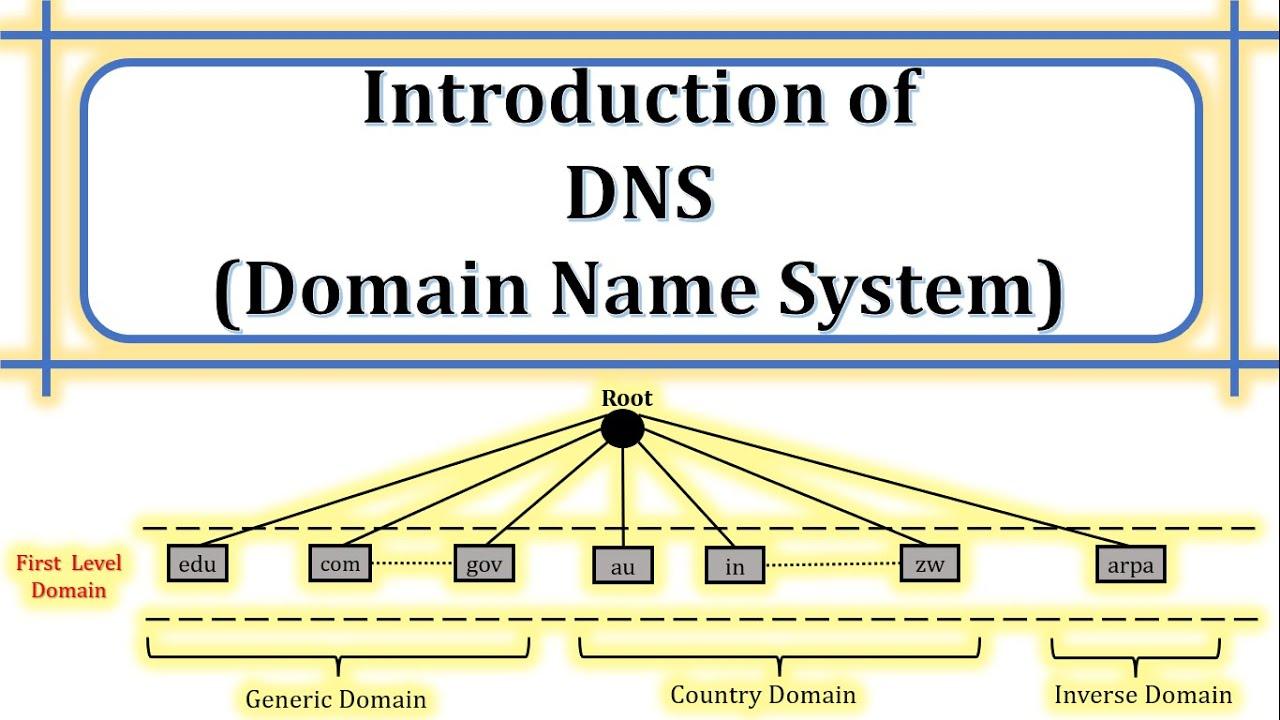
Guide to using free DNS checking and domain information lookup tools
Steps to check DNS and look up domain names
To quickly check the DNS configuration and information of any domain, you can follow these steps:
- Go to an official domain checking tool such as whois.domaintools.com or dnschecker.org.
- Enter the domain name to check (e.g.: yourdomain.com).
- Select the DNS record type to query: A, MX, NS, TXT, SOA…
- View the analysis results and response times from each global DNS server.
Tip: It is recommended to periodically check DNS configuration to detect CNAME duplication errors or SPF records missing authentication marks early.
Checklist of items to pay attention to when checking
Below is a list of important information you should check each time you access a domain:
- Registration status: Still valid or expired
- DNS propagation: Has it been properly distributed to the servers?
- WHOIS contact information: Is it hidden or public?
- DNSSEC security: Is it enabled?
Summary table of example check results
Ví dụ, kiểm tra tên miền “thietkewebabc.com” với bản ghi A:
| Record type | Value | TTL |
|---|---|---|
| A | 203.119.8.105 | 3600 |
| NS | dns1.vina.com.vn | 86400 |
| MX | mail.thietkewebabc.com | 7200 |
Ví dụ thực tế & rủi ro tiềm ẩn
An (anonymous) business accidentally let their domain expire for 24 hours, causing all internal email to be completely shut down. According to ICANN's report (2023), up to 18% of DNS incidents stem from inconsistent configuration between records.
Warning: Lack of regular checks can lead to forged TXT records (SPF, DKIM) and result in brand spoofing emails.
Quick conclusion
Việc kiểm tra DNS & tên miền không chỉ phòng tránh sự cố, mà còn hỗ trợ tối ưu bảo mật & vận hành. Hãy duy trì thói quen xác thực DNS ít nhất 1 lần/tháng!
Analysis of important parameters when checking DNS to ensure stability and security
1. DNS Response Time
This is one of the most important metrics to monitor when you check DNS domain. High response time can cause delays in website loading, affecting user experience.
– Thời gian tải nên dưới 100ms (theo Pingdom, 2023)
– Kiểm tra từ nhiều vị trí địa lý để phát hiện nút thắt mạng
– Dùng công cụ: DNSPerf, DNS Spy
2. Trạng thái bản ghi DNS (A, MX, CNAME…)
A full analysis of existing records helps determine whether the DNS configuration is accurate and complete. Errors in records can easily lead to undelivered/received emails or 404 error pages.
List of important records to check:
– A, AAAA: Địa chỉ IP của domain
– MX: Gửi và nhận email
– CNAME: Tên miền thay thế
– TXT: SPF, DKIM, DMARC để bảo vệ email
– NS: Name Server chính thống
| Record type | Main role | Security note |
|---|---|---|
| MX | Email routing | Set up SPF and DKIM correctly |
| TXT | Xác minh & bảo mật | add DMARC to prevent spoofing |
| CNAME | Redirect subdomain | Do not point to uncontrolled domains |
3. DNSSEC: Prevent DNS spoofing
DNSSEC technology helps verify data sources and prevent DNS spoofing attacks (man-in-the-middle). However, not all providers enable it by default.
– Theo Statista (2023), chỉ 27% domain toàn cầu kích hoạt DNSSEC
– VPS tự quản lý thường cần cấu hình DNSSEC thủ công
– Nếu DNS không có DNSSEC, người dùng có thể bị chuyển hướng đến trang giả mạo
Quick DNS Check Checklist
- ✅ Đảm bảo bản ghi A & MX trả đúng IP và host
- ✅ Check SPF, DKIM, DMARC to prevent email spoofing
- ✅ Authenticate NS as the official name server
- ✅ Test DNS latency from multiple locations (DNS Benchmark)
- ✅ Consider enabling DNSSEC if supported
Short summary
Checking DNS not only helps your website run quickly and stably but also avoids unnecessary security risks, especially with business domain emails. With a few actions like checking TXT records or enabling DNSSEC, you have significantly reduced the risk of spoofing and phishing from bad actors. Remember to check periodically every 3-6 months or when changing system infrastructure.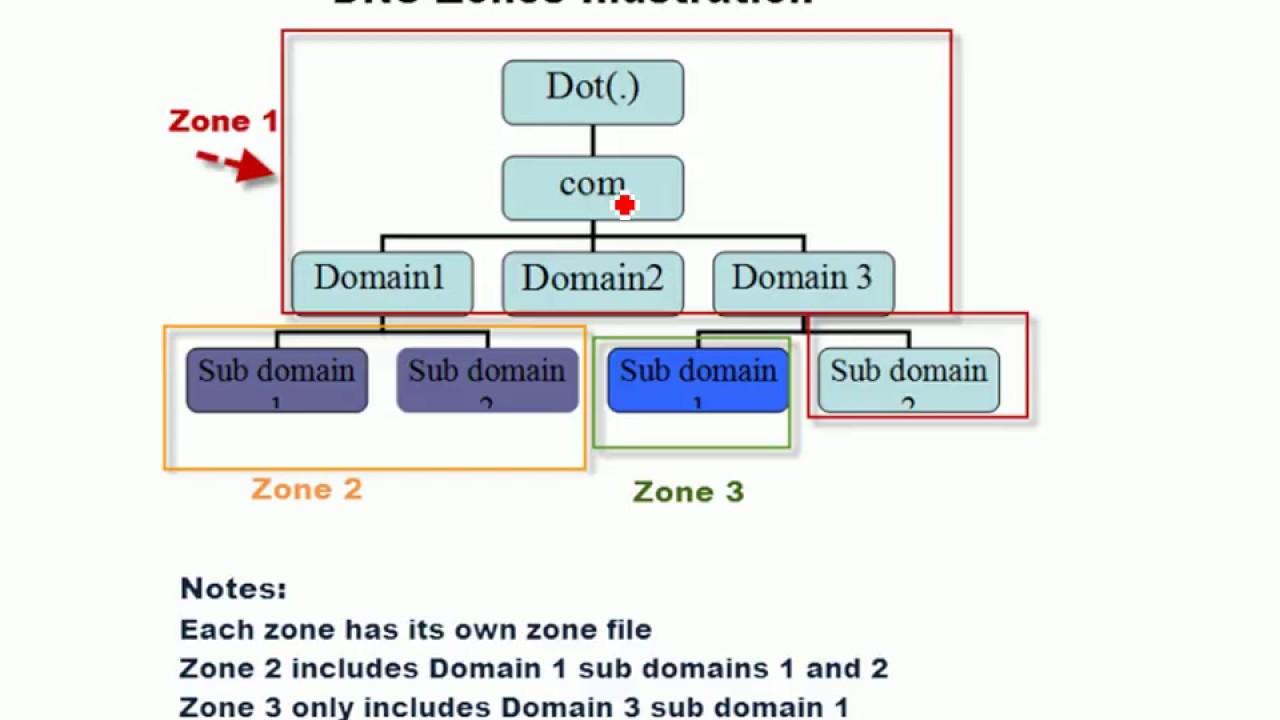
DNS configuration optimization tips to enhance user experience and SEO
How does DNS configuration affect website speed?
Việc định tuyến DNS chậm có thể khiến website mất đến 1-2 giây để tải trang – điều này khiến tỷ lệ thoát tăng gần 32% theo nghiên cứu của Google (2023).Một hệ thống DNS được tối ưu sẽ giúp người dùng truy cập nhanh chóng hơn và giảm thiểu thời gian tải trang.
Các bước kiểm tra & tối ưu DNS cơ bản
Regularly check DNS records to ensure there are no errors or misconfigurations:
- Use free tools like DNS Checker, mxtoolbox for instant checks
- Verify the consistency of A, CNAME, TXT records globally
- Enable DNSSEC to protect against DNS spoofing
Effective DNS configuration optimization checklist
- ✔ Check appropriate TTL (usually from 300-1800 seconds)
- ✔ Verify response speed < 150ms in the target market
- ✔ Remove unused records to reduce DNS latency
- ✔ Set up SPF, DKIM, and DMARC records to support email deliverability
Real-life example: E-commerce company A
An e-commerce business in Ho Chi Minh City recorded a 42% reduction in average response time after switching DNS from the default server to Cloudflare (according to internal report Q2/2023). As a result, the conversion rate increased by 8.7% after 6 weeks of implementation.
| Indicators | Before | After |
|---|---|---|
| DNS response time | 320ms | 185ms |
| Conversion Rate | 2.4% | 3.1% |
Cảnh báo & rủi ro cần lưu ý
- If the IP or domain is misconfigured, it may cause page loading errors
- Incorrect SPF/DKIM records affect email marketing deliverability
- Changing DNS without understanding propagation time causes service interruptions
Brief takeaway
Việc kiểm tra & tối ưu DNS không chỉ giúp website tải nhanh hơn mà còn ảnh hưởng trực tiếp đến SEO và trải nghiệm người dùng dài hạn.Hãy chủ động giám sát DNS định kỳ để duy trì hiệu suất tối ưu.
–
DPS.MEDIA – Hỗ trợ SMEs nâng cấp hệ thống DNS và tối ưu hạ tầng web.
Handling common DNS-related issues and effective domain management
Lỗi DNS phổ biến & cách nhận diện
When a domain is not functioning properly, the cause often comes from incorrect DNS configuration. Here are some common errors you should check:
- ❌ Not pointing to the correct IP address (A record or CNAME).
- ⛔ Slow DNS propagation: can take 24-48h.
- ❗ TTL too long makes it difficult to quickly update DNS configurations.
- ⚠️ Missing or incorrect MX records leading to email loss.
Tips: Use tools like whatsmydns.net to check DNS resolution status by geographic region.
Quick DNS error troubleshooting checklist
Here is a list of steps to help you check and handle the process correctly:
- ✅ Ensure DNS points to the correct current hosting/IP.
- 🔍 Check that the domain has not expired at whois.icann.org.
- 🛠 Use DNS lookup tools to verify each record.
- 📩 Recheck the MX record with SMTP test services if email errors occur.
- 🔁 Temporarily reduce TTL to 300s when a quick update is needed.
Tips: Always keep periodic backup DNS records in case a quick rollback is required.
Real-life example: Customer lost email for 3 days
A small business in the e-commerce sector experienced a complete loss of internal email for 72 hours. Cause: MX record was deleted when switching DNS to a new provider. After support from DPS.MEDIA:
- → Restored MX record from old log
- → Deployed SPF, DKIM to prevent loss or spam
- → Reduced risk of data loss via GWS sync system
Common DNS structure table
| Record Type | Function | Example |
|---|---|---|
| A | Point domain to IP | mydomain.com → 123.456.789.10 |
| CNAME | Redirect to another domain | www.mydomain.com → mydomain.com |
| MX | Set up email server | mail.mydomain.com |
| TXT | Authenticate SPF, DKIM, etc. | v=spf1 include:_spf.google.com ~all |
Rủi ro & cảnh báo khi thay đổi DNS
Thay đổi DNS ảnh hưởng trực tiếp đến sự hoạt động của website và hệ thống email – thậm chí có thể làm website “nghỉ chơi” tạm thời nếu cấu hình sai. Theo báo cáo từ Verisign (2023), có hơn 5% tên miền doanh nghiệp bị downtime >3 giờ do lỗi DNS không được test trước.
Tips: Always thoroughly check in the staging/testing environment before applying to the production system.
Brief takeaway
Quản lý DNS hiệu quả đòi hỏi sự chính xác và kiểm soát chặt chẽ. Đừng chỉ rely on “auto” hay mặc định từ nhà cung cấp – hãy chủ động kiểm tra thường xuyên và sử dụng các công cụ check DNS miễn phí để phòng ngừa sự cố kịp thời.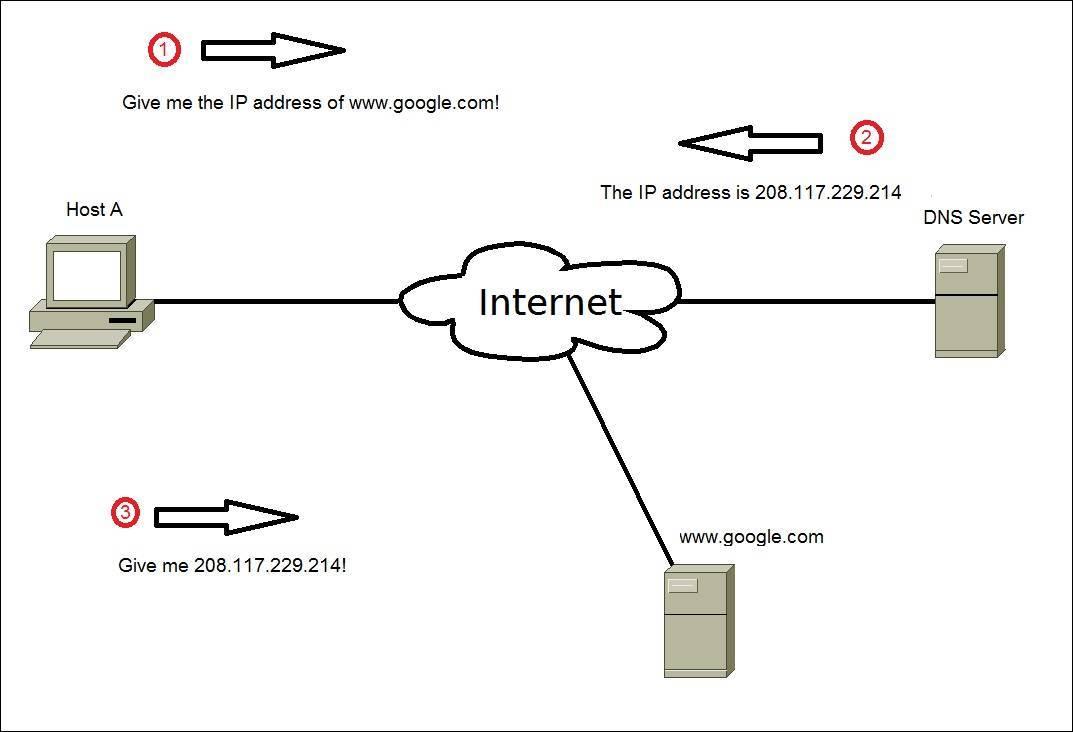
The importance of checking domain ownership information in building an online brand
Building trust and increasing reliability
domain ownership verification helps ensure that the brand is operating legally and transparently. According to ICANN (2023), over 45% of users have refused to purchase due to doubts about the authenticity of a website.
- Official domain increases brand credibility
- Transparent WHOIS information makes legal verification easy
- Helps increase customer conversion rates
Reducing the risk of online brand hijacking
Kẻ xấu có thể mạo danh thương hiệu bằng cách đăng ký các tên miền tương tự để lừa đảo. Tình trạng “domain squatting” khiến doanh nghiệp lỡ mất cơ hội bảo vệ danh tiếng online.
Domain ownership verification checklist
- ✅ Access the free WHOIS tool → check address, contact email
- ✅ Compare domain information with the company’s legal information
- ✅ Kiểm tra ngày hết hạn – tránh mất quyền sở hữu
- ✅ Enable WHOIS protection if the domain is important
Comparison table: Verified domain vs. anonymous domain
| Headline | Verified domain | Unknown owner domain |
|---|---|---|
| Reliability | Cao | Low |
| Risk of impersonation | Low | Cao |
| Easy brand management | Yes | No |
Real-life example: Case of a business being impersonated
In September 2022, a cosmetics brand in Hanoi was scammed through a fake domain with an extension similar to the brand name. Customers transferred money in advance following instructions from the impersonating domain, causing losses of over 200 million VND. Early WHOIS checks and domain locking could have prevented this incident.
Takeaway
Checking domain ownership information plays a key role in building a safe and transparent brand in the digital environment. This is not just a technical step, but also a strategy to protect reputation and user trust.
Looking back on the journey so far
Checking DNS and looking up domain names helps protect the brand, optimize website performance, and increase control over data in the digital environment.
Understanding the domain name system is the first step to success in digital.
Access the free DNS checking tool now to review your domain information.
Just a few minutes of checking can help you detect potential issues early.
You should also learn more about SSL, hosting, and CDN for web security.
They are indispensable components for the stability of enterprise digital infrastructure.
DPS.MEDIA always accompanies SMEs in the process of effective and sustainable digital transformation.
Leave a comment below if you have any questions or want to share more information!




