


In the digital era, maintaining a continuous social media presence is vital for businesses. However, creating content consistently every day consumes significant time and resources. How can this challenge be solved? The answer is to establish a system to automatically write posts and publish to fanpages using artificial intelligence (AI).
This article will guide you through a detailed 5-step process for building a fully automated “content production factory” using n8n, Google Sheets, and AI.
Table of Contents
- 1. Benefits of automatically writing posts and publishing to fanpages with AI
- 2. Overview of the automation system architecture
- 3. Step 1: Plan content in Google Sheets
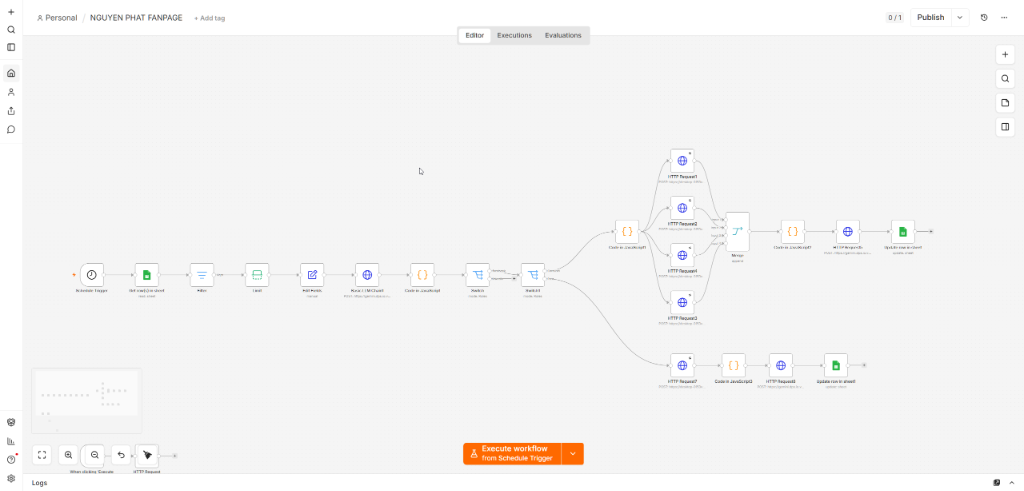
- 4. Step 2: Build an automation workflow in n8n
- 5. Step 3: Check actual publishing results on Facebook
- 6. Important notes for maintaining post quality
1. Benefits of automatically writing posts and publishing to fanpages with AI
Applying this solution to automatically write posts and publish to fanpages brings many outstanding benefits to marketing activities:
- Save 90% time: You only need to plan once for the entire month; AI and the automated system will handle the rest.
- Maintain a consistent posting frequency: Ensure Facebook's algorithm values your fanpage thanks to a stable posting frequency.
- Diverse, professional content: AI helps write posts in multiple styles (Funnel, Pillar, Angle) based on available sample data.
2. Overview of the automation system architecture
Our system for automatically writing posts and publishing to fanpages is built on the integration of three main components: Google Sheets (where plans and topics are stored), n8n (the automation platform that coordinates the process and calls AI APIs to create content), and Facebook Graph API (to publish posts to the fanpage).
3. Step 1: Plan content in Google Sheets
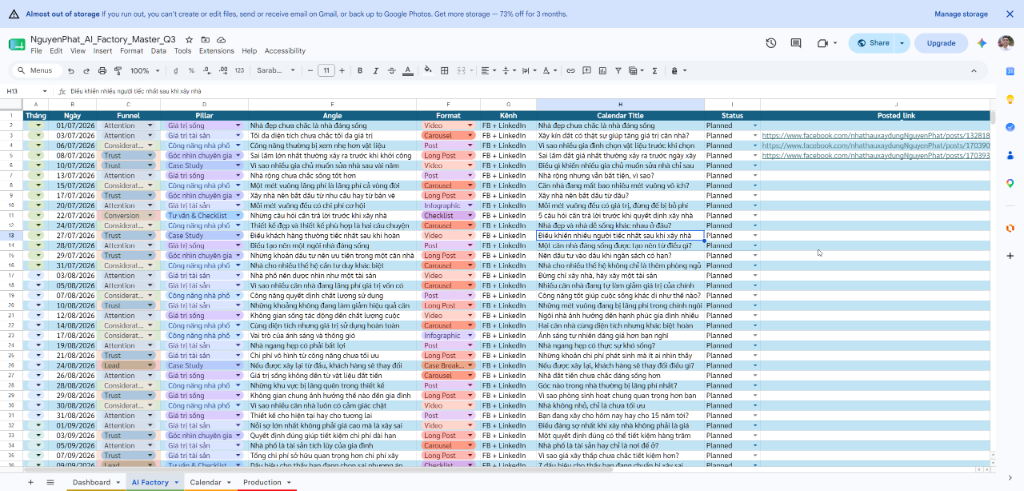
Google Sheets serves as the source database that controls the entire process. You need to create a detailed content planning table (Content Calendar) including the following columns:
- Funnel / Pillar / Angle: Define the customer funnel and the post's approach angle.
- Calendar Title: The main topic or keyword of the post.
- Status: Post status (for example:
Planned5pxPosted). - Posted Link: The column where the system automatically records the post link after successful publishing.
4. Step 2: Build an automation workflow in n8n
To connect the applications together, we use n8n – a powerful open-source automation tool:
- Schedule Trigger: Configure it to run automatically at a fixed time every day (for example: 8:00 AM).
- Get row from Sheet: Read the content planning row with the status
Plannedclosest from Google Sheets. - HTTP Request (AI Content Generator): Send the title and approach angle through the API of a large language model (such as OpenAI GPT or Gemini) to write detailed content and design image-generation prompts.
- Facebook Graph API: Send the post content along with illustrative images to the Facebook Fanpage.
- Update Row in Sheet: Update the status of that row to
Postedand fill in the actual post link in thePosted Link.
5. Step 3: Check actual publishing results on Facebook
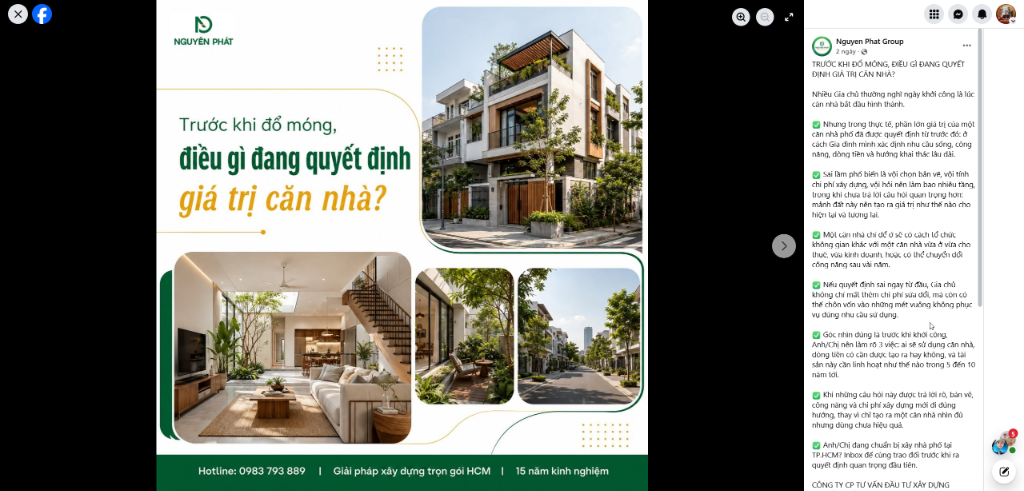
After the n8n workflow completes its test run, you will see the post displayed immediately on your Fanpage with complete text formatting, emojis, and vivid AI-generated illustrations.
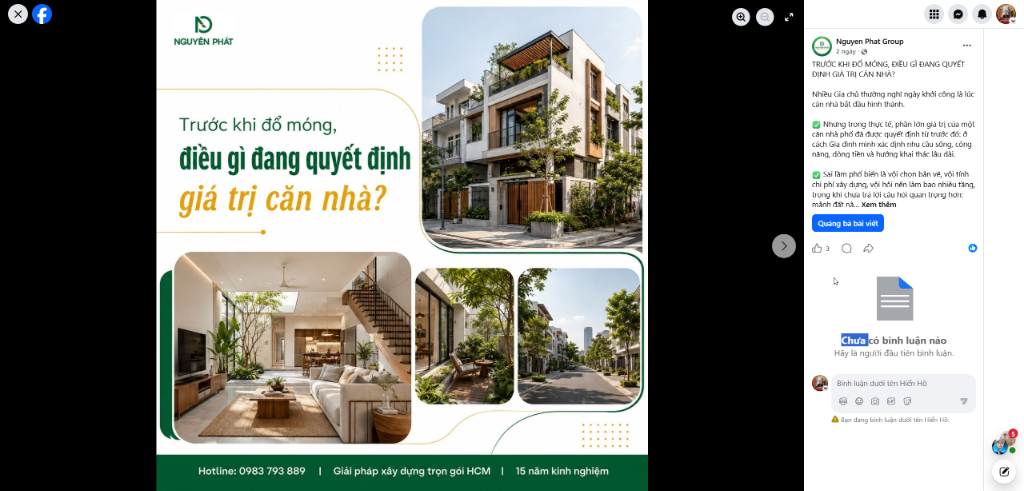
This system for automatically writing posts and publishing to fanpages supports long-form posts with clearly structured formatting and visual bullet points, helping increase engagement and attract readers more effectively.
6. Important notes for maintaining post quality
Although the system runs fully automatically, you should still note the following points to achieve the best results:
- Regular review: Take time to review published posts and adjust AI writing prompts so they align best with the brand voice.
- High-quality cover image design: Use professional image templates so AI can integrate titles into images consistently.
- Post SEO optimization: Naturally include the main keyword at the beginning of the post to optimize reach through Facebook's search bar.
Combining n8n, Google Sheets, and AI to to automatically write posts and publish to fanpages is a breakthrough step that helps you save operating costs and accelerate Content Marketing campaigns sustainably. Start building an automation process for your brand today!






Ý kiến bạn đọc (0)
Chưa có bình luận nào. Hãy là người đầu tiên chia sẻ cảm nghĩ!
Đăng nhập / Tạo tài khoản
Đăng nhập với Google để gửi bình luận và tương tác cùng cộng đồng.
Tiếp tục là đồng ý với điều khoản sử dụng và chính sách bảo mật của DPS Media.