

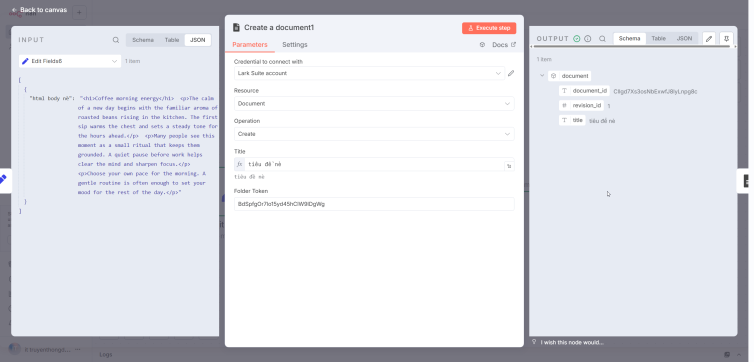

Have you ever wondered how to automatically generate Lark Suite documents directly from an n8n workflow? Introducing n8n-nodes-larksuite-document – giải pháp tự động hóa tài liệu mạnh mẽ nhất hiện nay!
What is Node Lark Suite Document?
@hienhoceo/n8n-nodes-larksuite-document là một custom node cho n8n cho phép bạn tương tác với Lark Suite Document API một cách dễ dàng và mạnh mẽ. Từ việc tạo documents mới, thêm nội dung đa dạng, cho đến chuyển đổi HTML sang định dạng Lark – tất cả đều trong tầm tay bạn!
1. What is Node Lark Suite Document
@hienhoceo/n8n-nodes-larksuite-document is a custom node for n8n, used to work with the Lark Suite Document API.
Key capabilities include:
- Create a new Document in Lark
- Insert content such as text, heading, list, code block
- Insert images from URL
- Create checklist
- Create quote, callout, divider
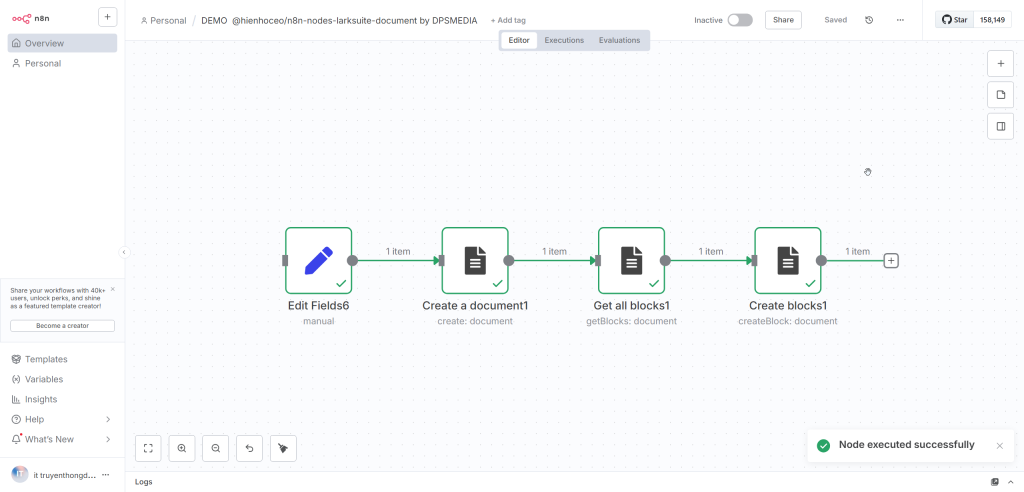
- Convert HTML into Lark's block structure
This node is especially useful if you need to create automated reports, internal documents, technical documentation, marketing materials, or aggregate data from multiple sources into a single Lark file.
2. Main Features
2.1. Create New Document
- Set custom title
- Select folder to save
- Support for multiple languages
2.2. Support for Various Content Blocks
- Heading H1 to H9
- Paragraph
- Bullet list and ordered list
- Code block with highlight
- Quote
- Checklist with checked or unchecked status
- Callout with representative icon
- Divider
- Insert image by URL and customize width
2.3. Convert HTML to Lark Document
Example HTML is converted to corresponding Lark block:
2.4. Advanced Features
- Automatically split blocks when document exceeds 50 blocks
- Detailed error handling
- Use App ID and App Secret to limit manual access token entry
3. Installation
Install node via NPM:
npm install @hienhoceo/n8n-nodes-larksuite-document
4. Lark App Configuration
- Access Lark Developer Console
- Create a new app or use an existing app
- Get App ID and App Secret
- Grant the following permissions:
- docx:document
- docx:document:readonly
- Publish app trong mục Version Management & Release
6. Practical Applications
6.1. Automated Report Generation
Fetch data from API or database, render HTML content, convert to Lark Document.
6.2. Content Conversion
- From Google Docs to Lark
- From Notion to Lark
- From blog HTML to Lark Document
6.3. Automate Technical Documentation
- Create API documentation
- Project documentation
- Technical notes
6.4. Automate Marketing Content
- Content calendar
- Campaign report
- Product introduction document
7. Other Advanced Features
7.1. Custom JSON Blocks
Allow creating special blocks in Lark API format.
7.2. Smart Chunking
Automatically split blocks to avoid API limit errors when sending multiple contents at once.
8. Comparison Table
| Feature | Node @hienhoceo/n8n-nodes-larksuite-document | Call API directly | Other nodes |
|---|---|---|---|
| HTML to Lark | Yes | No | Limitations |
| Create multiple blocks at once | Yes | No | Unstable |
| Automatically split large blocks | Yes | No | No |
| Insert image via URL | Yes | Must upload manually | No |
| Checklist | Yes | Do manually | No |
9. Benefits of Use
9.1. Productivity
Significantly reduces manual document creation time.
9.2. Document Standardization
Easy to create templates, easy to sync between teams.
9.3. Flexibility
Supports more than 16 types of content blocks.
9.4. Stability
Fully handles errors and automatically splits blocks when the document is large.
10. Conclusion
If you want to automate document creation in Lark Suite, then the node @hienhoceo/n8n-nodes-larksuite-document is one of the most powerful solutions for n8n today.
This node helps you build automated workflows:
- Create daily reports
- Create technical documents
- Create marketing documents
- Generate documents from templates
- Automatically aggregate data into reports
You can apply it in businesses, technical teams, marketing teams, or any process that requires automated documents.




