


Introduction: The Era of AI Agents and WordPress Transformation
We are living in the explosive phase of artificial intelligence, where large language models (LLM) are no longer just passive chatbots but have transformed into “AI Agents” – virtual assistants capable of performing specific tasks. Model Context Protocol (MCP) was born as an open standard, a common language helping these AI Agents communicate with the external data world.
However, for the WordPress community – the world's most popular content management platform – integrating this trend remains a challenge. How can an AI Agent running on your computer (like Claude Desktop) or in the cloud “understand” WordPress data structure and perform operations like writing posts, uploading images, or managing comments safely? The answer is WP MCP Connect.
(Illustrative image: Smart data bridge between AI and WordPress)
What is WP MCP Connect? Comprehensive Solution for 2026
WP MCP Connect not just a plugin connecting APIs. It is a custom-designed infrastructure solution to turn your WordPress website into a standard MCP Server. Built on open-source efforts from Automattic and the AI community, this plugin solves three core problems:
- Standardized Communication: Instead of writing scattered API endpoints yourself, the plugin provides an “Adapter” layer that strictly adheres to the MCP protocol. This means any MCP Client (Claude, Cursor, IDEs) can connect immediately without complex configuration.
- Flexible Expansion: With the “Abilities API” system, developers can easily define new functions (Abilities). Want AI to check WooCommerce revenue? Just register a new Ability.
- AI Optimization: Unlike traditional REST APIs for humans or mobile apps, WP MCP Connect endpoints are optimized for AI “reading and understanding”. Data schemas, error descriptions, and response structures are fine-tuned to minimize AI “hallucination”.
System Architecture: Inside the Machine
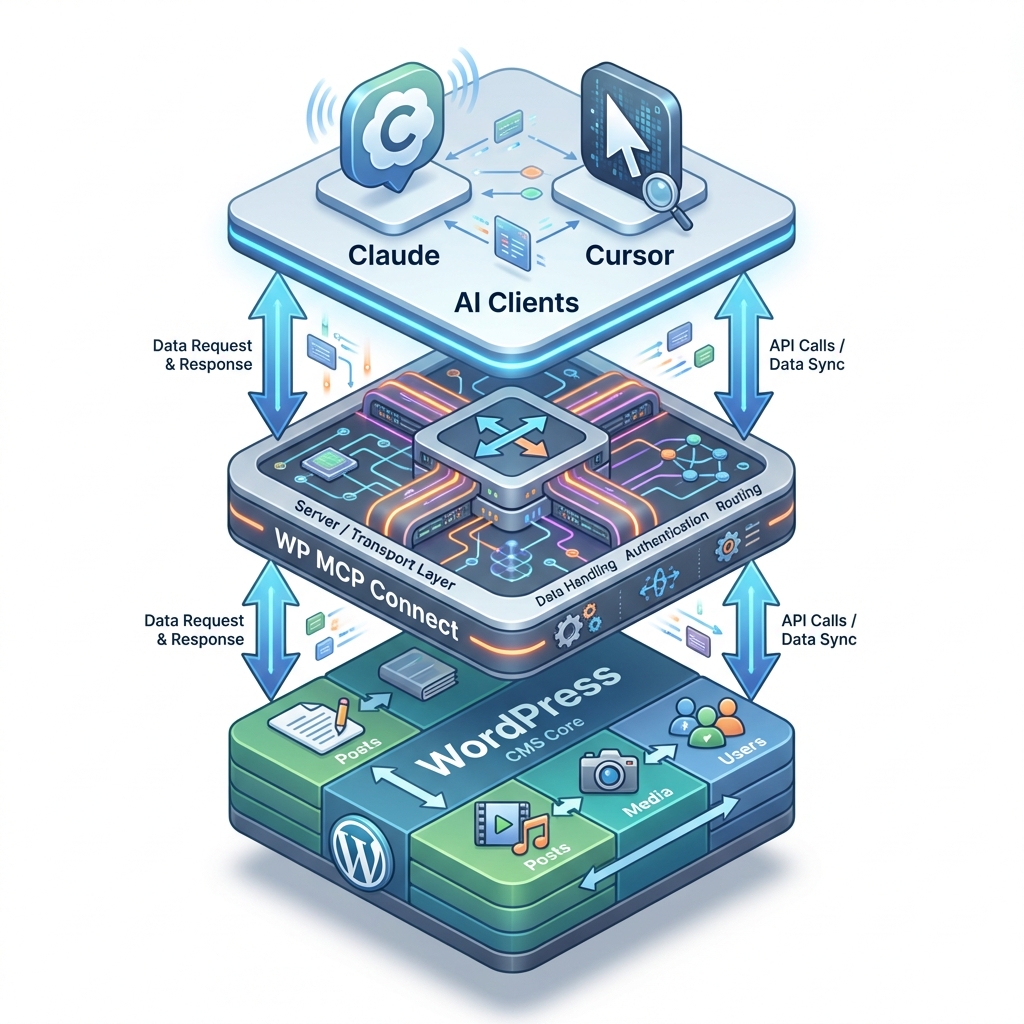
To truly master this tool, we need to look deep into its internal architecture. Consider the data flow diagram below:
The system operates on a tightly layered model to ensure security and performance:
- Client Layer (AI Agents): This is where commands originate. It could be Claude Desktop running on your Mac, or an automated Agent on a server. They send JSON-RPC packets according to MCP standard.
- Transport Layer: WP MCP Connect supports multiple channels.
- Stdio Transport: For internal connections (Localhost), extremely fast and secure as it runs directly through the command-line process.
- HTTP Transport (SSE/Post): For remote connections. The plugin integrates Server-Sent Events (SSE) to maintain real-time connections with the Agent.
- Protection Layer (Security & Validation): Before any command is executed, it must pass through this layer. Tokens are checked, user capabilities are authenticated, and input data is rigorously validated.
- Execution Layer (WordPress Core): Finally, the Abilities will call WordPress native functions (such as
wp_insert_post,wp_handle_uploadto change data in the database.
Detailed Installation Guide
Installing WP MCP Connect is very simple, but to work smoothly, you need to follow the exact process. Here is the guide for the latest version:
Step 1: Install Plugin
You can install via ZIP file or Composer (for developers):
# Method 1: Upload ZIP file
1. Download wp-mcp-connect.zip from the repository.
2. Go to WP Admin > Plugins > Add New > Upload Plugin.
3. Activate the plugin.

# Method 2: Composer (Recommended for large projects)
composer require wordpress/mcp-adapter
Step 2: Client-Side Configuration (Claude Desktop)
To allow Claude to “talk” to your website, you need to declare the server in the JSON configuration file. Open Claude Desktop's configuration file and add the following:
{
  "mcpServers": {
    "my-wordpress-blog": {
      "command": "npx",
      "args": ["-y", "@automattic/mcp-wordpress-remote"],
      "env": {
        "WP_API_URL": "https://yoursite.com/wp-json/mcp-connect/v1/server",
        "WP_API_USERNAME": "your-username",
        "WP_API_PASSWORD": "your-application-password"
      }
    }
  }
}
Note: You should use Application Password instead of the main password to enhance security.
For Developers: Register Custom Ability
The real power of WP MCP Connect lies in its extensibility. Suppose you want AI to get server disk space information, you can write a short code snippet into the file functions.php:
add_action( 'wp_abilities_api_init', function() {
    wp_register_ability( 'system/get-disk-space', [
        'label' => 'Get Disk Space',
        'description' => 'Check available disk space on server',
        'input_schema' => ['type' => 'object', 'properties' => []],
        'output_schema' => [
            'type' => 'object',
            'properties' => [
                'total' => ['type' => 'string'],
                'free' => ['type' => 'string']
            ]
        ],
        'execute_callback' => function() {
            return [
                'total' => disk_total_space('/'),
                'free' => disk_free_space('/')
            ];
        }
    ]);
});
Immediately after saving, you just need to ask the AI: “Please check the server disk space”, and it will automatically find and use this new tool.
Real-World Use Cases
Here are some scenarios where WP MCP Connect is being successfully applied:
- News Blog Automation: An AI Agent monitors RSS sources, automatically summarizes content, finds illustrative images, and posts drafts to WordPress for review. With the “Smart Publishing” feature, articles are pre-formatted with H2, H3 tags, and images inserted in the correct positions.
- Intelligent Customer Support: AI Chatbot connected to WordPress can look up Woocommerce orders, check shipping status, and respond to customers immediately without direct access to the Admin Dashboard.
- Automatic SEO Audit: Agent periodically scans all articles, checks keyword density, image alt tags, and automatically updates old articles to optimize SEO based on the latest algorithms.
The Future of WordPress and AI
The birth of WP MCP Connect marks a significant turning point. We are transitioning from the era of “Website Administrators” to the era of “AI Administrators”. In the near future, you won't have to write every line of plugin updates or fix typos yourself. Instead, you will act as the “conductor”, coordinating a team of AI Agents to work on your website.
Start integrating WP MCP Connect today to not be left behind in this exciting technology revolution.




