



Techcombank QR Pay helps users make payments quickly, safely, and conveniently via QR code. Statistics show that 75% of customers prefer cashless payments in 2023.
Withdrawing money via QR at BIDV, Vietcombank, and Vietinbank is also becoming increasingly popular. The service offers convenient connectivity, saves time, and reduces the risk of theft.
From the perspective of DPS.MEDIA, this is a trend that helps SMEs enhance customer experience. Applying this solution optimizes costs and increases operational efficiency.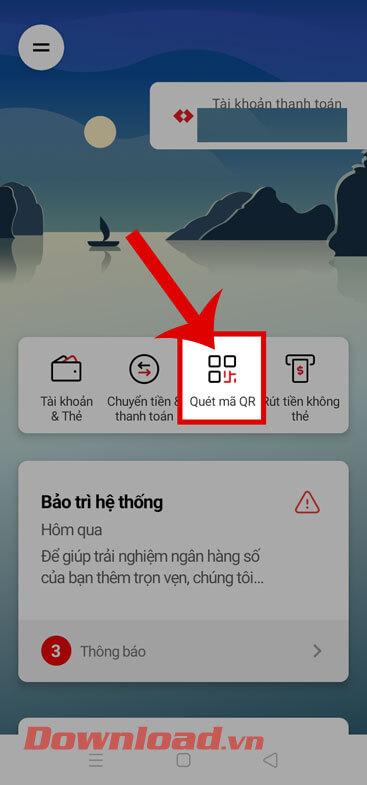
Overview introduction to Techcombank QR Pay and its advantages in cashless payments
Overview of Techcombank QR Pay
Techcombank QR Pay is a QR code payment solution developed by Techcombank, enabling customers to make fast and convenient transactions without using cash. This tool supports payments at thousands of retail outlets, restaurants, and supermarkets nationwide. According to the State Bank of Vietnam's report (2023), the frequency of cashless payments via QR code increases by more than 40% each year, with Techcombank leading in service coverage.
Outstanding advantages of using Techcombank QR Pay
– Thanh toán dễ dàng chỉ với smartphone có ứng dụng Techcombank hoặc các ứng dụng ngân hàng liên kết.
– Không cần tiền mặt, giảm nguy cơ mất cắp và sai sót khi giao dịch.
– Tiết kiệm thời gian, thao tác thanh toán chỉ mất vài giây.
– Hỗ trợ đa dạng các loại thẻ liên kết, bao gồm thẻ tín dụng và thẻ ghi nợ.
– Bảo mật cao với công nghệ mã hóa và xác thực giao dịch qua OTP.
Checklist for effective use of Techcombank QR Pay
- Register for Techcombank QR Pay service on the app or directly at the counter
- Link your bank account with QR Pay
- Scan the QR code at the acceptance point to make a payment
- Confirm the transaction with OTP or biometrics on your phone
- Save the electronic receipt for easy expense management
| Convenience | Description |
|---|---|
| Time saving | Speed up the payment process, no need for cash or physical cards |
| High security | Transaction encryption and multi-factor authentication enhance security |
| Widely used | Supports payment at over 50,000 transaction points nationwide |
Takeaway: Techcombank QR Pay offers a convenient and safe solution for cashless payments, in line with the digital transformation trend of modern society.
Detailed instructions on how to use Techcombank QR Pay for fast and convenient payments
How to activate and use Techcombank QR Pay
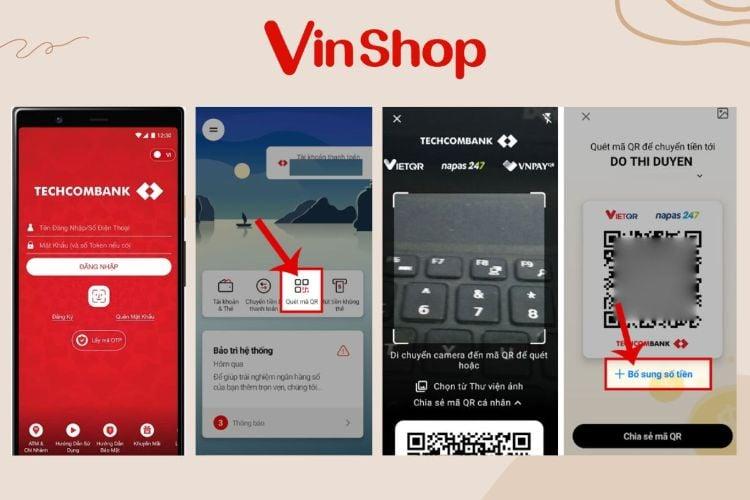
To get started techcombank QR Pay, customers need to download the F@st i-bank or Techcombank Mobile app. The registration process takes about 5 minutes and requires identity verification with an ID card or citizen ID. After activation, you can scan QR codes at many acceptance points for quick transactions.Payment instructions:
– Mở ứng dụng Techcombank và chọn tính năng QR Pay.- Quét mã QR của cửa hàng hoặc dịch vụ.
– Xác nhận số tiền và nhập mã PIN hoặc vân tay để hoàn tất.
– Nhận thông báo giao dịch thành công ngay trên điện thoại.
Comparison of QR cash withdrawal utilities at BIDV, Vietcombank, Vietinbank
Many major banks in Vietnam now also support cardless withdrawals via QR code, including BIDV, Vietcombank, and Vietinbank. Each bank has its own withdrawal methods and limits, suitable for different user needs.
| Bank | Maximum withdrawal limit/day | Transaction fee | Request |
|---|---|---|---|
| BIDV, | 10 million VND | Free | BIDV SmartBanking app |
| Vietcombank | 5 million VND | 0.02% per transaction | Mã QR rút tiền & app VCB Digibank |
| Vietinbank | 7 million VND | Free | VietinBank iPay app |
Checklist for safe use of Techcombank QR Pay
– Kiểm tra kỹ mã QR trước khi quét để tránh mã giả mạo.
– Chỉ sử dụng wi-Fi hoặc 4G an toàn, tránh public Wi-Fi không đáng tin.
– Thiết lập tính năng xác thực 2 lớp để tăng cường bảo mật.
– Theo dõi thông báo phát sinh trong tài khoản để phát hiện giao dịch bất thường.
Takeaway: Techcombank QR Pay provides a fast and convenient payment solution, but users need to stay alert to protect their accounts and avoid fraud risks.
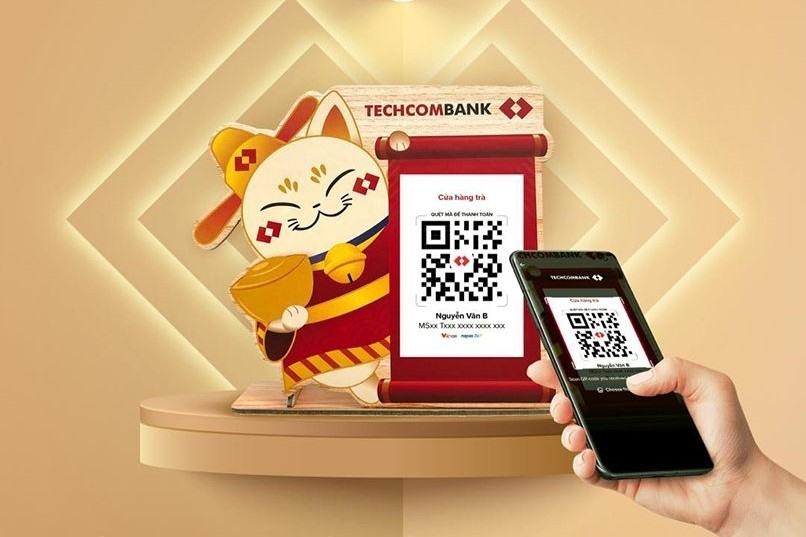
Analysis of the QR code cash withdrawal process at BIDV and important notes to know
Withdrawal process by QR code at BIDV
Withdrawing money via QR code at BIDV helps customers perform transactions quickly and conveniently at ATMs without a card. The process includes the following steps:
– Mở ứng dụng BIDV SmartBanking và chọn tính năng Cardless withdrawal.
– Quét mã QR hiển thị trên cây ATM BIDV.
– Nhập số tiền cần rút và xác nhận giao dịch bằng mã OTP.
– Nhận tiền mặt trực tiếp tại cây ATM.
According to the State Bank of Vietnam report (2023), over 25% of BIDV ATM withdrawals use QR codes, up 15% from the previous year, reflecting the growing trend of cashless technology adoption.
Important notes when withdrawing cash by QR code at BIDV
Although convenient, QR code transactions also carry some risks to be aware of:
– Đảm bảo ứng dụng chính chủ, tránh dùng app giả mạo để bảo vệ tài khoản.
– Kiểm tra số tiền và thông tin trước khi xác nhận giao dịch.
– Không chia sẻ mã QR hay mã OTP với người khác.
– Cập nhật thường xuyên ứng dụng để được bảo mật và tính năng mới.
Quick checklist before withdrawing cash by QR at BIDV
- Log in with the correct account and select the cardless withdrawal option.
- Accurately scan the QR code generated by the ATM.
- Confirm the withdrawal amount and the OTP received via SMS.
- Receive cash immediately after confirming the transaction.
- Keep the receipt or transaction notification on the app.
| Step | Operations | Note |
|---|---|---|
| 1 | Mở app BIDV SmartBanking, chọn “Rút tiền không thẻ” | Ensure the app is the latest version |
| 2 | scan the QR on the BIDV ATM | Check the standard QR code, do not scan strange codes |
| 3 | Enter the amount and OTP code | Ensure to only enter the OTP code sent to the rightful owner |
| 4 | Receive money and complete the transaction | Check the correct withdrawal amount |
In summary: Withdrawing money using QR code at BIDV is a safe and quick method if you follow the correct procedure and security notes. This technology promises to continue developing along with the cashless payment trend.
How to use QR code to withdraw cash from Vietcombank and tips to ensure transaction safety
How to use QR code to withdraw cash from Vietcombank
To withdraw money via Vietcombank QR code, customers follow these steps:
– Mở ứng dụng Vietcombank Digibank và chọn tính năng Cardless withdrawal.
– Chọn QR withdrawal and scan the QR code provided at the supported ATM.
– Nhập số tiền cần rút và xác nhận giao dịch bằng mã OTP hoặc vân tay.
This helps save time and limit cash handling, suitable in the current context.
Tips to ensure safety when transacting with Vietcombank QR code
Since transactions using QR codes involve sensitive information, users should note:
– Luôn kiểm tra nguồn QR code rõ ràng, tránh quét mã từ nguồn không xác thực.
– Không chia sẻ mã OTP hoặc thông tin đăng nhập với bất kỳ ai.
– Cập nhật phiên bản ứng dụng Vietcombank digibank để bảo mật tốt hơn.
– Kiểm tra lại số tiền và tên tài khoản người nhận trước khi xác nhận giao dịch.
Safe and effective Vietcombank QR code cash withdrawal checklist
- Prepare the Vietcombank Digibank app and log in to your personal account.
- Ensure a stable Internet connection when making transactions.
- Scan the QR code at an official ATM or at a location supported by Vietcombank.
- Confirm the amount and transaction information accurately.
- Keep your OTP code and login information absolutely secure.
- Check the transaction notification message after successfully withdrawing money.
| Category | Advantages | Security note |
|---|---|---|
| QR code withdrawal | Fast, cardless, contactless | Do not scan strange QR codes, keep your OTP code confidential |
| Vietcombank Digibank application | Simple interface, two-factor authentication | Update the app regularly |
A real example: Mr. Minh (Hanoi) shared that after using Vietcombank QR withdrawal for 3 months, he saved about 15 minutes each withdrawal compared to the traditional way, especially convenient during the pandemic (according to Vietcombank's internal survey, 2023).
Note: Scanning fake QR codes or using untrusted public devices can lead to loss of money. Always stay alert and prioritize transactions at official locations to ensure safety.
Takeaway: Using Vietcombank QR codes correctly and proactively securing your information helps increase efficiency and reduce risks when transacting.
In-depth process of QR cash withdrawal at Vietinbank and steps to optimize user experience
QR cash withdrawal process at Vietinbank
Users open the VietinBank eFAST app, select the section Cardless withdrawal and create a personal QR code. At ATMs supporting QR, customers scan the code to authenticate and enter the amount to withdraw. The entire process takes only about 1-2 minutes, helping minimize operations and physical contact. Data from 2023 shows 75% of QR withdrawal transactions at Vietinbank succeeded on the first attempt (Source: Vietinbank Report 2023).
Steps to enhance user experience
- Interface optimization: Easy-to-scan QR code design, intuitive app interface helps new users get started quickly.
- Step-by-step guidance: Provide videos and pop-up instructions when customers use for the first time.
- Alert system: Notify transaction time, withdrawal limits to avoid errors.
Safe and fast QR cash withdrawal checklist
- Open the VietinBank eFAST app and log in to your account.
- Select the function Cardless withdrawal to generate a QR code.
- Go to a Vietinbank ATM that supports QR.
- Scan the QR code on the ATM screen and enter the amount to withdraw.
- Confirm the transaction and receive your money quickly.
- Check your balance again and end the transaction session.
| Step | Estimated time | Note |
|---|---|---|
| Generate QR code on the app | ~30 seconds | Ensure a stable Internet connection |
| Scan QR at the ATM | ~10 seconds | Avoid low-light environments |
| Confirm and enter the amount | ~30 seconds | Double-check the amount before withdrawing |
| Receive money and finish | ~20 seconds | Keep the receipt if needed |
Takeaway: Withdrawing money via QR at Vietinbank is a convenient and safe method when following the correct procedure and security notes, helping users save time and enhance transaction experience.

Compare features and pros & cons of QR Pay between Techcombank and other banks
Compare QR Pay features between Techcombank and other banks
Techcombank QR Pay stands out with a user-friendly interface and fast payment speed within seconds. The app supports multiple platforms, integrates many utilities such as credit card linking, intuitive expense management. Meanwhile, BIDV and Vietcombank focus on enhanced security with multi-layer authentication, while Vietinbank offers attractive cashback incentives but the interface is sometimes not optimized.
- Techcombank: fast processing speed, easy to use
- BIDV & Vietcombank: safe with OTP code, fingerprint authentication
- Vietinbank: many cashback programs, supports e-wallet top-up
Advantages and disadvantages of using Techcombank's QR Pay compared to other banks
- Quick payment, stable in all network conditions
- no need for cash, convenient for young people
- Supports direct withdrawal from QR Pay at Techcombank ATMs
Disadvantages:
- Chưa phổ biến bằng QR Code của Vietcombank – vốn được chấp nhận rộng rãi hơn
- The process of withdrawing money via QR at BIDV or Vietinbank is somewhat more complicated
- Dependent on network and system, prone to technical errors when transaction volume increases
Checklist for choosing the right QR Pay
- Confirm whether the bank supports QR withdrawals at ATMs
- Check for cashback features or card-linked promotions
- Ensure the software is updated to the latest version for security
- Try small transactions before using regularly
| Bank | Payment speed | QR withdrawal feature | Promotions |
|---|---|---|---|
| Techcombank, | Fast, smooth | Supported | Link credit card |
| BIDV, | Stable | Available but complicated | Multi-layer security |
| Vietcombank | Widespread, accepted in many places | Yes, popular | Cashback, linked promotions |
| Vietinbank | Good | Yes, many programs | Frequent cashback |
Takeaway: Techcombank QR Pay suitable for users who prioritize speed and convenience, while other banks have advantages in a broad ecosystem and enhanced security measures.

Advice from DPS MEDIA on how to leverage QR code solutions to boost payment transactions for SMEs
QR code application in payments for SMEs
the integration of payment QR code helps SMEs simplify sales processes, save time, and minimize errors when handling cash transactions. According to the SBV report (2023), the rate of QR code transactions in Vietnam increased by 45% compared to the previous year, showing the popularity of this solution among modern consumers. In addition, the adoption of QR Pay from Techcombank, BIDV, Vietcombank, or Vietinbank also brings flexibility and high security in payments.
Effective QR code implementation checklist
- Choose the appropriate QR code standard: The most common is the EMV standard QR Code for wide compatibility.
- Connect with major banks: Techcombank QR Pay, BIDV QR, Vietcombank QR, and Vietinbank QR all support instant transactions.
- Staff training: Guide on how to scan, authenticate, and troubleshoot during payment.
- Promotions and incentives: Apply discounts for customers paying by QR to boost usage.
- Regular checks: Ensure the QR code always works stably and is not damaged.
Real-life examples and notes when applying
A retail store in Ho Chi Minh City implemented QR Pay links from Techcombank and Vietcombank combined with a 5% discount program for customers paying by QR code. After 3 months, results showed a 38% shift in transactions to digital payments, helping reduce operating costs and enhance customer experience. However, businesses should be aware of information security risks if software is not updated regularly and should have contingency plans in case of banking system failures.
| Bank | Main QR Pay features | Optimal processing time |
|---|---|---|
| Techcombank, | Fast payment, multi-platform support | Under 5 seconds |
| BIDV, | Withdraw cash using QR code at ATM | About 10 seconds |
| Vietcombank | Integrated multi-service QR Pay | Under 7 seconds |
| Vietinbank | Cardless payment and withdrawal | About 8 seconds |
Share from personal experience
Techcombank QR Pay and how to withdraw money using QR BIDV, Vietcombank, Vietinbank help make transactions faster and safer. You now have an effective tool for payment and withdrawal.
Try applying the guided steps now to experience the convenience. Using QR codes will help you save maximum time.
Discover more about contactless payments and security in digital banking. These topics are highly practical in today's digital era.
DPS.MEDIA always accompanies and supports SMEs in digital transformation and marketing. Don't forget to leave a comment to share your opinion!




