
Are you looking for a professional Shopee advertising service to optimize your sales? Before deciding, take some time to explore the significant changes in the new interface of Shopee Ads. With these updates, creating and managing your advertising campaigns will become easier and more effective than ever.
Why should you run ads on Shopee?
Before learning about the new changes in Shopee's advertising interface, let's review the great benefits that advertising brings:
- For sellers: Shopee Ads is a powerful tool that helps sellers increase customer reach, thereby boosting sales and profits. With advertising, your products will be displayed in prominent positions, attracting the attention of a large number of users. At the same time, detailed data analysis tools will help you optimize campaigns and make more effective business decisions.
- For buyers: Shopee Ads brings a more convenient and enjoyable shopping experience for users. Thanks to advertising, you can easily discover products that suit your needs and preferences. Product information is displayed clearly, helping you make quick and accurate purchasing decisions.
Important updates to the Shopee Ads interface
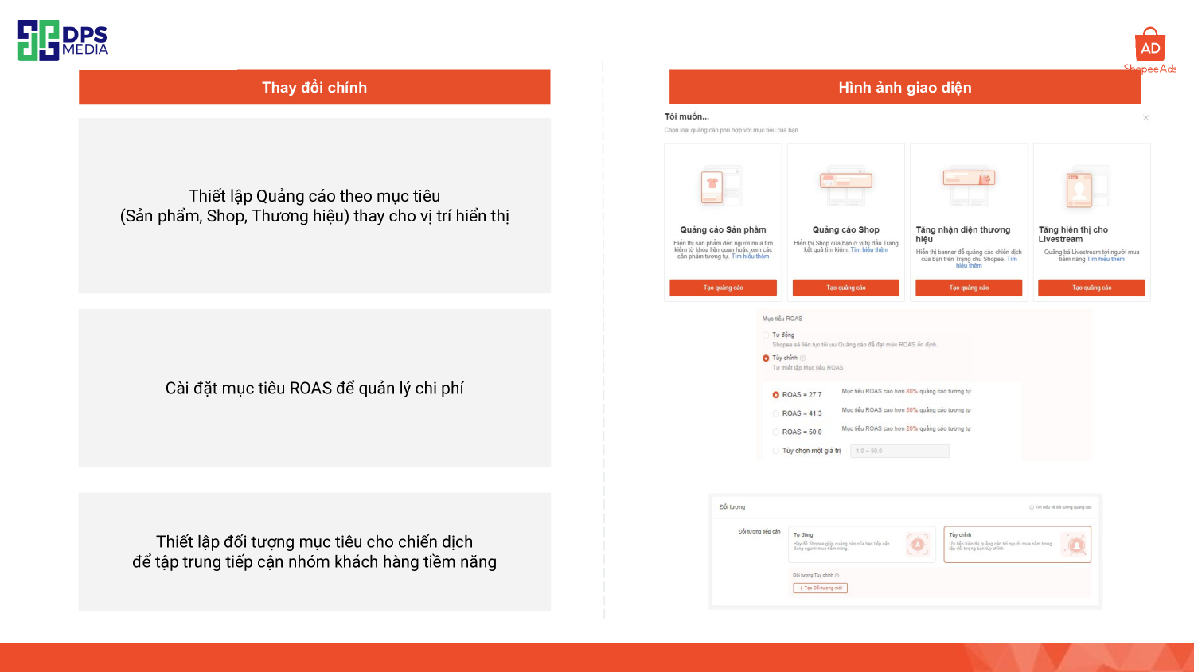
New Product Ads Structure
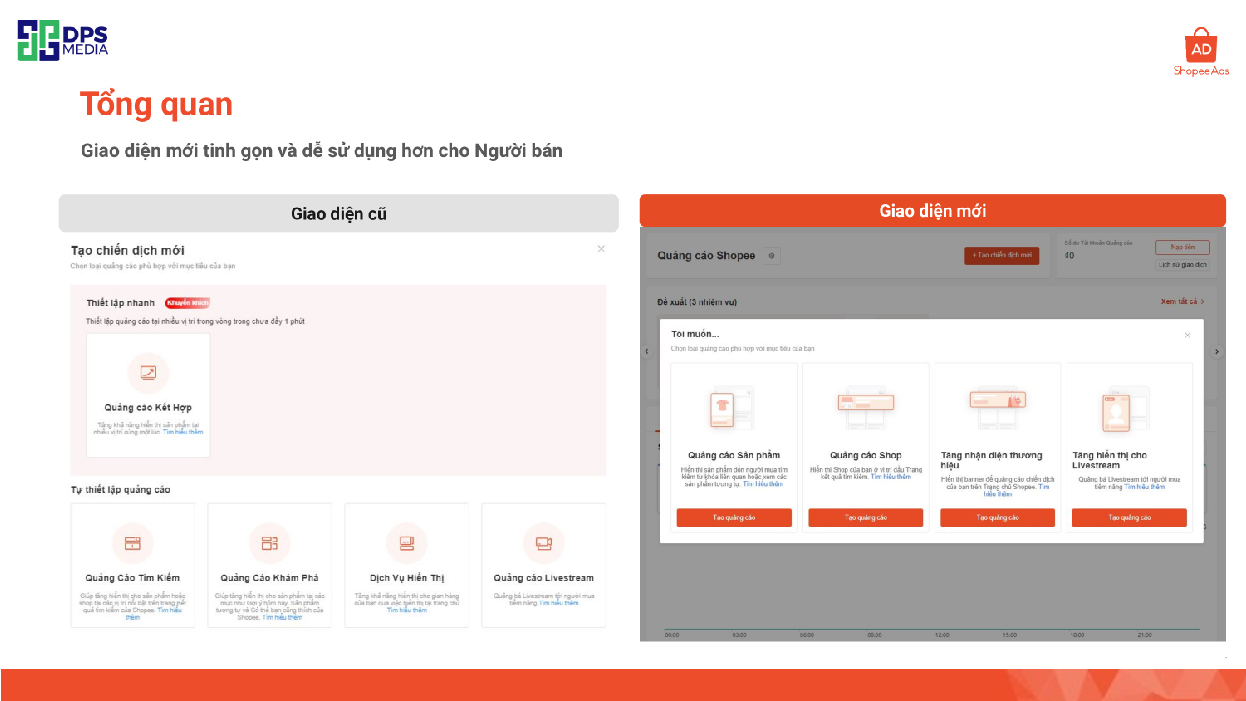
Shopee has just rolled out a new update in the product advertising structure. This will help classify and display ads more effectively. Now, Product Search Ads and Shop Search Ads are clearly separated in terms of display positions, allowing advertisers to reach their target customers more optimally. With this change, sellers can choose between two specific types of ads, based on their needs and strategies. This separation helps ads not only reach potential customers more accurately but also increases the ability to generate better revenue by focusing precisely on customer needs.
Enhance effective ad management
Shopee has made an important improvement in ad management to help sellers optimize their campaign effectiveness. Specifically, this update improves buyer targeting and ROAS (Return On Ad Spend) targeting, making it easier for sellers to manage and allocate ads based on performance. The buyer targeting improvement helps sellers adjust ads for specific customer groups. As for ROAS targeting, Shopee enables sellers to focus on cost optimization, ensuring every dollar spent on advertising brings value.
Simplify Ad Budget configuration settings
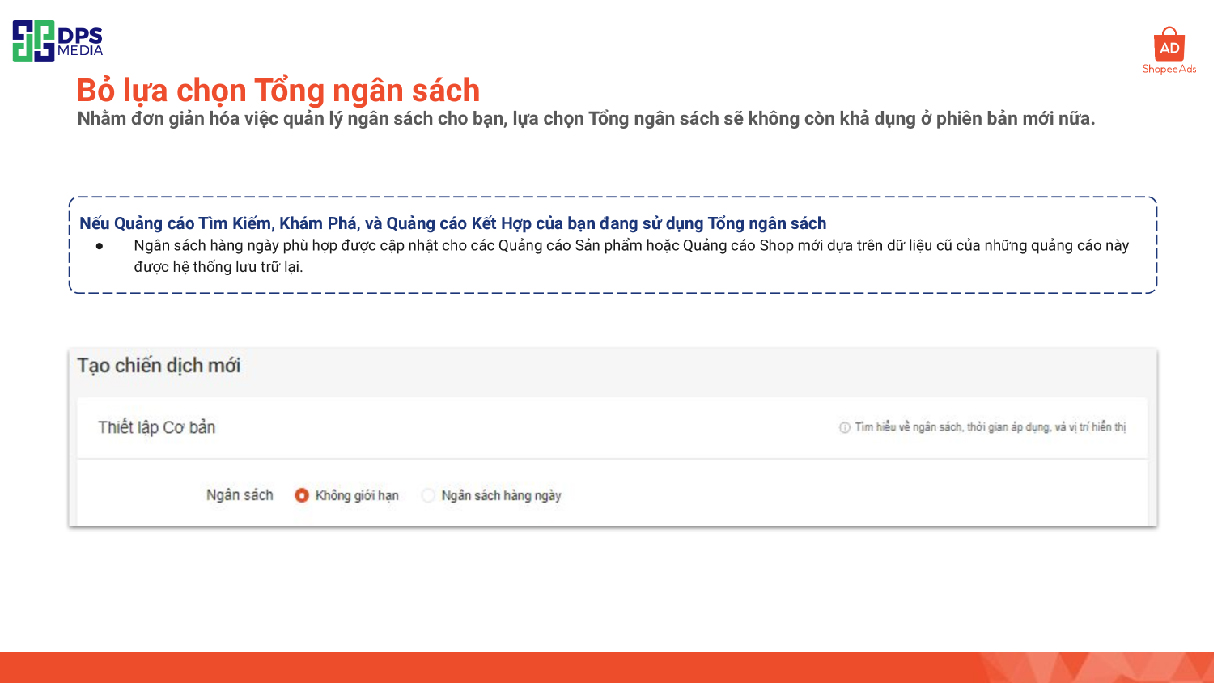
Shopee also focuses on optimizing the ad budget setup process to help sellers more easily control advertising costs. Instead of having to set up many complicated budget types, Shopee now reduces it to just two main types: Daily Budget and Unlimited Budget. This helps sellers be more flexible in managing advertising costs without worrying about overspending or lacking budget for ad campaigns.
ROAS metric will be displayed directly on the Ads Overview page
The next update helps advertisers easily track and evaluate their ad performance through the ROAS metric displayed right on the ad dashboard. The ROAS metric is an important measure to know the success level of advertising campaigns, so sellers can make decisions to adjust campaigns for better effectiveness. Having ROAS right on the dashboard helps sellers closely monitor ad performance, allowing flexible budget or strategy adjustments when needed, without having to dive deep into complex reports.
Permanently delete your ad with the Delete function
A new feature added by Shopee is the ability to permanently delete ads from the ad dashboard. This new feature allows sellers to be more proactive in organizing their campaigns neatly, removing ads that are no longer relevant or necessary. With the permanent delete feature, sellers don't have to worry about managing a long list of unnecessary ads, thereby optimizing the experience and saving time on effective ad management.
Create all Ads on one page
To help sellers save time and enhance their experience, Shopee has combined ad settings into a single page. Previously, to create different ad campaigns, sellers had to move back and forth between different pages. With this new update, all Search and Discovery ads can be set up on the same page. This consolidation helps sellers easily adjust and manage campaigns, minimizing operation time, thereby improving the overall experience and allowing sellers to focus on more important factors in their advertising strategy.
What are the benefits of the upgraded Shopee Ads interface?
Superior visual and intuitive experience
With this upgrade, your advertising campaigns will become more vibrant and engaging than ever before. Product images will be displayed clearly and attractively, helping to capture users' attention at first glance. Additionally, it also increases brand recognition and creates a lasting impression in customers' minds.
Set clear and effective ROI goals
One of the highlights of this upgrade is the ROI (Return on Investment) goal-setting feature. Thanks to this, you can set specific measurement indicators and closely monitor the effectiveness of each advertising campaign. This helps you optimize your budget, avoid waste, and achieve your business goals efficiently.
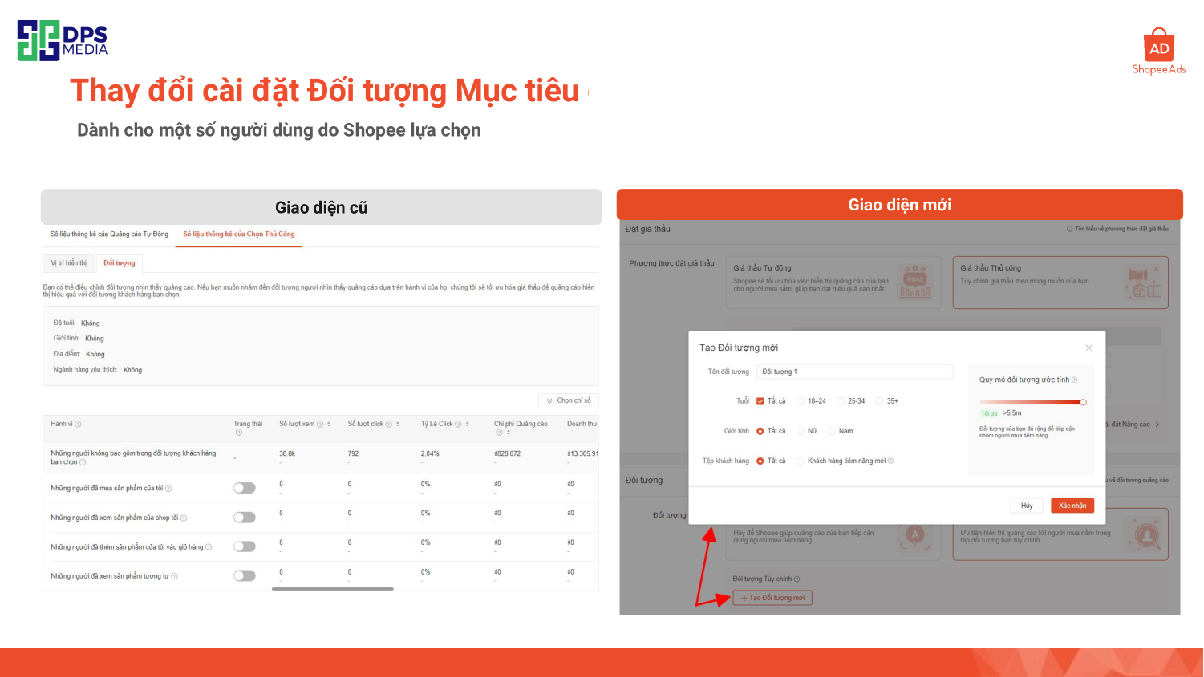
Optimize target audience
With more precise targeting capabilities, you can reach potential customers with a high conversion rate. The system will help you analyze shopping behavior and preferences of each customer group to deliver the most suitable ads. As a result, you can increase conversion rates and reduce advertising costs.
Create ads easily and quickly
Creating and managing advertising campaigns has become simpler than ever. The intuitive, user-friendly interface helps you easily set parameters, choose images, and ad content. You don't need to be a marketing expert to create effective ads.
Increase traffic to your shop and products
Thanks to improvements in display and targeting capabilities, ads Shopee will help you increase traffic to your store and products. This not only boosts sales but also enhances brand recognition on the Shopee platform.
Changes to the two most popular Shopee ad types in the new interface
Shop Ads on Shopee
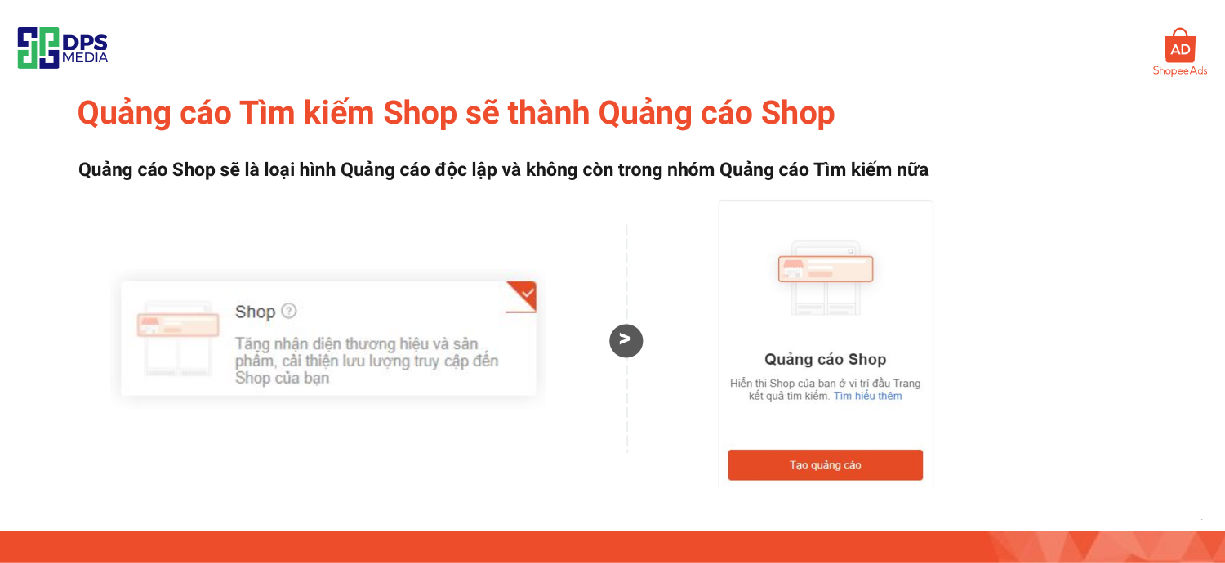
Shop Search Ads will become Shop Ads
Shopee is making a major change to its advertising system. Specifically, Shop Search Ads will be merged and become a completely new, independent type of ad called Shop Ads. This means from now on, you will no longer find Shop Search Ads in the ad category. Instead, all previous features and benefits of Shop Search Ads will be integrated into Shop Ads.
What's new in Shop Ads?
With this change, Shop Ads will bring more benefits to sellers. First, Shop Ads will be displayed in more locations, not just limited to search results pages but also appearing on the Shopee Farm page, increasing customer reach to your store. On the other hand, the management interface of Shop Ads is also designed to be more intuitive and user-friendly, making it easier for you to set up and monitor campaign effectiveness. Finally, a highlight of Shop Ads is that you can set a profit goal (ROAS) for your campaign, helping you optimize ad costs and achieve the best business results.
Distinguish new Shop Ads from the old ad type
| New version of Shop Ads | Current version of Shop Ads | Main differences | ||
| Shop Ads | Shop Search Ads | Shop Ads and Shop Search Ads | ||
| Basic Setup | Basic Setup | |||
| Budget | Unlimited, Daily Budget | Budget | Unlimited, Daily Budget, Total Budget | No more Total Budget (ads using Total Budget will be converted to Daily Budget based on the amount the system deems appropriate) |
| Time | Unlimited, Set start/end date | Application period | Unlimited, Set start date/ end date | Application Time will be renamed to Time |
| Ad Mode (Automatic Mode) | Bidding strategy | Ad Mode will be Bidding Strategy | ||
| Preview advertising | – | Automatic Bidding | Allow Shopee to select and set bids for keywords | Previous Automatic Mode The ROAS target setting feature in Automatic Bidding is now available |
| Ad Mode (Manual Mode) | Manual Bidding | Keyword | Previous Manual Mode | |
| Ad Name | ROAS Target (For whitelisted sellers) ROAS Target (For certain users only) | Target audience | Custom Target Audience Not Supported | |
| Automatic Ads | – | – | ||
| Nội dung quảng Ad | Edit Image and Slogan for Shop Search Ads | Custom Audience | Age, Gender, Buyer Profile, Premium Tier | – |
| Ad Content Setup | – | |||
| Keyword Setup | Select Keywords Manually | Default | – | Previously in Your Ad Preview |
| Customize | Edit Image and Slogan for Ads Shop Search | Previously Ad Content in Manual Mode | ||
Product Ads on Shopee
Introducing Product Ads
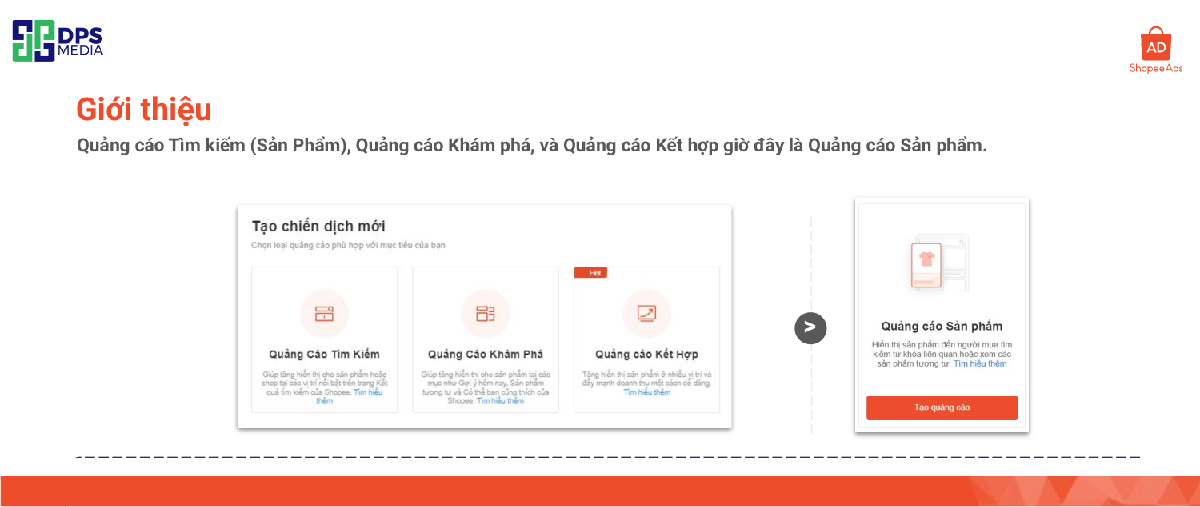
Shopee has consolidated previous ad formats such as Product Search Ads, Discovery Ads, and Combined Ads into a single format, which is Product Ads. This consolidation makes creating and managing ad campaigns simpler and more efficient. Now, you can focus on promoting your products across various positions on Shopee with just one ad format. This not only helps you save time but also makes it easier to track and manage the effectiveness of your ad campaigns.
Benefits that Product Ads bring
Product Ads bring significant benefits to sellers on Shopee. Instead of creating multiple different ads for each display position, you only need one Product Ad. This helps you save time and effort in setting up and managing ad campaigns. Moreover, managing campaign effectiveness becomes easier when you can track all key metrics in one place. This allows you to make optimal decisions to increase sales efficiency and achieve your business goals.
Distinguishing new Product Ads from the old type of ads
| New Ad Type | Old Ad Types | ||||||
| Product Ads | Product Search Ads | Discovery Ads | Combined Ads | ||||
| Basic Setup | Basic Setup | Automatic Ads | Automatic Mode | ||||
| Budget | Unlimited | Daily Budget | Budget | Unlimited | Budget Daily | Total Budget | Advertising Automatic | Toggle Button | Budget | Unlimited | Budget Daily | Total Budget |
| Time | Unlimited | Set Start Date / End Date | Application Period | Unlimited | Set Start Date / End Date | Basic Setup | |||
| Display Position | All | Search | Discovery | Budget | Unlimited | Budget Daily | Total Budget | ||||
| Select Product | Product Setup | Application Period | Unlimited | Set Start Date / End Date | ||||
| Automation | – | Select products products | Select up to 50 products | Application Period | Unlimited | Set Start Date / End Date | ||
| Manual | Select up to 50 products | ||||||
| Bidding method | Set up Keywords | Select products products | Select up to 50 products | Manual Mode | |||
| Automatic Bid | Set ROAS target (for some sellers selected by Shopee) | Select automatic | (For eligible sellers only) Set a ROAS Target | ||||
| Manual Bid | Manually select keywords and set bids for each keyword – Cài đặt nâng cao: quản lý vị trí Khám Phá và tính Competitive Bid feature | Advanced setup | Select plan | – | |||
| Advertising audience | Select manual | Select keywords | Audience | Age, Gender, Preferred industries, Behavior | |||
| Automation | – | Products | Select up to 50 products | ||||
| Customize | Define Age, Gender, Buyer type and Insurance fee Rank your custom audience | Enhanced bid | Toggle Button | Setup for display position | Premium level | ||
| Creative Optimization feature (only for Shopee Mall sellers) | |||||||
Commitment
Shopee continuously improves its advertising system to bring higher efficiency to sellers. Recent updates, from separating ad types, simplifying budget configuration, to integrating performance metrics directly on the user interface, all aim to help sellers manage campaigns more easily and effectively. These changes not only save sellers time but also optimize costs, enhancing the ability to attract and convert customers.
DPS.MEDIA – Agency Marketing cung cấp dịch vụ chạy quảng cáo Shopee tối ưu với chi phí tối thiểu
If you are looking for a professional partner to optimize your Shopee advertising campaign, DPS.MEDIA is the perfect choice. We are committed to providing effective Shopee ad services at minimal cost. This way, you can achieve your business goals while saving budget.
The team of experts at DPS.MEDIA will support you from A to Z, from building your store, listing products, designing attractive banners, order buffing From product listings to setting up attractive promotional programs for your shop on Shopee. We also focus on budget optimization and monitor ad performance to ensure the highest revenue. Contact DPS.MEDIA now to comprehensively boost your sales on Shopee!