

Image Optimizer: The Best Free Image Compression, Resize & WebP Conversion Tool 2025
Are you struggling with a slow-loading website? Large image sizes are causing customers to leave before they even see your content? Image Optimizer is the “All-in-one” solution to thoroughly solve this problem for you.
Not only does it reduce file size, our tool also offers resizing capabilities, conversion to the modern WebP format, and absolute data security for your files.
Why Should You Use Image Optimizer Today?
Image optimization is the most important step to speed up page load (Page Speed) and improve SEO rankings on Google. With Image Optimizer, you can reduce up to 80% of image size while the naked eye can hardly tell any difference in quality.
1. Smart Image Compression – Quality Control at Your Fingertips
Unlike other “rigid” automatic image compression tools, Image Optimizer gives you full control:
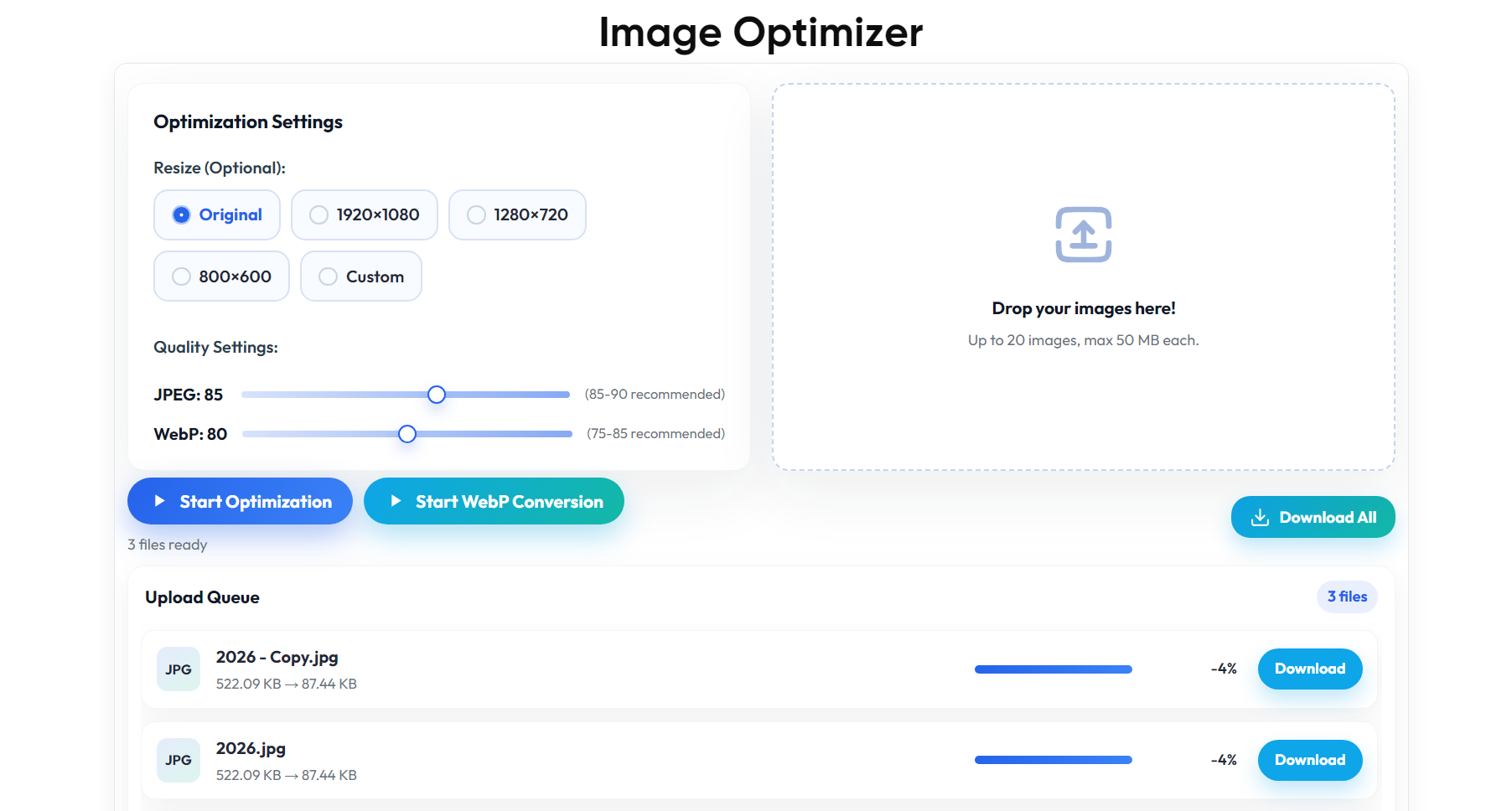
- Quality Control Sliders (NEW): You can drag the slider to adjust quality from 70-95% for JPEG/WebP and see the results instantly (Realtime).
- Superior compression performance:
- PNG: Reduce image size by 70-80%.
- JPEG: Reduce image size flexibly by 30-50%.
- WebP: Smaller than JPEG by another 30%.
2. WebP Conversion – The Image Format of the Future
Google highly favors websites that use the WebP image format. Our tool comes with integrated Convert JPG/PNG to WebP automatically. You don't need to install complex software, just upload and get a lighter, faster-loading image file.
3. Diverse & Customizable Resize
No need to open Photoshop to resize images. We provide standard presets for the Web:
- Full HD (1920×1080)
- HD (1280×720)
- Web Standard (800×600)
- Custom: Enter your desired size (maintain aspect ratio).
Comparison: Image Optimizer vs. TinyPNG
Why pay a monthly fee when you can use a more powerful tool completely free? Here is a real comparison table:
| Feature | TinyPNG | Image Optimizer (Ours) |
| Cost | ₫25,000 – ₫150,000/month | FREE FOR LIFE |
| Adjust quality | ❌ (Automatic) | ✅ (Custom slider) |
| Resize image | ❌ | ✅ (Presets & Custom available) |
| Privacy | ❌ (Uploaded to their server) | ✅ (100% private, deleted immediately) |
| Embed mode | ❌ | ✅ (Embed into your website) |
Fast & Convenient Processing Workflow
The Image Optimizer interface is designed in a Modern UI style with modern Gradients, supporting Drag & Drop extremely smooth.
- Batch Upload: Supports parallel processing up to 20 images/time with a maximum size of 50MB/file.
- Visual Tracking: Progress bar displays realtime progress, letting you know exactly the original size, size after compression, and % saved.
- Smart Download (Improved):
- Download individual images or download all via ZIP file.
- The ZIP file name is automatically generated with a Timestamp (for example:
optimized-images_2025...zip) ensures that file names never duplicate old ones.
Security & Privacy Commitment (100% Privacy)
We understand your data is a valuable asset.
- Self-hosted: Data is processed internally, no information is sent outside.
- Auto Cleanup: The system automatically deletes temporary files as soon as you close the browser or after processing is complete. User images are not stored on the server.
Quick User Guide
- Step 1: Access the Image Optimizer tool.
- Step 2: In the Optimization Settings, section, select Resize mode (if needed) and adjust the Quality slider (JPEG/WebP) as desired.
- Step 3: Drag and drop your images into the “Drop your images here” box or click to upload.
- Step 4: Wait for the system to process in a flash and click Download All to download the optimized ZIP file.
SEO Tip: Use the WebP conversion feature combined with resizing to Full HD size to achieve the highest Google PageSpeed Insights score for your website.



