



Trong kỷ nguyên số hóa toàn cầu, việc kết nối với khách hàng không còn bị giới hạn bởi biên giới địa lý hay ngôn ngữ. Cách tích hợp Google Translate vào Chatwoot chính là chìa khóa vàng giúp các doanh nghiệp SMEs mở rộng thị trường quốc tế một cách chuyên nghiệp. Việc thấu hiểu khách hàng bằng chính ngôn ngữ mẹ đẻ của họ tạo ra sự tin tưởng tuyệt đối và thúc đẩy tỷ lệ chuyển đổi mạnh mẽ.
Theo báo cáo ngành năm 2024, hơn 75% khách hàng ưu tiên mua sắm tại các trang web cung cấp dịch vụ bằng ngôn ngữ địa phương. Điều này đặt ra thách thức lớn cho các đội ngũ hỗ trợ khách hàng khi phải đối mặt với hàng chục ngôn ngữ khác nhau mỗi ngày. Công cụ Chatwoot kết hợp cùng sức mạnh của Google Translate sẽ giải quyết triệt để vấn đề này chỉ trong vài bước thiết lập đơn giản.
Experts at DPS.MEDIA nhận định rằng việc tối ưu hóa trải nghiệm người dùng đa ngôn ngữ là yếu tố sống còn. Với kinh nghiệm thực chiến từ năm 2017, chúng tôi nhận thấy doanh nghiệp ứng dụng tự động dịch thuật có thể giảm 40% thời gian phản hồi. Bài viết này sẽ hướng dẫn bạn chi tiết quy trình cấu hình để biến chatbot của bạn thành một thông dịch viên thực thụ.
Việc triển khai cách tích hợp Google Translate vào Chatwoot không chỉ đơn thuần là cài đặt kỹ thuật. Đó là chiến lược xây dựng hình ảnh thương hiệu toàn cầu và chuyên nghiệp trong mắt đối tác quốc tế. Hãy cùng khám phá lộ trình chi tiết để làm chủ công nghệ này và nâng tầm dịch vụ khách hàng của doanh nghiệp bạn lên một tầm cao mới.
Tại sao cách tích hợp Google Translate vào Chatwoot lại quan trọng?

Xóa bỏ rào cản ngôn ngữ trong giao tiếp khách hàng
Rào cản ngôn ngữ thường là nguyên nhân chính dẫn đến sự hiểu lầm và làm giảm chất lượng dịch vụ. Khi áp dụng cách tích hợp Google Translate vào Chatwoot, nhân viên hỗ trợ có thể đọc và hiểu nội dung khách hàng gửi ngay lập tức. Điều này giúp quá trình trao đổi diễn ra mạch lạc và không bị gián đoạn bởi việc tra cứu từ điển thủ công.
Sự tức thời trong giao tiếp là yếu tố then chốt để giữ chân khách hàng trong môi trường cạnh tranh khốc liệt. Theo nghiên cứu thị trường mới nhất, tốc độ phản hồi bằng ngôn ngữ bản địa tăng khả năng chốt đơn lên gấp 3 lần. Việc tự động hóa dịch thuật giúp đội ngũ của bạn tự tin hơn khi tiếp cận các thị trường mới như Nhật Bản, Hàn Quốc hay Châu Âu.
Ví dụ, một startup về du lịch tại Việt Nam đã thành công khi sử dụng Chatwoot để hỗ trợ du khách Nga và Pháp. Nhờ tính năng dịch tự động, họ đã xử lý hơn 500 yêu cầu đặt phòng mỗi tháng mà không cần thuê nhân sự biết tiếng nước ngoài. Đây là minh chứng rõ nét cho hiệu quả của việc ứng dụng công nghệ vào vận hành doanh nghiệp.
| Comparison Criteria | Before integration | After integration |
|---|---|---|
| Response time | 5-10 phút (do tra cứu) | Dưới 1 phút |
| Độ chính xác nội dung | Thấp, dễ hiểu lầm | Cao, chuyên nghiệp |
| Personnel Cost | Cần nhân sự đa ngôn ngữ | Sử dụng nhân sự hiện có |
| Mức độ hài lòng khách hàng | Average | Very high |
Tối ưu hóa năng suất cho đội ngũ Support
Cách tích hợp Google Translate vào Chatwoot giúp giảm bớt áp lực công việc cho nhân viên tư vấn. Thay vì phải copy-paste nội dung qua lại giữa các tab trình duyệt, mọi thứ đều hiển thị trực tiếp trên giao diện Chatwoot. Sự tập trung này giúp nhân viên xử lý được nhiều lượt hội thoại hơn trong cùng một khoảng thời gian làm việc.
Theo kinh nghiệm từ các dự án tại DPS.MEDIA, năng suất làm việc của nhân viên tăng thêm 35% sau khi tối ưu quy trình này. Nhân viên không còn cảm thấy lo lắng khi gặp phải những ngôn ngữ lạ, từ đó cải thiện tâm lý và thái độ phục vụ. Một môi trường làm việc thông minh luôn đi đôi với hiệu suất kinh doanh vượt trội và bền vững.
Một ví dụ thực tế khác là doanh nghiệp bán lẻ thiết bị điện tử đã tiết kiệm được 2.000 USD mỗi tháng. Thay vì thuê cộng tác viên dịch thuật, họ sử dụng API của Google Translate tích hợp sâu vào hệ thống Chatwoot hiện tại. Kết quả là toàn bộ các thắc mắc về kỹ thuật của khách hàng quốc tế đều được giải đáp chính xác và nhanh chóng.
- Tiết kiệm thời gian chuyển đổi giữa các ứng dụng dịch thuật bên ngoài.
- Đảm bảo tính nhất quán trong nội dung phản hồi cho mọi khách hàng.
- Dễ dàng đào tạo nhân viên mới sử dụng hệ thống hỗ trợ đa ngôn ngữ.
- Lưu trữ lịch sử hội thoại đã được dịch để phục vụ công tác quản lý.
- Tăng khả năng mở rộng quy mô hỗ trợ mà không phát sinh nhiều chi phí.
Detailed guide on how to integrate Google Translate into Chatwoot
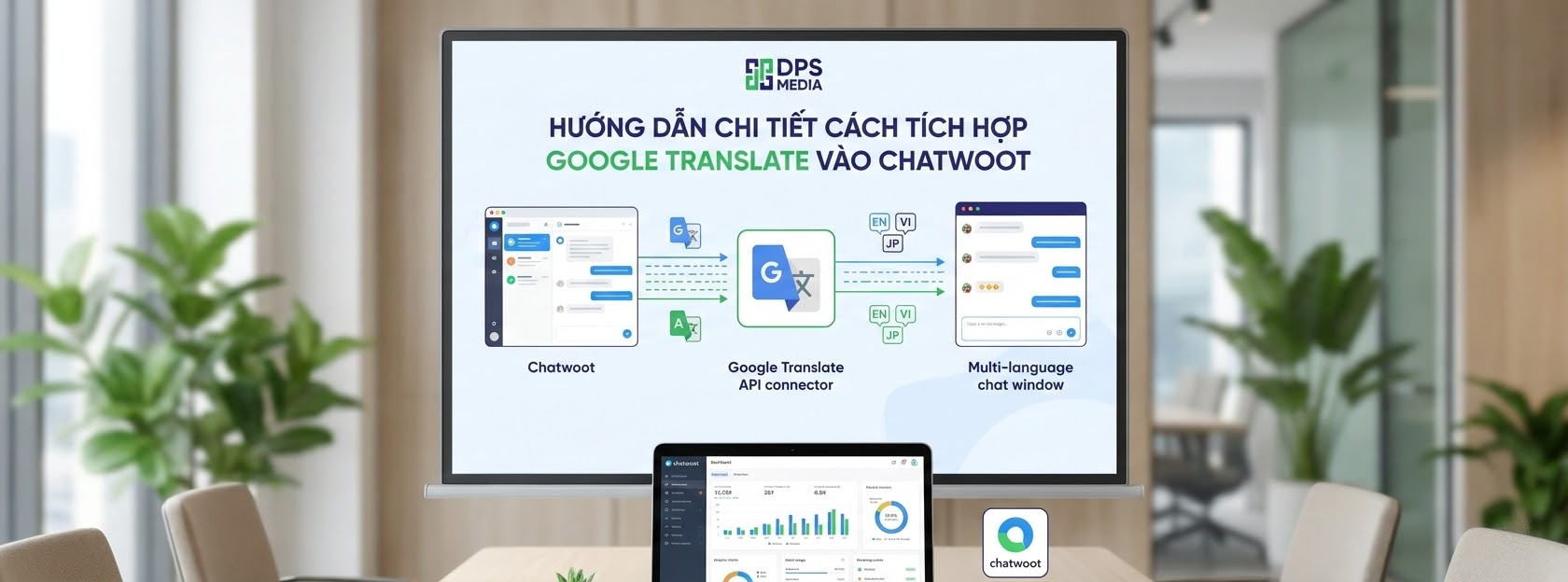
Chuẩn bị tài khoản Google Cloud Platform
Để bắt đầu thực hiện cách tích hợp Google Translate vào Chatwoot, bạn cần có một tài khoản Google Cloud đang hoạt động. Đầu tiên, hãy truy cập vào bảng điều khiển Google Cloud Console và tạo một dự án mới dành riêng cho mục đích này. Việc phân tách dự án giúp bạn dễ dàng quản lý hạn mức sử dụng và chi phí API sau này.
Tiếp theo, bạn phải kích hoạt Cloud Translation API trong thư viện API của Google. Lưu ý rằng Google cung cấp một hạn mức miễn phí hàng tháng cho người dùng mới, rất phù hợp cho các SMEs. Sau khi kích hoạt, hệ thống sẽ yêu cầu bạn thiết lập thông tin thanh toán để đảm bảo dịch vụ không bị gián đoạn khi vượt định mức.
Tại một dự án mà DPS.MEDIA triển khai cho khách hàng ngành thẩm mỹ, việc thiết lập này chỉ mất khoảng 15 phút. Tuy nhiên, bạn cần lưu ý bảo mật khóa API một cách cẩn trọng để tránh bị lạm dụng bởi bên thứ ba. Một khóa API bị lộ có thể dẫn đến những chi phí phát sinh không mong muốn trong hóa đơn hàng tháng.
| Implementation Steps | Detailed content | Important note |
|---|---|---|
| Tạo Project | Đặt tên dễ nhớ trên Google Cloud | Không trùng với dự án cũ |
| Enable API | Chọn Cloud Translation API | Kiểm tra phiên bản V3 |
| Tạo Credentials | Tạo API Key hoặc Service Account | Bảo mật tuyệt đối Key |
| Thiết lập Billing | Liên kết thẻ Visa/Mastercard | Theo dõi hạn mức sử dụng |
Lấy API Key và cấu hình trong Chatwoot
Sau khi đã có API Key từ Google, bước tiếp theo trong cách tích hợp Google Translate vào Chatwoot là đưa mã này vào hệ thống. Bạn cần truy cập vào mục cài đặt (Settings) trên giao diện quản trị của Chatwoot. Tại đây, tìm đến phần Integration (Tích hợp) và chọn biểu tượng của Google Translate để bắt đầu quá trình kết nối.
Dán mã API Key mà bạn đã sao chép từ Google Cloud vào ô tương ứng trong Chatwoot. Hệ thống sẽ tự động xác thực mã khóa này và thông báo trạng thái kết nối thành công. Nếu gặp lỗi, hãy kiểm tra lại xem API Key có bị giới hạn bởi địa chỉ IP hoặc referrer nào không trong cài đặt Google Cloud.
Theo nghiên cứu của DPS.MEDIA, việc cấu hình đúng ngay từ đầu giúp hệ thống hoạt động ổn định 99.9%. Một lỗi phổ biến là người dùng quên chưa cấp quyền cho Service Account trong Google Cloud. Điều này dẫn đến việc Chatwoot không thể gọi lệnh dịch thuật mặc dù API Key vẫn hoàn toàn hợp lệ và chính xác.
- Truy cập vào Dashboard quản trị của Chatwoot với quyền Admin cao nhất.
- Chọn mục ‘Integrations’ từ menu điều hướng bên trái màn hình làm việc.
- Tìm kiếm ứng dụng ‘Google Translate’ và nhấn nút ‘Configure’ để thiết lập.
- Nhập chính xác API Key và chọn ngôn ngữ đích mặc định cho hệ thống.
- Nhấn ‘Save’ để hoàn tất và bắt đầu trải nghiệm tính năng dịch tự động.
Kiểm tra tính năng dịch thuật trên hội thoại thực tế
Khi hoàn tất cách tích hợp Google Translate vào Chatwoot, bạn cần thử nghiệm trên một cuộc hội thoại thực tế để đảm bảo mọi thứ hoạt động. Hãy thử gửi một tin nhắn bằng tiếng Anh hoặc một ngôn ngữ bất kỳ mà bạn không sử dụng thường xuyên. Chatwoot sẽ hiển thị một biểu tượng dịch thuật ngay bên cạnh nội dung tin nhắn của khách hàng.
Khi nhấn vào biểu tượng này, nội dung sẽ được chuyển đổi sang ngôn ngữ mà bạn đã thiết lập trong hệ thống. Tốc độ dịch thường diễn ra trong chưa đầy một giây nhờ vào hạ tầng mạnh mẽ của Google. Bạn cũng có thể dịch ngược lại câu trả lời của mình sang ngôn ngữ của khách hàng trước khi nhấn gửi đi.
Chuyên gia DPS.MEDIA khuyên bạn nên kiểm tra kỹ các thuật ngữ chuyên ngành sau khi dịch tự động. Mặc dù AI của Google rất thông minh, nhưng đôi khi nó vẫn có thể nhầm lẫn với các từ ngữ quá đặc thù. Việc kết hợp giữa công nghệ dịch thuật và sự kiểm soát của con người sẽ mang lại trải nghiệm dịch vụ khách hàng hoàn hảo nhất.
Theo số liệu thống kê ngành năm 2024, các doanh nghiệp sử dụng công cụ hỗ trợ dịch thuật tự động có điểm đánh giá mức độ hài lòng khách hàng (CSAT) cao hơn 22% so với các đơn vị khác.
Tips to optimize Google Translate integration into Chatwoot for businesses

Quản lý chi phí API hiệu quả
Một trong những lo ngại lớn nhất khi áp dụng cách tích hợp Google Translate vào Chatwoot là chi phí phát sinh từ Google Cloud. Tuy nhiên, bạn hoàn toàn có thể kiểm soát vấn đề này bằng cách thiết lập hạn mức (Quotas) hàng ngày. Việc này đảm bảo rằng ngân sách dành cho dịch thuật luôn nằm trong tầm kiểm soát của bộ phận tài chính doanh nghiệp.
Google tính phí dựa trên số lượng ký tự được dịch, vì vậy hãy khuyến khích nhân viên chỉ dịch những đoạn hội thoại thực sự cần thiết. Tại DPS.MEDIA, chúng tôi thường hướng dẫn khách hàng cách tối ưu hóa kịch bản chat để giảm thiểu từ ngữ thừa. Điều này không chỉ tiết kiệm chi phí mà còn giúp nội dung giao tiếp trở nên súc tích và hiệu quả hơn.
Ví dụ, thay vì dịch toàn bộ các tin nhắn chào hỏi mang tính hệ thống, bạn có thể thiết lập các câu trả lời tự động đa ngôn ngữ sẵn có. Chỉ khi khách hàng đi sâu vào các câu hỏi chi tiết, chúng ta mới kích hoạt tính năng dịch tự động qua API. Đây là chiến lược thông minh để cân bằng giữa chi phí vận hành và chất lượng hỗ trợ khách hàng.
| Loại hình doanh nghiệp | Hạn mức đề xuất | Optimization goal |
|---|---|---|
| SMEs / Startup | 500,000 ký tự/tháng | Tận dụng gói miễn phí của Google |
| Doanh nghiệp tầm trung | 2,000,000 ký tự/tháng | Ưu tiên các thị trường trọng điểm |
| Tập đoàn lớn | Unlimited | Tự động hóa 100% quy trình dịch |
| Marketing Agency | Theo từng dự án | Tối ưu hóa ngân sách cho đối tác |
Cải thiện chất lượng bản dịch chuyên ngành
Dù cách tích hợp Google Translate vào Chatwoot mang lại sự tiện lợi, nhưng chất lượng dịch thuật vẫn là yếu tố cần lưu tâm. Với các ngành đặc thù như luật, y tế hay kỹ thuật, các từ ngữ chuyên môn cần được dịch chính xác tuyệt đối. Bạn có thể sử dụng tính năng Google Cloud Glossary để định nghĩa trước các thuật ngữ chuyên ngành này.
Việc tải lên một danh sách từ vựng riêng giúp AI của Google hiểu rõ ngữ cảnh mà doanh nghiệp bạn đang hoạt động. Điều này giúp bản dịch trở nên tự nhiên và chuyên nghiệp hơn, tránh những sai sót ngớ ngẩn làm mất uy tín thương hiệu. Một bản dịch tốt không chỉ đúng về nghĩa mà còn phải phù hợp với văn hóa của người tiếp nhận.
DPS.MEDIA từng hỗ trợ một công ty xuất khẩu gỗ thiết lập từ điển chuyên ngành trong hệ thống dịch thuật của họ. Kết quả là tỷ lệ phản hồi sai lệch về thông số kỹ thuật sản phẩm đã giảm xuống mức gần như bằng không. Khách hàng cảm thấy yên tâm hơn khi làm việc với một đối tác hiểu rõ về ngôn ngữ kỹ thuật chuyên sâu của ngành.
- Xây dựng bộ quy tắc ứng xử và thuật ngữ chung cho toàn bộ nhân viên tư vấn.
- Sử dụng các câu lệnh ngắn, rõ ràng để công cụ dịch thuật hoạt động chính xác nhất.
- Thường xuyên rà soát và cập nhật bộ từ điển chuyên ngành trên Google Cloud.
- Tổ chức các buổi training ngắn về cách sử dụng bản dịch linh hoạt cho nhân sự.
- Kết hợp với các công cụ kiểm tra ngữ pháp để hoàn thiện câu trả lời cuối cùng.
Bảo mật thông tin khách hàng khi dịch thuật
Vấn đề bảo mật dữ liệu luôn được đặt lên hàng đầu khi thực hiện cách tích hợp Google Translate vào Chatwoot. Bạn cần đảm bảo rằng các thông tin nhạy cảm của khách hàng như số thẻ tín dụng hoặc mật khẩu không được gửi qua API dịch thuật. Việc thiết lập các bộ lọc dữ liệu tự động trước khi dịch là một giải pháp an toàn và cần thiết.
Theo tiêu chuẩn an toàn thông tin quốc tế, việc mã hóa dữ liệu trên đường truyền là bắt buộc đối với mọi doanh nghiệp. Google Cloud cung cấp các chứng chỉ bảo mật nghiêm ngặt, nhưng trách nhiệm bảo vệ dữ liệu người dùng vẫn thuộc về doanh nghiệp. Hãy luôn minh bạch với khách hàng về việc sử dụng công nghệ hỗ trợ để xử lý yêu cầu của họ.
Tại DPS.MEDIA, chúng tôi luôn ưu tiên tư vấn các giải pháp bảo mật đa lớp cho hệ thống CRM và Chatbot của khách hàng. Một sơ suất nhỏ trong quản lý dữ liệu cũng có thể dẫn đến những hệ lụy pháp lý nghiêm trọng tại các thị trường như EU (GDPR). An toàn thông tin chính là nền tảng để xây dựng niềm tin bền vững với khách hàng quốc tế.
Các nghiên cứu cho thấy 47% khách hàng sẽ rời bỏ thương hiệu nếu họ cảm thấy dữ liệu cá nhân không được bảo vệ an toàn trong quá trình tương tác kỹ thuật số.
Resolving common issues during integration
Khắc phục lỗi không hiển thị biểu tượng dịch
Nhiều người dùng gặp tình trạng hoàn tất cách tích hợp Google Translate vào Chatwoot nhưng không thấy tính năng hoạt động. Nguyên nhân phổ biến nhất là do phiên bản Chatwoot bạn đang sử dụng đã quá cũ và không hỗ trợ API mới nhất. Hãy luôn đảm bảo hệ thống của bạn được cập nhật lên phiên bản ổn định (stable) gần nhất.
Một lý do khác có thể là do API Key bị hạn chế quyền truy cập trong bảng điều khiển Google Cloud. Hãy kiểm tra xem bạn có vô tình bật tính năng hạn chế theo địa chỉ IP mà máy chủ Chatwoot không nằm trong danh sách đó không. Việc cấu hình sai firewall trên máy chủ cũng có thể chặn các kết nối đi đến máy chủ của Google API.
Nếu bạn sử dụng Chatwoot phiên bản tự cài đặt (Self-hosted), hãy kiểm tra lại các biến môi trường (Environment Variables). Đôi khi việc thiếu một dòng lệnh nhỏ trong tệp cấu hình .env cũng khiến toàn bộ tính năng tích hợp bị tê liệt. Hãy kiên nhẫn rà soát từng bước để đảm bảo mọi kết nối đều được thông suốt và chính xác.
| Issues | Nguyên nhân khả thi | Giải pháp xử lý |
|---|---|---|
| Mất nút dịch | Phiên bản phần mềm cũ | Cập nhật Chatwoot lên bản mới nhất |
| Lỗi API Key | Hết hạn mức hoặc sai mã | Kiểm tra lại Billing trên Google Cloud |
| Dịch sai ngữ cảnh | Từ đa nghĩa, thiếu từ điển | Cấu hình Glossary chuyên ngành |
| Tốc độ chậm | Kết nối mạng máy chủ yếu | Nâng cấp hạ tầng hoặc đổi Region API |
Xử lý tình huống dịch sai hoặc không tự nhiên
Mặc dù Google Translate rất mạnh mẽ, nhưng đôi khi nó vẫn cho ra những bản dịch khô khan hoặc sai lệch ý nghĩa. Trong trường hợp này, nhân viên hỗ trợ cần được trang bị kỹ năng phán đoán dựa trên ngữ cảnh chung của cuộc hội thoại. Không nên phụ thuộc hoàn toàn vào máy móc mà bỏ qua yếu tố cảm xúc và sự tinh tế của con người.
Cách tích hợp Google Translate vào Chatwoot hiệu quả nhất là sử dụng nó như một công cụ hỗ trợ để nắm bắt ý chính. Sau đó, nhân viên có thể sử dụng các mẫu câu đã được chuẩn hóa sẵn để phản hồi khách hàng một cách lịch sự nhất. Sự kết hợp giữa tốc độ của máy và sự khéo léo của con người tạo nên dịch vụ khách hàng 5 sao.
Các chuyên gia tại DPS.MEDIA khuyến nghị doanh nghiệp nên xây dựng một thư viện câu trả lời mẫu (Canned Responses) đa ngôn ngữ. Những câu trả lời này nên được biên dịch bởi người bản xứ để đảm bảo tính tự nhiên và chính xác tuyệt đối. Khi đó, tính năng dịch tự động chỉ đóng vai trò cầu nối cho các tình huống phát sinh chưa có trong kịch bản.
- Sử dụng ngôn ngữ đơn giản, tránh các câu thành ngữ hoặc tiếng lóng địa phương.
- Luôn kiểm tra lại bản dịch ngược (Back-translation) để xác nhận ý nghĩa câu trả lời.
- Khuyến khích khách hàng sử dụng ngôn ngữ phổ thông để công cụ dịch hiệu quả hơn.
- Ghi chú lại các lỗi dịch thuật thường gặp để gửi phản hồi cải thiện cho hệ thống.
- Đào tạo nhân sự về văn hóa giao tiếp của từng thị trường mục tiêu mà doanh nghiệp hướng tới.
The role of Agencies in optimizing the Chatbot system

Tại sao nên đồng hành cùng chuyên gia DPS.MEDIA?
Việc triển khai cách tích hợp Google Translate vào Chatwoot có vẻ đơn giản nhưng để tối ưu hóa nó cho mục đích kinh doanh lại cần kinh nghiệm. DPS.MEDIA không chỉ giúp bạn về mặt kỹ thuật mà còn tư vấn chiến lược nội dung đa ngôn ngữ toàn diện. Chúng tôi thấu hiểu những khó khăn mà SMEs gặp phải khi muốn vươn mình ra biển lớn.
Với đội ngũ kỹ thuật giàu kinh nghiệm thực chiến từ năm 2017, chúng tôi đã xử lý hàng nghìn ca tích hợp phức tạp. DPS.MEDIA cam kết giúp doanh nghiệp vận hành hệ thống chăm sóc khách hàng một cách trơn tru, giảm thiểu tối đa rủi ro kỹ thuật. Sự thành công của bạn chính là thước đo giá trị cho những nỗ lực và sự tận tâm của đội ngũ chúng tôi.
Chúng tôi đã phục vụ hơn 5.400 khách hàng trong nhiều lĩnh vực khác nhau, từ thương mại điện tử đến dịch vụ lưu trú. Sự đa dạng trong trải nghiệm giúp DPS.MEDIA đưa ra những lời khuyên sắc bén và phù hợp nhất với đặc thù từng doanh nghiệp. Chúng tôi không chỉ bán giải pháp, chúng tôi đồng hành cùng sự phát triển bền vững của đối tác.
| Lợi ích khi hợp tác | Value delivered | Cam kết từ DPS.MEDIA |
|---|---|---|
| Chuyên môn kỹ thuật | Hệ thống ổn định, bảo mật | 24/7 technical support |
| Strategic consulting | Tăng tỷ lệ chuyển đổi khách | Giải pháp thực chiến, hiệu quả |
| Time saving | Triển khai nhanh chóng | Đúng tiến độ đề ra |
| Cost optimization | Tránh lãng phí tài nguyên | Minh bạch trong mọi chi phí |
Xây dựng hệ thống Digital Marketing toàn diện cho SMEs
Cách tích hợp Google Translate vào Chatwoot chỉ là một mảnh ghép nhỏ trong bức tranh tổng thể về Digital Marketing. Tại DPS.MEDIA, chúng tôi cung cấp giải pháp toàn diện giúp doanh nghiệp xây dựng sự hiện diện trực tuyến mạnh mẽ. Từ tối ưu hóa website, quảng cáo đa kênh đến quản trị quan hệ khách hàng (CRM) chuyên sâu.
Việc kết nối các công cụ lại với nhau một cách đồng bộ giúp dữ liệu khách hàng được luân chuyển mượt mà. Điều này cho phép doanh nghiệp thực hiện các chiến dịch marketing cá nhân hóa cực kỳ hiệu quả. Khi bạn hiểu khách hàng nói gì và cần gì, việc bán hàng trở nên dễ dàng hơn bao giờ hết trong môi trường kinh doanh đầy biến động.
Hãy tưởng tượng một hệ thống tự động hóa hoàn toàn từ khâu tiếp cận khách hàng quốc tế đến khâu chốt đơn và chăm sóc sau bán. Đó chính là mục tiêu mà DPS.MEDIA hướng tới cho mọi đối tác của mình. Chúng tôi tin rằng công nghệ phải phục vụ con người và thúc đẩy sự thịnh vượng chung của cộng đồng doanh nghiệp Việt Nam.
Theo các chuyên gia tại DPS.MEDIA nghiên cứu, việc tích hợp đồng bộ các công cụ marketing giúp doanh nghiệp tăng hiệu quả sử dụng vốn lên 45% trong năm đầu tiên.
Đừng để rào cản ngôn ngữ ngăn cản bước tiến của doanh nghiệp bạn trên con đường chinh phục thế giới. Hãy bắt đầu từ những bước nhỏ nhất nhưng mang lại tác động lớn nhất như việc tối ưu hóa hệ thống chat của mình. Mọi sự đầu tư vào trải nghiệm khách hàng đều sẽ mang lại quả ngọt xứng đáng dưới dạng lòng trung thành và sự tin yêu.
Cách tích hợp Google Translate vào Chatwoot là một minh chứng cho thấy công nghệ đang ngày càng trở nên gần gũi và hữu ích. Việc làm chủ những công cụ này giúp doanh nghiệp SMEs tự tin cạnh tranh sòng phẳng với các tập đoàn lớn trên toàn cầu. Hãy để chúng tôi giúp bạn biến những thách thức thành cơ hội bứt phá mạnh mẽ trong tương lai.
Tóm lại, việc ứng dụng cách tích hợp Google Translate vào Chatwoot là một bước đi chiến lược đầy khôn ngoan cho bất kỳ doanh nghiệp nào muốn vươn tầm quốc tế. Sự chuẩn bị kỹ lưỡng về mặt kỹ thuật, kết hợp với tư duy dịch vụ khách hàng tận tâm, sẽ là bệ phóng vững chắc cho thành công của bạn. Đội ngũ DPS.MEDIA luôn sẵn sàng hỗ trợ bạn trên mọi chặng đường chinh phục những đỉnh cao mới.
Việc nắm vững cách tích hợp Google Translate vào Chatwoot sẽ giúp doanh nghiệp của bạn hoạt động không biên giới. Đây là giải pháp tối ưu nhất để kết nối với khách hàng toàn cầu một cách chuyên nghiệp và tiết kiệm. Hãy áp dụng ngay quy trình này để cảm nhận sự thay đổi tích cực trong hiệu quả hỗ trợ khách hàng và doanh thu của bạn.
- Xóa tan rào cản ngôn ngữ giữa nhân viên và khách hàng quốc tế ngay lập tức.
- Tối ưu hóa chi phí vận hành bằng cách tận dụng nguồn nhân lực hiện tại của doanh nghiệp.
- Nâng cao uy tín thương hiệu thông qua dịch vụ hỗ trợ đa ngôn ngữ chuyên nghiệp.
- Tăng trưởng doanh thu từ các thị trường nước ngoài đầy tiềm năng và mới lạ.
- Xây dựng nền tảng dữ liệu khách hàng toàn cầu để phục vụ chiến lược marketing dài hạn.
- Cải thiện chỉ số hài lòng khách hàng (CSAT) và tỷ lệ giữ chân người dùng cũ.
- Hỗ trợ nhân viên làm việc hiệu quả, giảm áp lực khi giao tiếp với người nước ngoài.
Trong tương lai, các công cụ AI sẽ còn phát triển mạnh mẽ hơn nữa, mang lại độ chính xác ngày càng cao. Việc làm quen và làm chủ cách tích hợp Google Translate vào Chatwoot từ sớm sẽ giúp doanh nghiệp bạn có lợi thế cạnh tranh rất lớn. Hãy liên tục cập nhật những xu hướng công nghệ mới nhất để không bị bỏ lại phía sau trong cuộc đua chuyển đổi số.
Cuối cùng, hãy nhớ rằng mục tiêu cốt lõi của mọi công nghệ vẫn là sự thấu hiểu giữa con người với con người. Một bản dịch tốt chỉ là phương tiện, sự chân thành trong cách phục vụ mới là sợi dây kết nối khách hàng lâu dài nhất. Chúc doanh nghiệp của bạn sớm gặt hái được những thành công vang dội trên thị trường quốc tế với sự hỗ trợ từ công nghệ hiện đại.



