


By default, OpenLiteSpeed uses the /tmp/lshttpd/swap directory to store temporary files. If your /tmp partition has limited space, the disk may become full, causing errors for the entire VPS.
Below is a summary of the steps to move OpenLiteSpeed's Swapping directory.
Create a new directory for OpenLiteSpeed's Swapping Directory:
Create directory:
[bash]mkdir -p /lswstmp/lshttpd/swap[/bash]
Set permissions:
[bash]chmod 750 /lswstmp/lshttpd[/bash]
[bash]chmod 700 /lswstmp/lshttpd/swap[/bash]
Assign ownership:
[bash]chown -R nobody:nogroup /lswstmp/lshttpd[/bash]
Access the OpenLiteSpeed admin interface:
Address:
[bash]https://your-server-ip:7080/login.php[/bash]
If you don't have an account, reset the password with the command:
[bash]/usr/local/lsws/admin/misc/admpass.sh[/bash]
After logging in, go to the server configuration section:
Server Configuration > General
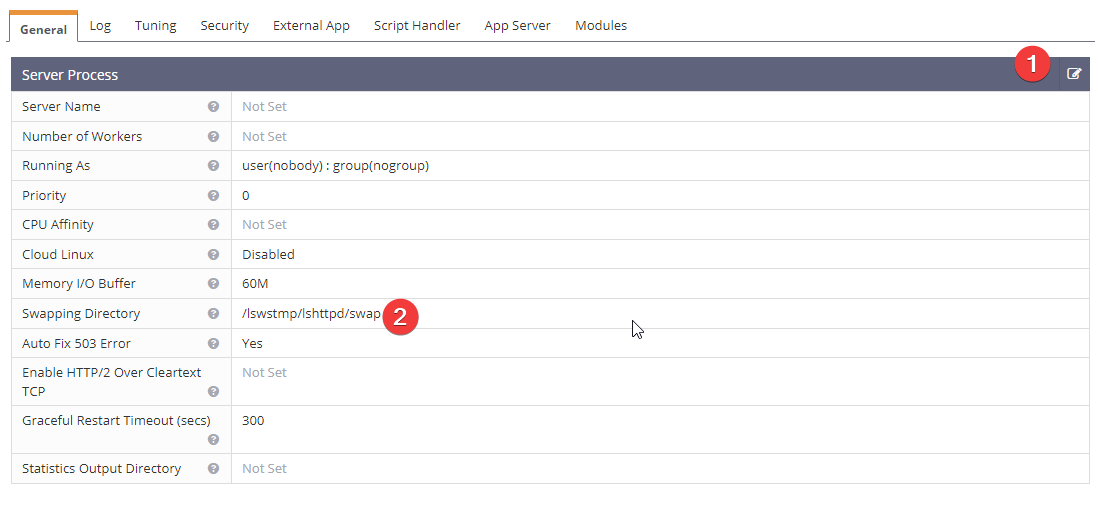
In the section Server Process, change the value of Swapping Directory
From the default value
[bash]/tmp/lshttpd/swap[/bash]
to
[bash]/lswstmp/lshttpd/swap[/bash]
Restart OpenLiteSpeed:
Use the web interface or SSH command:
[bash] systemctl restart lsws[/bash]
These steps help you move OpenLiteSpeed's temporary directory to a partition with more space, avoiding disk full issues due to a small /tmp partition.
If you want to take advantage of RAM to create a temporary (tmp) drive with higher speed, follow these steps:
Create Directory for Ramdisk, Use the command:
[bash]sudo mkdir -p /mnt/ramdisk[/bash]
Mount ramdisk with 1GB size:
[bash]sudo mount -t tmpfs -o size=1G tmpfs /mnt/ramdisk[/bash]
This command creates a temporary ramdisk with a size of 1GB.
Configure Ramdisk to Auto-Mount on Startup:
Add configuration to /etc/fstab so that ramdisk is automatically mounted every time the system starts.
Use the command:
[bash]echo 'tmpfs /mnt/ramdisk tmpfs nodev,nosuid,noexec,nodiratime,size=1G 0 0' | sudo tee -a /etc/fstab[/bash]
This line will be added to the /etc/fstab file, allowing the system to automatically create and mount the ramdisk with the specified options.
Select:
Server Configuration > General
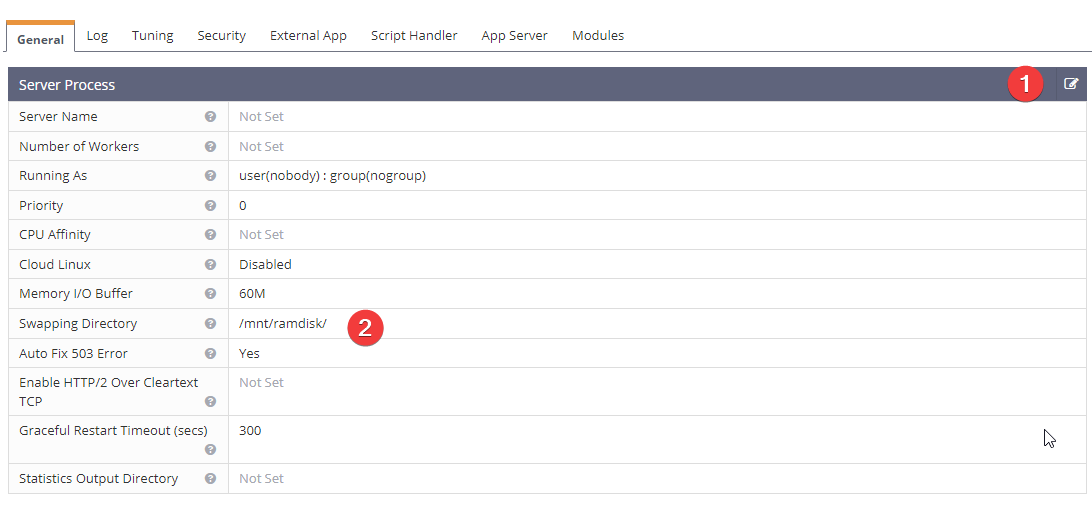
In the section Server Process, change the value of Swapping Directory
From the default value
[bash]/tmp/lshttpd/swap[/bash]
to
[bash]/mnt/ramdisk[/bash]
Restart OpenLiteSpeed:
Use the web interface or SSH command:
[bash] systemctl restart lsws[/bash]
The above steps will help you create a temporary disk on RAM, increasing the speed of temporary data processing due to the high speed of RAM compared to traditional drives. This is especially useful for applications that require fast data processing, such as web services or database applications. However, note that data on RAM will be lost when the system shuts down or restarts, so it should only be used for temporary files.
To add a cronjob to clean up the temporary drive at 3 AM daily, you can follow these steps:
Create a script file (logscleaner.sh) with the following content:
[bash]nano logscleaner.sh[/bash]
If using disk, add the following line:
[bash]find /lswstmp/lshttpd/swap -type f -delete[/bash]
If using RAM, add the following line:
[bash]find /mnt/ramdisk/ -type f -delete[/bash]
Grant execute permission to the script:
[bash]chmod +x logscleaner.sh[/bash]
Try running the script to check:
[bash]sh logscleaner.sh[/bash]
Add a cronjob to crontab:
[bash]crontab -e[/bash]
[bash]0 3 * * * sh /root/logscleaner.sh[/bash]
This script will automatically run at 3 AM daily to clean up temporary files in the temporary disk, helping to minimize disk full issues.




