

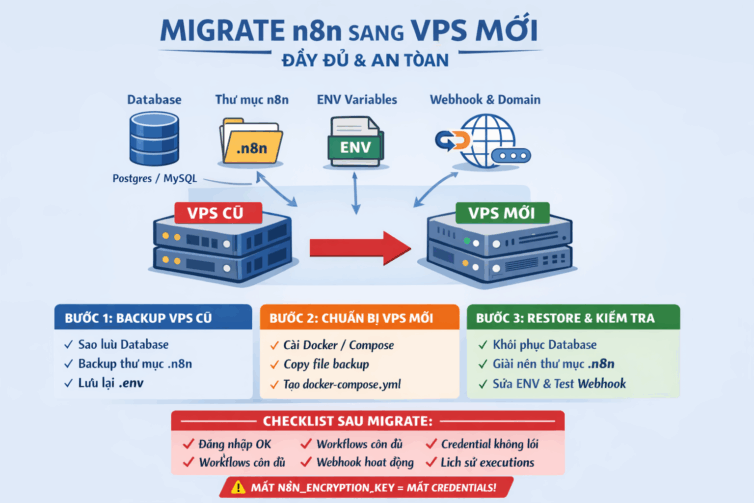

Migrating n8n from old VPS to new VPS sounds simple, but in reality, if you miss a few important steps, you may face serious errors such as losing credentials, webhook not working, or even the entire workflow disappearing.
This article is written based on real-world experience when migrating n8n in a production environment, ensuring the safest and most complete process.
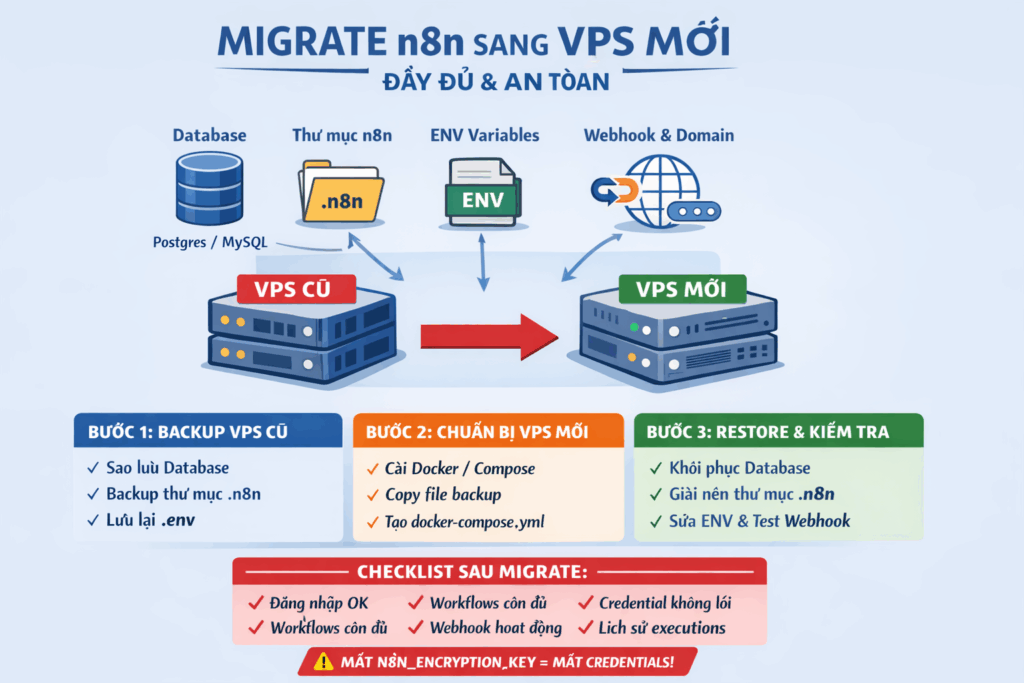
Objective of the migration process
After completing the migration, the new VPS must ensure:
- Normal n8n login
- All workflows remain intact
- Credentials are not faulty (no red color displayed)
- Webhooks and Cron operate stably
- Execution history is preserved
Components to be migrated (VERY IMPORTANT)
A complete n8n stack includes 4 mandatory parts:
1. Database
- PostgreSQL / MySQL / SQLite
2. n8n data directory
- Workflows
- Credentials
- Executions
3. Environment variables
- Especially
N8N_ENCRYPTION_KEY
4. Domain & webhook configuration
Note: Missing even one of these four parts can cause serious errors in the entire system.
Step 1: Prepare on old VPS (Source VPS)
1.1. Check if n8n is running
First, check how n8n is currently running:
bash
docker ps
docker compose ps
Identify the following information:
- Type of database in use
- Where the volume is mounted (
~/.n8nor Docker volume)
1.2. Backup database
With PostgreSQL:
bash
docker exec -t postgres \
  pg_dump -U n8n n8n > n8n.sql
With MySQL:
bash
docker exec -t mysql \
  mysqldump -u n8n -p n8n > n8n.sql
With SQLite:
bash
cp ~/.n8n/database.sqlite n8n.sqlite1.3. Backup n8n data
If using bind mount:
bash
tar -czvf n8n-data.tar.gz ~/.n8nIf using Docker volume:
bash
docker run --rm \
  -v n8n_data:/data \
  -v $(pwd):/backup \
  alpine tar czvf /backup/n8n-data.tar.gz /data
Important notes: This directory contains all encrypted credentials.
1.4. Save environment variables (.env)
File .env must have the following variables:
env
N8N_ENCRYPTION_KEY=
DB_TYPE=
DB_POSTGRESDB_DATABASE=
DB_POSTGRESDB_USER=
DB_POSTGRESDB_PASSWORD=
N8N_HOST=
WEBHOOK_URL=
⚠️ WARNING: Loss N8N_ENCRYPTION_KEY means losing all credentials!
Step 2: Prepare new VPS (Destination VPS)
2.1. Install Docker & Docker Compose
bash
apt update && apt upgrade -y
apt install docker.io docker-compose-plugin -y
systemctl enable docker --now
2.2. Create project directory
bash
mkdir -p /opt/n8n
cd /opt/n8n
Copy the following files into this directory:
docker-compose.yml.env- Backup file (
n8n.sql,n8n-data.tar.gz)
Step 3: Restore data on new VPS
3.1. Restore n8n data
With bind mount:
bash
tar -xzvf n8n-data.tar.gz -C /With Docker volume:
bash
docker volume create n8n_data

docker run --rm \
  -v n8n_data:/data \
  -v $(pwd):/backup \
  alpine tar xzvf /backup/n8n-data.tar.gz -C /
3.2. Restore database
PostgreSQL:
bash
docker compose up -d postgres
docker exec -i postgres \
  psql -U n8n n8n < n8n.sql
MySQL:
bash
docker compose up -d mysql
docker exec -i mysql \
  mysql -u n8n -p n8n < n8n.sql
Step 4: Start n8n
Start n8n:
bash
docker compose up -dMonitor logs to check:
bash
docker compose logs -f n8nWhen you see the following log line, n8n has started successfully:
Editor is now accessible via:Step 5: Fix domain & webhook (THE MOST EASILY FORGOTTEN STEP)
5.1. Update .env file
env
N8N_HOST=n8n.domainmoi.com
N8N_PROTOCOL=https
WEBHOOK_URL=https://n8n.domainmoi.com/
Then restart n8n:
bash
docker compose restart n8n5.2. Test webhook
- Open workflow with webhook
- Click Test URL
- Test by calling with browser or curl
If webhook errors, it is almost certainly due to WEBHOOK_URL not being configured correctly.
Step 6: Post-migration checklist
- ✅ Successfully logged into n8n
- ✅ Workflow is still sufficient
- ✅ Credentials not showing red
- ✅ Webhook works normally
- ✅ Cron workflow runs on schedule
- ✅ Execution history is intact
Common errors when migrating n8n
| Error | Cause | How to handle |
|---|---|---|
| Credentials error | Lost encryption key | Reuse old key |
| Webhook returns 404 | Wrong WEBHOOK_URL | Set correct domain |
| No workflow found | DB not restored yet | Re-import SQL |
| n8n restarts continuously | Wrong DB env | Check again .env |
| OAuth error | Change domain | Re-authorize |
Real-world experience
Always stop n8n before backup:
bash
docker compose stop n8nSome other notes:
- Production environment should use PostgreSQL instead of SQLite
- Save file
.envto password manager to avoid loss - Take VPS snapshot before migrate to be able to rollback if needed
- If using queue mode, remember to migrate Redis as well
Conclusion
Migrating n8n to a new VPS will be completely safe if you ensure all 4 pillars:
- Database – Contains all workflows and executions
- n8n data – Credentials and configuration
- Encryption key – To decrypt credentials
- Webhook – Ensure domain and URL are correct
If you're having trouble during the migration process or need further support, don't hesitate to leave a comment below. Let me know:
- Are you using PostgreSQL or MySQL?
- Single n8n or queue mode?
- Are you using reverse proxy (Nginx / Traefik / Cloudflare)?
I will support and provide specific commands suitable for your stack!




