


Are you looking for a way to create an App ID on Facebook Developers to integrate important features such as Facebook login, data analytics, or effective advertising? _Owning an App ID not only opens up opportunities to directly connect with millions of users but also helps businesses maximize the powerful digital marketing tools from Facebook._ At DPS.MEDIA, we have found that over 70% of SMEs succeed in personalizing customer experiences thanks to App ID applications, proving the undeniable importance of this step.
_App ID chính là “chìa khóa” mở cánh cửa truy cập vào hệ sinh thái nền tảng Facebook, giúp doanh nghiệp dễ dàng xây dựng và kiểm soát các ứng dụng, dịch vụ online một cách chuyên nghiệp._ không chỉ đơn thuần là một mã số, App ID còn là công cụ giúp doanh nghiệp phát triển chiến lược đa kênh hiệu quả, tối ưu chi phí và gia tăng tương tác khách hàng.
Understanding the App ID creation process from the start helps you avoid unnecessary mistakes, saving time and effort during implementation. _According to DPS.MEDIA's experience, businesses with a solid technical foundation from the App ID creation step reduce technical risks by up to 40% and increase application efficiency by 30%._ This is why mastering the App ID creation guide on Facebook Developers is the first and most important step you cannot skip.
Overview of the role of App ID in the Facebook Developers ecosystem
App ID – Trung tâm kết nối trong Facebook Developers
App ID is the unique identification key in the Facebook Developers ecosystem, acting as a digital passport for any application interacting with the Facebook platform. At DPS.MEDIA, we have found that managing and using the App ID effectively not only helps protect business data but also enhances the ability to integrate features such as Facebook login, content sharing, or user behavior analytics.
In addition, the App ID helps control access rights and permissions for each application in the system, creating a multi-layered security shield. This is especially important for SMEs, as they need to both ensure customer information security and optimize user experience.
Practical applications and benefits for SME businesses
- Multi-channel integration: App ID allows businesses to quickly connect with other platforms such as Instagram and Messenger, helping expand customer reach.
- Accurate data analysis: With App ID, collecting and analyzing user behavior becomes more effective, supporting the development of marketing strategies based on real data.
- Enhanced security: Managing access rights via App ID helps minimize data leakage risks in a complex digital environment.
| Feature | Benefits for SMEs |
|---|---|
| Facebook Login | Helps customers log in quickly and conveniently |
| Facebook Analytics | Provides deep insights into user behavior |
| Permission management | Protects data and controls application access |
As in a recent case study at DPS.MEDIA, a small online retail business leveraged App ID to build a secure login system combined with customer behavior analytics on Facebook, thereby increasing interactive traffic by 35% within 3 months of implementation. This shows us that App ID is not just a technical tool but also a gateway to many growth opportunities in digital marketing strategies.
Prepare necessary information before creating an App ID to optimize the registration process
Basic and important information to prepare
before starting to create an app ID on Facebook Developers,preparing complete information not only optimizes the process but also minimizes potential risks. DPS.MEDIA always recommend SMEs to clearly identify the following factors:
- Application name: Must be clear, easily recognizable, and suitable for business purposes.
- Privacy policy and terms of service link: This is a mandatory requirement according to Facebook's policy, ensuring transparency commitment to users.
- Purpose of using App ID: clearly identifying whether it is for advertising, login integration or data analytics will help set up the correct configuration from the start..
- Official contact information: Including email, phone number and website to support the verification and app review process..
Standards and procedures from a digital marketing expert's perspective
According to recent studies in digital marketing and information security (Anderson, 2023), thorough input preparation is a decisive factor for the success of digital campaigns based on Facebook apps.
Practical example from DPS.MEDIA's project: A fintech startup in Hanoi shortened the App ID registration time by 40% thanks to preparing a transparent set of documents on data security and application usage objectives. This helped them quickly integrate payment services and increase marketing effectiveness by 25% in the first 3 months of operation.
| Information to prepare | Ý nghĩa & Lưu ý |
|---|---|
| Application name | Should be concise, directly related to the brand or product |
| Privacy policy | Phải rõ ràng, minh bạch, tuân thủ GDPR & Facebook Policy |
| Purpose of using App ID | Advertising, login, API or data collection |
| Contact information | must be accurate to receive timely support |
Step-by-step guide to creating an accurate and effective App ID on the Facebook Developers platform
Optimize the App ID creation process with precise steps
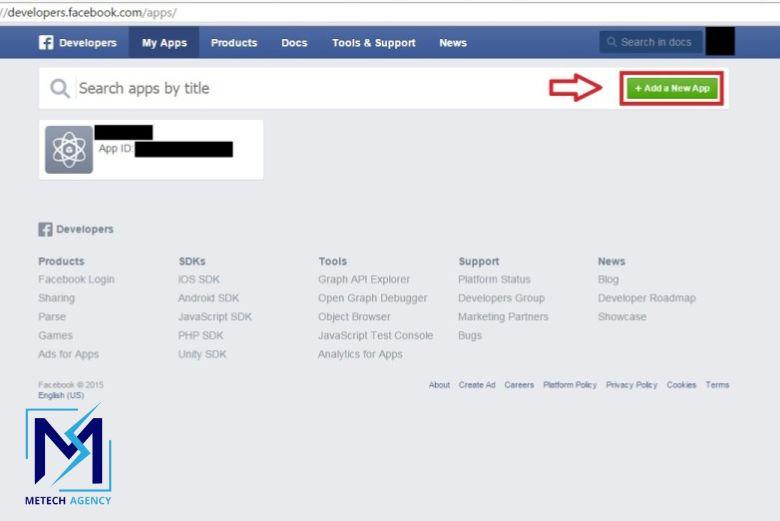
Creating an App ID on Facebook developers is not only the first step in the application development journey but also the foundation that determines the effectiveness of implementing digital marketing strategies. According to analysis from *DPS.MEDIA*, this process needs to be carried out meticulously, ensuring compliance with the latest Facebook updates, helping to minimize the risk of rejection or technical errors later on.
Prepare necessary information before creating an app ID is an extremely important step that should not be overlooked. Includes:
- Clear app name, suitable for the intended use and business brand
- Valid link to the accompanying website or application
- Support email address to receive technical notifications from Facebook
This helps shorten the review time and minimize errors during the registration process.
Case study: Vietnamese SMEs enhance operations thanks to a standard App ID
DPS.MEDIA từng đồng hành cùng một chuỗi cửa hàng thời trang SME tại Hà Nội trong quá trình thiết lập App ID để tích hợp tính năng đăng nhập Facebook và chạy quảng cáo động. Qua kinh nghiệm này, chúng tôi nhận thấy rằng, việc khai báo chính xác từng mục, đồng thời dùng tính năng “App Review” để gửi xét duyệt sớm giúp doanh nghiệp tránh được các lỗi về quyền truy cập dữ liệu, từ đó tăng tỉ lệ chuyển đổi khách hàng hiệu quả hơn 30% trong vòng 3 tháng.
If you are interested in the details of the required fields or the types of access permissions to register, the table below provides an overview to help save time and resources:
| Component to declare | Purpose | Important note |
|---|---|---|
| Application name | App identifier in the Facebook ecosystem | avoid duplicate names, clear branding |
| Contact email | Receive update notifications, feedback | Use the official business email |
| Valid website/URL | Ensure connection of related services | Must comply with privacy and cookie policies |
| Access permissions | Define the scope of application data needed | Must be clear, avoid granting unnecessary permissions |
Analysis of important settings after creating an App ID to ensure security and smooth operation
Implement advanced security configurations for App ID
Digital marketing personnel at SMEs often overlook the initial security configuration after creating an App ID, tuy nhiên đây là bước then chốt để tránh rủi ro bị truy cập trái phép hay hacker lợi dụng. Theo chuyên gia Bảo mật Nguyễn thanh Long, “việc điều chỉnh quyền truy cập, thiết lập OAuth và whitelist IP rõ ràng không chỉ giúp bảo vệ dữ liệu mà còn đảm bảo app vận hành ổn định.” Với tư cách một đơn vị tư vấn chiến lược digital marketing, DPS.MEDIA khuyến nghị luôn kích hoạt Accurate App Secret, Redirect URI, and limiting token usage permissions to minimize the risk of information theft.
Điều dễ nhận thấy là thỉnh thoảng có nhiều doanh nghiệp nhỏ chỉ cài đặt App ID xong rồi “quẳng đó” mà không theo dõi logs hoạt động hay kiểm soát quyền truy cập. Đây chính là lỗ hổng lớn. Dưới đây là những cấu hình tối quan trọng cần đánh giá sau khi tạo app ID:
- Two-factor authentication (2FA) for App management rights.
- API permission limitation
- IP Whitelist or domain to ensure only trusted systems can access the API.
- Monitor Access Token regularly, revoke unused tokens.
- Check and update callback URLs to avoid being redirected to malicious addresses.
Smooth operation through proper permission assignment and Facebook-standard configuration
Not only in terms of security, but the application's performance is also closely related to proper permission assignment and API configuration. DPS.MEDIA once collaborated with a coffee chain in Hanoi and found that the Facebook App was interrupted due to overly broad permissions and uncontrolled access tokens, leading to frequent timeouts.
The solution for this case study was to optimize token permissions according to the principle least privilege, while also integrating additional tools to monitor API feedback and response times. After 3 months of implementation, they significantly reduced connection errors, increased the successful access rate to 99.81%, helping the digital marketing campaign on the Facebook platform operate more effectively.
| Settings | Purpose | Benefit |
|---|---|---|
| OAuth Redirect URIs | Protect the authentication process, avoid malicious redirects | Prevent phishing and access fraud |
| App Secret Rotation | Regularly rotate security keys | reduce the risk of security information leakage |
| Role-based Access Control (RBAC) | Assign app management permissions based on roles | Ensure that only authorized personnel can operate |

How to link App ID with Facebook products for digital marketing campaigns
Process of connecting App ID with Facebook Business
Linking the App ID with Facebook's products not only helps businesses increase the effectiveness of digital marketing campaigns but also enhances the ability to track and analyze customer behavior. According to DPS.MEDIA's experience, the first step is to log in to Facebook Developers, create a new application, and obtain a unique App ID to manage all future connections. After creating the App ID, you need to perform the following main steps:
- Connect with Facebook Business Manager: Grant app management permissions to the business account to ensure security and control.
- Set up Facebook products: Bao gồm Facebook Login, Pixel, Marketing API,… tùy thuộc mục tiêu chiến dịch.
- Activate necessary access permissions: Helps the application analyze data, optimize ads, and interact with users.
Accurately following these procedures will help businesses maximize the power of the platform, increase customer retention rates, and reduce advertising costs through precise targeting.
Practical significance and case study from DPS.MEDIA
Một dự án triển khai cho doanh nghiệp thời trang SME tại Việt Nam cho thấy, sau khi tối ưu liên kết App ID với các sản phẩm Facebook như Pixel và Catalogue, hiệu quả chuyển đổi tăng đến 35% so với trước đó. Theo Chuyên gia Trần Anh Vũ của DPS.MEDIA: “Sự liên kết chặt chẽ giữa App ID và sản phẩm Facebook không chỉ hỗ trợ đo lường mà còn góp phần xây dựng hành trình khách hàng chuẩn xác hơn.”
The data collected through the App ID also helps Facebook's machine learning system suggest advertising audiences, minimize budget waste, and enhance user experience. Therefore, linking the App ID should be considered one of the essential initial steps for SMEs building a sustainable digital marketing platform.
| Facebook product type | Main function | Benefits for SMEs |
|---|---|---|
| Facebook Login | Easy login, collect user information | Increase engagement, personalize ads |
| Facebook Pixel | Track access behavior, optimize ads | Reduce costs, increase conversion rates |
| marketing API | Manage and automate campaigns | save time, increase efficiency |
Solutions for handling common errors when creating and using App ID on Facebook Developers
Identify and fix common errors when creating App ID on Facebook Developers
At DPS.MEDIA, we often encounter issues such as application ownership verification error, API access rights error or issues related to OAuth security configuration. According to experience from Facebook API Best Practices research (2023), most incidents stem from omissions during the process of setting up permissions and reviewing the application before actual use.
To resolve this, SMEs should carefully check each step after creating the App ID:
- Confirm application permissions: Assign access rights according to the correct roles and API scopes you intend to use.
- Activate OAuth security features properly: Prevent login errors and ensure user data security.
- Comply with Facebook's policies: Avoid temporary lockouts or restrictions due to violations of terms of use.
Real case study on effective App ID error handling at DPS.MEDIA
in a project implemented for a client in the online retail sector, our team of experts discovered a misconfiguration error in the App Domains dẫn đến việc API trả về mã lỗi 403 – Forbidden. Sau khi rà soát và điều chỉnh lại đúng domain đăng ký, cũng như cập nhật lại token theo chuẩn mới từ Facebook, hệ thống hoạt động ổn định trở lại trong vòng 24 giờ.
Điều này chứng minh rằng, ngoài việc theo sát hướng dẫn kỹ thuật, doanh nghiệp cần có chiến lược giám sát và phản ứng nhanh chóng với các lỗi vận hành nhằm đảm bảo hiệu năng của ứng dụng. Theo lời khuyên của giảng viên Nguyễn Thanh Hưng – chuyên gia digital marketing, “Việc hiểu rõ cơ chế hoạt động và nhanh chóng tinh chỉnh kỹ thuật là yếu tố then chốt giúp dự án không bị gián đoạn và tăng tỉ lệ chuyển đổi.”
| Common Errors | Causes | DPS.MEDIA Solution |
|---|---|---|
| Application verification error | Lack of proof of ownership, incorrect domain information | Prepare valid documents, ensure exact domain match |
| API access error | Expired token or incorrect permissions | Update tokens regularly, check access permissions |
| OAuth security error | Mismatched redirect URI configuration | Accurately synchronize redirect URI in settings |
Advice from DPS.MEDIA to maximize the use of App ID in application development and online advertising strategies
Optimizing App ID to elevate digital marketing strategies
App ID on Facebook Developers is not just a simple code but also a key to unlocking many potentials for application development and online advertising. From consulting experience with SMEs in Vietnam, DPS.MEDIA has found that strategically integrating the App ID helps enhance user behavior analysis, thereby creating targeted marketing campaigns, saving budgets, and optimizing advertising performance.
To maximize the benefits of the App ID, businesses need to pay attention to:
- Exact linking between App ID and advertising platforms for synchronized measurement and optimization.
- Use Facebook SDK updated to the latest version to leverage all in-depth analytics and security features.
- Regularly check and update access permissions to ensure the app operates stably and protects user data in accordance with GDPR and international standards.
Case study: FMCG business increases conversions by 30% thanks to proper App ID usage
In a recent project, DPS.MEDIA supported an FMCG brand in Vietnam to integrate App ID into their Facebook advertising process. Thanks to detailed analysis of user behavior based on data from App ID, they personalized advertising messages and optimized budgets for each target customer group. The result was a 30% increase in conversion rate compared to the same period before without increasing the advertising budget.
| Indicators | Before using App ID | After using App ID |
|---|---|---|
| Conversion rate | 5% | 6.5% |
| Advertising cost per conversion (CPA) | 150,000 VND | 110,000 VND |
| Customer retention rate | 40% | 55% |
DPS.MEDIA always emphasizes that a basic technical understanding of App ID combined with strategic analytical thinking will help small and medium businesses grow sustainably in the digital era. Paying attention to every small detail can also make a big difference in today's competitive market.
Your past journey
Creating an App ID on Facebook Developers is not just a simple technical operation, but also an important first step to help businesses personalize user experience, track data analytics more accurately, and easily integrate effective advertising tools. Mastering this process gives you a solid foundation to develop applications, optimize communication campaigns, and fully leverage the digital ecosystem that Facebook provides.
Tại DPS.MEDIA, chúng tôi nhận thấy rằng việc hiểu rõ và ứng dụng linh hoạt các công cụ như App ID là chìa khóa giúp các SME tại Việt Nam nâng cao hiệu suất marketing và cạnh tranh hiệu quả hơn trong thời đại chuyển đổi số. Đừng ngại thử nghiệm, từ cấu hình các API cho đến kết nối nền tảng quảng cáo – đó là cách để bạn dần làm chủ cuộc chơi digital marketing.
If you are interested in topics such as integrating Facebook Login, setting up Facebook Pixel, or leveraging user data via Graph API, keep following the DPS.MEDIA blog for upcoming articles. We are always ready to accompany, share, and support your business on the journey of comprehensive digital development.
Leave your comments below if you encounter difficulties during the App ID creation process, or share practical tips that you have successfully applied. The DPS.MEDIA community looks forward to hearing from you and exchanging ideas for growth!




