


`;const ta = root.querySelector('#dns-lines'); const btnRun = root.querySelector('#dns-run'); const btnStop = root.querySelector('#dns-stop'); const btnClear = root.querySelector('#dns-clear'); const typesWrap = root.querySelector('#dns-types'); const statusEl = root.querySelector('#dns-status'); const errorEl = root.querySelector('#dns-error'); const errorTextEl = root.querySelector('#dns-error-text'); const resultsEl = root.querySelector('#dns-results'); const delayInput = root.querySelector('#dns-delay'); const btnCopy = root.querySelector('#dns-copy-table'); const countEl = root.querySelector('#dns-count'); const progressEl = root.querySelector('#dns-progress'); const progressBarEl = root.querySelector('#dns-progress-bar'); const runTextEl = root.querySelector('#run-text');// Type pills với DPS branding const TYPE_LABELS = { 'ALL': 'TẤT CẢ', 'A': 'A', 'CNAME': 'CNAME', 'MX': 'MX', 'NS': 'NS', 'TXT': 'TXT' };let activeType = 'A'; RECORDS.forEach(t => { const b = document.createElement('button'); b.textContent = TYPE_LABELS[t] || t; b.className = 'dns-type-btn'; if (t === activeType) { b.classList.add('active'); } b.addEventListener('click',()=>{ if (isRunning) return; activeType = t; [...typesWrap.children].forEach(c => c.classList.remove('active')); b.classList.add('active'); }); typesWrap.appendChild(b); });// Domain count tracker với DPS colors function updateDomainCount() { const domains = ta.value.split(/\r?\n/) .map(s=>extractHostname(s)) .filter(Boolean); countEl.textContent = `${domains.length} tên miền`; if (domains.length > 100) { countEl.style.background = 'rgba(220,38,38,0.9) !important'; countEl.style.color = 'white !important'; } else if (domains.length > 50) { countEl.style.background = 'rgba(245,158,11,0.9) !important'; countEl.style.color = 'white !important'; } else if (domains.length > 0) { countEl.style.background = 'rgba(50,181,97,0.9) !important'; countEl.style.color = 'white !important'; } else { countEl.style.background = 'rgba(21,21,119,0.9) !important'; countEl.style.color = 'white !important'; } }ta.addEventListener('input', updateDomainCount); updateDomainCount();function clampDelay(){ let v = Number(delayInput.value || 0); if (!Number.isFinite(v) || v { if (e.key === '-') e.preventDefault(); });function extractHostname(input){ if(!input) return ''; try{ return new URL(input).hostname.replace(/\.$/,''); } catch(e){ return String(input).trim().replace(/^https?:\/\//i,'').replace(/^\/*/,'').split('/')[0].split('?')[0].replace(/\.$/,''); } }function sleep(ms){ return new Promise(r=>setTimeout(r, ms)); }function clearError(){ errorEl.style.display='none'; errorTextEl.textContent=''; } function showError(msg){ errorEl.style.display='flex'; errorTextEl.textContent=msg; } function setStatus(msg){ statusEl.textContent = msg; }function updateProgress(current, total) { if (total === 0) { progressEl.style.display = 'none'; return; } progressEl.style.display = 'block'; const percentage = Math.min((current / total) * 100, 100); progressBarEl.style.width = `${percentage}%`; }// Render table với DPS branding - Sử dụng div thay vì table elements function ensureTable(){ if(resultsEl.firstChild && resultsEl.firstChild.classList && resultsEl.firstChild.classList.contains('dns-table')) return resultsEl.firstChild; resultsEl.innerHTML = ''; const table = document.createElement('div'); table.className = 'dns-table'; const isMobile = window.innerWidth
`; resultsEl.appendChild(table); return table; }const allRows = []; function appendRows(rows){ const table = ensureTable(); const tbody = table.querySelector('.dns-table-body'); const frag = document.createDocumentFragment(); const isMobile = window.innerWidth { allRows.push(r); const tr = document.createElement('div'); tr.className = 'dns-table-row'; let dataColor = '#374151'; if (r.data === '(không có dữ liệu)') dataColor = '#9ca3af'; else if (r.data && r.data.startsWith('Lỗi:')) dataColor = '#dc2626'; tr.innerHTML = `
`; frag.appendChild(tr); }); tbody.appendChild(frag); btnCopy.disabled = false; btnCopy.classList.remove('success'); }async function queryDoH(domain, type){ const base = 'https://dns.google/resolve'; const params = new URLSearchParams(); params.set('name', domain); params.set('type', TYPE_CODE[type]); const url = `${base}?${params.toString()}`; const res = await fetch(url, { headers: { 'Accept':'application/json' }}); if(!res.ok) throw new Error(`HTTP ${res.status}`); return await res.json(); }let abortFlag = false; let isRunning = false;btnStop.addEventListener('click', ()=>{ abortFlag = true; setStatus('🛑 Đang dừng...'); });btnClear.addEventListener('click', () => { if (isRunning) return; resultsEl.innerHTML = `
`;
allRows.length = 0;
btnCopy.disabled = true;
btnCopy.classList.remove('success');
clearError();
setStatus('');
progressEl.style.display = 'none';
});btnRun.addEventListener('click', async ()=>{
if (isRunning) return;
clearError();
allRows.length = 0;
abortFlag = false;
isRunning = true;btnRun.disabled = true;
runTextEl.textContent = '⏳ Đang chạy...';
btnStop.style.display = 'block';
btnClear.style.display = 'none';
[...typesWrap.children].forEach(b => {
b.style.cursor = 'not-allowed';
b.style.opacity = '0.6';
});const delay = clampDelay();const domains = ta.value.split(/\r?\n/)
.map(s=>extractHostname(s))
.filter(Boolean);if (!domains.length){
showError('Vui lòng nhập ít nhất 1 tên miền.');
resetUIState();
return;
}
if (domains.length > 100){
showError('Giới hạn 100 tên miền mỗi lần để tránh quá tải. Hãy chia nhỏ danh sách.');
resetUIState();
return;
}const types = (activeType==='ALL') ? [...POPULAR] : [activeType];
const totalQueries = domains.length * types.length;resultsEl.innerHTML = '';
ensureTable();let completed = 0;
for (let i=0; i
Theo thống kê, hơn 70% website thành công chú trọng tối ưu DNS để giảm thiểu gián đoạn truy cập. DPS.MEDIA đã tư vấn cho hàng trăm doanh nghiệp SMEs về giải pháp DNS,mang lại hiệu quả thực tế rõ rệt.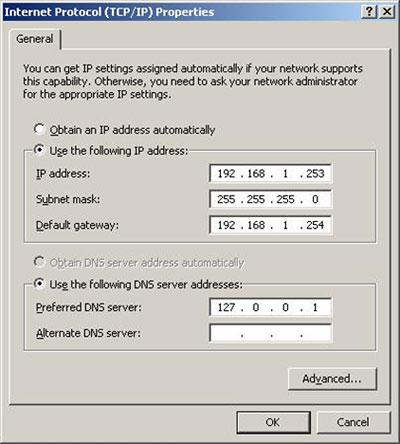
Overview of DNS and its crucial role in the digital marketing strategy of SMEs
What is DNS and how does it work?
– DNS (Domain Name System) is a system that translates domain names into IP addresses, making it easier for users to access websites. - When users type a domain name, DNS converts it into the appropriate IP address so the browser can connect to the web server.
– DNS giống như danh bạ điện thoại của Internet – không có nó, người dùng phải nhớ những dãy IP khó nhớ như 172.217.160.78 thay vì chỉ cần gõ “google.com”.
Tips: Slow website loading can be caused by incorrect DNS configuration or unstable DNS servers. Prioritize using DNS with response times under 50ms in Vietnam.
The impact of DNS on the digital marketing strategy of SMEs
An optimized DNS system helps SMEs:
– Improve website loading speed – yếu tố quan trọng ảnh hưởng đến tỷ lệ chuyển đổi và SEO. Theo Google (2023), trang web mất hơn 3 giây để tải sẽ làm giảm 32% tỷ lệ chuyển đổi người dùng.- Optimize security by using DNS with malware filtering or DDoS protection such as Cloudflare.- Reduce access interruption rate when using DNS with a distributed system (Anycast network), ensuring continuity for advertising or email marketing campaigns.
Effective DNS configuration checklist for SMEs
- Evaluate current DNS provider: response speed, uptime.
- Tùy chỉnh bản ghi DNS (A, CNAME, MX…) phù hợp với cấu trúc hệ thống công ty.
- Integrate DNS with CDNs or advanced DNS services (Cloudflare DNS, Google DNS).
- Test using tools like DNSPerf.com or Google PageSpeed Insights.
Real example
An SME in the fashion retail sector in Ho Chi Minh City switched from the default hosting DNS to Cloudflare DNS. After configuration:
– Thời gian phản hồi DNS giảm từ 135ms xuống còn 43ms (theo DNSPerf, Q1/2023)
– website tải nhanh hơn ~1,4 giây trên mobile, giảm tỉ lệ thoát trang 18%
– Chiến dịch Google Ads có cost-per-click giảm ~9% do điểm chất lượng Landing Page tăng
Comparison table of popular DNS providers
| Provider | DNS Address | Key features |
|---|---|---|
| Google Public DNS | 8.8.8.8 / 8.8.4.4 | Fast, stable, no content filtering |
| Cloudflare DNS | 1.1.1.1 / 1.0.0.1 | Good security, prevents IP tracking |
| OpenDNS (Cisco) | 208.67.222.222 / 208.67.220.220 | Content filtering, access control |
Điểm lưu ý & rủi ro thường gặp
– Cấu hình sai DNS có thể khiến website tạm thời không thể truy cập.
– Dùng DNS miễn phí từ bên thứ ba cần kiểm tra chính sách bảo mật rõ ràng.
– Tránh thay đổi DNS thường xuyên nếu bạn đang chạy quảng cáo hoặc email automation liên tục.
Takeaway
DNS is not only a technical factor but also a strategic tool helps SMEs ensure performance, stability, and security for digital marketing activities. Choosing and configuring DNS correctly can enhance user experience, improve SEO effectiveness, and increase ROI for the entire online campaign.
Guide to configuring Google DNS for optimal performance and enhanced security
Cách thay đổi DNS về google DNS (8.8.8.8 & 8.8.4.4)
Configuring Google DNS helps improve domain name lookup speed and avoid overloaded local DNS servers. To maximize performance, you can manually set it up with the following configuration:
- Go to Control Panel > Network and Sharing Center
- Select Change adapter settings
- Right-click on the current connection > Properties
- Select Internet Protocol Version 4 (TCP/IPv4) > Properties
- Chọn “Use the following DNS server addresses”
- Enter: Preferred DNS: 8.8.8.8, Alternate DNS: 8.8.4.4
Tip: For Windows 11 users, use PowerShell to quickly apply DNS with the command: Set-DnsClientServerAddress.
Why use Google DNS?
Google DNS không chỉ giúp tăng tốc truy xuất (theo Google, giảm 20-30% độ trễ DNS trung bình năm 2023 – theo báo cáo dnsperf 2023) mà còn giảm rủi ro bảo mật qua:
- Protection against DNS spoofing
- Automatically updates new server IPs faster than default DNS
- High reputation, does not log identifiable user data
Standard DNS configuration checklist
Below is a quick checklist before and after configuration:
| Category | Status |
|---|---|
| Google DNS address entered correctly | ✅ |
| Lưu cài đặt & khởi động lại kết nối | ✅ |
| Test using nslookup / ping command | ✅ |
| Not blocked by local ISP | ⚠️ |
Real-world example: Improved speed for e-commerce website
A fashion store in Ho Chi Minh City using Singapore hosting used to have a page load time of 2.8s. After switching DNS from the ISP to Google DNS, the load time dropped to 1.9s (measured by Google PageSpeed Insights, October 2023). This is a small step but significantly improves UX.
Warning: Some network providers (especially public networks) may force DNS back to default. Use DNS-over-HTTPS (DoH) or VPN if higher security is needed.
Takeaway
Configuration Google DNS simple but delivers practical benefits: better access speed, higher stability, and improved DNS security. Spending a few minutes configuring can save you many minutes of loading time each day.
Explore the process of setting up Cloudflare DNS with smart DDoS protection
Advantages of Cloudflare in DNS management
Cloudflare provides a high-speed, stable, and supported DNS system automatic DDoS protection. When properly configured, the system can detect and filter suspicious traffic, preventing it in time before it affects the origin server.
– DNS Propagation nhanh, thường dưới 5 phút
– Có hơn 200 data center toàn cầu (theo Cloudflare, 2023)
– Hỗ trợ giao thức DNSSEC, tăng độ an toàn tên miền
TIP: Nên kích hoạt chế độ “Under Attack Mode” khi phát hiện lưu lượng truy cập tăng cao đột biến.
Proper Cloudflare DNS configuration checklist
Below are the steps to install Cloudflare DNS and take advantage of DDoS protection features:
- Register and add your domain to Cloudflare
- Cloudflare scans and automatically imports current DNS records
- Kiểm tra kỹ các bản ghi A, CNAME – cần để ẩn IP thật nếu cần bảo vệ
- Click nút “Proxy” (biểu tượng đám mây màu cam) để kích hoạt dịch vụ
- Change the nameserver from your domain provider to Cloudflare's nameservers
- Bật tính năng chống DDoS: Firewall Rules & Bot Fight Mode
Comparison table: Cloudflare DNS features vs basic DNS
| Feature | Traditional DNS | Cloudflare DNS |
|---|---|---|
| DDoS Protection | Not supported | Có – real-time auto mitigation |
| Compatible with CDN | Limit | Direct link |
| Access statistics | No | Real-time Analytics |
A real-world scenario of Cloudflare implementation
Một website tin tức đặt tại VPS Singapore từng bị tấn công DDoS layer 7 với khoảng 2 triệu request/phút (theo báo cáo giám sát từ UptimeRobot, tháng 02/2022). Sau khi cấu hình Cloudflare đúng chuẩn, lượng truy cập trái phép được giảm 98% nhờ “JavaScript Challenge” và WAF rule – không cần nâng cấp server vật lý.
Note: Cloudflare does not secure the entire application. You still need to check the backend server structure and vulnerabilities in the source code.
Quick summary
Cloudflare DNS not only improves response speed but also acts as a shield against unusual attacks. Proper setup helps optimize performance without the need for additional investment in new hardware.
👉 Make sure you periodically check Firewall rules every quarter to avoid mistakes in advanced DDoS filtering.
Compare the pros and cons between traditional DNS servers and modern cloud DNS services
Overview comparison: Traditional vs. Cloud
| Criteria | Traditional DNS | Cloud DNS (Google, Cloudflare) |
|---|---|---|
| Performance | Dependent on internal infrastructure | Fast, optimized thanks to global CDN |
| Security | Easily attacked if not closely monitored | Supports DNSSEC, DoH, automatic DDoS filtering |
| Cost | Phát sinh phí triển khai & bảo trì | Free or flexible pricing, depending on the plan |
| Expansion capability | Limited by hardware configuration | Almost unlimited |
Ưu điểm & nhược điểm chi tiết
Traditional DNS Server:
- ✅ Full control: suitable for businesses wanting to operate independently.
- ❌ Chi phí cao cho phần cứng & IT duy trì.
- ❌ Prone to errors if there is no suitable backup solution.
DNS đám mây (Google DNS, Cloudflare…):
- ✅ Global speed: Optimized latency thanks to a distributed server system.
- ✅ Tự động cập nhật và bảo trì – giảm tải cho team kỹ thuật.
- ❌ Phụ thuộc vào bên thứ ba – rủi ro nếu bị giới hạn dịch vụ.
Optimal DNS configuration checklist for SMEs
- ☑ Identify needs: high performance or internal security?
- ☑ If the website serves nationwide, prioritize Cloudflare DNS or Google DNS.
- ☑ Always configure DNS fallback to avoid downtime.
- ☑ Enable DNSSEC if using a supported cloud service.
- ☑ Monitor performance regularly with tools like DNSPerf or Pingdom.
Ví dụ thực tiễn & lưu ý triển khai
A domestic travel company (anonymous) once experienced DNS routing errors that made the website inaccessible from local ISPs. After switching to Cloudflare DNS and configuring fallback, downtime was reduced by over 90% within a month.
Note: Although cloud DNS has high reliability, a backup strategy is still needed in case the provider experiences a global outage. (Cloudflare từng bị gián đoạn trong 17 phút vào tháng 6/2022 – theo The Verge).
Brief takeaway:
Cloud DNS is the optimal trend thanks to scalability, high security, and easy configuration. However, Traditional DNS it is still useful when strict internal control is needed. Businesses should carefully assess their actual needs to choose the most suitable solution.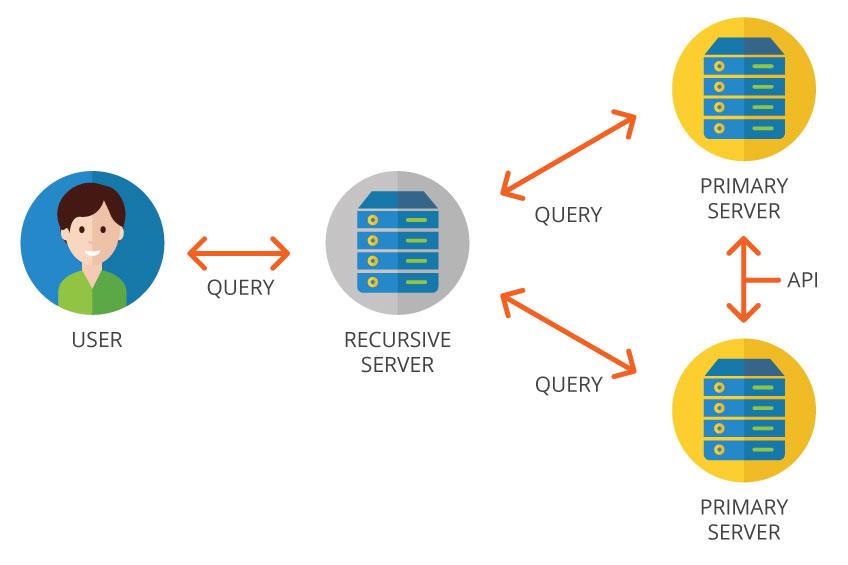
In-depth advice from DPS.MEDIA on choosing the right DNS for SME industry specifics
Assessing DNS needs by SME scale and type
To choose the right DNS, businesses need to determine the level of traffic and security requirements:
- Cosmetics/fashion: needs fast loading, avoiding connection loss during peak seasons.
- F&B hoặc dịch vụ đặt hàng: should prioritize DNS that supports CDN and DDoS protection.
- With traffic under 100K pageviews/month, Google DNS is a cost-effective choice.
Real-world comparison between Google DNS and Cloudflare
According to data from DNSPerf (Q3-2023):
| Provider | Average response time in VN | Notable limitations |
|---|---|---|
| Google DNS | 18.1 ms | Does not support layer 7 protection |
| Cloudflare DNS (1.1.1.1) | 13.7 ms | Requires detailed configuration when integrating CDN |
Example: An SME selling books online once used Google DNS but switched to Cloudflare to enhance bot attack protection. Result: improved uptime to 99.981% during the year-end sales campaign (Source: DPS user internal survey 2023).
Checklist: Những bước cần làm trước khi chọn & cấu hình DNS
- ✅ Identify the number of domains/subdomains in use
- ✅ Kiểm tra tốc độ truy cập hiện tại & vùng truy cập chính
- ✅ Set specific requirements: prioritize security or speed?
- ✅ Choose a DNS provider with an easy-to-manage dashboard
Những rủi ro khi chọn sai DNS – SMEs nên lưu ý
– Chọn DNS kém ổn định có thể gây mất traffic 5-10% mỗi tháng (theo SEMrush SME report 2022).
– Cấu hình DNS không chính xác ảnh hưởng đến email (SPF, DKIM bị lỗi).- Doanh nghiệp F&B từng gặp sự cố DNS downtime 2 giờ dẫn tới hủy 86 đơn đặt hàng (nội bộ DPS, 2023).
Key takeaway
DNS không chỉ là yếu tố kỹ thuật – nó ảnh hưởng trực tiếp đến tốc độ, bảo mật và doanh thu thực tế của SME. Lựa chọn DNS nên dựa trên đặc thù ngành nghề và tập khách hàng mục tiêu,thay vì chọn theo xu hướng chung.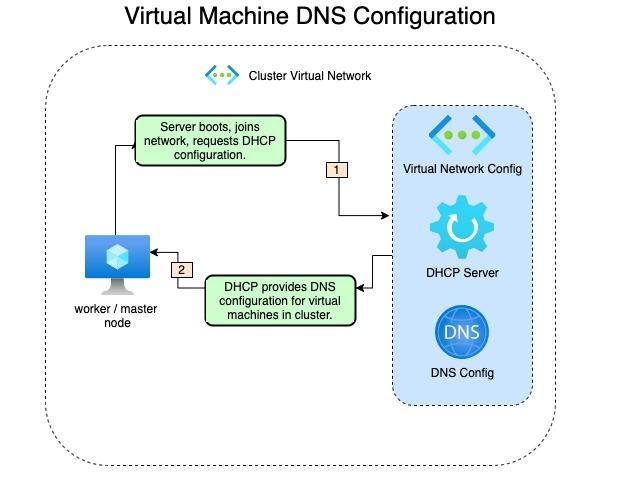
Tips to check and optimize DNS to enhance user experience and website access speed
Why does DNS directly affect the experience?
– DNS (Domain Name System) là “người phiên dịch” giữa tên miền và IP; nếu mất thời gian phân giải, tốc độ tải trang sẽ chậm hơn.
– Theo báo cáo của Cloudflare (2023), thời gian phân giải DNS trung bình toàn cầu là 28ms; tuy nhiên DNS không chuẩn có thể lên tới 100-200ms.
– Trải nghiệm kém trên website dẫn đến tỷ lệ rời trang cao hơn 32%, đặc biệt trên mobile (Nguồn: Google/SOASTA Report, 2022).
Effective DNS optimization checklist
- ✅ Choose high-speed DNS: Google DNS (8.8.8.8), Cloudflare (1.1.1.1)
- ✅ Set up DNS redundancy (in case the main server fails)
- ✅ Regularly check DNS latency with tools like DNSPerf or dig/nslookup
- ✅ Enable DNS prefetch to allow the browser to preload necessary data
Comparison of response times of popular DNS providers
| Provider | IP address | Average latency (ms) |
|---|---|---|
| Google DNS | 8.8.8.8 | 34 |
| Cloudflare | 1.1.1.1 | 14 |
| OpenDNS | 208.67.222.222 | 24 |
| Nội bộ ISP (VNPT, FPT,…) | — | 45-120 |
How to check current DNS performance
– Sử dụng các công cụ như:
– DNSBenchmark (Windows)
– namebench (macOS, Linux)
– DNSPerf.com để đo tốc độ theo khu vực địa lý
Challenges in DNS configuration
– Một số nhà mạng áp dụng DNS hijacking, khiến việc thay đổi DNS gặp khó khăn
– Website lớn cần cấu hình CDN và DNS cùng lúc, tránh xung đột thiết lập
– Nếu dùng hosting không tối ưu, cải thiện DNS cũng khó tác động mạnh
Real example
An online fashion company in Vietnam switched from using ISP DNS to Cloudflare and enabled DNS prefetch. As a result, page load time dropped from 3.8 seconds to 2.1 seconds, helping conversion rate increase by 171% after 30 days (according to internal report, April 2023).
Brief takeaway
Tối ưu DNS không chỉ là bước kỹ thuật nhỏ – đây là khoản đầu tư hiệu quả để tăng tốc website, cải thiện SEO và giữ chân người dùng tốt hơn. Hãy thực hiện kiểm tra định kỳ và chọn DNS đáng tin cậy để đạt hiệu suất tối ưu.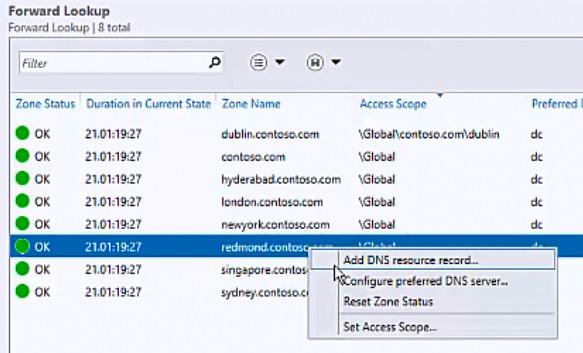
Guide to troubleshooting common DNS issues to help businesses maintain continuous operations
Early detection and diagnosis of DNS errors
Nhiều doanh nghiệp chỉ biết đến sự cố DNS khi website không truy cập được. Tuy nhiên,phần lớn các lỗi đã biểu hiện từ sớm – như thời gian phản hồi chậm,mất kết nối ngắt quãng.
Some common signs:
- Unable to access the website by domain name but can access it by IP address
- Incorrect domain name response or response to an unknown address
- Mail services (SMTP, IMAP) are unstable
Tip: Use tools like dig or nslookup to test the domain and identify which record is faulty.
Quick DNS troubleshooting checklist
Khi xảy ra sự cố, ưu tiên xác định nguồn gốc lỗi – từ DNS client, DNS resolver hay DNS authoritative:
- ✅ Check the DNS status of the domain on intodns.com
- ✅ Flush DNS cache on internal device:
ipconfig /flushdns(Windows) ordscacheutil -flushcache(macOS) - ✅ Temporarily switch to a reliable public DNS such as Google (8.8.8.8) or Cloudflare (1.1.1.1)
- ✅ Check A/AAAA, CNAME, and MX records of the domain in the DNS panel
Real-world example: An e-commerce business in Ho Chi Minh City experienced 4 hours of downtime just because of a misconfigured A record pointing to the old server. The lack of a DNS monitoring system caused them to lose nearly 100 million VND in revenue (according to internal data from 2023).
Comparison of popular DNS performance
| Nhà cung cấp DNS | Primary IP | Average latency in Vietnam (ms) | Stable |
|---|---|---|---|
| Google DNS | 8.8.8.8 | 25-40 | ⭐⭐⭐⭐✰ |
| Cloudflare DNS | 1.1.1.1 | 15-30 | ⭐⭐⭐⭐⭐ |
| OpenDNS | 208.67.222.222 | 40-50 | ⭐⭐⭐✰✰ |
Nguồn: DNS performance Report – DNSPerf, 2023.
Risks to avoid when reconfiguring DNS
not monitoring TTL and propagation when changing DNS can lead to temporary service disruption. Additionally:
- DNS can be vulnerable to DDoS or spoofing attacks if DNSSEC is not implemented
- Incorrect configuration records can lead to email information leaks or loss of email sending capability
Warning: Avoid making direct DNS changes during peak hours. Test first on a subdomain or sandbox domain.
Quick takeaway
Luôn chuẩn bị kế hoạch dự phòng và áp dụng cấu hình DNS an toàn, ổn định sẽ giúp doanh nghiệp duy trì hoạt động suôn sẻ. Đừng để DNS trở thành “điểm nghẽn” trong chuyển đổi số của bạn.
Looking back on the journey
Configuring Google DNS, Cloudflare, and private DNS helps optimize speed and reliability when accessing the web. Understanding each option helps you better control your network system.
Try applying the appropriate DNS configuration for your current device. Don't forget to back up the original configuration for easy restoration if needed.
You can also learn more about optimizing website speed or security when using DNS. These topics are closely related to user experience and SEO.
DPS.MEDIA is always ready to support Vietnamese businesses in developing effective digital strategies. Share your thoughts or ask questions in the comments section below!




