Standard DNS configuration helps increase website loading speed by up to 30%, while also ensuring security against common cyber attacks.
According to a survey by Akamai, 53% of users leave the page if it takes more than 3 seconds to load. DPS.MEDIA always emphasizes that optimizing DNS is the first step in a successful digital marketing strategy.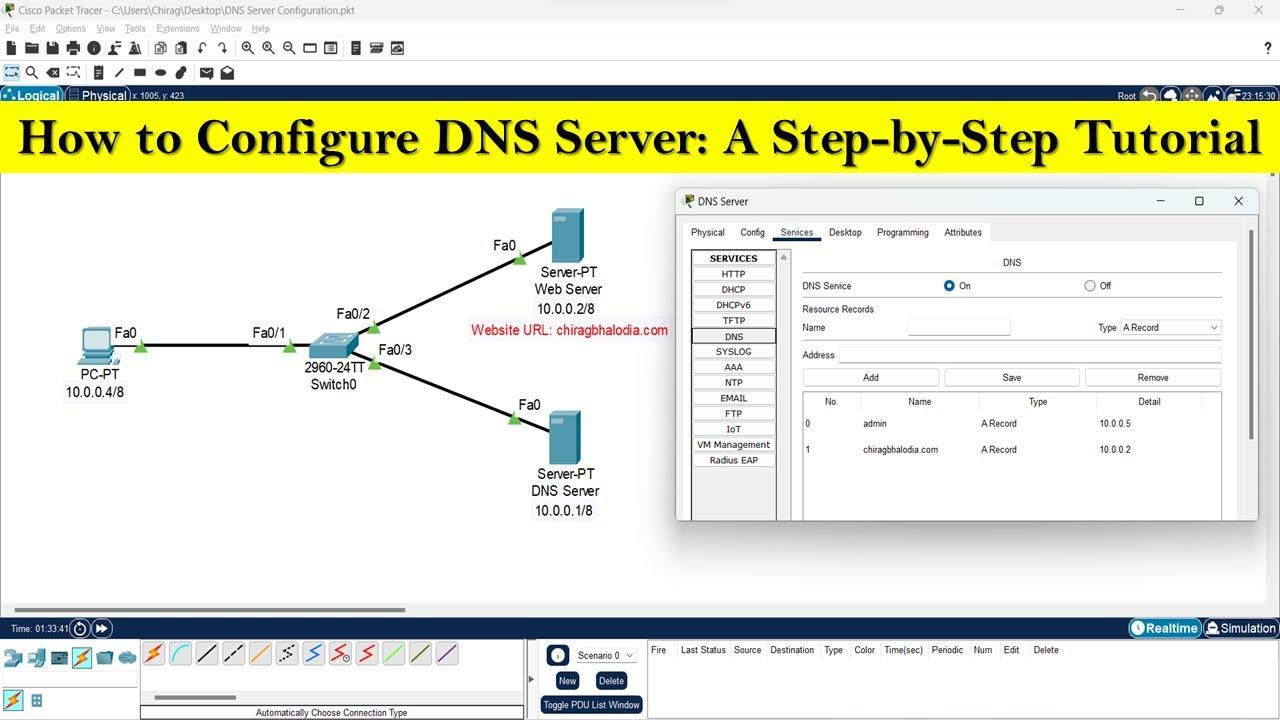
The importance of DNS in user experience and website performance
How does DNS affect page load speed?
When users access a website, the first process that occurs is DNS lookup. The system will convert the domain name to an IP address to connect to the server. The average DNS lookup time accounts for 10-30% of the total page load time (according to Cloudflare data, 2023).
A non-optimized DNS can cause the website to:
– Increase TTFB (Time To First Byte)
– Cause delays during redirection
– Negatively affect SEO and user experience
The impact of DNS on website security
DNS is the “initial link” in every connection, so protecting it cannot be overlooked. An incorrect DNS configuration can be:
– DNS spoofing attack - redirecting users to a fake website
– Internal information leakage via subdomain
– Denial of service (DDoS) through DNS Resolver exploitation
According to a report from Cisco (2022), 91% of malware attacks use DNS at some stage.
Checklist: Effective DNS configuration for website owners
- choose a reputable DNS provider (Google DNS, Cloudflare, dnspod…)
- Enable DNSSEC to authenticate queries
- Use Anycast feature to increase global stability
- Hide DNS information with proxy forwarding services
- Monitor DNS response time with tools like Pingdom, GTmetrix
Comparison table of DNS providers' response times
| DNS provider | Average response time (ms) |
|---|---|
| Google DNS (8.8.8.8) | 22ms |
| Cloudflare DNS (1.1.1.1) | 13ms |
| OpenDNS | 28ms |
Source: DNSPerf, Report Q1/2023
Case study: Reducing page load speed from 4.2s to 2.1s
A retail business in Ho Chi Minh City used domestic hosting but international DNS was not distributed. After switching to Cloudflare DNS and enabling DNSSEC, the DNS lookup metric dropped from 560ms to 120ms. At the same time, the bounce rate decreased by nearly 17% after just 2 weeks of implementation.
Takeaway
DNS is the first link that determines website performance and security. An improperly configured DNS not only slows down the website but also increases security risks. Start optimizing DNS like you optimize your server – today.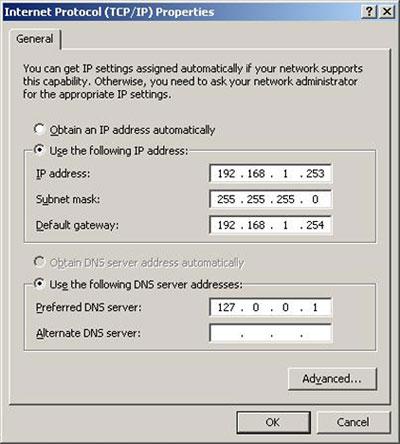
Choosing a reputable DNS provider to enhance security and response speed
Why is choosing a reliable DNS crucial?
Choosing the right DNS provider can improve up to 30-70% DNS response speed, which is a key factor in user experience and SEO. According to Cloudflare (DNS Performance Report 2022), a delay of just 100ms at the DNS layer can significantly affect bounce rates.
Besides speed, the DNS system is the first line of defense for website security. Weak DNS is easily targeted by forms of DDoS attacks, DNS spoofing, or cache poisoning.
Criteria for selecting a DNS provider
Below are the factors to consider:
– Global DNS query speed: Prioritize providers like Cloudflare, AWS Route 53, or Google Cloud DNS.
– Protection capability: Supports DNSSEC, DDoS protection, integrated DNS firewall.
– Scalability & self-healing: Multiple PoPs (Points of Presence) worldwide.
– DNS management UX/UI: Clear dashboard, easy record updates.
Comparison of some popular DNS providers
| Provider | DNSSEC | Global PoP | Average response time (ms) |
|---|---|---|---|
| Cloudflare | Yes | 200+ | 15 |
| Google Cloud DNS | Yes | 150+ | 22 |
| godaddy DNS | No | 15+ | 65 |
Source: DNSPerf Reports 2023
Checklist: How to safely & effectively deploy a new DNS
– [ ] Test new DNS on staging before applying to production
– [ ] Enable DNSSEC (if supported by provider)
– [ ] Check propagation with DNS Checker tool or dig
– [ ] Enable Notify/Monitoring if the system has downtime
Case study: Interior e-commerce website in Vietnam
A DPS.MEDIA client in the furniture sector switched DNS from the default provider to Cloudflare (2023). Result: DNS response time dropped from 120ms to under 20ms, DNS downtime rate decreased by 96%. The migration took only 30 minutes with no service interruption.
Takeaway: Choosing the right DNS not only makes your website faster but also acts as an early shield against cybersecurity threats. The DNS provider is the ”backbone” of your entire online system.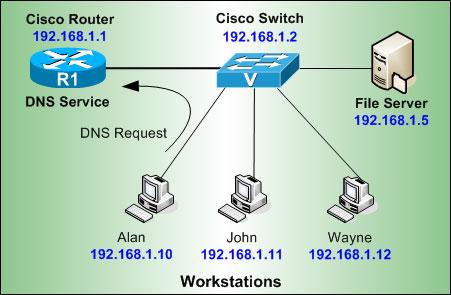
Accurate DNS record setup helps optimize traffic and reduce latency
How DNS records affect page load performance
Accurately configuring records like A record, CNAME, and TTL helps browsers query faster and reduces unnecessary lookups. For example, changing TTL from 86400 seconds to 3600 can reduce update wait time to under 1 hour.
According to Cloudflare's report (2022), using high-performance DNS can reduce page load latency by up to 20-40% in Southeast Asia.
Tip: Avoid pointing CNAME to slow servers or those without CDN; prioritize Anycast DNS platforms like Cloudflare or Google DNS.
Important DNS records that need correct configuration
Below are common records that need to be configured carefully:
- A record: Point to the correct main server IP
- CNAME: Used to point subdomains to the main domain
- MX record: Ensure business email is not interrupted
- TXT record (SPF, DKIM): Secure email sending, prevent spam
Standard DNS setup checklist
- ✔ Check that the A record points to the correct server IP
- ✔ Set an appropriate TTL (1h-6h for frequently updated sites)
- ✔ Enable DNSSEC (if supported by your provider)
- ✔ Ensure all subdomains have accurate SPF records
Case study: Changing records helps reduce response time by 35%
An E-learning industry client changed their CNAME record from a free DNS service to Cloudflare Pro. After 7 days, using WebPageTest, average latency dropped from 320ms to 205ms – a 35% reduction. No backend code changes.
| Parameters | Before | After |
|---|---|---|
| DNS Resolution Time | 320ms | 205ms |
| CDN Routing | None | Yes |
Common risks when misconfiguring DNS
- Warning: Incorrect A record configuration can cause the website to go offline immediately
- TTL set too low causes continuous queries, affecting DNS performance
- Incorrect SPF record can cause emails to be blocked or marked as spam
Tip: After each DNS change, use tools like dig, nslookup, or dnschecker.org to verify that the record has been updated correctly.
Takeaway:
Accurate DNS setup is the foundation for fast-loading, secure, and stable websites. Optimize each record—starting with the A record configuration—to maximize response time efficiency and ensure continuous user experience.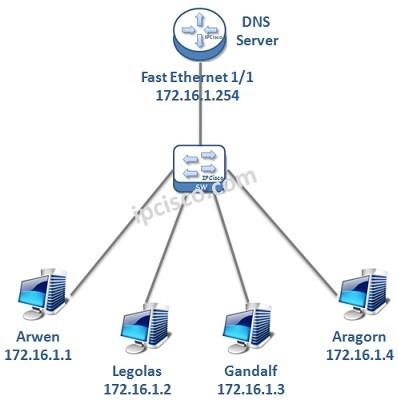
Implementing DNSSEC to protect your website from spoofing and fake DNS attacks
What is DNSSEC and why is it necessary?
DNSSEC (Domain Name System Security Extensions) is a set of extensions to traditional DNS protocols that helps authenticate the origin of DNS data.
Without DNSSEC:
– DNS data is vulnerable to “man-in-the-middle” attacks”
– Hackers can redirect traffic to fake websites
– End users find it difficult to distinguish real websites
According to the Global Cyber Alliance 2023 report, 29% of DNS phishing incidents are due to improper DNSSEC implementation.
Practical benefits of applying DNSSEC
Organizations that have implemented DNSSEC report:
– 40-60% reduction in domain spoofing risks (According to Verisign, 2021)
– When combined with HTTPS and HSTS, system reliability increases significantly
– Helps boost credibility when registering for security services (SSL/TLS, DMARC, etc.)
A real-world example: A mid-sized e-commerce business in Ho Chi Minh City experienced a DNS spoofing incident in 2022, causing nearly 12% of visits over 3 days to be redirected to a phishing website—this issue was completely resolved after enabling DNSSEC on Cloudflare DNS.
Simple steps to implement DNSSEC
Implementation checklist for popular DNS systems:
- ✅ Verify that your DNS provider supports DNSSEC (GoDaddy, Cloudflare, etc.)
- ✅ Enable DNSSEC in the DNS control panel
- ✅ Update the DS Record on the domain management system (such as VNNIC or Namecheap)
- ✅ Check DNS signature authentication using tools like dig or dnsviz.net
| DNS Provider | DNSSEC Support | Easy Deployment |
|---|---|---|
| Cloudflare | Available | ✔️ With just 1 toggle |
| Google Domains | Yes | ✔️ Automatic Configuration |
| GoDaddy | Premium Package | ⚠️ Additional purchase required |
Considerations before deployment
– Incorrect DS Record deployment can make the website inaccessible
– Requires coordination between DNS administrators and domain registrars
– Backup old DNS configuration to rollback in case of issues
DPS.MEDIA recommends SMEs test DNSSEC in a test environment before rolling it out system-wide.
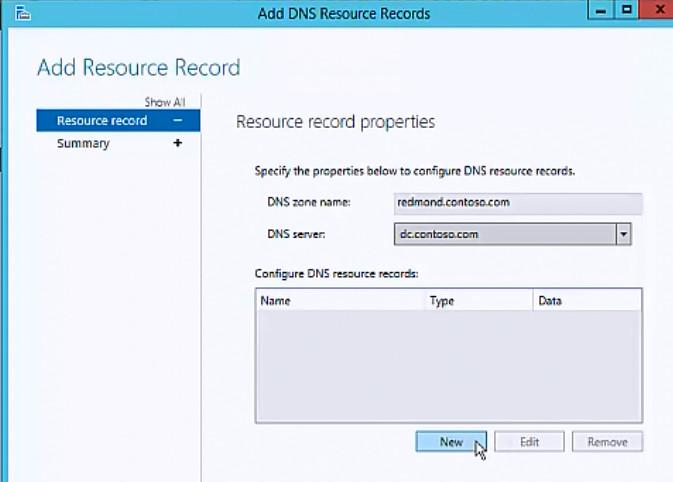
Using CDN combined with DNS configuration to improve page load speed in all regions
Reasons to combine CDN and smart DNS
– CDN (Content Delivery Network) helps distribute content through servers closest to users, reducing latency when accessing.
– DNS is the first layer that determines routing speed to the CDN server—if configured correctly, access time is significantly reduced.
– According to Cloudflare's report (2023), average page load time is reduced by 30-45% when there is good coordination between CDN and distributed DNS architecture.
TIP: Always choose a DNS provider with global infrastructure coverage and Anycast support (such as Cloudflare or Google DNS) to optimize routing.
Effective CDN & DNS configuration checklist
- ✔ Set up a CDN such as Cloudflare, Akamai, or BunnyCDN, prioritizing servers in the target region.
- ✔ Point the domain to an intermediary DNS integrated with CDN (or use a custom DNS that supports low TTL).
- ✔ Enable automatic static caching and GZIP compression from the CDN side.
- ✔ Configure Domain CNAME or A record to ensure compatibility and avoid timeouts.
- ✔ Check DNS propagation using tools like What’s my DNS to assess stability.
DNS configuration illustration combined with CDN (HTML Table)
| Record Type | Value | Function |
|---|---|---|
| A record | 192.0.2.1 | Point to the original CDN IP address |
| CNAME | cdn.example.com | Point subdomain to CDN resources |
| TTL | 300s | Reduce DNS update latency |
Real-world examples & effectiveness
A customer in Da Nang using DPS.MEDIA combined with Global CDN and Anycast DNS improved page load time from 4.2s to 1.7s (measured by GTmetrix). International traffic increased by 561% after 30 days of deployment—thanks to improved access from the US and Japan.
NOTE: Not all CDNs are fully compatible with your current DNS system. You should test partitioning before large-scale deployment.
Brief takeaway
Optimal combination between CDN and smart DNS helps speed up global website loading and reduces pressure on the origin server. This is a technical foundation that should be prioritized early in a sustainable website acceleration strategy.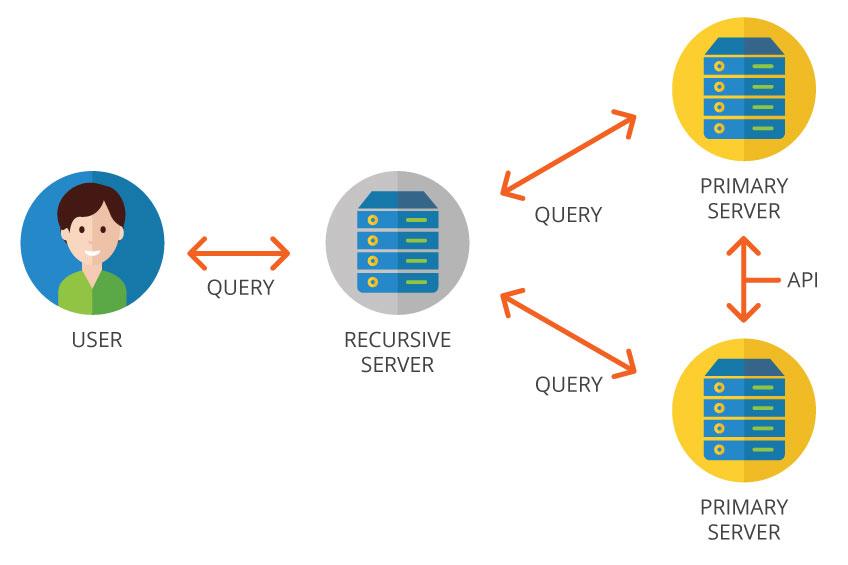
Monitor and periodically update DNS configuration to ensure continuous and stable operation
Why is it necessary to monitor DNS regularly?
Monitoring DNS configuration not only helps detect issues early but also maintains page load performance and security. According to a report from Uptime Institute (2023), 28% of website outages lasting more than 30 minutes are caused by DNS misconfiguration or update errors.
Here are the main reasons for regular monitoring:
- Domain name retrieval error detected due to incorrect A/AAAA record
- Avoid DNS abuse used as a DDoS attack vector
- Ensure TTL time is optimized for page load speed
Recommended periodic check schedule
Regular updates help respond quickly to changes in server IP, hosting, or related service records. Some organizations perform weekly checks, but most SMEs should set up a 2-week cycle higher reliability.
Quickly check the following items:
| Item to check | Recommended cycle |
|---|---|
| A/AAAA record | 2 weeks |
| MX record (email) | 1 month |
| TXT record (SPF, DKIM) | 1 month |
| Reverse DNS | 2 months |
Notes when updating incorrect DNS configuration
Careless DNS editing can cause temporary disconnection. For example: A small business accidentally deleted the MX record during editing, causing internal email disruption for over 14 hours—even though it only took 1 minute to fix after discovery.
Periodic DNS monitoring checklist
- ✅ Check IP match in A record
- ✅ Ensure CNAME does not create a loop
- ✅ Review TTL time according to access level
- ✅ Verify DKIM, SPF signatures for no errors
- ✅ Record changes and reconciliation logs
Brief takeaway
Monitoring and adjusting DNS at the right frequency helps the website operate stably, avoiding service interruptions due to configuration errors. Consider DNS not only as a technical factor but also as “a ”potential bottleneck” affecting the entire digital system of the business.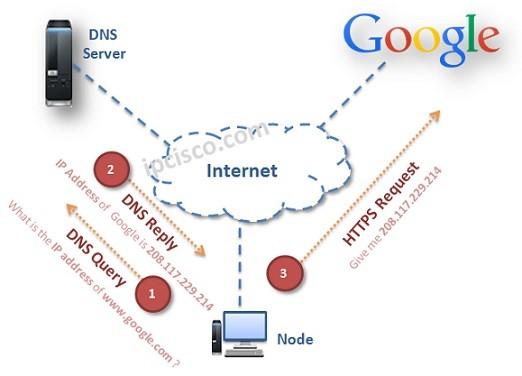
Backup and rapid DNS recovery strategy to ensure website sustainability in case of incidents
DNS contingency plan: Why is it important?
Loss of connection due to DNS issues can cause website downtime from a few minutes to several hours – directly impacting revenue and reputation. According to Uptime Institute 2023, 60% of businesses lose over $100,000 for each hour of downtime.
Below are the negative impacts if there is no DNS recovery strategy:
– Loss of customers due to inaccessible website
– Temporary drop in SEO ranking if crawls continuously return errors
– Disruption of email, API, subdomain services
Configuration checklist for effective DNS backup and recovery
Take the following steps to protect your website when DNS issues occur:
- Settings 2 parallel DNS systems: For example, use Cloudflare combined with Amazon Route 53
- Automation backup DNS configuration weekly (via API or manual export)
- Configure short TTL (from 60-300 seconds) to reduce latency when switching to backup DNS
- Quarterly simulated DNS disaster recovery test
- Set up alert monitoring via Pingdom, StatusCake, or UptimeRobot
Real-world example of DNS incident & how to handle it
In July 2022, an online retail business in Vietnam experienced a DNS incident due to an SOA configuration error, causing the website to be down for 1 hour. Thanks to a pre-connected secondary DNS at DigitalOcean, they restored service after 5 minutes – reducing the estimated loss from 30 million VND to less than 2 million VND.
Quick comparison table of primary DNS & backup DNS
| Criteria | Primary DNS | Backup DNS |
|---|---|---|
| Response speed | 20-50ms | 30-70ms |
| Uptime level | 99.99% | 99.9% |
| Automatic activation capability | No | Yes (if health check is configured) |
Risk warning when there is no DNS backup solution
– DNS data modified or overwritten due to privilege vulnerability
– DNS hit by DDoS causing the entire website system to go down
- DNS resolver does not return results – response time may exceed >10 seconds
Without preparation, even minor DNS errors can cause significant losses.
Takeaway summary
Website sustainability starts with the ability to recover the DNS system. Establishing a proper DNS backup and failover system helps businesses operate stably, avoid major losses, and maintain a smooth user experience even during incidents. - DPS.MEDIA JSC –
Your past journey
Proper DNS configuration helps improve page load speed and enhance website security. This is a foundational factor for user experience and SEO performance.
Check your current DNS configuration today. Apply the shared principles to optimize your website more effectively.
You can also learn more about how to choose the right CDN or techniques to mitigate DDoS attacks. These topics contribute to a comprehensive website security strategy.
DPS.MEDIA is always ready to accompany SMEs to optimize digital infrastructure. Don't hesitate to share your thoughts or ask questions by commenting below!