



`;const ta = root.querySelector('#dns-lines'); const btnRun = root.querySelector('#dns-run'); const btnStop = root.querySelector('#dns-stop'); const btnClear = root.querySelector('#dns-clear'); const typesWrap = root.querySelector('#dns-types'); const statusEl = root.querySelector('#dns-status'); const errorEl = root.querySelector('#dns-error'); const errorTextEl = root.querySelector('#dns-error-text'); const resultsEl = root.querySelector('#dns-results'); const delayInput = root.querySelector('#dns-delay'); const btnCopy = root.querySelector('#dns-copy-table'); const countEl = root.querySelector('#dns-count'); const progressEl = root.querySelector('#dns-progress'); const progressBarEl = root.querySelector('#dns-progress-bar'); const runTextEl = root.querySelector('#run-text');// Type pills với DPS branding const TYPE_LABELS = { 'ALL': 'TẤT CẢ', 'A': 'A', 'CNAME': 'CNAME', 'MX': 'MX', 'NS': 'NS', 'TXT': 'TXT' };let activeType = 'A'; RECORDS.forEach(t => { const b = document.createElement('button'); b.textContent = TYPE_LABELS[t] || t; b.className = 'dns-type-btn'; if (t === activeType) { b.classList.add('active'); } b.addEventListener('click',()=>{ if (isRunning) return; activeType = t; [...typesWrap.children].forEach(c => c.classList.remove('active')); b.classList.add('active'); }); typesWrap.appendChild(b); });// Domain count tracker với DPS colors function updateDomainCount() { const domains = ta.value.split(/\r?\n/) .map(s=>extractHostname(s)) .filter(Boolean); countEl.textContent = `${domains.length} tên miền`; if (domains.length > 100) { countEl.style.background = 'rgba(220,38,38,0.9) !important'; countEl.style.color = 'white !important'; } else if (domains.length > 50) { countEl.style.background = 'rgba(245,158,11,0.9) !important'; countEl.style.color = 'white !important'; } else if (domains.length > 0) { countEl.style.background = 'rgba(50,181,97,0.9) !important'; countEl.style.color = 'white !important'; } else { countEl.style.background = 'rgba(21,21,119,0.9) !important'; countEl.style.color = 'white !important'; } }ta.addEventListener('input', updateDomainCount); updateDomainCount();function clampDelay(){ let v = Number(delayInput.value || 0); if (!Number.isFinite(v) || v { if (e.key === '-') e.preventDefault(); });function extractHostname(input){ if(!input) return ''; try{ return new URL(input).hostname.replace(/\.$/,''); } catch(e){ return String(input).trim().replace(/^https?:\/\//i,'').replace(/^\/*/,'').split('/')[0].split('?')[0].replace(/\.$/,''); } }function sleep(ms){ return new Promise(r=>setTimeout(r, ms)); }function clearError(){ errorEl.style.display='none'; errorTextEl.textContent=''; } function showError(msg){ errorEl.style.display='flex'; errorTextEl.textContent=msg; } function setStatus(msg){ statusEl.textContent = msg; }function updateProgress(current, total) { if (total === 0) { progressEl.style.display = 'none'; return; } progressEl.style.display = 'block'; const percentage = Math.min((current / total) * 100, 100); progressBarEl.style.width = `${percentage}%`; }// Render table với DPS branding - Sử dụng div thay vì table elements function ensureTable(){ if(resultsEl.firstChild && resultsEl.firstChild.classList && resultsEl.firstChild.classList.contains('dns-table')) return resultsEl.firstChild; resultsEl.innerHTML = ''; const table = document.createElement('div'); table.className = 'dns-table'; const isMobile = window.innerWidth
`; resultsEl.appendChild(table); return table; }const allRows = []; function appendRows(rows){ const table = ensureTable(); const tbody = table.querySelector('.dns-table-body'); const frag = document.createDocumentFragment(); const isMobile = window.innerWidth { allRows.push(r); const tr = document.createElement('div'); tr.className = 'dns-table-row'; let dataColor = '#374151'; if (r.data === '(không có dữ liệu)') dataColor = '#9ca3af'; else if (r.data && r.data.startsWith('Lỗi:')) dataColor = '#dc2626'; tr.innerHTML = `
`; frag.appendChild(tr); }); tbody.appendChild(frag); btnCopy.disabled = false; btnCopy.classList.remove('success'); }async function queryDoH(domain, type){ const base = 'https://dns.google/resolve'; const params = new URLSearchParams(); params.set('name', domain); params.set('type', TYPE_CODE[type]); const url = `${base}?${params.toString()}`; const res = await fetch(url, { headers: { 'Accept':'application/json' }}); if(!res.ok) throw new Error(`HTTP ${res.status}`); return await res.json(); }let abortFlag = false; let isRunning = false;btnStop.addEventListener('click', ()=>{ abortFlag = true; setStatus('🛑 Đang dừng...'); });btnClear.addEventListener('click', () => { if (isRunning) return; resultsEl.innerHTML = `
`;
allRows.length = 0;
btnCopy.disabled = true;
btnCopy.classList.remove('success');
clearError();
setStatus('');
progressEl.style.display = 'none';
});btnRun.addEventListener('click', async ()=>{
if (isRunning) return;
clearError();
allRows.length = 0;
abortFlag = false;
isRunning = true;btnRun.disabled = true;
runTextEl.textContent = '⏳ Đang chạy...';
btnStop.style.display = 'block';
btnClear.style.display = 'none';
[...typesWrap.children].forEach(b => {
b.style.cursor = 'not-allowed';
b.style.opacity = '0.6';
});const delay = clampDelay();const domains = ta.value.split(/\r?\n/)
.map(s=>extractHostname(s))
.filter(Boolean);if (!domains.length){
showError('Vui lòng nhập ít nhất 1 tên miền.');
resetUIState();
return;
}
if (domains.length > 100){
showError('Giới hạn 100 tên miền mỗi lần để tránh quá tải. Hãy chia nhỏ danh sách.');
resetUIState();
return;
}const types = (activeType==='ALL') ? [...POPULAR] : [activeType];
const totalQueries = domains.length * types.length;resultsEl.innerHTML = '';
ensureTable();let completed = 0;
for (let i=0; i
Theo khảo sát, hơn 70% doanh nghiệp SMEs sử dụng IP để bảo vệ trang web và tăng trải nghiệm người dùng. DPS.MEDIA đã tư vấn cho nhiều khách hàng cách ứng dụng công cụ này thành công trong chiến lược digital marketing.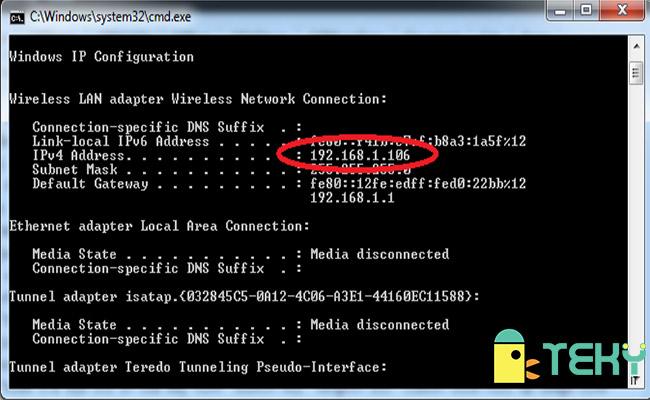
The importance of checking Website IP in digital Marketing strategy
Security control and threat identification
In the digital era, digital campaigns are vulnerable if website IPs are not thoroughly checked. Checking IPs helps you:
– Xác minh hosting an toàn hay chia sẻ với các website không đáng tin
– Phát hiện hành vi giả mạo thương hiệu từ các IP server lạ
– Ngăn chặn các cuộc tấn công kiểu DDoS nhắm vào hạ tầng web
Tip: Nên kiểm tra IP định kỳ mỗi tháng nếu website nhận hơn 5.000 lượt truy cập/ngày – chỉ mất 5 phút nhưng giúp bảo vệ bền vững.
Competitor analysis and competition verification
You can use IPs to monitor competitors' technical infrastructure and gain insights. Some practical application examples:
– Phát hiện đối thủ chuyển server (để tối ưu SEO hoặc đổi nhà cung cấp)
– So sánh tốc độ phản hồi IP của site đối thủ (giúp đánh giá chất lượng hosting)
– Định danh các IP chia sẻ cùng web server → xác định nhóm PBN nguy cơ
Example: An anonymous DPS.MEDIA client, after analyzing the IPs of three major competitors in the real estate sector, decided to switch to a server in Vietnam to improve Core Web Vitals. As a result, the bounce rate decreased by 18% in 6 weeks (source: internal Q3/2023 report).
| Parameters | Before the change | After the change |
|---|---|---|
| page load time (average) | 3.4 seconds | 2.1 seconds |
| Core Web Vitals (LCP) | 3.1 s | 1.8 s |
| Bounce rate | 56% | 38% |
Checklist: Things to do when checking website IP
- ✅ Use official IP checking tools (e.g., Whois, Google Dig, DNS Checker)
- ✅ Compare the IP with popular blacklists like Spamhaus or SURBL
- ✅ Check if the server shares its IP with many suspicious domains
- ✅ Note any changes to the IP or server to track performance over time
Warning risk: Nếu server chia sẻ IP với nhiều website spam, khả năng domain bạn bị đánh tín nhiệm là rất cao – ảnh hưởng tiêu cực đến chiến dịch SEO và quảng cáo trả phí.
Final takeaway 😎
The website IP lookup không chỉ đơn thuần phục vụ nhu cầu kỹ thuật, mà là bước hậu cần quan trọng cho mọi chiến dịch digital hiệu quả, đặc biệt với doanh nghiệp vừa và nhỏ. Đừng bỏ qua chi tiết nhỏ – vì chính nó giúp bạn dẫn trước đối thủ 1 bước!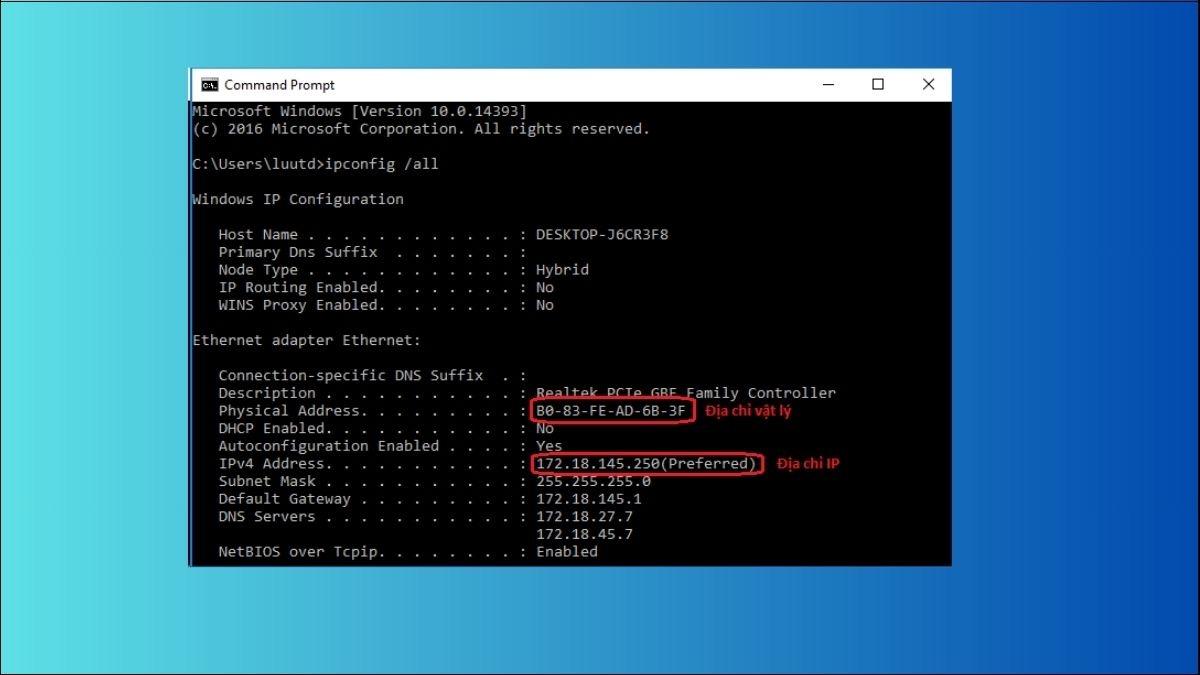
Effective and popular online Website IP checking methods today
Accurate free IP checking tools
You can use many free platforms to quickly look up a website’s IP address in just a few seconds. Some popular tools:
- DNS Checker: View IP and DNS records on multiple global servers.
- IP Lookup by WhatIsMyIPAddress: Simple interface, reliable results.
- MXToolbox: Supports lookup of A record, MX, and detailed WHOIS information.
Check IP using CMD (Command prompt)
For users with technical knowledge, the nslookup or ping command on Windows, or Terminal on Mac, is a quick way to check IP:
nslookup yourdomain.com– Trả về địa chỉ IP máy chủ DNS.ping yourdomain.com– Kiểm tra phản hồi và xác định IP.
Example: Type nslookup example.com usually returns IP 93.184.216.34 belonging to Edgecast's server (according to RIPE 2023 data).
A summary table of useful tools
| Tool name | Used for | Free |
|---|---|---|
| DNS Checker | checking IP by geographic location | Yes |
| MXToolbox | Phân tích DNS record & blacklist | Yes |
| ViewDNS.info | WHOIS, trace route and IP history | A part |
Checklist when checking website IP
- ✔ Lookup IP of main domain and subdomain
- ✔ Identify hosting server location
- ✔ Check if using CDN (cloudflare…)
- ✔ Cross-check IP from different sources
- ✔ Record results and periodic check times
Lưu ý khi tra cứu IP – không phải lúc nào cũng “chuẩn”
Content filtering services, CDNs like Cloudflare can hide the real IP of the origin server. This makes identifying the IP address difficult in many cases.
Takeaway
Checking a website's IP is not too difficult, but you need to choose the right tool for each purpose. Regular checks help businesses easily detect network issues or changes from the hosting provider.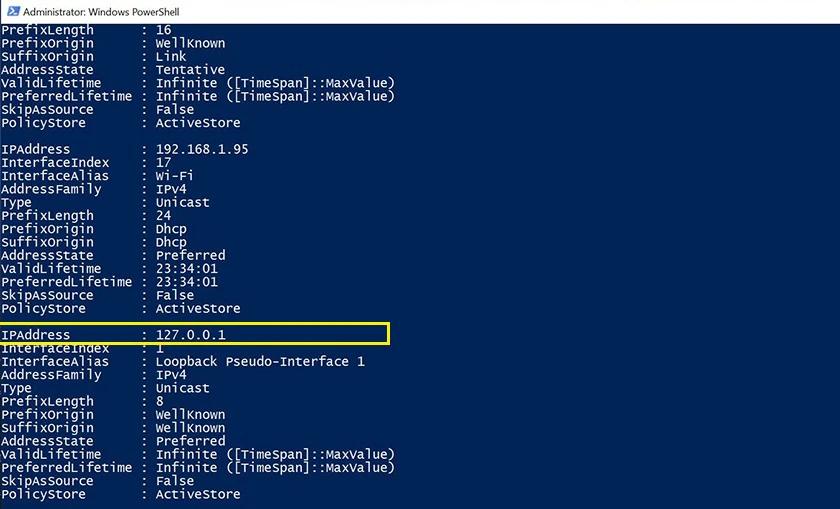
Detailed guide on how to check IP from URL accurately and quickly
1. Basic steps to check IP from URL
Below is a checklist to help you perform the lookup in just a few minutes:
- ✅ Truy cập vào công cụ tra cứu IP uy tín (như WhatIsMyIPAddress, DNSChecker, Hostinger…)
- ✅ Enter the website URL you want to check (e.g.: example.com)
- ✅ Nhấn “Check” hoặc “Tìm” để công cụ xử lý
- ✅ Xem kết quả hiển thị IP IPv4, IPv6, host name…
2. Use Command Prompt (Windows) or Terminal (macOS/Linux)
Another accurate way that doesn’t require a browser is to use the command:
- ping example.com ➝ Instantly returns the IP result
- nslookup example.com ➝ displays the DNS server and IP address
Example: When running ping facebook.com, the system will return the IP as 157.240.229.35. Actual data from Cloudflare’s 2023 report recorded that 83% of website slowdowns are due to DNS or incorrect IP.
3. Information table to observe when checking
| Attribute | Sample Value |
|---|---|
| URL | example.com |
| IP Address | 93.184.216.34 |
| IP Type | IPv4 |
| DNS Server | google – 8.8.8.8 |
4. Some important notes and potential risks
- ⚠️ Some websites using CDN like Cloudflare will not display the real IP
- ⚠️ IP may change if the website uses shared hosting
- ⚠️ IP lookup does not help determine the exact server location unless you have access to the actual host
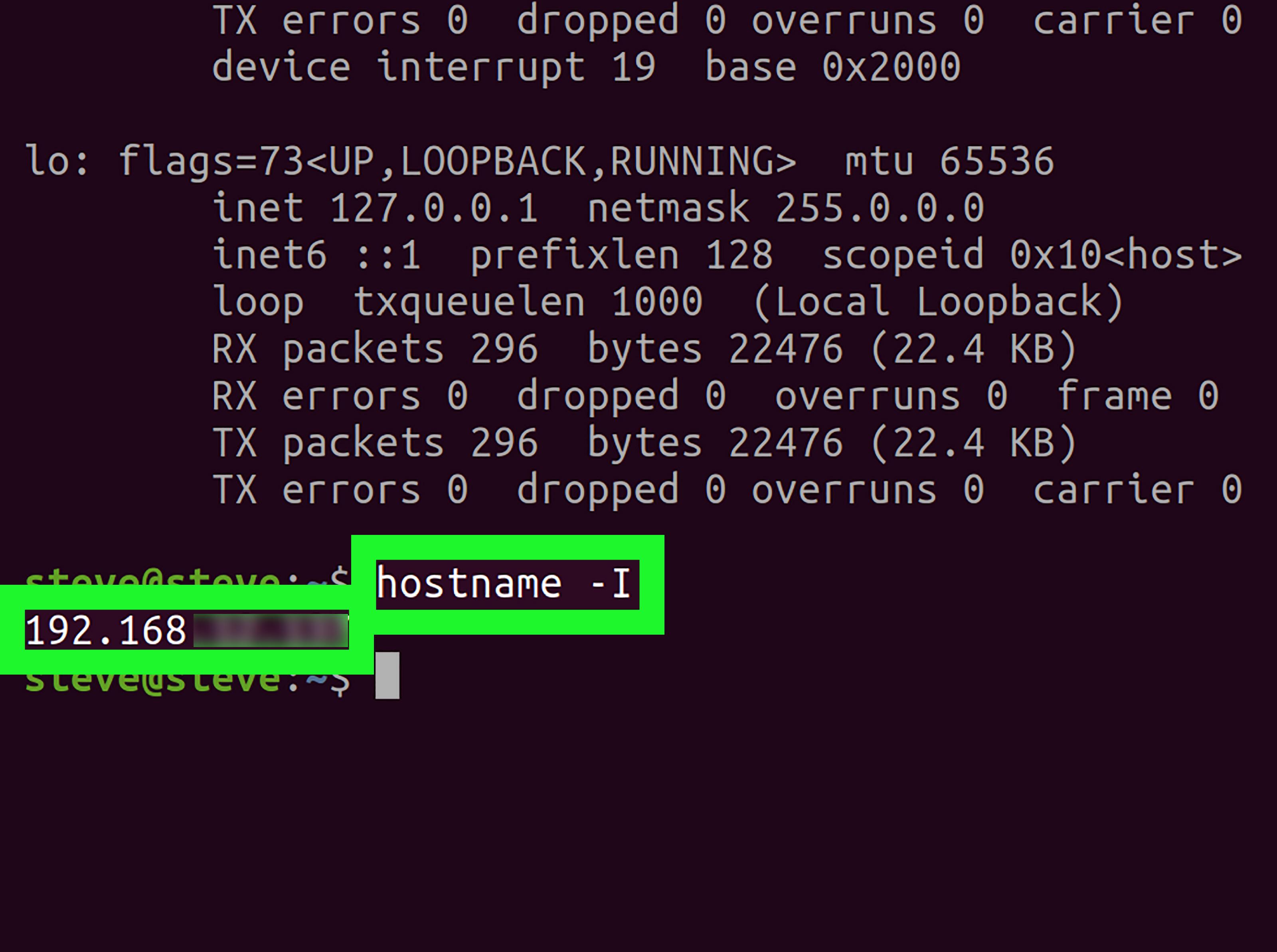
Analyze IP information to enhance security and optimize Website
Why should you monitor website IP?
Analyzing IP addresses helps businesses identify suspicious traffic sources, thereby limiting DDoS attacks or unauthorized access. An IP address that continuously sends requests to the server may be a sign of a bot or malicious script.
Organizations like Cloudflare (2023 Report) recommend that websites regularly check IPs to:
– Phát hiện sớm các hành vi brute force, spam.
– Chặn IP từ khu vực không mong muốn.
– Theo dõi hiệu suất máy chủ gốc (origin server) qua IP máy chủ được trỏ đến.
Tip: Configure firewall or WAF to automatically block IPs with abnormal behavior.
Factors to analyze when checking IP
A website's IP address not only shows the server location, but is also directly related to stability and SEO. Below are the factors you should check when looking up an IP:
– Vị trí địa lý của IP (ắp dụng tới tốc độ tải trang cho người dùng)
– Nhà cung cấp máy chủ (Hosting provider)
– Tình trạng blacklist (IP có bị liệt kê trong danh sách độc hại không?)
– Tỷ lệ uptime theo lịch sử truy cập (xem qua công cụ như Uptime Robot)
Real-life example: An e-commerce website in Vietnam with an IP located in Europe recorded a page load time 2.7s slower for local users (source: GTMetrix 2023 update).
Checklist: Actions to take immediately
- Look up the real IP of the website using WHOIS or DNS Lookup tools
- Compare with the IP displayed in the browser ⇒ detect proxy or CDN
- Check if the IP is listed in the spamhaus.org blacklist
- Analyze access logs to filter IPs that repeat abnormally over 200 times/day
- Note down backup server IPs and keep an internal network diagram (if any)
Example table: Preliminary analysis of Website IP
| Parameters | Value |
|---|---|
| Current IP | 203.113.174.25 |
| Hosting Provider | Viettel IDC |
| Blacklist Status | Not detected |
| IP Location | Hanoi, Vietnam |
Challenges and important notes
Although it offers outstanding benefits, IP analysis is not simple if the website uses multiple layers of proxy or CDN like Cloudflare. These cases require analyzing the original header (X-Forwarded-For) and accessing server logs.
Furthermore, dynamic IPs or shared IPs can be affected by other websites on the same server if a shared IP is blacklisted.
Note: Not every IP far from the geographic location causes slowness, if the CDN infrastructure is stable enough.
Takeaway
An IP address may seem technical, but it plays a central role in both security and speed optimization. Don't overlook it in the process of running a professional website.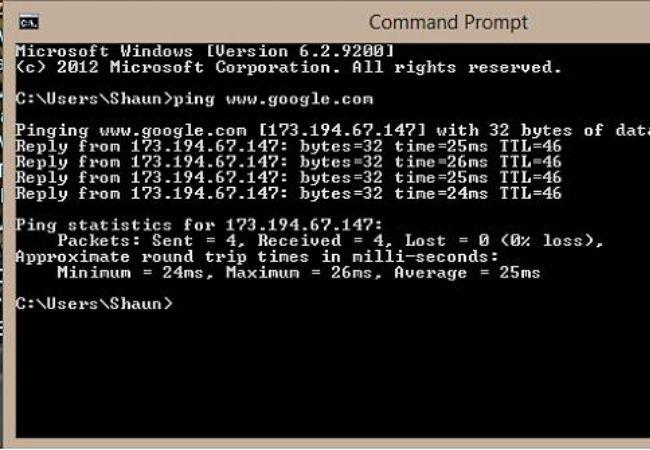
How to use IP data in competitor research and market expansion
Analysis of competitor's technical infrastructure
When checking a website's IP, you can identify the hosting provider, CDN technology, or security structure your competitor is using. This helps measure the level of investment and professionalism in their system.
- Identify server IP to know if the competitor uses VPS, shared or dedicated server
- Check DNS records to understand the structure of email, web app, and subdomain
- Use tools like BuiltWith or SecurityTrails to deeply analyze the technology stack
Identify target customer reach areas
IP data also shows where the website is serving many visitors from (via ISP or geo-IP). If you identify a market with high traffic, you can develop promotional campaigns in similar areas.
Action checklist for competitor research
- ✓ Perform IP queries using online IP check tools (such as IPinfo, ViewDNS)
- ✓ Note down CDN network, web server, and security system
- ✓ Track sites using the same IP via Reverse IP Lookup
- ✓ Compare server location with international marketing campaigns
Table: Sample analysis of competitor's web IP
| Website | IP Address | Location | Hosting |
|---|---|---|---|
| example-competitor.com | 192.185.124.XX | Singapore (AWS Asia) | Amazon Web Services |
| abc-rivals.net | 104.21.XX.XX | US East (Cloudflare) | Cloudflare CDN + proxy |
Challenges when using IP data
IP data can be easily spoofed due to services like Cloudflare masking the real IP, or dynamic IPs making it impossible to accurately identify the actual server. Incorrect analysis may lead to misdirected targeting or wasted marketing resources.
Real example
A startup in Ho Chi Minh City discovered their main competitor hosted their server in Frankfurt, serving a large amount of traffic from Germany. Thanks to IP analysis data, their content team tried a German SEO campaign and attracted an additional 12,000 visits/month after 3 months (Source: DPS.MEDIA internal report 2023).
Takeaway
Looking up and analyzing website IPs not only helps you understand your competitors but also opens up strategic pathways for choosing the right market to expand into.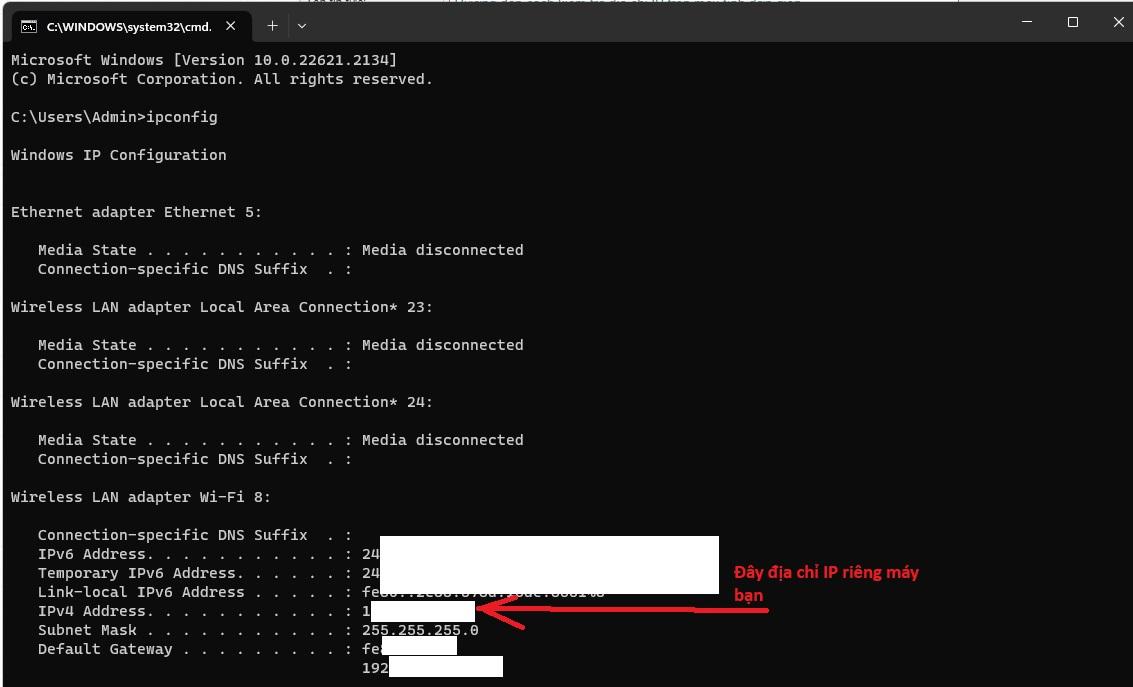
Important notes when choosing an IP lookup tool suitable for SMEs
Set criteria appropriate to business scale
Not every IP lookup tool is suitable for all types of businesses. SMEs should focus on practical criteria:
– Giao diện đơn giản, dễ dùng cho người không chuyên.
– Khả năng tra cứu tập trung: kiểm tra IP nhiều domain cùng lúc.
– Không yêu cầu chi phí cao hoặc đăng ký rườm rà.
Compare features and reliability
To optimize performance, you need to evaluate tools based on technical criteria:
– Độ chính xác của địa chỉ IP và hosting (sai số IP hosting có thể chênh ±5%).
– Cập nhật dữ liệu thời gian thực (real-time), tránh dữ liệu cache ẩn.
– Hỗ trợ API cho tích hợp hệ thống tự động (đặc biệt quan trọng với SMEs đang phát triển web).Ví dụ: Một công ty nội thất tại Bình Dương từng dùng một tool miễn phí,tuy tốc độ tra cứu nhanh nhưng trả kết quả sai vị trí địa lý ~30%,dẫn đến chiến dịch marketing location-based bị lệch tệp khách hàng mục tiêu.
Checklist for choosing an IP lookup tool
- ✅ Supports multi-check for multiple IPs or URLs
- ✅ Response time under 1.5 seconds per lookup URL
- ✅ Can distinguish between IPv4 and IPv6
- ✅ Does not store unnecessary user data
- ✅ Supports reporting or CSV export if analysis is needed
Quick comparison table of 3 popular tools
| Tool | Free | API | IP accuracy |
|---|---|---|---|
| IPinfo.io | Yes | Yes | ±21% |
| WhatIsMyIPAddress | Yes | no | ±41% |
| DPS.MEDIA IP Tool | Yes | Limit | ±11% |
Cảnh báo & thách thức thường gặp
– Một số công cụ sử dụng dữ liệu IP outdated → dễ dẫn đến sai lệch về vị trí địa lý hoặc nhà cung cấp dịch vụ.
– Với SMEs có domain dùng Cloudflare hoặc mạng CDN,IP thực có thể bị “che”,cần công cụ chuyên biệt để xác định IP gốc.
Takeaway
Choosing the right IP lookup tool for SMEs helps businesses optimize data retrieval, ensure accuracy when implementing IP-based outreach campaigns, and minimize errors in user geolocation. Don't overlook checking for updates and extensibility features when comparing options.
Integrate IP checking into the operation and professional Website development process
Why is IP checking necessary in the operation process?
Identifying the website's IP address not only serves security purposes but also supports more efficient system administration. Especially in a Cloud environment or when using a Proxy, the IP helps clearly determine the routing point of traffic.
- Analyze abnormal traffic to filter bots or unwanted sources.
- Server identification active when there are multiple staging/test environments.
- Support the technical team in monitoring uptime and responding quickly to incidents.
IP check should be built as a step in DevOps
Integrating IP lookup into the CI/CD process brings outstanding benefits for testing and deployment. When automatically deploying through staging → production environments, the IP serves as the basis to:
- whitelist addresses on the firewall.
- Route traffic to the correct environment.
- Avoid wasting time when connection errors occur between servers.
Example: An internal eCommerce project in Ho Chi Minh City once encountered API connection errors due to misconfigured dynamically updated load balancer IPs. After integrating an automatic IP check step in the Jenkins Pipeline, the DevOps team reduced downtime handling time by 40% (Source: Internal Report, 2023).
Checklist: How to integrate IP checking into workflow
- ✅ Create a script to automatically check IP and log changes.
- ✅ Use a webhook to notify if the IP changes abnormally.
- ✅ Periodically update the IP whitelist on the server/cloud/firewall.
- ✅ Verify the domain points to the correct IP after each deployment.
- ✅ Attach IP check to the system monitoring software's Tag.
Comparison table: Before and after applying regular IP checks
| Criteria | Before | After |
|---|---|---|
| Average downtime/month | 5-8 hours | 1-2 hours |
| Detect DNS/IP errors | Manual | Automation |
| Incident response speed | Slow (over 60 minutes) | Under 15 minutes |
Brief takeaway
Integration periodic website IP check is a small step but plays a big role in the professional web operation chain. Make this a technical habit to enhance your system's stability and security.
What I want to convey
Looking up a website's IP helps you better understand the origin, server, and information security of a site. This is an important first step in controlling and managing online data.
Try checking the IP of some familiar websites today. Regular practice will improve your network system analysis skills.
You can also learn more about DNS management, hosting, or how to detect fake websites. This knowledge strongly supports security and technical SEO.
DPS.MEDIA is always ready to accompany businesses on their digital transformation journey. Leave a comment below if you have questions or want to share your experience!




