

According to statistics, more than 70% of successful websites focus on optimizing DNS to minimize access interruptions. DPS.MEDIA has advised hundreds of SMEs on DNS solutions, bringing clear practical efficiency.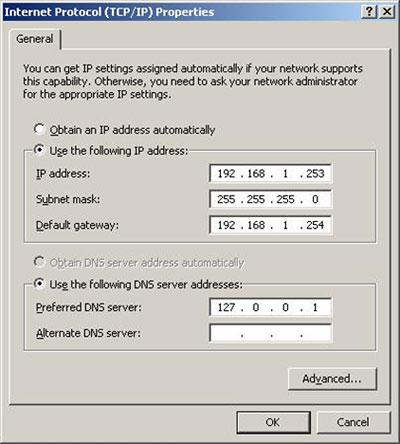
Overview of DNS and its crucial role in the digital marketing strategy of SMEs
What is DNS and how does it work?
– DNS (Domain Name System) is a system that translates domain names into IP addresses, making it easier for users to access websites. - When users type a domain name, DNS converts it into the appropriate IP address so the browser can connect to the web server.
– DNS is like the phone book of the Internet – without it, users have to remember difficult-to-remember IP strings like 172.217.160.78 instead of just typing “google.com”.
Tips: Slow website loading can be caused by incorrect DNS configuration or unstable DNS servers. Prioritize using DNS with response times under 50ms in Vietnam.
The impact of DNS on the digital marketing strategy of SMEs
An optimized DNS system helps SMEs:
– Improve website loading speed – a key factor affecting conversion rates and SEO. According to Google (2023), websites that take more than 3 seconds to load will reduce the user conversion rate by 32%.- Optimize security by using DNS with malware filtering or DDoS protection such as Cloudflare.- Reduce access interruption rate when using DNS with a distributed system (Anycast network), ensuring continuity for advertising or email marketing campaigns.
Effective DNS configuration checklist for SMEs
- Evaluate current DNS provider: response speed, uptime.
- Customize DNS records (A, CNAME, MX…) to fit the company's system structure.
- Integrate DNS with CDNs or advanced DNS services (Cloudflare DNS, Google DNS).
- Test using tools like DNSPerf.com or Google PageSpeed Insights.
Real example
An SME in the fashion retail sector in Ho Chi Minh City switched from the default hosting DNS to Cloudflare DNS. After configuration:
– DNS response time decreased from 135ms to 43ms (according to DNSPerf, Q1/2023)
– website loads ~1.4 seconds faster on mobile, reducing the bounce rate by 18%
– Google Ads campaigns have a cost-per-click decrease of ~9% due to increased Landing Page quality scores
Comparison table of popular DNS providers
| Provider | DNS Address | Key features |
|---|---|---|
| Google Public DNS | 8.8.8.8 / 8.8.4.4 | Fast, stable, no content filtering |
| Cloudflare DNS | 1.1.1.1 / 1.0.0.1 | Good security, prevents IP tracking |
| OpenDNS (Cisco) | 208.67.222.222 / 208.67.220.220 | Content filtering, access control |
Notes & common risks
– Incorrect DNS configuration can make the website temporarily inaccessible.
– Using free DNS from third parties requires checking clear privacy policies.
– Avoid changing DNS frequently if you are running continuous advertising or email automation.
Takeaway
DNS is not only a technical factor but also a strategic tool helps SMEs ensure performance, stability, and security for digital marketing activities. Choosing and configuring DNS correctly can enhance user experience, improve SEO effectiveness, and increase ROI for the entire online campaign.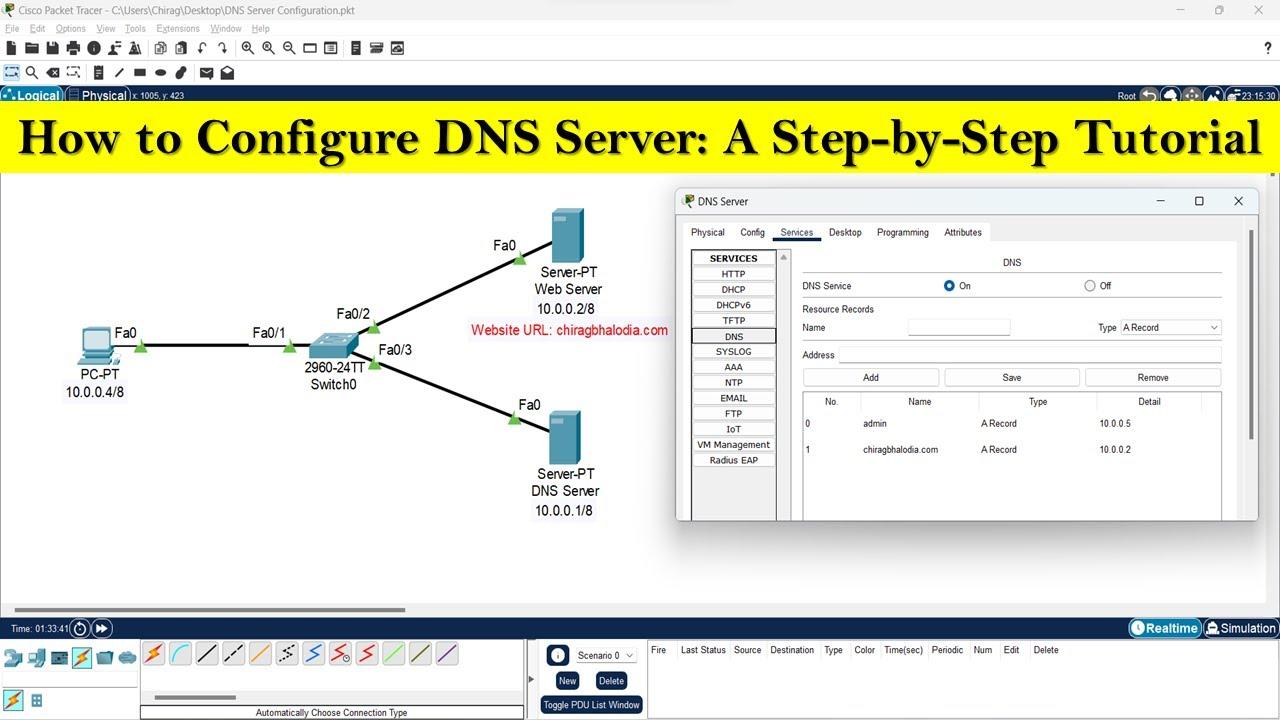
Guide to configuring Google DNS for optimal performance and enhanced security
How to change DNS to Google DNS (8.8.8.8 & 8.8.4.4)
Configuring Google DNS helps improve domain name lookup speed and avoid overloaded local DNS servers. To maximize performance, you can manually set it up with the following configuration:
- Go to Control Panel > Network and Sharing Center
- Select Change adapter settings
- Right-click on the current connection > Properties
- Select Internet Protocol Version 4 (TCP/IPv4) > Properties
- Select “Use the following DNS server addresses”
- Enter: Preferred DNS: 8.8.8.8, Alternate DNS: 8.8.4.4
Tip: For Windows 11 users, use PowerShell to quickly apply DNS with the command: Set-DnsClientServerAddress.
Why use Google DNS?
Google DNS not only helps speed up retrieval (according to Google, reducing average DNS latency by 20-30% in 2023 – according to the dnsperf 2023 report) but also reduces security risks through:
- Protection against DNS spoofing
- Automatically updates new server IPs faster than default DNS
- High reputation, does not log identifiable user data
Standard DNS configuration checklist
Below is a quick checklist before and after configuration:
| Category | Status |
|---|---|
| Google DNS address entered correctly | ✅ |
| Save settings & restart connection | ✅ |
| Test using nslookup / ping command | ✅ |
| Not blocked by local ISP | ⚠️ |
Real-world example: Improved speed for e-commerce website
A fashion store in Ho Chi Minh City using Singapore hosting used to have a page load time of 2.8s. After switching DNS from the ISP to Google DNS, the load time dropped to 1.9s (measured by Google PageSpeed Insights, October 2023). This is a small step but significantly improves UX.
Warning: Some network providers (especially public networks) may force DNS back to default. Use DNS-over-HTTPS (DoH) or VPN if higher security is needed.
Takeaway
Configuration Google DNS simple but delivers practical benefits: better access speed, higher stability, and improved DNS security. Spending a few minutes configuring can save you many minutes of loading time each day.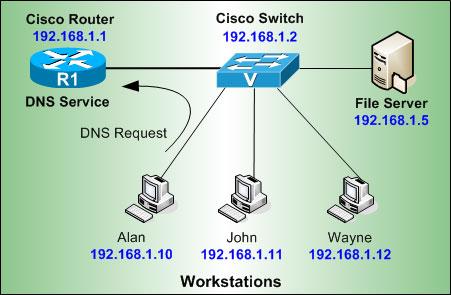
Explore the process of setting up Cloudflare DNS with smart DDoS protection
Advantages of Cloudflare in DNS management
Cloudflare provides a high-speed, stable, and supported DNS system automatic DDoS protection. When properly configured, the system can detect and filter suspicious traffic, preventing it in time before it affects the origin server.
– Fast DNS Propagation, usually under 5 minutes
– Has more than 200 data centers globally (according to Cloudflare, 2023)
– Supports DNSSEC protocol, increasing domain name safety
TIP: Should activate “Under Attack Mode” when detecting a sudden surge in traffic.
Proper Cloudflare DNS configuration checklist
Below are the steps to install Cloudflare DNS and take advantage of DDoS protection features:
- Register and add your domain to Cloudflare
- Cloudflare scans and automatically imports current DNS records
- Carefully check A, CNAME records – needed to hide real IP if protection is required
- Click the “Proxy” button (orange cloud icon) to activate the service
- Change the nameserver from your domain provider to Cloudflare's nameservers
- Turn on anti-DDoS features: Firewall Rules & Bot Fight Mode
Comparison table: Cloudflare DNS features vs basic DNS
| Feature | Traditional DNS | Cloudflare DNS |
|---|---|---|
| DDoS Protection | Not supported | Yes – real-time auto mitigation |
| Compatible with CDN | Limit | Direct link |
| Access statistics | No | Real-time Analytics |
A real-world scenario of Cloudflare implementation
A news website located at a Singapore VPS was once hit by a layer 7 DDoS attack with about 2 million requests/minute (according to a monitoring report from UptimeRobot, February 2022). After proper Cloudflare configuration, unauthorized traffic was reduced by 98% thanks to “JavaScript Challenge” and WAF rules – no physical server upgrade needed.
Note: Cloudflare does not secure the entire application. You still need to check the backend server structure and vulnerabilities in the source code.
Quick summary
Cloudflare DNS not only improves response speed but also acts as a shield against unusual attacks. Proper setup helps optimize performance without the need for additional investment in new hardware.
👉 Make sure you periodically check Firewall rules every quarter to avoid mistakes in advanced DDoS filtering.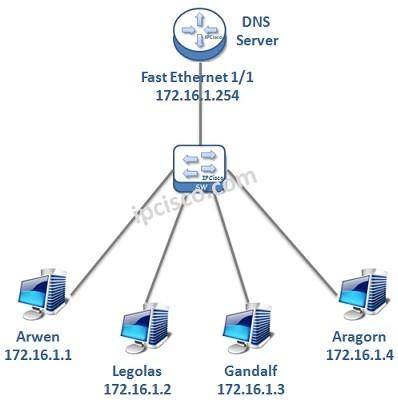
Compare the pros and cons between traditional DNS servers and modern cloud DNS services
Overview comparison: Traditional vs. Cloud
| Criteria | Traditional DNS | Cloud DNS (Google, Cloudflare) |
|---|---|---|
| Performance | Dependent on internal infrastructure | Fast, optimized thanks to global CDN |
| Security | Easily attacked if not closely monitored | Supports DNSSEC, DoH, automatic DDoS filtering |
| Cost | Implementation & maintenance fees arise | Free or flexible pricing, depending on the plan |
| Expansion capability | Limited by hardware configuration | Almost unlimited |
Detailed advantages & disadvantages
Traditional DNS Server:
- ✅ Full control: suitable for businesses wanting to operate independently.
- ❌ High cost for hardware & IT maintenance.
- ❌ Prone to errors if there is no suitable backup solution.
Cloud DNS (Google DNS, Cloudflare…):
- ✅ Global speed: Optimized latency thanks to a distributed server system.
- ✅ Automatic updates and maintenance – reducing the load for the technical team.
- ❌ Dependence on third parties – risk if service is limited.
Optimal DNS configuration checklist for SMEs
- ☑ Identify needs: high performance or internal security?
- ☑ If the website serves nationwide, prioritize Cloudflare DNS or Google DNS.
- ☑ Always configure DNS fallback to avoid downtime.
- ☑ Enable DNSSEC if using a supported cloud service.
- ☑ Monitor performance regularly with tools like DNSPerf or Pingdom.
Practical examples & implementation notes
A domestic travel company (anonymous) once experienced DNS routing errors that made the website inaccessible from local ISPs. After switching to Cloudflare DNS and configuring fallback, downtime was reduced by over 90% within a month.
Note: Although cloud DNS has high reliability, a backup strategy is still needed in case the provider experiences a global outage. (Cloudflare was interrupted for 17 minutes in June 2022 – according to The Verge).
Brief takeaway:
Cloud DNS is the optimal trend thanks to scalability, high security, and easy configuration. However, Traditional DNS it is still useful when strict internal control is needed. Businesses should carefully assess their actual needs to choose the most suitable solution.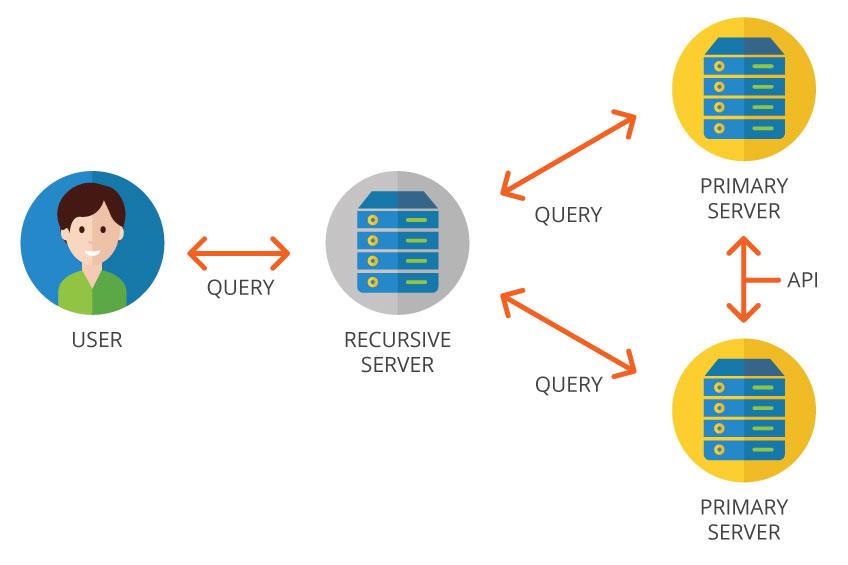
In-depth advice from DPS.MEDIA on choosing the right DNS for SME industry specifics
Assessing DNS needs by SME scale and type
To choose the right DNS, businesses need to determine the level of traffic and security requirements:
- Cosmetics/fashion: needs fast loading, avoiding connection loss during peak seasons.
- F&B or ordering services: should prioritize DNS that supports CDN and DDoS protection.
- With traffic under 100K pageviews/month, Google DNS is a cost-effective choice.
Real-world comparison between Google DNS and Cloudflare
According to data from DNSPerf (Q3-2023):
| Provider | Average response time in VN | Notable limitations |
|---|---|---|
| Google DNS | 18.1 ms | Does not support layer 7 protection |
| Cloudflare DNS (1.1.1.1) | 13.7 ms | Requires detailed configuration when integrating CDN |
Example: An SME selling books online once used Google DNS but switched to Cloudflare to enhance bot attack protection. Result: improved uptime to 99.981% during the year-end sales campaign (Source: DPS user internal survey 2023).
Checklist: Steps to take before choosing & configuring DNS
- ✅ Identify the number of domains/subdomains in use
- ✅ Check current access speed & main access region
- ✅ Set specific requirements: prioritize security or speed?
- ✅ Choose a DNS provider with an easy-to-manage dashboard
Risks when choosing the wrong DNS – SMEs should note
– Choosing unstable DNS can cause a loss of 5-10% traffic per month (according to SEMrush SME report 2022).
– Incorrect DNS configuration affects email (SPF, DKIM errors).- An F&B business once encountered a 2-hour DNS downtime incident leading to the cancellation of 86 orders (DPS internal, 2023).
Key takeaway
DNS is not just a technical factor – it directly affects the speed, security, and actual revenue of SMEs. DNS selection should be based on industry characteristics and target customer base, instead of following general trends.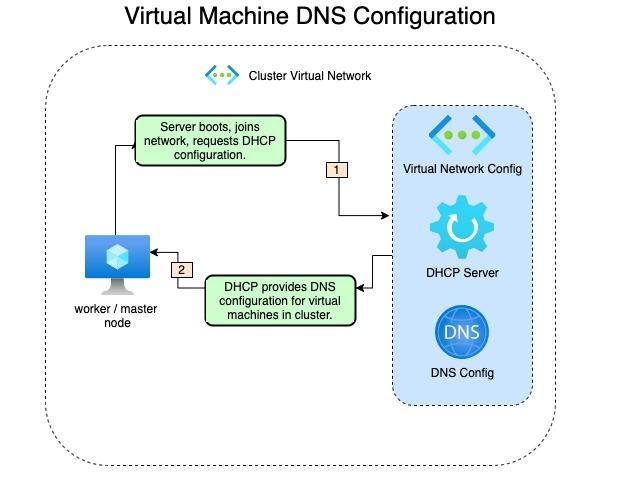
Tips to check and optimize DNS to enhance user experience and website access speed
Vì sao DNS ảnh hưởng trực tiếp đến trải nghiệm?
– DNS (Domain Name System) is the “translator” between domain names and IPs; if resolution takes time, page load speed will be slower.
– According to Cloudflare's report (2023), the global average DNS resolution time is 28ms; however, non-standard DNS can be up to 100-200ms.
– Poor experience on the website leads to a 32% higher bounce rate, especially on mobile (Source: Google/SOASTA Report, 2022).
Effective DNS optimization checklist
- ✅ Choose high-speed DNS: Google DNS (8.8.8.8), Cloudflare (1.1.1.1)
- ✅ Set up DNS redundancy (in case the main server fails)
- ✅ Regularly check DNS latency with tools like DNSPerf or dig/nslookup
- ✅ Enable DNS prefetch to allow the browser to preload necessary data
Comparison of response times of popular DNS providers
| Provider | IP address | Average latency (ms) |
|---|---|---|
| Google DNS | 8.8.8.8 | 34 |
| Cloudflare | 1.1.1.1 | 14 |
| OpenDNS | 208.67.222.222 | 24 |
| Internal ISP (VNPT, FPT,…) | — | 45-120 |
How to check current DNS performance
– Use tools such as:
– DNSBenchmark (Windows)
– namebench (macOS, Linux)
– DNSPerf.com to measure speed by geographic region
Challenges in DNS configuration
– Some network providers apply DNS hijacking, making it difficult to change DNS
– Large websites need to configure CDN and DNS simultaneously to avoid setup conflicts
– If using non-optimized hosting, improving DNS is also difficult to have a strong impact
Real example
An online fashion company in Vietnam switched from using ISP DNS to Cloudflare and enabled DNS prefetch. As a result, page load time dropped from 3.8 seconds to 2.1 seconds, helping conversion rate increase by 171% after 30 days (according to internal report, April 2023).
Brief takeaway
Optimizing DNS is not just a small technical step – it is an effective investment to speed up the website, improve SEO, and retain users better. Perform periodic checks and choose reliable DNS for optimal performance.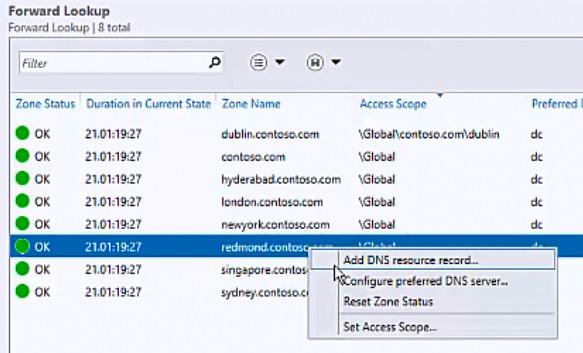
Guide to troubleshooting common DNS issues to help businesses maintain continuous operations
Early detection and diagnosis of DNS errors
Many businesses only know about DNS incidents when the website is inaccessible. However, most errors manifest early – such as slow response times, intermittent connection loss.
Some common signs:
- Unable to access the website by domain name but can access it by IP address
- Incorrect domain name response or response to an unknown address
- Mail services (SMTP, IMAP) are unstable
Tip: Use tools like dig or nslookup to test the domain and identify which record is faulty.
Quick DNS troubleshooting checklist
When an incident occurs, prioritize identifying the source of the error – from DNS client, DNS resolver, or DNS authoritative:
- ✅ Check the DNS status of the domain on intodns.com
- ✅ Flush DNS cache on internal device:
ipconfig /flushdns(Windows) ordscacheutil -flushcache(macOS) - ✅ Temporarily switch to a reliable public DNS such as Google (8.8.8.8) or Cloudflare (1.1.1.1)
- ✅ Check A/AAAA, CNAME, and MX records of the domain in the DNS panel
Real-world example: An e-commerce business in Ho Chi Minh City experienced 4 hours of downtime just because of a misconfigured A record pointing to the old server. The lack of a DNS monitoring system caused them to lose nearly 100 million VND in revenue (according to internal data from 2023).
Comparison of popular DNS performance
| DNS provider | Primary IP | Average latency in Vietnam (ms) | Stable |
|---|---|---|---|
| Google DNS | 8.8.8.8 | 25-40 | ⭐⭐⭐⭐✰ |
| Cloudflare DNS | 1.1.1.1 | 15-30 | ⭐⭐⭐⭐⭐ |
| OpenDNS | 208.67.222.222 | 40-50 | ⭐⭐⭐✰✰ |
Source: DNS performance Report – DNSPerf, 2023.
Risks to avoid when reconfiguring DNS
not monitoring TTL and propagation when changing DNS can lead to temporary service disruption. Additionally:
- DNS can be vulnerable to DDoS or spoofing attacks if DNSSEC is not implemented
- Incorrect configuration records can lead to email information leaks or loss of email sending capability
Warning: Avoid making direct DNS changes during peak hours. Test first on a subdomain or sandbox domain.
Quick takeaway
Always prepare a backup plan and apply a safe, stable DNS configuration to help the business maintain smooth operations. Do not let DNS become a “bottleneck” in your digital transformation.
Looking back on the journey
Configuring Google DNS, Cloudflare, and private DNS helps optimize speed and reliability when accessing the web. Understanding each option helps you better control your network system.
Try applying the appropriate DNS configuration for your current device. Don't forget to back up the original configuration for easy restoration if needed.
You can also learn more about optimizing website speed or security when using DNS. These topics are closely related to user experience and SEO.
DPS.MEDIA is always ready to support Vietnamese businesses in developing effective digital strategies. Share your thoughts or ask questions in the comments section below!