


`;const ta = root.querySelector('#dns-lines'); const btnRun = root.querySelector('#dns-run'); const btnStop = root.querySelector('#dns-stop'); const btnClear = root.querySelector('#dns-clear'); const typesWrap = root.querySelector('#dns-types'); const statusEl = root.querySelector('#dns-status'); const errorEl = root.querySelector('#dns-error'); const errorTextEl = root.querySelector('#dns-error-text'); const resultsEl = root.querySelector('#dns-results'); const delayInput = root.querySelector('#dns-delay'); const btnCopy = root.querySelector('#dns-copy-table'); const countEl = root.querySelector('#dns-count'); const progressEl = root.querySelector('#dns-progress'); const progressBarEl = root.querySelector('#dns-progress-bar'); const runTextEl = root.querySelector('#run-text');// Type pills với DPS branding const TYPE_LABELS = { 'ALL': 'TẤT CẢ', 'A': 'A', 'CNAME': 'CNAME', 'MX': 'MX', 'NS': 'NS', 'TXT': 'TXT' };let activeType = 'A'; RECORDS.forEach(t => { const b = document.createElement('button'); b.textContent = TYPE_LABELS[t] || t; b.className = 'dns-type-btn'; if (t === activeType) { b.classList.add('active'); } b.addEventListener('click',()=>{ if (isRunning) return; activeType = t; [...typesWrap.children].forEach(c => c.classList.remove('active')); b.classList.add('active'); }); typesWrap.appendChild(b); });// Domain count tracker với DPS colors function updateDomainCount() { const domains = ta.value.split(/\r?\n/) .map(s=>extractHostname(s)) .filter(Boolean); countEl.textContent = `${domains.length} tên miền`; if (domains.length > 100) { countEl.style.background = 'rgba(220,38,38,0.9) !important'; countEl.style.color = 'white !important'; } else if (domains.length > 50) { countEl.style.background = 'rgba(245,158,11,0.9) !important'; countEl.style.color = 'white !important'; } else if (domains.length > 0) { countEl.style.background = 'rgba(50,181,97,0.9) !important'; countEl.style.color = 'white !important'; } else { countEl.style.background = 'rgba(21,21,119,0.9) !important'; countEl.style.color = 'white !important'; } }ta.addEventListener('input', updateDomainCount); updateDomainCount();function clampDelay(){ let v = Number(delayInput.value || 0); if (!Number.isFinite(v) || v { if (e.key === '-') e.preventDefault(); });function extractHostname(input){ if(!input) return ''; try{ return new URL(input).hostname.replace(/\.$/,''); } catch(e){ return String(input).trim().replace(/^https?:\/\//i,'').replace(/^\/*/,'').split('/')[0].split('?')[0].replace(/\.$/,''); } }function sleep(ms){ return new Promise(r=>setTimeout(r, ms)); }function clearError(){ errorEl.style.display='none'; errorTextEl.textContent=''; } function showError(msg){ errorEl.style.display='flex'; errorTextEl.textContent=msg; } function setStatus(msg){ statusEl.textContent = msg; }function updateProgress(current, total) { if (total === 0) { progressEl.style.display = 'none'; return; } progressEl.style.display = 'block'; const percentage = Math.min((current / total) * 100, 100); progressBarEl.style.width = `${percentage}%`; }// Render table với DPS branding - Sử dụng div thay vì table elements function ensureTable(){ if(resultsEl.firstChild && resultsEl.firstChild.classList && resultsEl.firstChild.classList.contains('dns-table')) return resultsEl.firstChild; resultsEl.innerHTML = ''; const table = document.createElement('div'); table.className = 'dns-table'; const isMobile = window.innerWidth
`; resultsEl.appendChild(table); return table; }const allRows = []; function appendRows(rows){ const table = ensureTable(); const tbody = table.querySelector('.dns-table-body'); const frag = document.createDocumentFragment(); const isMobile = window.innerWidth { allRows.push(r); const tr = document.createElement('div'); tr.className = 'dns-table-row'; let dataColor = '#374151'; if (r.data === '(không có dữ liệu)') dataColor = '#9ca3af'; else if (r.data && r.data.startsWith('Lỗi:')) dataColor = '#dc2626'; tr.innerHTML = `
`; frag.appendChild(tr); }); tbody.appendChild(frag); btnCopy.disabled = false; btnCopy.classList.remove('success'); }async function queryDoH(domain, type){ const base = 'https://dns.google/resolve'; const params = new URLSearchParams(); params.set('name', domain); params.set('type', TYPE_CODE[type]); const url = `${base}?${params.toString()}`; const res = await fetch(url, { headers: { 'Accept':'application/json' }}); if(!res.ok) throw new Error(`HTTP ${res.status}`); return await res.json(); }let abortFlag = false; let isRunning = false;btnStop.addEventListener('click', ()=>{ abortFlag = true; setStatus('🛑 Đang dừng...'); });btnClear.addEventListener('click', () => { if (isRunning) return; resultsEl.innerHTML = `
`;
allRows.length = 0;
btnCopy.disabled = true;
btnCopy.classList.remove('success');
clearError();
setStatus('');
progressEl.style.display = 'none';
});btnRun.addEventListener('click', async ()=>{
if (isRunning) return;
clearError();
allRows.length = 0;
abortFlag = false;
isRunning = true;btnRun.disabled = true;
runTextEl.textContent = '⏳ Đang chạy...';
btnStop.style.display = 'block';
btnClear.style.display = 'none';
[...typesWrap.children].forEach(b => {
b.style.cursor = 'not-allowed';
b.style.opacity = '0.6';
});const delay = clampDelay();const domains = ta.value.split(/\r?\n/)
.map(s=>extractHostname(s))
.filter(Boolean);if (!domains.length){
showError('Vui lòng nhập ít nhất 1 tên miền.');
resetUIState();
return;
}
if (domains.length > 100){
showError('Giới hạn 100 tên miền mỗi lần để tránh quá tải. Hãy chia nhỏ danh sách.');
resetUIState();
return;
}const types = (activeType==='ALL') ? [...POPULAR] : [activeType];
const totalQueries = domains.length * types.length;resultsEl.innerHTML = '';
ensureTable();let completed = 0;
for (let i=0; i
Explore DNS Records and Their Crucial Role in Digital Marketing Strategy
What is a DNS record and why should marketers care?
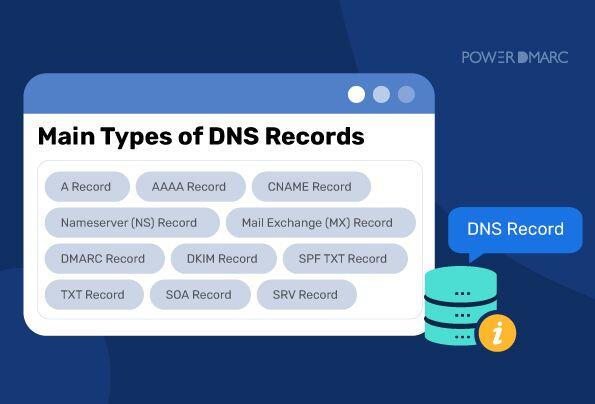
DNS records such as A, MX, CNAME not only affect website stability but are also closely related to the effectiveness of digital campaigns:
– A record: points the domain name to the correct server IP
– MX record: ensures emails sent and received are not lost or marked as spam
– CNAME: supports configuring content distribution via subdomains, cloud, or tracking
An advertising campaign can fail just because of a wrong CNAME configuration causing pixel tracking to not work.
How does DNS impact Martech tools?
Email marketing platforms (e.g., Mailchimp, Sendgrid) require SPF, DKIM authentication via DNS records to:
– Increase email reliability (Deliverability)
– Reduce spam rates by up to 62% (according to EmailToolTester 2022)
– Comply with DMARC standards to protect the domain from spoofing
If marketers do not understand DNS, they risk losing thousands of contacts due to emails being blocked or marked as spam.
Tip: Regularly check MX records before major email automation campaigns to minimize delivery errors.
DNS Checklist for Digital Marketers
- ✅ Check DNS A record – Is the website loading stably?
- ✅ MX record working correctly – Are emails being bounced?
- ✅ Correctly installed SPF, DKIM, DMARC?
- ✅ Is CNAME redirect tracking working?
- ✅ SSL cert has no configuration errors from DNS?
Real-life Examples of DNS Errors Affecting Performance
An E-commerce SME once implemented a retargeting campaign via a CNAME tracking custom domain. However, the record failed due to a misconfiguration on the DNS side – a result that contributed to a 32% drop in click rates and a doubling of CPA.
| Incorrect DNS factor | Consequence |
|---|---|
| MX not correct | Email cannot be sent |
| CNAME tracking incorrect | Loss of user behavior data |
| Missing DKIM | Email goes to spam |
Challenges & notes when checking DNS
– DNS systems have a propagation time of 1 to 48 hours – plan to check early.
– Not all DNS platforms are friendly to non-tech marketers.
– Should coordinate with the IT or DevOps department to avoid technical errors.
Brief takeaway: You don't need to code, but marketers need to understand DNS clearly to protect campaign performance and maintain user experience.
Detailed Guide to Checking A Records to Ensure Website Access Speed
What is an A record and why should it be checked?
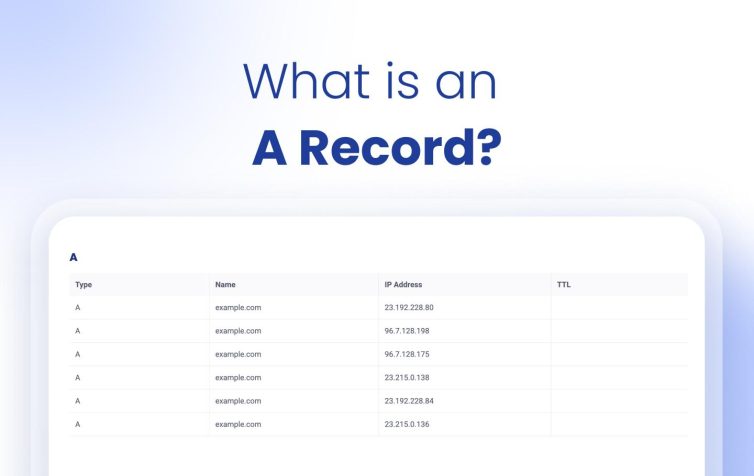
The A record (Address Record) in DNS maps a domain name to a specific IP address – it is a critical factor in helping browsers access the correct web hosting server. An incorrect A record can cause the website to slow down or become inaccessible.
According to a report from CDN Planet (2023), over 35% of website slow loading incidents are due to DNS configuration errors, especially from A records not updated with the correct IP.
Detailed Steps to Check A Records
It's not difficult to check the A record yourself if you follow this checklist:
- Use the ping or nslookup command on Windows/macOS:
nslookup yourdomain.com - Access online tools such as DNSChecker.org or MXToolbox
- Compare the returned IP with the server IP provided by the hosting
- Check the record's TTL (Time to Live) – recommendation < 300s for websites that require fast updates
If there is an IP mismatch or the record still points to the old server, update it immediately in the DNS manager (usually found in your domain or hosting account).
Standard A Record Parameter Checklist
| Information | Recommended Value |
|---|---|
| Domain name | example.com |
| Record type | A |
| IP address | 192.0.2.1 |
| TTL | 300 |
Real-life Examples and Common Challenges
An e-commerce startup migrated from shared hosting to VPS but forgot to update the A record. Result: 48 hours of website downtime despite purchasing a high-speed package. This led to a 36% traffic loss during the sales event week (according to internal Google Analytics, 2023).
Brief takeaway
An accurate A record is the foundation of website performance. Check immediately after changing IPs, moving hosts, or seeing signs of slow loading – because fast access speed starts with the DNS configuration you are using.
Steps to Check MX Records to Ensure Smooth Business Email Operation
1. Identify the current email provider
First, you need to know which email service your business is using (Google Workspace, Microsoft 365, etc.). Each provider will have different requirements for records. MX (Mail Exchange).- Example: Google Workspace requires MX records pointing to mail servers such as: ASPMX.L.GOOGLE.COM, ALT1, ALT2…
– If unsure, try sending an email out and see if it works, or re-check the contract with IT/former partner.
Note: Using the wrong record can cause all emails to be undeliverable.
2. Check current MX records using online tools
There are many free tools that help you retrieve MX records in just a few seconds:
- mxtoolbox: https://mxtoolbox.com
- Google Admin Toolbox: https://toolbox.googleapps.com/apps/dig/
For example, when checking the domain abccompany.vn on MXToolbox and seeing the mail server return “mx.yandex.net”, it means the email system is running through Yandex.
3. Standard MX Configuration Checklist
Below is a list of items to carefully check when configuring MX:
- ✔️ Correct mail server name (matching the provider's domain)
- ✔️ At least one backup system (multiple MX records with different priority values)
- ✔️ No duplicate or conflicting records
- ✔️ TTL should not be lower than 300 seconds unless testing is required
4. Common MX Record Checklist
| Provider | MX record | Priority |
|---|---|---|
| Google Workspace | ASPMX.L.GOOGLE.COM | 1 |
| Microsoft 365 | domain-com.mail.protection.outlook.com | 0 |
| Zoho Mail | mx.zoho.com | 10 |
5. Real Business Example: Lost Email Due to MX Error
In 2022, an e-commerce business in Ho Chi Minh City reported losing all customer contact for nearly 3 days. The cause was the MX record being deleted when switching DNS providers without backing up the old configuration. According to the internal IT report, revenue was affected by up to 12%, equivalent to more than 500 million VND (Source: Internal technical report, 2022).
Takeaway:
Always check and maintain accurate MX records to avoid email service interruptions. Periodic checks every 3-6 months are a simple but effective way for any business to maintain professional communication.
Quick Tips for Checking CNAME Records and Their Application in Online Brand Management
How to Quickly Check CNAME Records
To check the record CNAME,you can use online DNS checking tools such as:
– Google Admin Toolbox (toolbox.googleapps.com)
– DNSChecker.org or mxtoolbox.com
– Command line: nslookup -type=CNAME subdomain.domain.com
An online tool provides almost instant results, very suitable for those with little technical knowledge. Ensure that the CNAME record does not duplicate or conflict with other records (such as an A record).
Applications of CNAME in Brand Management
CNAME record is used to map subdomains like blog, shop, or mail to a third-party subdomain, for example:
– blog.tenmien.com → hosted-by.medium.com
– shop.tenmien.com → stores.shopify.com
This helps maintain brand consistency across external platforms. According to data from HubSpot Report 2022, 68% of small and medium businesses use subdomains for content or ecommerce to maintain consistent brand identity.
Checklist for implementing CNAME for brands
- ✅ Identify the subdomain to be mapped (e.g., blog, support, shop)
- ✅ Check the current CNAME record using a DNS checker tool
- ✅ Confirm CNAME values from the platform provider (Medium, Zendesk,…)
- ✅ Test the operation of each link after updating
- ✅ Monitor TTL (time to Live) to know the record update time
Real-life example: Checking CNAME for event landing page
An event organizing brand uses a subdomain event.domain.com to point to an external platform like Eventbrite. After creating the CNAME record, they check using nslookup and verify that it points correctly to pages.eventbrite.com. This helps maintain brand quality without being split across long or hard-to-read URLs.
| Subdomain | target CNAME | Status |
|---|---|---|
| event.brand.com | pages.eventbrite.com | ✅ Active |
| blog.brand.com | custom.medium.com | ✅ Active |
Be cautious of risks when using CNAME
– If the root domain record is accidentally overwritten → causes complete loss of access.
– Some CDNs or email services do not allow using CNAME at the apex level. - Easy to miss DNS updates when a third party changes the endpoint.
Brief Takeaway
CNAME is an optimal tool to expand your brand without sacrificing consistency. Always check records regularly, especially before major campaigns, to avoid hidden errors that can reduce your brand's credibility in the digital environment.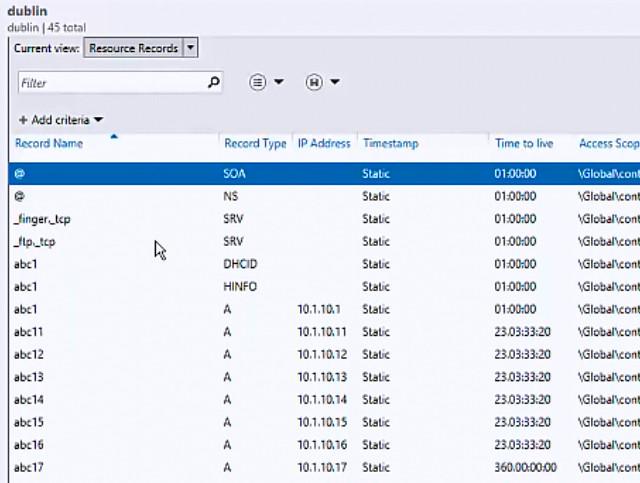
Effective Tools for Checking and Managing DNS Records Specifically for SMEs
Reliable and free DNS tools
For small and medium enterprises (SMEs), choosing an effective DNS tool can help avoid website and email disruptions. Below are some popular, easy-to-use tools highly rated by the technical community:
- MXToolbox: Check A, MX, SPF, DKIM in just a few seconds
- Google Admin Toolbox: Intuitive interface, suitable for beginners
- DNSChecker: Supports DNS resolution checks by country
- WhatsMyDNS.net: Check DNS record updates in real time globally
Tip: Always check MX and SPF records whenever you change email providers to avoid emails being marked as spam.
Periodic DNS record checklist for SMEs
Regularly checking important DNS records helps maintain the stability of email and website systems. SMEs can implement a bi-weekly check schedule with the following steps:
- ✔️ Check that the A record points to the correct current IP
- ✔️ Cross-check CNAME records with linked services (subdomain, CDN)
- ✔️ Review MX, SPF, DKIM records to ensure email works properly
- ✔️ Compare TTL to determine effective update times
Summary table of DNS tools by purpose
| Tool | Main function | Suitable for |
|---|---|---|
| MXToolbox | Check MX, A, SPF, blacklist | SMEs with business email |
| DNSChecker | Global DNS check | Businesses with international users |
| Cloudflare DNS Analytics | Monitor DNS queries in real time | SMEs using Cloudflare |
Real-life example from a retail business
An SME in the retail sector once experienced missed orders due to incorrect MX records after switching to a new email provider. After checking with MXToolbox and updating the correct records, the inbox delivery rate increased back to 95% in just 24 hours (according to internal Q2/2023 statistics).
Risks if DNS is not checked regularly
If DNS records are not checked regularly, businesses may encounter the following errors:
- ❌ Website inaccessible due to incorrect A record
- ❌ Email sent to spam or completely blocked
- ❌ Subdomain loses connection with third-party services
Note: DNS has a distributed structure, so even a small record error can affect the entire system.
Brief takeaway
For SMEs, using free tools and regularly checking DNS is a simple but extremely effective way to protect daily digital operations. Choose the right tool for your needs to save time and reduce operational risks.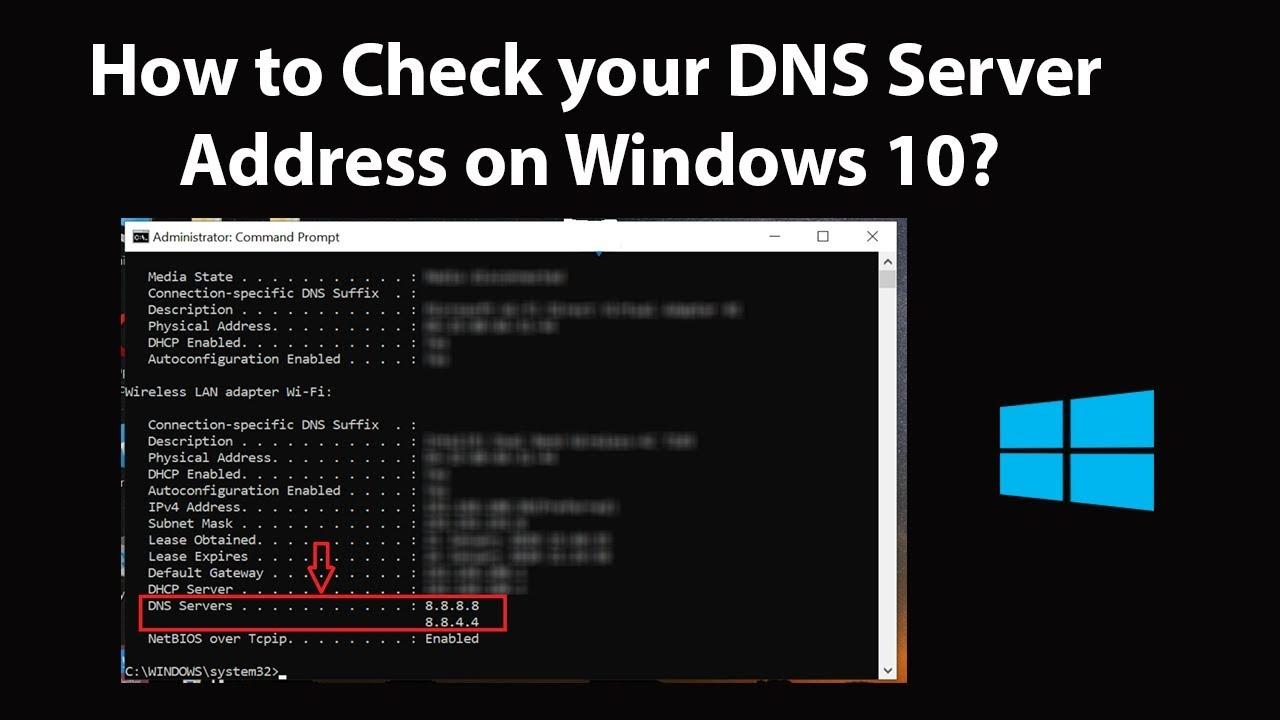
Advice from DPS MEDIA to Optimize DNS Records Supporting Digital Marketing Campaigns
Understand the correct role of DNS records
DNS records are a foundational factor that directly affects website visibility and email deliverability in digital marketing campaigns. Some important records to pay attention to:
– A record: Points the domain to the main server IP address
– MX record: Supports sending/receiving emails, especially important for Email Marketing
– CNAME: Easily configures subdomains for landing pages, remarketing, etc.
A 2023 study by HubSpot showed that: 71% of failed email campaigns are due to DNS setup errors (source: HubSpot Email Deliverability Report 2023).
Effective DNS configuration checklist for marketers
To optimize DNS for marketing activities, make sure to follow these steps:
- Verify the domain with platforms like Google, Meta, Zoho using TXT records
- Set up SPF, DKIM, and DMARC to increase email reliability
- Use CNAME records to configure custom domains for landing pages
- Check TTL time to ensure quick updates when running A/B tests
Sample DNS records to set up for email marketing
| Record Type | Value | Purpose |
|---|---|---|
| SPF | v=spf1 include:mailprovider.com ~all | Authenticate sending emails from the provider |
| DKIM | selector._domainkey.example.com | Email signature encryption |
| DMARC | v=DMARC1; p=quarantine; | Anti-email spoofing |
Practical example from a (anonymous) client
An SME in the service industry improved email open rates from 8% to 24% after correcting SPF and DKIM records to standard requirements as recommended by DPS.MEDIA. The setup time took only 3 hours, but the results remained stable for 6 months after the campaign.
Warning: Common risks
– Misconfigured MX can prevent emails from being sent/received
– TTL too high slows down the ability to update A/B test content
– Missing TXT authentication records can lead to advertising campaign rejection (e.g., Meta Business Suite)
Quick summary:
Optimizing DNS is not just a technical task – it is a vital part of helping digital marketing campaigns achieve high efficiency, from landing page display and email security to accelerating remarketing campaigns. When implemented correctly, marketers will have a “hidden lever” to increase impressions and conversion rates.
Proactively Handling DNS Record Issues Helps Businesses Increase Stability and Reliability
Reasons why businesses need to monitor DNS regularly
Incorrect or missing DNS records can result in emails not being sent, websites being inaccessible, or internal services being disrupted. According to the Digital Infrastructure Security Report by IDC (2022), over 36% of small businesses have experienced downtime due to undetected DNS errors. Some common consequences of poor DNS control:
– Website access interrupted nationwide
– Loss of traffic and e-commerce revenue
– Business emails marked as spam or failing to send
– Information exposure if DNS is spoofed (DNS Spoofing)
Proactive checklist for handling and preventing DNS issues
Instead of only reacting when errors are detected, businesses should implement a regular DNS record check plan to detect and resolve issues early:
- ✔ Regularly check A, MX, and CNAME records weekly
- ✔ Set up alerts if the domain expires or DNS parameters change
- ✔ Monitor DNS uptime with tools like UptimeRobot, Pingdom
- ✔ Log all DNS changes for easier auditing
- ✔ Training the technical team to handle domain name resolution errors
Sample DNS record monitoring table plays an important role
| Record type | Subdomain | Value | Update date |
|---|---|---|---|
| A | example.com | 203.113.123.45 | 05/03/2024 |
| MX | @ | mail.example.com (Priority 10) | 02/03/2024 |
| CNAME | www | example.com | 01/03/2024 |
TIP: Assign DNS management responsibility to a specific department and use DNS audit services to detect unauthorized changes from third parties.
Real-life example: 8 hours downtime due to MX record error
An e-commerce business just launched an email marketing campaign but received no user feedback. After 8 hours of investigation, they discovered the MX record pointed to the wrong SMTP server. The result was a loss of over 1,200 potential orders – according to internal summary (2023).
Note on implementing DNS to prevent domain name resolution errors
– Avoid using free DNS if the business has high traffic
– Use DNS redundancy (such as Cloudflare + root DNS)
– Combine DNS checking with periodic SSL/TLS security evaluations
Takeaway:
Proactively controlling DNS records not only helps businesses maintain stable operations but also reduces the risk of data loss, lost orders, and long-term reputation damage. A simple, regularly updated plan can make a big difference.
Valuable lessons
Checking DNS records such as A, MX, and CNAME helps ensure website stability. It also supports quick troubleshooting of connection issues.
Try out the DNS lookup tools you just read about. Start by checking your business domain.
You can learn more about optimizing website speed or configuring SEO-standard SSL. This is an important next step in your digital strategy.
DPS.MEDIA always accompanies Vietnamese SMEs on their digital transformation journey. Join the discussion and share your questions in the comments below!




